





Gekko
Members
-
Joined
-
Last visited
Everything posted by Gekko
-
Thank you Kilrah for answering so swiftly...i really love your Nextcloud version! When deactivating the workflow app, all related issues disappear - for me, it's not a serious issue pausing the app until an update is provided. Regarding the error messages i thought there might be some deeper layer of problems ocurring through a basic misconfiguration of WebDAV services. Thank you for your help! This might be some very basic question, but i really don't know the answer: is there a way to determine what version will be installed when the Action Center in unraid alerts a new version of Nextcloud being available?
-
After updating to Nextcloud 10 from the latest Nextcloud 9 build, my protocols are full with this error: [PHP] Fehler: Declaration of Psr\Log\AbstractLogger::emergency($message, array $context = []) must be compatible with Psr\Log\LoggerInterface::emergency(Stringable|string $message, array $context = []): void at /var/www/html/custom_apps/workflow_kitinerary/vendor/psr/log/Psr/Log/AbstractLogger.php#22 GET /remote.php/dav/ von 127.0.0.1 von ? um 17.03.2025, 21:28:14 In the backend overview, there are multiple errors referring to WebDAV as the problem source, although i never had any issue with this at any time: - Dein Webserver ist noch nicht hinreichend für Datei-Synchronisierung konfiguriert, da die WebDAV-Schnittstelle vermutlich nicht funktioniert. Damit diese Prüfung ausgeführt werden kann, muß sichergestellt sein, dass der Webserver eine Verbindung zu sich selbst herstellen kann. Daher muss er in der Lage sein, mindestens eine seiner `trusted_domains` oder `overwrite.cli.url` aufzulösen und eine Verbindung zu ihnen herzustellen. Dieser Fehler kann das Ergebnis einer serverseitigen DNS-Nichtübereinstimmung oder einer ausgehenden Firewall-Regel sein. - Der Webserver ist nicht ordnungsgemäß für die Auflösung von `.well-known`-URLs eingerichtet. Fehler bei: `/.well-known/caldav` Weitere Informationen findest du in der Dokumentation ↗. - 143 Fehler in den Protokollen seit 10. März 2025, 21:50:53 in my htaccess inside the nextcloud folder, there is the following block regarding .well-known calls: <IfModule mod_rewrite.c> RewriteEngine on RewriteCond %{HTTP_USER_AGENT} DavClnt RewriteRule ^$ /remote.php/webdav/ [L,R=302] RewriteRule .* - [env=HTTP_AUTHORIZATION:%{HTTP:Authorization}] RewriteRule ^\.well-known/webfinger /index.php/.well-known/webfinger [R=301,L] RewriteRule ^\.well-known/nodeinfo /index.php/.well-known/nodeinfo [R=301,L] RewriteRule ^\.well-known/carddav /remote.php/dav/ [R=301,L] RewriteRule ^\.well-known/caldav /remote.php/dav/ [R=301,L] RewriteRule ^remote/(.*) remote.php [QSA,L] RewriteRule ^(?:build|tests|config|lib|3rdparty|templates)/.* - [R=404,L] RewriteRule ^\.well-known/(?!acme-challenge|pki-validation) /index.php [QSA,L] RewriteRule ^ocm-provider/?$ index.php [QSA,L] RewriteRule ^(?:\.(?!well-known)|autotest|occ|issue|indie|db_|console).* - [R=404,L] </IfModule> As far as i know, the server is not restricted by a firewall or by the router, pinging my nextcloud-domain from the unraid prompt gets answers all the time. I really don't understand what happens here. Does anyone have any idea?
-
As far as i dove into the issue, i realized a bad config of the cache settings. I'm using redis to take care of cache and in my config there was still a line left naming ACU as cache method. Since i got rid of that line, the issue seems to be solved. EDIT: -------- No, the issue is not solved. Nextcloud-ffmpeg still keeps changing the ownership of the /data folder randomly, destroying the reachability of the cloud. As there is no support finding the reason for this, i truely can't recommend this Nextcloud distribution as ist is not reliable at all.
-
Just to be absolutely sure: The right adress to access Plex is this adress plus /manage at the end, so the adress in your browser reads like this: 192.168.0.170:32400/manage
-
Nothing. Nextcloud is an operational isolated instance here, meaning there is no interacting with other tools/dockers. And as i said, all of this is happening in parallel on a seperate machine running unraid and Nextcloud-ffmpeg/MariaDB/Redis/Cron: the whole setup there is just an standard operational Nextcloud instance with no sharings in data or permissions. And the folder rights of /data are happening there as well - after every update, reboot and processor load. I really can't believe there is no solution for this and nobody has had any issue with folder rights changing multiple times a day...when i have two installations doing exactly this.
-
So, as far as i understand this: the data should be moved to the array before detaching the faulty SSD The array should be stopped The faulty SSD should be detached ... WHEN TO CONVERT THE DRIVE? WHEN THE OTHER DRIVE IS OUT? WHEN THE OTHER DRIVE IS IN? WHAT HAPPENS TO THE DATA? ... Both cache drives should be in Raid 1 mode Start the array Could you please specify the UPPER case part? Cause it still remains totally unclear, either in the manual or in the answers people give. Thank you for your help!
-
Can you specify where/how to convert the 1TB NVME to Raid 1?
-
Yeah, so i changed the folder rights from nobody to sshd and it happens again, without anybody barely interacting with Nextcloud: It's really getting SUPER annoying, cause this seems to happen when the processors are under heavy load. And this could be anytime plugging off the cloud from working. This is far from reliable right now. terra-diagnostics-20241029-0340.zip
MozillaFirefox.jpg.253b03e14369eee2763963790b681785.jpg)
-
By the way: The manual does not describe the process in a way that there is no doubt about how the data in the pool is distributed to the (in my case) two drives and if the shown steps include unraid to secure possible scattered data on the two drives to one drive only when performing these steps: Replace a disk in a pool Notes: - You can only do this if the pool is formatted as BTRFS AND it is set up to be redundant. - You can only replace up to one disk at a time from a pool. To replace a disk in the redundant pool, perform the following steps: - Stop the array. - Physically detach the disk from your system you wish to remove. - Attach the replacement disk (must be equal to or larger than the disk being replaced). - Refresh the Unraid WebGUI when under the Main tab. - Select the pool slot that previously was set to the old disk and assign the new disk to the slot. - If presented with an option to Format the device, click the checkbox and button to do so. Remove a disk from a pool There have been times when users have indicated they would like to remove a disk from a pool they have set up while keeping all the data intact. This cannot be done from the Unraid GUI but is easy enough to do from the command line in a console session. - With the array running type on the console: btrfs device remove /dev/sdX1 /mnt/cache Replace X with the correct letter for the drive you want to remove from the system as shown on the Main tab (don't forget the 1 after it). - If the device is encrypted, you will need slightly different syntax: btrfs device remove /dev/mapper/sdX1 /mnt/cache - If the drive is an NVMe device, use nvmeXn1p1 in place of sdX1 - Wait for the device to be deleted (i.e., until the command completes and you get the cursor back). The device is now removed from the pool, you don't need to stop the array now, but at the next array stop you need to make Unraid forget the now-deleted member, and to achieve that: - Stop the array - Unassign all pool devices - Start the array to make Unraid "forget" the pool config If the docker and/or VMs services were using that pool best to disable those services before start or Unraid will recreate the images somewhere else, assuming they are using /mnt/user paths) - Stop array (re-enable docker/VM services if disabled above) - Re-assign all pool member except the removed device - Start array
-
Hey folks, i'd like to remove a disk from my cache pool consisting of two drives: One is a 1TB NVME which should remain inside One is a 256GB SSD which gave SMART errors and i want to replace it with a second 1TB NVME to make it run in RAID 1 with the remaining NVME. There are only 32GB used in the cache pool, but i don't have any idea how the data is distributed in this constellation and if it could damage the integrity of the data when i remove the SSD, so i need an instruction how to do this. There are multiple threads here in the forums that are highly specific regarding the user's situations and after having read a couple of them i don't find any useful information about how this is done. So, could you please give a step-by-step instruction on this, that would be awesome. Thanks in advance, Gekko terra-diagnostics-20241029-0340.zip
-
/data is on the array (xfs/folder rights: sshd) /appdata is on the cache (nvme/btrfs/folder rights: sshd), the empty /data folder in there had folder rights for nobody, no idea why, never touched them opcache-recommended.ini is on the array (xfs/ folder rights: root) --> I changed the folder rights in cache /appdata/data from nobody to sshd now to see if this works. I deployed the Nextcloud-FFMPEG distribution on another machine from scratch with the same result as described above, the error is reproducable even on a very fresh installation.
-
Me again with some different issue: since i have Nextcloud-FFMPEG installed, i get the message 'Your data directory is readable by other users. Please change the permissions to 0770 so that the directory cannot be listed by other users' every time i perform an update, sometimes when restarting the container. Now, this error occured 3 times during a day without the container or unraid even touched - so it endangers the reachability of the server. To solve this, i usually get inside the docker via sudo docker exec --user root -it Nextcloud-ffmpeg bash and ls'sing the directory shows what's wrong: so i use chown to fix that: chown -R www-data:www-data ./data And then everything works fine. But it bothers me that this happened 3 times this day and there is no warning or some action from the user's side indicating a possible change of that folder rights. My question: can i prevent this from happening in any way? I'm no expert using unraid/docker so forgive me if this is trivial to solve. Thanks alot for help!
MozillaFirefox.jpg.1d4ee646003dff375bf40faba7259975.jpg)
-
I got it: I had the character ! in my meilisearch master key. That's it. Removed it and all works great.
-
Tried it on a different machine, problem is as i described above exactly the same: meilisearch does not work at all with Hoarder. Although all settings are made carefully, the search ends up with "something went wrong" without any further information. Logs are flooded with this error (i edited the IP adress): 2024-10-21T00:39:47.411671Z INFO HTTP request{method=GET host="xxx.xxx.xxx.xxx:7700" route=/indexes query_parameters= user_agent=node status_code=401 error=The Authorization header is missing. It must use the bearer authorization method.}: meilisearch: close time.busy=74.9µs time.idle=79.2µs 2024-10-21T00:39:49.438857Z WARN HTTP request{method=GET host="xxx.xxx.xxx.xxx:7700" route=/indexes query_parameters= user_agent=node status_code=401 error=The Authorization header is missing. It must use the bearer authorization method.}: tracing_actix_web::middleware: Error encountered while processing the incoming HTTP request: ResponseError { code: 401, message: "The Authorization header is missing. It must use the bearer authorization method.", error_code: "missing_authorization_header", error_type: "auth", error_link: "https://docs.meilisearch.com/errors#missing_authorization_header" }
-
Sadly, this was always filled the right way
-
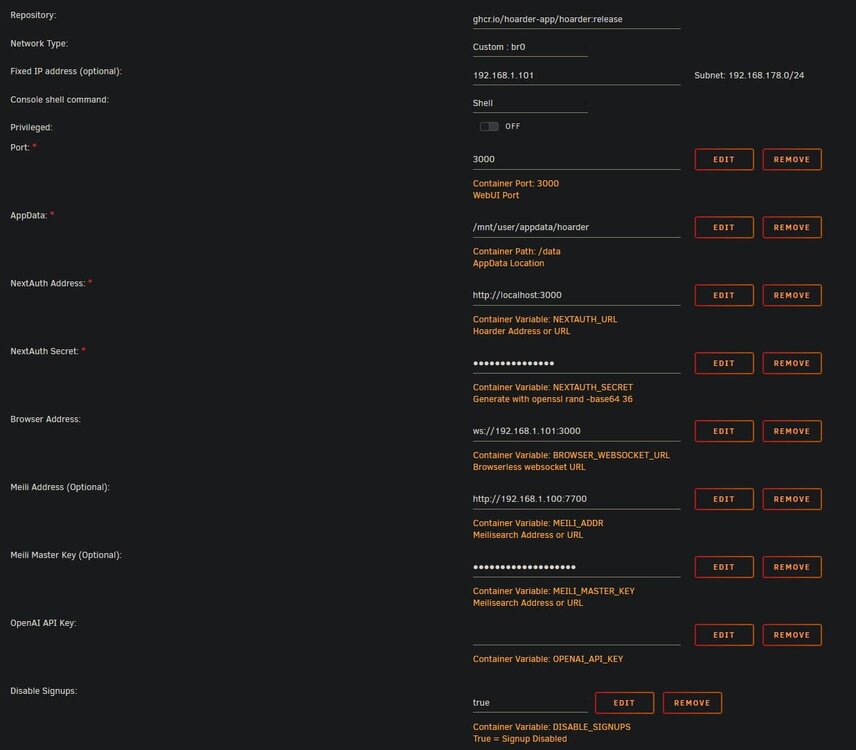
As i said, your descriptions are not sufficient to get this to work. To reconstruct my setup: meilisearch: br0 with manual IP 192.168.1.100 / port: 7700 hoarder: br0 with manual IP 192.168.1.101 / port: 3000 / linked with browserless fixed IP (192.168.1.99) on port 3000 / linked with meilisearch fixed IP (192.168.1.100) with port 7700 When entering search on hoarder's web gui, the search bar disappears and the text 'something went wrong' pops up. When entering the hoarder docker log, this error is all over: 2024-10-07T12:06:02.872Z error: [search][1455] search job failed: MeiliSearchApiError: The Authorization header is missing. It must use the bearer authorization method. MeiliSearchApiError: The Authorization header is missing. It must use the bearer authorization method. at /app/apps/workers/node_modules/.pnpm/[email protected]/node_modules/meilisearch/dist/bundles/meilisearch.cjs.js:378:19 at Generator.next (<anonymous>) at fulfilled (/app/apps/workers/node_modules/.pnpm/[email protected]/node_modules/meilisearch/dist/bundles/meilisearch.cjs.js:298:58) at process.processTicksAndRejections (node:internal/process/task_queues:95:5)
-
Hey! I'm trying to use meilisearch on Hoarder, but it doesn't work at all. docker logs meilisearch 888b d888 d8b 888 d8b 888 8888b d8888 Y8P 888 Y8P 888 88888b.d88888 888 888 888Y88888P888 .d88b. 888 888 888 .d8888b .d88b. 8888b. 888d888 .d8888b 88888b. 888 Y888P 888 d8P Y8b 888 888 888 88K d8P Y8b "88b 888P" d88P" 888 "88b 888 Y8P 888 88888888 888 888 888 "Y8888b. 88888888 .d888888 888 888 888 888 888 " 888 Y8b. 888 888 888 X88 Y8b. 888 888 888 Y88b. 888 888 888 888 "Y8888 888 888 888 88888P' "Y8888 "Y888888 888 "Y8888P 888 888 Config file path: "none" Database path: "./data.ms" Server listening on: "http://0.0.0.0:7700" Environment: "production" Commit SHA: "0df84bbba7db46680e83843dd6454257161a282f" Commit date: "2024-06-27T12:47:08Z" Package version: "1.9.0" Anonymous telemetry: "Disabled" Instance UID: "fc159891-e429-4f25-b308-529982a67d39" A master key has been set. Requests to Meilisearch won't be authorized unless you provide an authentication key. Check out Meilisearch Cloud! https://www.meilisearch.com/cloud?utm_campaign=oss&utm_source=engine&utm_medium=cli Documentation: https://www.meilisearch.com/docs Source code: https://github.com/meilisearch/meilisearch Discord: https://discord.meilisearch.com 2024-10-07T08:42:09.741320Z INFO actix_server::builder: starting 6 workers 2024-10-07T08:42:09.741349Z INFO actix_server::server: Actix runtime found; starting in Actix runtime No matter how i start the docker container (host, bridge, br0 without IP, br0 with IP), the listening IP won't change and it doesn't work in Hoarder. There is as good as NONE explaination given how to set up meilisearch/Hoarder (and Hoarder on unraid in general), you might consider providing a SHORT tutorial on this, cause without a tutorial it's a PAINFUL try & error leading to nothing.
-
I got an update info through the unraid/apps/action-center notifications. There's no info about the version this update will end up. Can someone give me a hint how to find this out? Backend says i'm on the latest version 29.0.7. Thanks
-
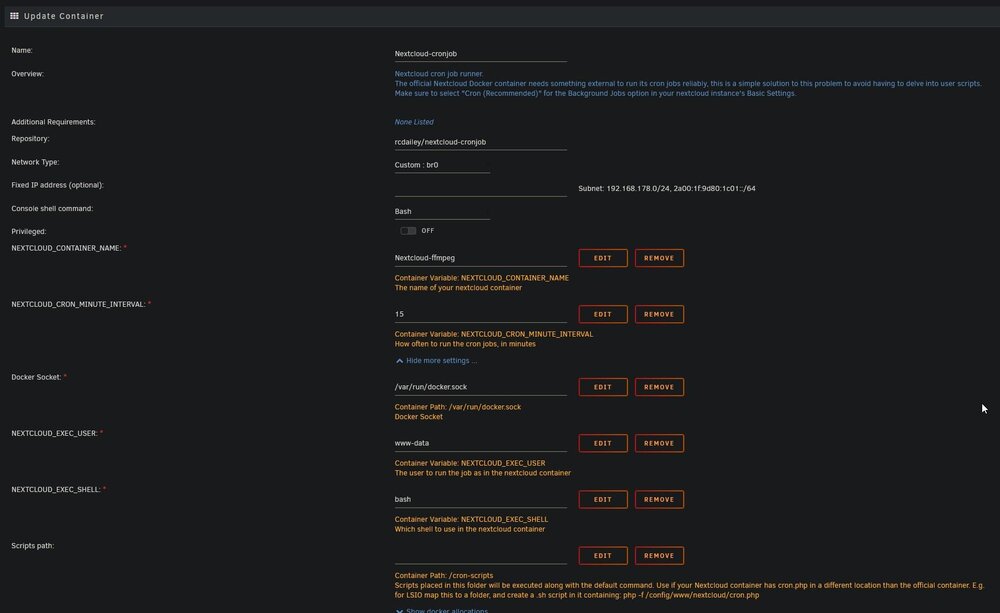
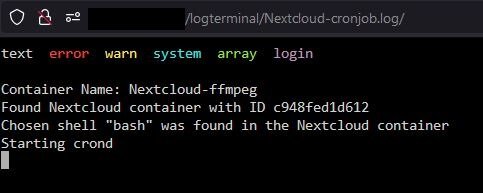
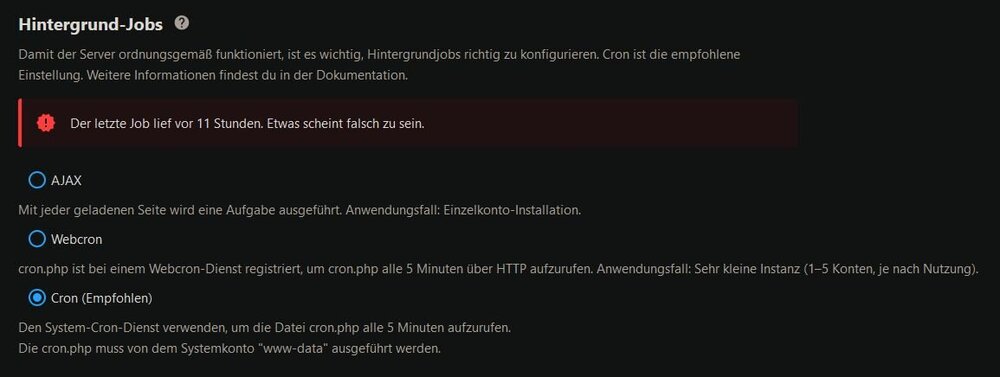
Thanks for pointing that out, i didn't expect there's a different behavior by doing that. Thanks! Regarding PHP, i'm sure, i can handle this involving the proxy, it was just an idea to place it with the extra parameters, but this is no crucial thing. So, i reinstalled the nextcloud-cronjob container with the parameters being *REALLY* fully vanilla, the log seems to be ok, still no luck at the backend.
-
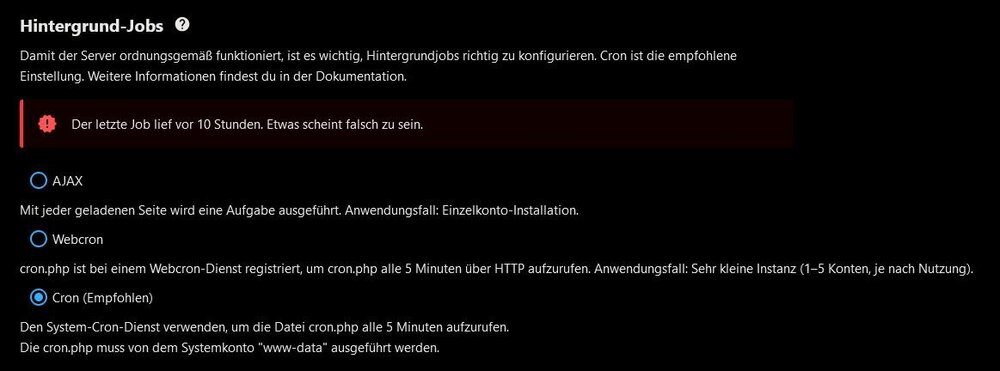
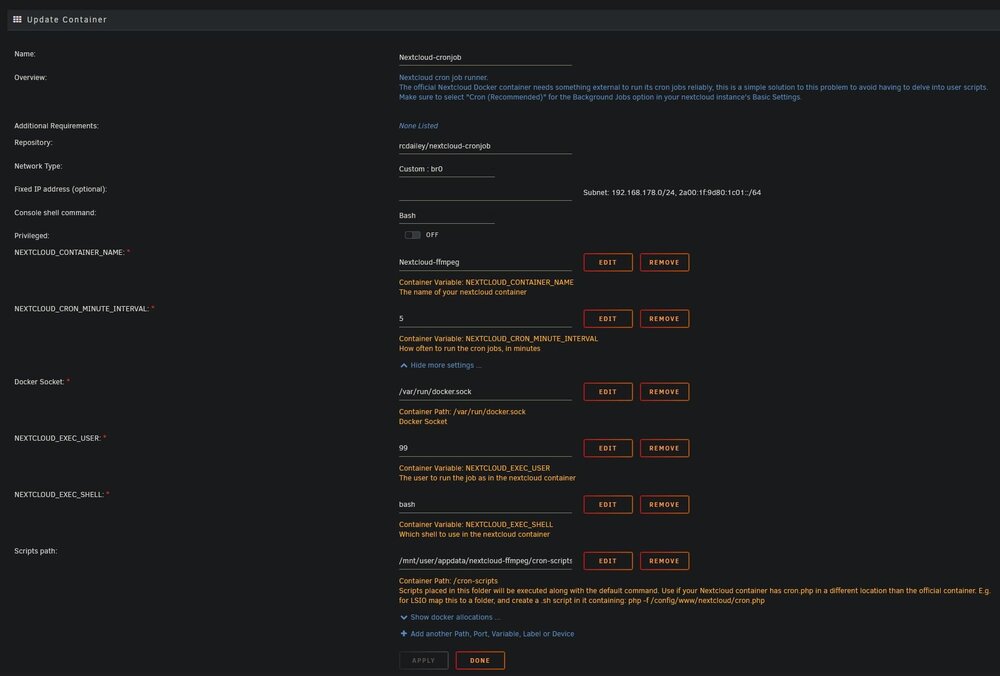
Thank you so much for your answer! I tried using the -e before each parameter, but only the first one (memory_limit=2G) seems to be acknowledged, the upload size seems to be ignored (screenshot)...does the extra parameters approach need some seperation character for each parameter? I installed the crontab using vanilla variables on an nextcloud-ffmpeg installation, but in the backened, the cron service seems to get no feedback from the cronjob container.

-
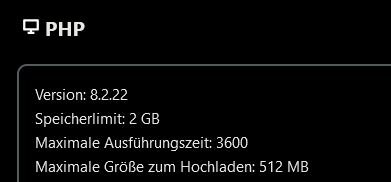
First of all, thanks a LOT for the work you invested in keeping this project alive! I tried several nextcloud dockers in unraid so far, the implementation of FFMPEG just makes me wonder, why this isn't implemented by the official devs, because i won't run any instance of nextcloud without it anymore! I have several questions regarding your image: As you mentioned in your initial posting, the PHP setting for the memory_limit should be increased using the template's extra parameters. As i did not find any php-locale.ini which would override the original php.ini as it is done in other distros, i tried to increase the php_post_max_size and php_upload_max_filesize as well using the extra parameters via -e PHP_MEMORY_LIMIT=2G PHP_UPLOAD_MAX_FILESIZE=15G PHP_POST_MAX_SIZE=15G as well. This ended up in an error message during the restart of the container and now it's not on the DOCKER container list in unraid anymore. Is there a chance to restart it via console? Can i remove the seemingly faulty extra parameters before i restart it? After spending literally hours of trying, i did not get the crontab companion to work in any way. Since the nextcloud-ffmpeg container is gone now, i can't go on trying further, but it is a real pain regarding all of the contradictory info snippets in this thread. There are few variables to be filled in the parameters setup of the container, but even for the nextcloud_user your initial posting gave the instruction to use user 'abc', the template itself names the user '99' and when you helped somebody using the nextcloud-ffmpeg distro, you talked about user '33'. Could you perhaps put in all the variables known to be working into that companion as a default in the future? The non-working state of the companion provokes an endless guess game on what might be the reason for the trouble...and even after hours i don't even know what the correct user is. Since this topic is about the nextcloud-ffmpeg container, it should default it's settings to that specific container for everybody to be able to override these basic settings with custom variables - not the other way around, since all other nextcloud distros i tried out had the cron jobs running out of the box, i never had to enter or edit anything, it was working from the start. Since i don't know crontab, the initial posting contains instructions that are hard for me to understand. Where do i have to put an .sh file and is it a lsio-specific path you wrote about leading to the cron.php? Does the nextcloud-ffmpeg path differ? Does it really consist of only that one line php -f /config/www/nextcloud/cron.php without anything else in it, no beginning brackets, nothing at the end? Is this file needed for the first cronjob to start generally or is this also an lsio-specific thing? Where do the minutes in the container's parameter lead to...is there a cronjob already running using that frequency, but why isn't nextcloud recognizing it? I'm sorry about all that questions, but i never got in touch with cron by now and all i want to do is get nextcloud-ffmpeg to work, since it is an awesome package besides that cron issue, that really drove me nuts by now. Thank you for any hint and have a beautiful weekend!
-
Yeah, there are many implementations of nextcloud, i know - thanks for your help. After trying to let nextcloud recreate the previews folder by using docker exec -it nextcloud occ preview:generate-all -vvv i stepped into an error: [OCP\Files\NotPermittedException] Could not create folder "/appdata_[MyInstanceID]/preview/4/1/0/0/9/0/5/82634" So i moved the content of my photos from a synced remote directory on a windows machine out of nextcloud's reach and wiped the whole preview directory with rm -r /mnt/user/nextcloud/app_[MyInstanceID]/preview logged into mariadb via docker exec -it mariadb mysql -h [MyMariaDBDockerContainerIP] -P 3306 --protocol=tcp -u root -p nextcloud provided the root password for mariaDB and inserted the following line: DELETE FROM oc_filecache WHERE path LIKE "appdata\_[MyInstanceID]/preview/%"; After that, i moved the photos folder back into the synced directory, let Nextcloud do it's magic and after having synced the content, i dropped docker exec -it nextcloud occ files:scan --all docker exec -it nextcloud occ preview:generate-all -vvv to rebuild the preview pictures. Now, the photos section not only works again, but is incredibly fast as well - it never performed so well during the whole installation. I wrote this down here in unraid forums to include it the way other users can reproduce this solution if they step into the weird behavior or experience the error mentioned above. I'm hosting this installation for me and my girlfriend, so i had not to worry about a huge user population. As far as i'm concerned, nothing was specifically unraid related regarding the origins of the weird behavior. Every command displayed here shows the way how the solution can be handled using unraid's terminal and docker logic. Good luck, Gekko [Edit: spelling]
-
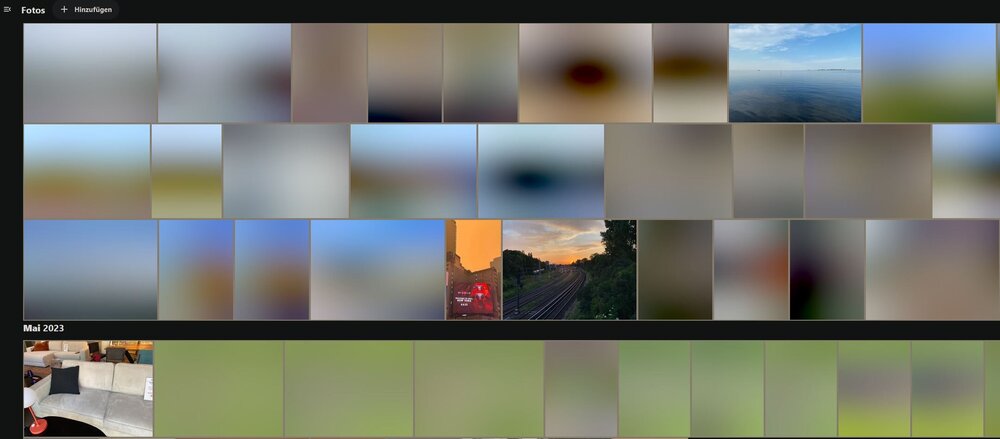
DEAR TRIGGER HAPPY MODS: BEFORE CLOSING TOPICS IN THIS FORUM YOU SHOULD BE ABSOLUTELY SURE, THAT THE ISSUE DESCRIBED IS NOT CAUSED BY UNRAID! YOU'RE HOSTING A PRODUCT AND I HAVE STILL 18 DAYS TIME TO DECIDE IF YOUR BEHAVIOR IS THE WAY I WANT TO BE HANDLED AS A FUTURE CUSTOMER! I'M TRYING TO GET UNRAID WORKING TO RUN NEXTCLOUD, NOT RESEARCHING NEXTCLOUD'S FUNCTIONALITY! ------------------------------------------------------------------ Hey! I'm experiencing the following: in the Photos section, many previews are not generated on demand and will not be updated, even if i throw docker exec -it nextcloud occ preview:generate-all -vvv at them. The result is seen in the screenshot given. In the Nextcloud app on my phone, entering the photo view works for about 100 images, after that the app stutters and freezes, heating up the phone in a terrible way. When doing this, missing previews are displayed. I have about 600 images in the folder, all of them are normal sized JPGs, no RAW images or anything exotic. The file sizes of the images is about 2-3 MB each. My nextcloud-data is stored in my array as secondary location, the first is an cache nvme and mover taking care of nightly transfers. My default directory for container appdata is /mnt/cache/appdata I am really confused about where the exact location of the preview files is. I have one at /mnt/user/nextcloud/app_[id] and one at /mnt/cache/nextcloud/app_[id]. If i move the cache preview folder and do a rescan, no new preview folder will be created. If i move the one in the user folder, occ preview:generate-all quits with 'can't create folder'. Can anyone help me understand, what's going on? Is this explainable with the cache/array setting? When clicking on an image with a bad preview, it takes about 6 seconds to open, files with a good preview open instantly. So i'm convinced it is an unraid thing failing to host a nextcloud instance. Can anyone help me pointing in the right direction? terra-diagnostics-20240729-2235.zip
-
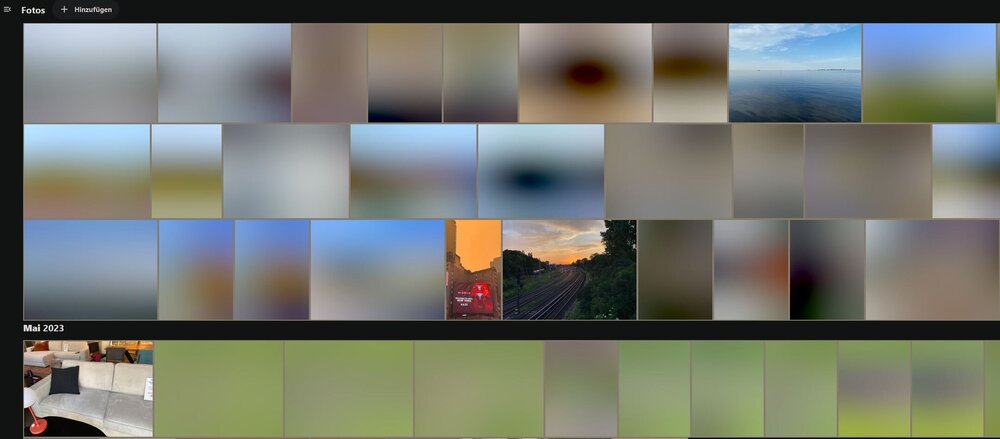
I'm experiencing the following: in the Photos section, many previews are not generated on demand and will not be updated, even if i throw docker exec -it nextcloud occ preview:generate-all -vvv at them. The result is seen in the screenshot given. In the Nextcloud app on my phone, entering the photo view works for about 100 images, after that the app stutters and freezes, heating up the phone in a terrible way. When doing this, missing previews are displayed. I have about 600 images in the folder, all of them are normal sized JPGs, no RAW images or anything exotic. My nextcloud-data is stored in my array as secondary location, the first is an cache nvme and mover taking care of nightly transfers. My default directory for container appdata is /mnt/cache/appdata I am really confused about where the exact location of the preview files is. I have one at /mnt/user/nextcloud/app_[id] and one at /mnt/cache/nextcloud/app_[id]. If i move the cache preview folder and do a rescan, no new preview folder will be created. If i move the one in the user folder, occ preview:generate-all quits with 'can't create folder'. Can anyone help me understand, what's going on? terra-diagnostics-20240729-2235.zip
-
It's a bit shameful that this community did not provide any answers to this in a non-cryptic way, even after years. I really don't understand, why not even the developers themselves care about user problems - because every user might set all this up with tools free of charge instead of buying the insanely expensive unraid licence, so it would be in the dev's own interest to help. Anyway: in unraid, nextcloud runs in a docker container. To transfer any command to this docker container, you have to adress this container via the 'docker' command and it's name that's shown in the docker overview in unraid. Mine is called 'nextcloud'. After that, you enter the direct commands to that docker container, in this case the 'occ' part, so the command would be this: docker exec -it nextcloud occ preview:generate-all -vvv So, every command injected EXTERNALLY (meaning out of the docker container into the docker container) needs this prefix before the command itself: docker exec -it [docker-name] [command to docker container] Regarding the cron.php: i'm sorry i can't help with that.
MozillaFirefox.jpg.253b03e14369eee2763963790b681785.jpg)
MozillaFirefox.jpg.1d4ee646003dff375bf40faba7259975.jpg)



