





Gekko
Members
-
Joined
-
Last visited
Everything posted by Gekko
-
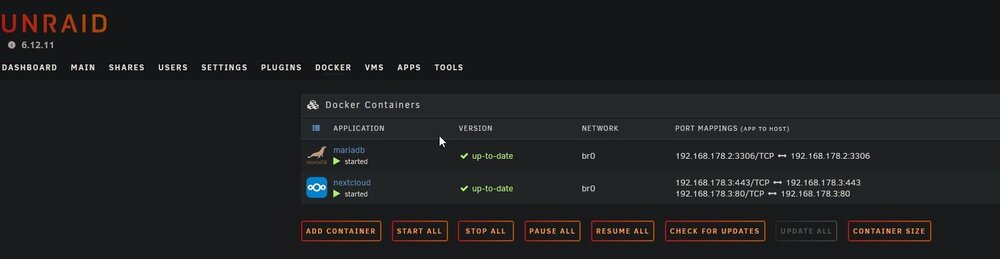
Hi, i'm having trouble running the combo nextcloud, mariaDB and the reverse-proxy SWAG as docker containers inside unraid. There are no technical issues with nextcloud and mariaDB, but when going live using swag, the browser quits with 'error: too many redirects'. When checking the URL in redirect-checker.org a quick check of my site produces a hell lot of '301 moved permanently'. Since i'm using a simple CNAME subdomain to dyndns redirection at Cloudflare, i don't have any clue what might produce this. As https://developers.cloudflare.com/ssl/troubleshooting/too-many-redirects/ states, this might be caused by SSL misconfigurations. To get this off my checklist, i need to know, how to delete an SSL certificate on a swag instance running on a docker in unraid. Does anyone know where this file is located exactly? I'm using the wildcard/DNS/Cloudflare version of SSL generation. Is it safe to delete it and restart swag to renew the certificate or is there something i need to know before deleting it? Or does anyone have an idea what could cause this issue instead of being an SSL cert issue? Thank you so much for helping me out!
-
Meine Lieben, eine ganz primitive Frage: Wie kann ich in unraid neben den IPv4-Adressen der Docker-Container auch/stattdessen die IPv6-Adressen anzeigen lassen? Ich finde einfach keine Option dafür! Besten Dank und viele Grüße, Gekko
-
Ok, Hürde eins hab ich gestemmt, wusste nicht, dass sich das Netzwerk-Protokoll nur auf IPv4+IPv6 ändern lässt, wenn das Array zuvor gestoppt wurde. Etwas seltsam, dass das so ist, aber immerhin einen Schritt weiter.
-
Meine Lieben, ich habe einen wirklich, wirklich extrem trivialen Wunsch: ich möchte eine Nextcloud in unraid realisieren. Sollte eigentlich einfach sein. Allerdings: kein einziges Tutorial funktioniert mehr, denn mittlerweile ist die Vergabe von ipv6-Adressen durch Provider vorangeschritten und mittlerweile gibt es für mich keine Möglichkeit mehr, eine externe IPv4-Adresse zu erhalten. Das bedeutet, dass sämtliche Anleitungen hinsichtlich NginxProxyManager, Portvergaben in der Fritzbox, etc nicht mehr so umgesetzt werden können, wie etwa in dem Tutorial hier: https://forums.unraid.net/topic/101492-einrichtung-von-swag-klappt-nicht-fritzbox/ Lustig: der Thread endet wie alle Threads im Jahr 2021 damit, dass sich alle anschauen und sagen "wenn man IPv6 ausschaltet, lösen sich alle Probleme, bleib einfach bei IPv4 und schalte IPv6 aus". Nun, das mag mal eine Zeit funktioniert haben, jetzt ist IPv6 der neue Provider-Standard. Und als unraid-Newbie stolpert man schon beim ersten motivierten Luftholen über unüberwindbare Hürden: Wie schaltet man in unraid IPv6 frei? Gibt es da irgendwo eine Option? Unter Settings->Network kann ich nichts auf IPv6 umstellen, die Option Network Protocol ist ausgegraut und uneditierbar. Bei mir scheint auch die Fritzbox keine Lust zu haben, die unraid-internen Ports von extern 80/443 auf 1880/18443 (in meinem Fall an den NginxProxyManager) weiterzuleiten...die Box meldet nur stumpf "Für diese Freigabe wurden andere Ports extern vergeben als von Ihnen gewünscht"...ich vermute, das hängt ebenfalls mit IPv6 und dem Gesamtkonzept von IPv6 zusammen? Macht es überhaupt noch Sinn, einen Reverse-Proxy wie NginxProxyManager zu betreiben, wenn einzelne Container-Ports quasi eigene IPv6-Adressen haben könnten? Wie zum Geier macht man nun also 2024 eine Nextcloud von außen erreichbar? Wie ihr sehen könnt, ein Laie kann an einem so unfassbar trivialen Wunsch wie einer Nextcloud-Realisierung Hirnblasen werfen, ohne einen einzigen Schritt weiterzukommen. Google ist hier kein Freund, da es nach stundenlanger Suche nicht aufhört, kaskadenweise Realisierungen aus vergangenen IPv4-Tagen zu spammen. Ich wäre über Hilfe wirklich sehr dankbar. Gekko
-
Thank you, blkdiscard -f /dev/sdX blkdiscard -f /dev/sdb did the job, formatted the unmonted drive again and the full capacity is available now! Thank you so much!
-
ls -l /dev/mapper total 0 crw------- 1 root root 10, 236 Jun 15 20:08 control lrwxrwxrwx 1 root root 7 Jun 15 20:08 ubuntu--vg-ubuntu--lv -> ../dm-0 fdisk -l /dev/sdd Disk /dev/sdd: 238.47 GiB, 256060514304 bytes, 500118192 sectors Disk model: SanDisk SD7TB6S2 Units: sectors of 1 * 512 = 512 bytes Sector size (logical/physical): 512 bytes / 512 bytes I/O size (minimum/optimal): 512 bytes / 512 bytes Disklabel type: dos Disk identifier: 0x00000000 Device Boot Start End Sectors Size Id Type /dev/sdd1 2048 500118191 500116144 238.5G 83 Linux blkid /dev/sdd /dev/sdd: PTTYPE="dos"
-
Voilá, and thank you for your help! diagnostics-20240617-1457.zip
-
Hey, i just installed unraid, made an array consisting of an 2x12TB array (parity & disk1) and two chache disks consisting of an nvme and an ssd. The ssd was in use before, it contains the uefi, boot and data section of a previous installment of Ubuntu. I went through the process of building up the array (24h) and clicked FORMAT for the ssd, which was labeled 'unmountable'. So far, so good. But for whatever reason, unraid decided just to take the 2GB boot section of that drive to format, not the whole disk. I don't see any way to change that in the backend...is this a bug or a feature i'm too petted to have dealt with for my entire life? I never used an option or a command named 'FORMAT' which just leaves a filesystem without formatting. This is not a useful label on that button. So, i don't want to destroy anything or want to endanger the consistency of the array, so i kindly ask, what exact steps have to be done (using command line? parted?) to get the full capacity of the disk and get it preperated for the filesystem deployment, when pressing FORMAT. I'm not very experienced in using Linux, i probably need a beginner's description. Please don't get me wrong: i surely can google 'parted' myself, but i really want to know the exact parameters that should be used in the situation of adding an ssd as a cache into a flawlessly working unraid array. Thanks in advance!
