






Novaliz
Members
-
Joined
-
Last visited
Everything posted by Novaliz
-
The following worked for me: (1) All local paths need "file://" at the beginning, e.g., "file:///mnt/user/xxx.png". Note the three slashes. (2) Delete all files from "/var/lib/docker/unraid/images/" and "/var/local/emhttp/plugins/dynamix.docker.manager/images/" (3) Delete the file "/var/local/emhttp/plugins/dynamix.docker.manager/docker.json" (4) Reload the Docker UI page. After that, all the icons were back.
-
There is a much simpler solution to use fail2ban with swag without using the iptables of Unraid: (1) Create an empty "blocklist.conf" file in /nginx/site-confs; (2) Create an "nginx-blocklist.conf" file in /fail2ban/action.d with the following content: [Definition] actionstart = actionstop = actioncheck = actionban = echo "deny <ip>;" >> /config/nginx/site-confs/blocklist.conf && nginx -s reload actionunban = sed -i '/deny <ip>;/d' /config/nginx/site-confs/blocklist.conf && nginx -s reload [Init] (3) Edit your "jail.local" for an application to be monitored, in my example owncloud: [owncloud] enabled = true port = http,https filter = owncloud logpath = /fail2ban/owncloud.log maxretry = 3 findtime = 600 bantime = 10800 action = nginx-blocklist (4) Create the corresponding filter, in my example "owncloud.local", in /fail2ban/filter.d: [Definition] failregex = ^{"reqId":"[^"]*","level":\d+,"time":"[^"]*","remoteAddr":"<HOST>","user":"[^"]*","app":"core","method":"[^"]*","url":"[^"]*","message":"Login failed: [^"]* \(Remote IP: '[^']*'\)"}$ ignoreregex = datepattern = %%Y-%%m-%%dT%%H:%%M:%%S That's it. After three failed login attempts, the IP address to be blocked is now added to the "/nginx/site-confs/blocklist.conf" file. Access is blocked. Tip: Set the following environment variable in docker: "SWAG_AUTORELOAD=true"
-
Sofern es jemanden interessieren sollte, hier meine Docker Compose für PILER. https://pastebin.com/C4FGf5Fe Zuvor müsst ihr in Appdata entsprechend die Dateien manticore.conf und piler.cnf ablegen. https://github.com/jsuto/piler/blob/master/docker/piler.cnf https://github.com/jsuto/piler/blob/master/docker/manticore.conf Außerdem muss unter PILER_HOSTNAME eure lokale IP eingetragen werden (oder alternativ eure Domain).
-
My only solution to the problem is to simply move the file from the "removed" folder back to the plugins folder 5-10 minutes after the restart (with a script).
-
The problem is actually relatively easy to solve. Open Console/Terminal and then: cd /var/lib/docker/unraid/images ls rm -f filename.png and cd /var/local/emhttp/plugins/dynamix.docker.manager/images ls rm -f filename.png recreate the container with the correct image url.
-
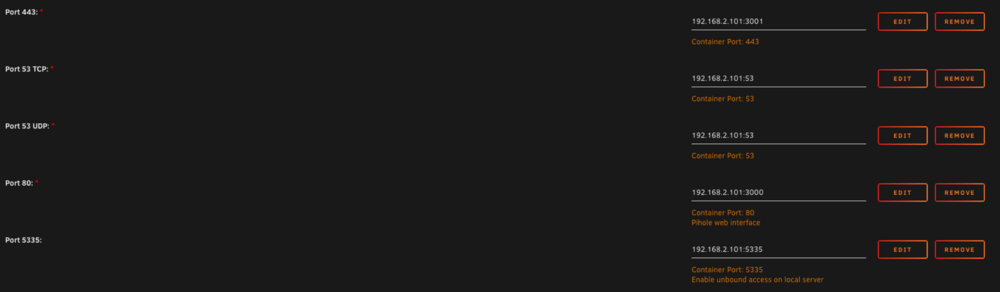
Simply add the IP of your server in front of the ports:
-
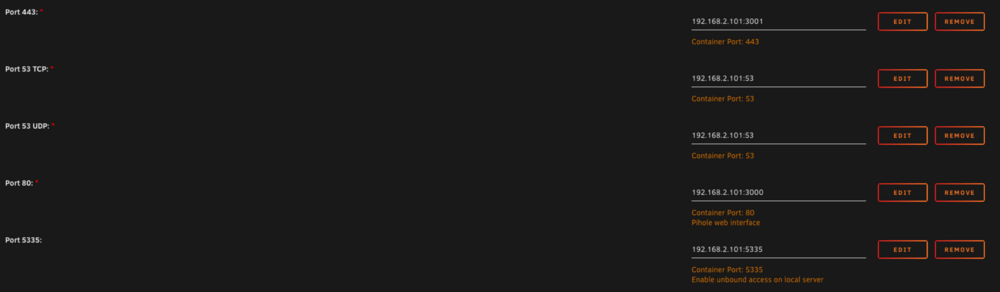
Simply add the IP of your server in front of the ports:
-
Hello, I have the same problem that was described on page 2. Every time I restart my server I have to reinstall the plugin. On the stick it is moved from the "Plugins" folder to the "Plugins-error" folder. But no errors are displayed in the logs and it works without any problems.. 😐 A bit annoying 😅
-
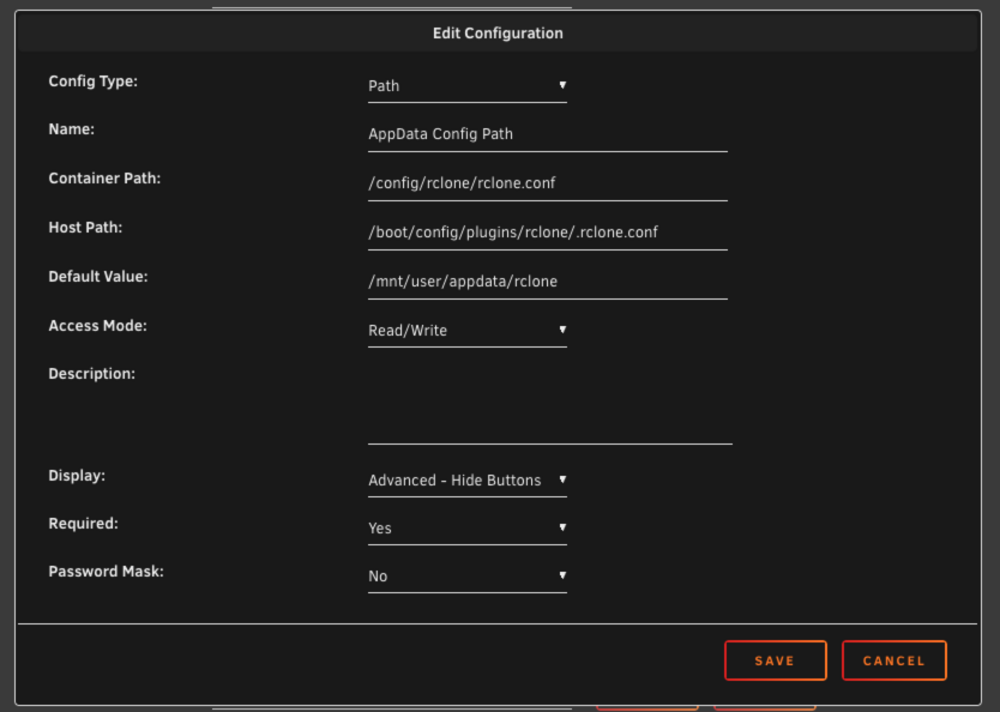
My solution: (1) Install the rclone plugin for Unraid (2) Install "Nacho-Rclone-Native-GUI" and change the following path: (a) Click on "Show more settings" (b) Change "AppData Config Path" (see image) (3) Run the container. After that you have the normal Rclone plugin running and can also edit the config in the GUI.
-
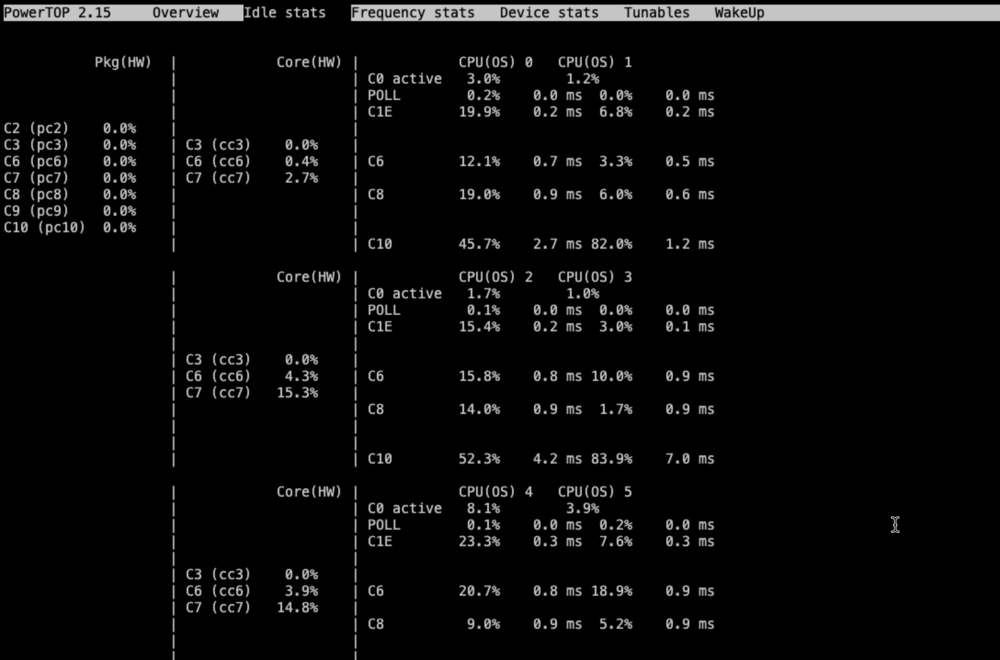
Hello, powertop shows me the following c states values: Why do the CPUs go up to C10, but Pkg shows 0 percent everywhere? Something isn't right?! MB: ASrock Z790 Pro RS Addition: I have made all the BIOS settings/tips that I could find. No change.
-
Great. Thanks for the instructions. It finally worked Finally, don’t forget to enable the GPU in Plex:

-
Genau das hat mein Problem gelöst. Danke
-
Thanks for the instructions
-
Das dürfte funktionieren. Zumindest klappt es bei mir
-
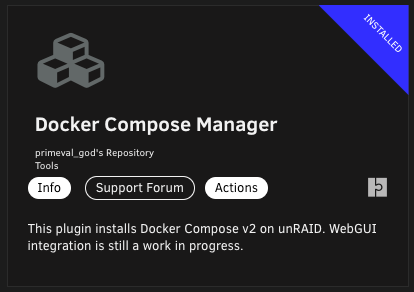
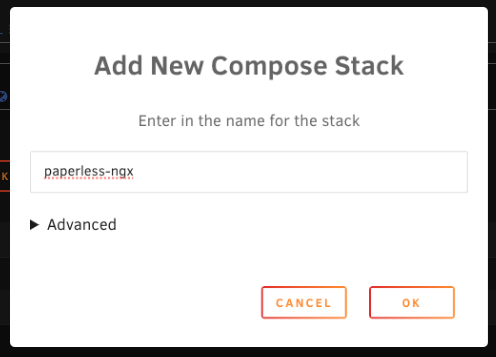
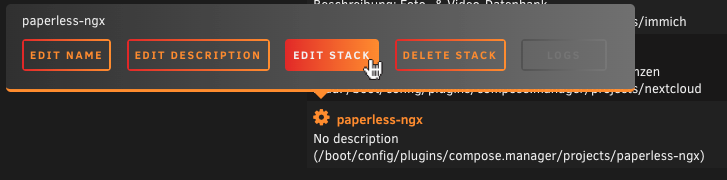
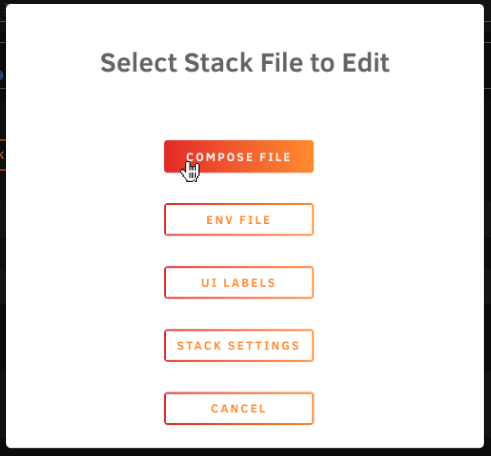
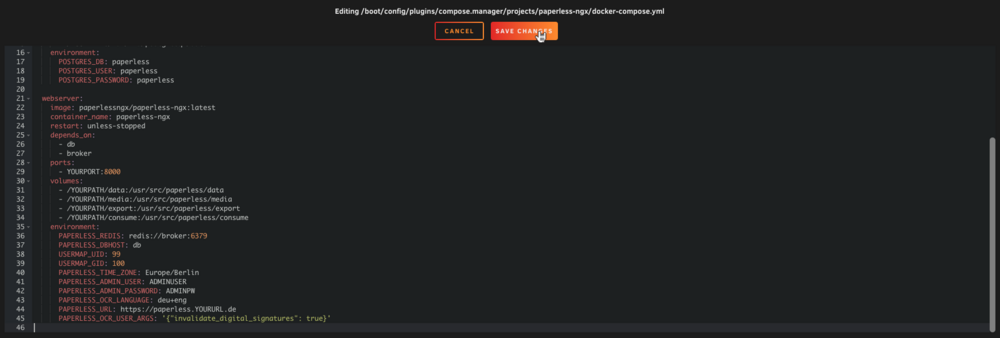
Bei mir ist es bislang noch nicht zu einem derartigen Problem gekommen. Schwierig nachzuvollziehen, wo da genau der Stolperstein lag. Aber im Folgenden einmal meine Konfiguration (docker compose), die seither problemlos läuft – sowohl auf einer Synology als auch mit Unraid: services: broker: image: redis:7.4.0 container_name: paperless-ngx-redis restart: unless-stopped volumes: - /YOURPATH:/data db: image: postgres:16.3 container_name: paperless-ngx-postgres restart: unless-stopped volumes: - /YOURPATH:/var/lib/postgresql/data environment: POSTGRES_DB: paperless POSTGRES_USER: paperless POSTGRES_PASSWORD: paperless webserver: image: paperlessngx/paperless-ngx:latest container_name: paperless-ngx restart: unless-stopped depends_on: - db - broker ports: - YOURPORT:8000 volumes: - /YOURPATH/data:/usr/src/paperless/data - /YOURPATH/media:/usr/src/paperless/media - /YOURPATH/export:/usr/src/paperless/export - /YOURPATH/consume:/usr/src/paperless/consume environment: PAPERLESS_REDIS: redis://broker:6379 PAPERLESS_DBHOST: db USERMAP_UID: 99 USERMAP_GID: 100 PAPERLESS_TIME_ZONE: Europe/Berlin PAPERLESS_ADMIN_USER: ADMINUSER PAPERLESS_ADMIN_PASSWORD: ADMINPW PAPERLESS_OCR_LANGUAGE: deu+eng PAPERLESS_URL: https://paperless.YOURURL.de PAPERLESS_OCR_USER_ARGS: '{"invalidate_digital_signatures": true}' Sinnvoll ist es vermutlich, sowohl die Datenbank als auch Redis einfach auf eine Version – wie hier geschehen – festzulegen und diese auch erst einmal nicht zu updaten. Außerdem bin ich dazu übergegangen, für jede Anwendung eine eigene, neue Datenbank-Instanz zu erstellen, die dann den Namen der Anwendung im Namen trägt. Wenn also etwas zerschossen wird, sind alle übrigen Anwendungen nicht betroffen, wie z. B. bei dir Nextcloud. Ergänzung für jene, die noch nicht docker compose verwendet haben: Gruß aus dem nahen Hamburg


-
I had the same problem with Nextcloud and docker compose. The solution was to use nextcloud:stable instead of nextcloud:latest as image.
-
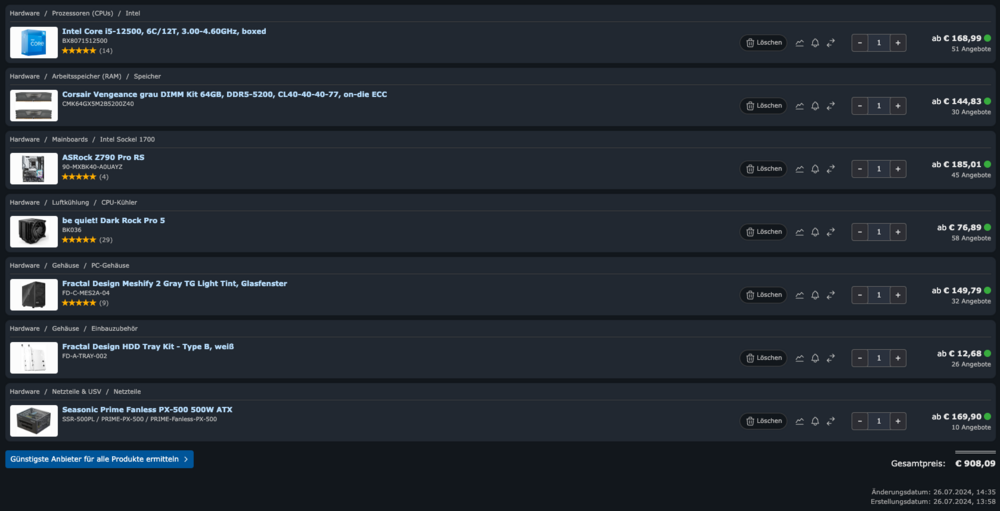
Budget: no limit Drives: 5–8 SATA and max. 2 SSD Expandability: no GPU Use case: Data backup (especially for work) Plex (including hardware transcoding) Various Docker containers (including Nextcloud, a Moodle instance) Hard drives 1 x 18 TB Parity 4 x 18 TB data (films/series/music) Hardware: Case: Fractal Design Meshify 2 Gray TG Light Tint MB: ASRock Z790 Pro RS As I've read here, it should be possible to get good c states with the ASRock boards - with a little adjustment. CPU: Intel Core i5 12500 CPU fan: be quiet! Dark Rock Pro 5 Power supply: Seasonic Prime Fanless PX-500 500W RAM: Corsair Vengeance DIMM Kit 64GB, DDR5-5200 (2x32GB) Other: 3 x Type B, white, double pack FD-A-TRAY-002 + Seagate IronWolf Pro | 18TB hard drive as parity (all other drives are already there) + unRAID license Does that make sense? If I add it all up, I arrive at a hardware price (including unRAID license) of around 1200 euros. I should get around 500 euros for my current Synology server. That actually seems legitimate to me. I'm just not really sure about the power supply...
-
Moin, ich modifiziere meinen Beitrag noch einmal. Ich habe mir nun nach einiger Recherche ein System zusammengestellt und würde gerne eure Meinung dazu hören. Anwendungsgebiet: Datensicherung (v. a. für die Arbeit) Plex (inkl. Hardware transcoding) Diverse Docker-Container (darunter Nextcloud, eine Moodle-Instanz) Festplatten 18 TB Parity 4 x 18 TB Daten (Filme/Serien/Musik) Hardware: Gehäuse: Fractal Design Meshify 2 RGB (wobei die RGB-Variante eigentlich unsinnig ist) MB: ASRock Z790 Pro RS/D4 Wie ich hier gelesen habe, soll es doch sehr wohl möglich sein, mit den ASRock-Boards gute c states zu erhalten – mit etwas Anpassung. CPU: Intel Core i5 12500 CPU-Lüfter: be quiet! Dark Rock 4 Tower Kühler Netzteil: Corsair RM750x 80 PLUS Gold RAM: 32GB Corsair Vengeance LPX DDR4-3200 DIMM CL16 Dual Kit Sonstiges: 3 x Typ B, Weiß, Doppelpack FD-A-TRAY-002 + Seagate IronWolf Pro | 18TB Festplatte als Parity (alle anderen Platten sind bereits vorhanden) + unRAID-Lizenz Klingt das sinnvoll? Wenn ich das alles zusammenrechne, komme ich auf einen Hardware-Preis (inkl. unRAID-Lizenz) von ca. 1200 Euro. Für meinen jetzigen Synology-Server sollte ich noch ca. 500 Euro bekommen. Scheint mir eigentlich legitim. Nur bei dem Netzteil bin ich mir irgendwie noch nicht so wirklich sicher ... Ursprünglicher Beitrag:
-
Wenn ich das richtig sehe, gibt es ja ein Modell von Asrock mit integriertem Netzteil und eines ohne. Was ist da denn sinnvoller?3 Als Gehäuse, dachte ich, nehme ich ein Fractal Node 804. Das kommt in den Beiträgen immer recht gut weg.
-
Moin liebe unRAID-Community, zurzeit habe ich eine Synology DS1621+ im Betrieb. Von dieser möchte ich auf ein eigenes System mit unRAID umsteigen, da mir doch immer häufiger auffällt, dass mir im Laufe der Jahre die Synology-Hardware zu wenig geworden ist. Am Anfang zum Thema „Homeserver“ war das eine nette Sache, aber ich benutze quasi kein einziges der Synology-eigenen Programme, sondern hoste alles in Docker. Folglich habe ich mal angefangen, mich mit der Hardware-Thematik zu beschäftigen. Leider weiß ich gar nicht richtig, wo ich da anfangen soll, sodass mir ein paar Referenzvorschläge wirklich helfen könnten. Ich würde demnach im Folgenden meine Anforderungen vorstellen und wäre über ein paar kleine Vorschläge sehr dankbar: Preis: max. 1.000 Euro für die Hardware (ausgenommen Festplatten; bestenfalls mit der unRAID-Lizenz, 249 USD) Docker: Diverse Container ⟶ Nextcloud, Moodle, WebDAV- und CalDAV-Server und Kleinigkeiten (für die Arbeit); Privat v. a. Plex, bestenfalls mit genug Leistung für eine 4K-Videotranscodierung im Stream Virtuelle Maschinen: nicht primär notwendig, quasi kaum/nie genutzt Festplatten: Diese sind bereits vorhanden und fallen daher nicht in den Preis 6 x Seagate Exos X18 (18TB) für meine Medien (später bestenfalls im Spindown) 1 x Seagate Exos 2x20 (20 TB) als Parity 1 oder 2 x Seagate Iron Wolf Pro (4 TB) für die Docker-Container und beruflichen Dateien Insgesamt also = mind. 8 Anschlüsse auf dem Mainboard oder Extracontroller Theoretisch noch 2 x 2 TB NVME SSDs als Pool (wirklich notwendig?) Stromverbrauch: Am liebsten sollte der Stromverbrauch (idle) nicht über 40 Watt steigen. Je weniger, desto besser. Ich bin für eure Vorschläge dankbar. Liebe Grüße Schiller






