





quicky
Members
-
Joined
-
Last visited
Everything posted by quicky
-
Du scheinst recht zu haben. Dann stellen wir das wohl wieder um :-D Vielleicht waren die veralteten Plugins ja das Problem.
-
Hi dibux, vielen Dank für den Hinweis: Bei mir war tatsächlich macvlan eingestellt. Ich habe das jetzt angepasst und die beiden veralteten Plugins entfernt. Bis jetzt läuft alles. Allerdings habe ich keine Ahnung ob ich die ipvlan Konfiguration korrekt gemacht habe. Da muss ich mich nochmal einlesen. Interessant ist nur, dass mein Unraid schon seit Monaten mit Fritzbox auf macvlan lief. Vielen Dank! :-)
-
Liebe Unraid Community, seit neustem habe ich ein Problem das ich mir nicht erklären kann. Bis vor ein paar Tagen lief mein Server absolut problemlos. Ich konnte irgendwann nicht mehr auf die GUI zugreifen. Alle Docker Dienste waren erreichbar. Ich konnte den Server auch pingen aber weder über die Reverse Proxy Adresse noch über unraid.local noch über die lokale IP hatte ich Zugriff auf die GUI. Über SSH habe ich dann via "reboot" neu gestartet und alles hat wieder funktioniert. Das selbe hat sich dann ein paar Tage später wiederholt. Das einzige was sich in letzter Zeit geändert hat ist mein Router. (Fritzbox) Dieser wurde ausgetauscht. Auch die neue Fritzbox hat dem Server die selbe IP zugewiesen. Aktuell wird die IP noch via DHCP vergeben. Ist nicht optimal, ich habe in der Fritzbox allerdings festgelegt, dass die IP immer die selbe bleiben soll und wie oben geschrieben, ich erreiche den Server ja auch unter der IP-Adresse. Nur die GUI ist nicht erreichbar. Ich habe online ein paar Einträge zu diesem Phänomen gefunden aber leider hat nichts auf meinen Fall gepasst. Anbei habe ich mal den Diagnostics Report. Hat jemand eine Idee was das Problem sein könnte? unraid-diagnostics-20250603-0939.zip
-
Thanks for the fast reply and thanks for the clarification. Just to make sure: I am absolutely happy to support the development and do some more testing if this helps. Also I can give some structured guidelines on how I got it to work (however I have no idea if most a the flaws that I saw were based on a lack of knowledge. So currently I have it up and running and it looked as I overcame most of the mentioned issues apart from the last one (where I provided a screenshot) and another one which I forgot to mention in my initial post: When you start the container for the first time and do the final steps like the creation of the db and setting up the user everything seems to work until you stop the container for the first time. After that it won't start up again. The logfile says that it won't start the server again because an instance is already running (it even gives me the PID of that server). After some research I found out that this is because the server wrote some file into a tmp-folder within the docker. However I can't delete this file as I can't access the content of the cointer because it doesn't start up. Maybe this info also helps to get the template optimized... and again, feel free to PM me if I can be of any help with testing. Cheers!
-
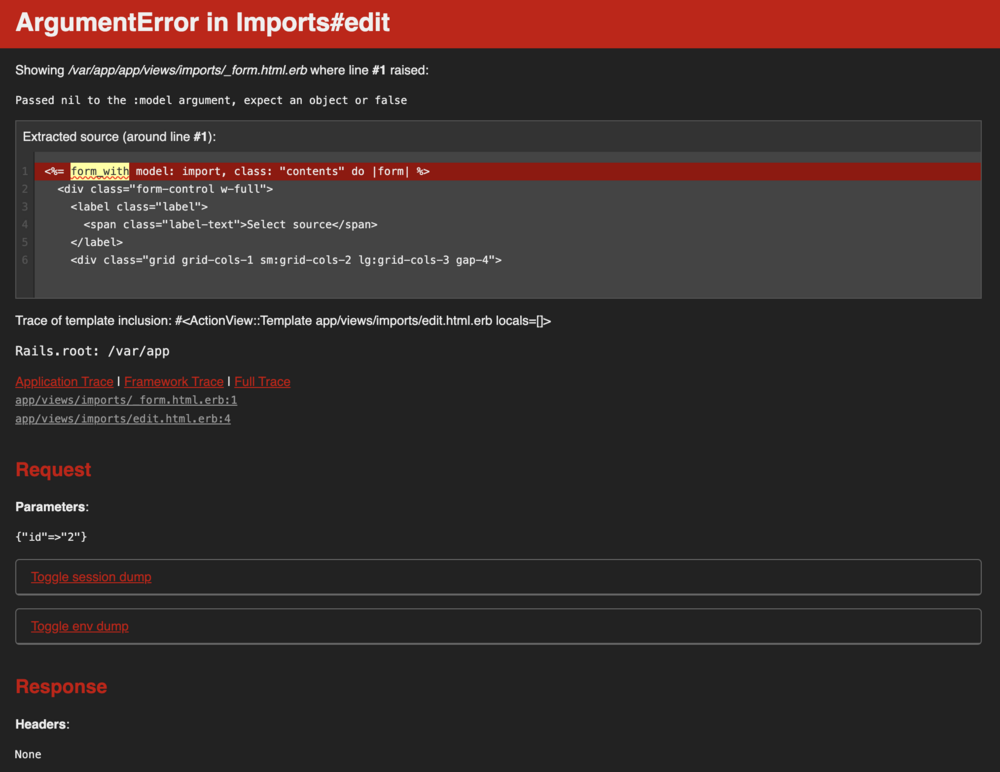
Hi all, I am trying to get the dawarich template to work and it's really a tough one. As I was able to some parts if it to work it still seems pretty bumpy and on some areas I am stuck: 1. It seems that the sidekiq-docker is a mandatory part of the whole setup (without it, my installation didn't import any gpx-files) however I don't understand why it's to seperate unraid community templates which cover almost identical values. In the docker-compose from dawarich both applications are packaged into one file. While I have no idea about unraid community templates there's probably a reason for it. However it would be amazing to get a better understanding what the sidekiq-template is needed for. 2. The install has some flaws. E.g. after the installation some manual db migration needs to be triggered via the shell.. this is pretty straight forward but it's not documented anywhere. 3. The initial user (as mentioned in the dawarich instructions) seems to be missing. While I found a way to add a user via the console (https://github.com/Freika/dawarich/issues/660) it would be cool to fix it. 4. Once I was able to login and import data I would stll get a pretty ugly rail-error-message when I clicked on the Edit button within a gps import (https://mydawarich.domain/imports/2/edit). See attached screenshot. In a nutshell: It could very well be that all this issues are caused by my lacking unraid-skills, but a short manual which highlights some specifics around this template would be amazing. Thanks so much! Cheers, quicky
-
Also ich habe es gelöst, aber verstehen tue ich es nicht: In NPM hatte als "Destination" localhost angegeben. Jetzt habe ich es auf die IP-adresse der Servers geändert und die Login-Seite kommt wieder. Danke für die Tipps!
-
Yup, klappt wunderbar von unterschiedlichen Geräten 😮 Und wie Du wahrscheinlich schon ahnst: Im Lan mit IP und HTTP Port kommt der Login Screen wie erwartet.
-
Aktuell teste ich es gerade extern. Der NPM mapped die den unverschlüsselten Port von Unraid auf eine extern erreichbare Subdomain die via Let's Encrypt eine HTTPS Verbindung erfordert. Fachlich war das jetzt wahrscheinlich nicht ganz korrekt erklärt und mir ist auch bewusst, dass man die GUI eigentlich nicht ohne VPN verfügbar machen sollte, aber erst mal wäre die Verfügbarkeit der des Login Screens schon mal ne gute Verbesserung
-
Liebe Community, ich habe heute mit Schrecken festgestellt, dass ich keinen Login-Screen mehr brauche um auf meine Unraid Webgui zu kommen. Ich bin sofort eingelogged. Folgendes habe ich bereits getestet: Log Out oben rechts. Ich komme auf die Logout seite (mit der Option zum anmelden). Allerdings kann ich die Seite einfach neu öffnen und bin wieder drin Root Passwort über User-Tab geändert Browser-Cache gelöscht, Incognito-Mode und neuen Browser getestet Ich nutze Nginx Reverse Proxy. Hier habe ich keine Änderungen vorgenommen, es mag aber evtl. trotzdem relevant sein. Anbei die Diagnostics. Um kurzfristig abgesichert zu sein habe ich via NPM ein htaccess eingefügt. Der erscheint auch brav, dahinter bin ich aber wieder ohne Unraid-Login-Screen. Ich bin überzeugt, dass es an mir liegt weshalb ich auch alle Foren durchsucht habe, aber eine Lösung habe ich deshalb dennoch nicht gefunden. Danke für Euren Support. unraid-diagnostics-20241219-1521.zip
-
Sorry für den Delay, also ich habe es jetzt mit dem Entwickler geklärt. Er ist der Meinung, dass beim Löschen und neu installieren des Containers eine neu Version installiert wird. Das habe ich versucht (ich habe natürlich auch das Image beim löschen entfernt). Hat alles nichts gebracht. Ich habe nun einfach im VNS des laufenden Dockers das Update via shell installiert. Das hat geklappt. Das Image scheint das Update nicht zu beinhalten. Danke dennoch für Eure Hilfe 🙂 LG quicky
-
Liebe Community, ich habe jetzt mal mein erstes eigenes Docker Template für Unraid gebaut und es funktioniert soweit echt super. Das ganze läuft jetzt schon seit einiges Zeit aber mittlerweile sagt mir die Anwendung, dass es ein Update gibt. Unraid selbst erkennt aber nicht, dass der Docker-Container aktualisiert wurde. Nach Rückfrage beim Owner des Repos wurde mir gesagt, dass dieses korrekt aktualisiert wurde. Irgendwo scheint diese Info aber nicht zu Unraid durchzukommen. Der Fehler liegt sicher bei mir, aber ich finde ihn nicht... Anbei mein Docker XML. Es wäre super wenn Ihr einen Tipp hättet. LG quicky my-openaudible.xml
-
Hi all, As I didn't find any solution in this threat I am sure that I am doing something wrong: I want to change port 6881 to some other port. I thought I just edit the three entries in the template ("Port: 6881:" for TCP "Port: 6881:" for UDP and "TORRENTING_PORT:"). So I changed the value 6881 for all three entries to "22000" and of course I changed the port-forwording in my router accordingly. However the port is still not reachable. It works perfectly with the default settings but it looks to me as if the change won't have any effect. I tested multiple different ports but it only seems to work with the default port of 6881. Btw: I left the WebUI on 8080 but the behaviour is the same there... any change to the default doesn't seem to have an impact. What am I overseeing here? Thanks for your support. quicky
-
It's soooo amazing... whenever I am using Unraid I can't believe that it took me so many years to learn how userfriendly a NAS OS can be. Unbelievable, really! I was using Synology before and it was okay, I didn't miss anything but I never expected that it could be as cool as Unraid is! Thanks a lot!
-
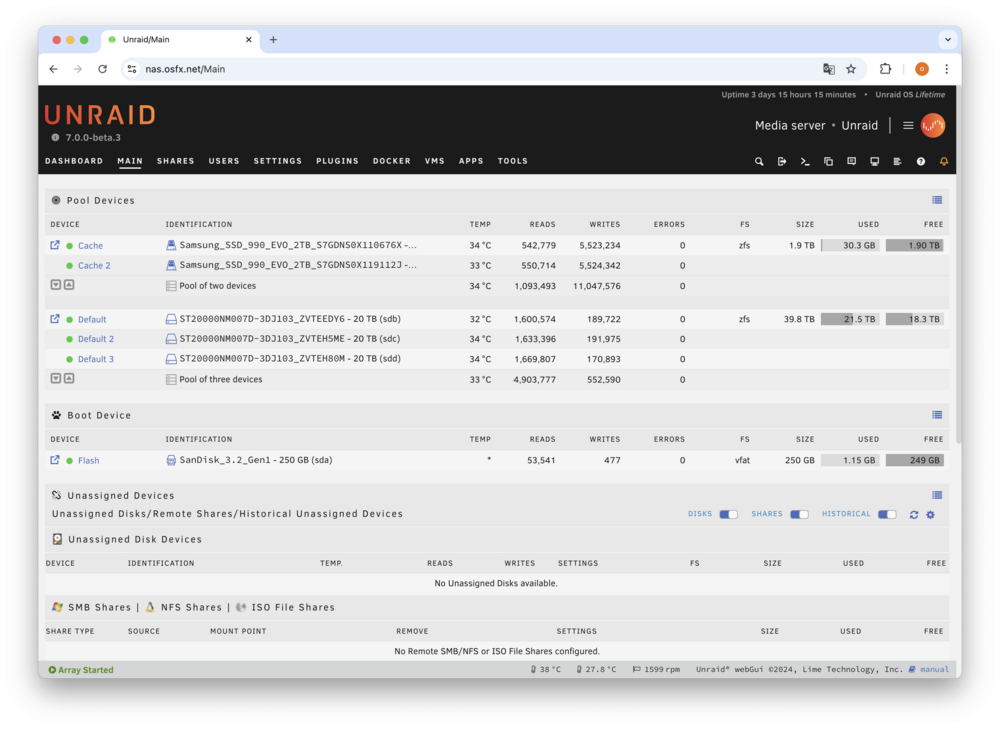
Okay, today is the day where I will sell my current NAS which is still running my RAIDZ1. As I don't have my new hardware yet (it will come next week hopefully) I am a bit nervous to not loose data. That's why I just wanted to make sure that I won't miss anything. So here's what I am running currently: I'm running Unraid 7 beta3. I have two ZFS arrays: One mirrored Cache and on RAIDZ1 array (please see screenshot). If I understood it right I just do the following: Stop the arrays Shut down the system Uninstall the harddrives and remember the order of them Reinstall Unraid on the new system Add the drives and the Cache Create a new Cache pool with two devices and a new RAIDZ1 with three devices and then add the drives in the order that they were before Then Unraid should show me all my data as it was before?! Sorry for this stupid question and my ask to reconfirm the process but it just sounds too easy... I thought there would be something like a "recover from old pool" process or something like that. Thanks again for your understanding and support. Cheers, quicky
-
Hallo alturismo, vielen Dank für Deine Hilfe! Das ist super, ich schaue mir Deine Beispiele mal im Detail an! Liebe Grüße quicky
-
Liebe Unraid Community, ich bin ein riesen Unraid Fan. Nach Jahren mit Synology habe ich mir nicht vorstellen können, dass es sowas geniales wie Unraid gibt. Nun habe ich schon viel damit rumgespielt und jede Menge Community-Apps installiert und konfiguriert. Es gibt im DockerHub aber noch so viele spannende Projekte die ich gerne ebenfalls mal testen würde, deshalb meine Frage: Gibt es einen einfachen Weg um sich die Dockergrundlagen (speziell in Hinblick auf Unraid) beizubringen. Mir ist absolut bewusst, dass es nicht schaden kann wenn man sich zuerst mit den gesamten Grundlagen zu Docker beschäftigen würde. Wenn ich aber "lediglich" den Bereich "Wie passe ich ein docker-compose an um es unter Unraid lauffähig zu machen" geht, gibt es evtl. einen leichteren Weg? Bitte röstet mich jetzt nicht, weil ich versuche einen leichten Einstieg in die Thematik zu finden. Lieben Dank und viele Grüße quicky
-
Amazing, sounds pretty simple. And thanks for the FYI. I will stay with 7... I just thought about setting up everything from scratch once 7 (final) comes out.
-
Hey all, I was looking for an answer for this but due to my limited knowledge I might have not used the best search terms to find any existing threat. I am running Unraid without any array but only with two Pools 1 Cache pool with two NVMe disks and another RAIDZ1 pool with 3 SATA drives. Now I am considering building a new Unraid server from scratch and I would like to take this stack of 3 disks and just install them in the new server. All software (appdata, VMs etc.) is running on the cache (and I will probably set this all up from scratch). My question is only around the RAIDZ1 which only consists of images and other "static" storage. As I don't want to risk any data loss I am looking for an easy step-by-step guide on how to configure the new Unraid server so it uses the existing pool again. FYI: I am using Unraid 7b2 but I guess the process would be identical to Unraid6?! Thank you so much for your help!
-
Danke für Deine schnelle Antwort. Das erklärt dann wohl so einiges. Mich wundert es immer mehr weshalb es keine gute Lösung für Notizen unter Unraid gibt. Ich hatte Nextcloud am laufen aber das ist viel zu große für meinen Usecase. Anytype schien mir recht populärt zu sein (oder zu werden). Aber wenn das natürlich si ein Wirrwarr ist, dann ist es zumindest aus dieser Hinsicht auch nichts. Dann versuche ich mich vielleicht mal an Joplin. Dafür gibt es wohl ein Unraid Paket. Liebe Grüße quicky
-
Liebe Unraid Community, ich bin noch recht neu im Unraid Business, aber (wie so viele) bin ich nach meinem Umstieg von Synology auf Unraid absolut begeistert. Die Möglichkeiten scheinen unbegrenzt zu sein. Leider bin ich nicht sehr erfahren mit Docker was bis jetzt aber noch keine Hürde darstellte weil das mit Unraid ja unglaublich einfach funktioniert. Aufgrund meiner Begeisterung kommen nun aber langsam neue Ideen auf: Ich nutze aktuell sehr gerne Anytype für meine Notizen. Das ganze ist Opensource und scheint mir eine tolle Alternative zu Notion zu sein. Nun habe ich gesehen, dass man den Anytype Server auch via Docker-Compose selbst hosten kann. Nachdem ich hier zu sehr Neuling bin und Anytype auch nicht als offizielles Paket bei Docker gefunden habe, wollte ich fragen ob jemand mit Erfahrung grundsätzlich Lust hätte das für Unraid verfügbar zu machen. Liebe Grüße quicky
-
Please bare with me, but doesn't this all add to my point that it's constantly transferring at about 100MB/sec. With or without Parity. And even when I start the transfer it's at 100MB. So the 64Gig of RAM can't be filled up at the beginning of the copy-process.
-
I've just added the Paritiy drive again and the Parity check started... it's running with about 280.0 MB/sec constantly. It's 12TB Seagate IronWolf drives (ST12000VN0008) but my main point is that with the exact same setup I was able to get 250MByte/s with a SFTP transfer. I was accessing the same share and everything. I'm a complete noob so if you're telling me that 100MByte/sec is a good rate I would live with that (especially because it's an activity which won't happen too often) but I was wondering if there's anything I could do to improve rsync if a standard FTP transfer can be so much faster.
-
Hi itimpi, Thanks a lot for your feedback! In fact I'm writing it to the main array but I disabled parity by stopping the array first and then temporarily unassigning the partiy disk. Is there any other way I could do the sync? It's actually going to be a one off. So if there's a onetime solution to speed up that transfer I'd be happy to do that.
-
Dear all, After going through all existing posts about "rsync transfers are too slow" I decided to add another post as none of the existing solutions seem to be working for me. Basically I'm connecting my Macbook via a 2.5Gb LAN adapter directly to my Unraid server. I'm using the internal IP to access the Unraid server. When testing the connection with a random SFTP transfer I get a speed with about 250MByte/s. However rsync won't get faster than 100MByte/s (the files are identical and they are all big (above 80mb each) I've tested a lot the proposed solution (like lowering the SSH overhead with a weaker Cipher "aes128-ctr") but I also checked the CPU load and it seems that it's not the bottleneck at all (in fact it's never above 10% when the transfer runs). Increase the SSH Buffer Size. etc. etc. but this all has no impact to the speed. It always stays at about 100MByte/sec. I thought it could be some Mac issue but SFTP transfers are as fast as expected with the same connection. My current command is pretty basic again: /usr/bin/rsync -avP --progress /Volumes/drive/folder/ [email protected]:/mnt/user/media/folder Any idea what else I should be looking into to solve this? Thanks a million for any idea... Cheers, Oliver
-
Fair point. I guess there was a guide which said that it's recommended to set Nextcloud to CRON (which runs every 5 minutes) and then install the "User Scripts" plugin and enter the cron-details there. I already had a strange feeling about this as both CRON-processes asked for a timing to be set for the cron-job. That's why I was of the assumption that maybe "User Scripts" should just act as the "cron-editor" and once the script is set up there. Nextcloud might just be able to trigger it. As you can see, I really had no idea. But on the other hand if it's either Nextcloud or User Scripts that should manage the CRON, shouldn't I then be able to just disable the CRON in Nextcloud completely? (if that's an option at all).


