




Skip to content
View in the app

A better way to browse. Learn more.

Unraid

A full-screen app on your home screen with push notifications, badges and more.

To install this app on iOS and iPadOS
  1. Tap the Share icon in Safari
  2. Scroll the menu and tap Add to Home Screen.
  3. Tap Add in the top-right corner.
To install this app on Android
  1. Tap the 3-dot menu (⋮) in the top-right corner of the browser.
  2. Tap Add to Home screen or Install app.
  3. Confirm by tapping Install.

Lennart_02

Members
  • Joined

  • Last visited

  1. Thanks for the fast reply and sorry for the Unnecessary post. I just noticed that the Plugins and Drivers are Stored on the USB Stick. And I had an 1GB USB Stick which was almost full. Replaced it and now it works.
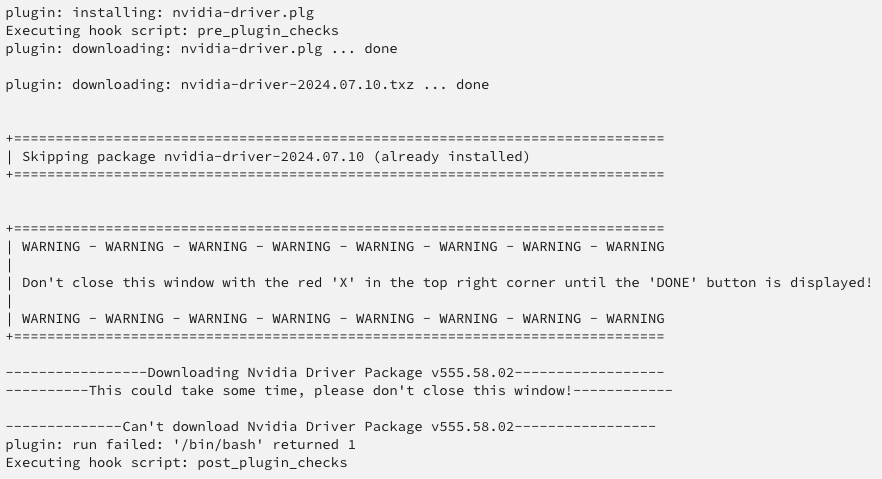
  2. Hello, I get an "Error" that I can't download the Nvidia Driver. How can I troubleshoot this problem? My P400 shows up in System Devices. Can not install the Plugin with and without the GPU installed.
  3. Hello, I want to increase my limit for the upload limit file size. Unfortunately I can not find the PHP.ini or even the PHP folder. I tried to find it with the Dynamics File Manger and also via the Console of the Docker Container.

Account

Navigation

Search

Search

Configure browser push notifications

Chrome (Android)
  1. Tap the lock icon next to the address bar.
  2. Tap Permissions → Notifications.
  3. Adjust your preference.
Chrome (Desktop)
  1. Click the padlock icon in the address bar.
  2. Select Site settings.
  3. Find Notifications and adjust your preference.