





Moniker Lewinski
Members
-
Joined
-
Last visited
-
thank you for the responses. That was all very confusing! However I managed to get it working and resolve all the Nextcloud errors, log errors, and finally to get the android apps connected! I really appreciate the responses.
-
I should have added that I recently had to move the server to a new location and a new IP address. I am pretty sure that I went through everything and updated the IP addresses... But I still get this error and so far am unable to fix it. Your web server is not yet properly set up to allow file synchronization, because the WebDAV interface seems to be broken. To allow this check to run you have to make sure that your Web server can connect to itself. Therefore it must be able to resolve and connect to at least one of its trusted_domains or the overwrite.cli.url. This failure may be the result of a server-side DNS mismatch or outbound firewall rule.
-
Hi all, The error is stated in the title. I have the Nextcloud AIO install working perfectly with Onlyoffice running in a cloudflare tunnel. If I connect through a web browser all is fine ... if I try to connect the android app I get the "malformed server configuration". I have searched the forums and found nothing to help so am making a post. I don't fully understand this stuff so would appreciate a bit of help :) Chat GPT summarises the error as, The error “malformed server configuration” — especially when accessing Nextcloud AIO via a Cloudflare Tunnel on Android — generally points to a TLS or reverse proxy misconfiguration ❌ Incorrect overwrite.cli.url, overwriteprotocol, or trusted_proxies in config.php ❌ Incomplete or broken HTTPS forwarding (e.g., Cloudflared → HTTP backend) ❌ Missing or misconfigured headers via NGINX or Docker labels ❌ Self-signed certs or invalid TLS for Android clients A few points As per Spaceinvader's video and his install I connect to Nextcloud to the nextcloud-aio-apache container on port 11000. I trusted my doman in config.php Inside my Cloudflare tunnel I have to leave the public service connection setting as HTTP://XX.XX.XX.XX:11000. If I change it to HTTPS it fails. Putting 2 and 2 together from the Chat GPT info and the cloudflare HTTP tunnel setting I'm guessing the failure lies in "Incomplete or broken HTTPS forwarding (e.g., Cloudflared → HTTP backend)" I don't understand how to alter the AIO container settings ... perhaps if port 11000 was mapped to 443 it would be happy? I don't fully understand where the apache stuff is in the install ... is it actually referring to NGINX in the nextcloud installation? I'll leave it there. Maybe someone else solved this... and I also don't want to put too much information (can add more as needed). Thank you in advance.
-
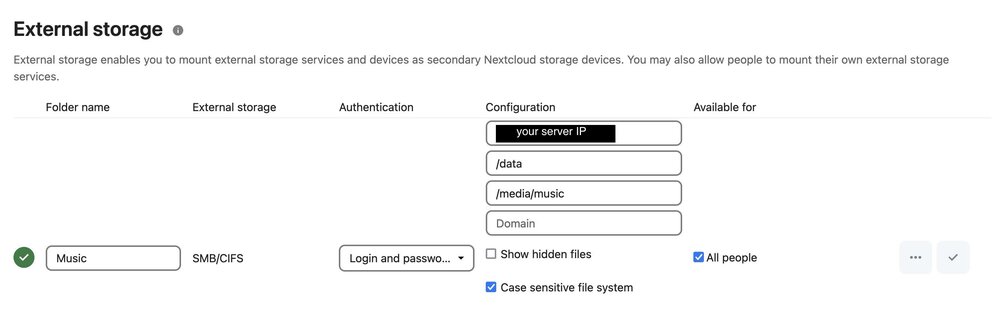
I sped read the previous responses so hopefully I am making a new contribution. I found that if what I wanted to share on my server was already accessible using SMB ... that i could simply share the folders using SMB.
-
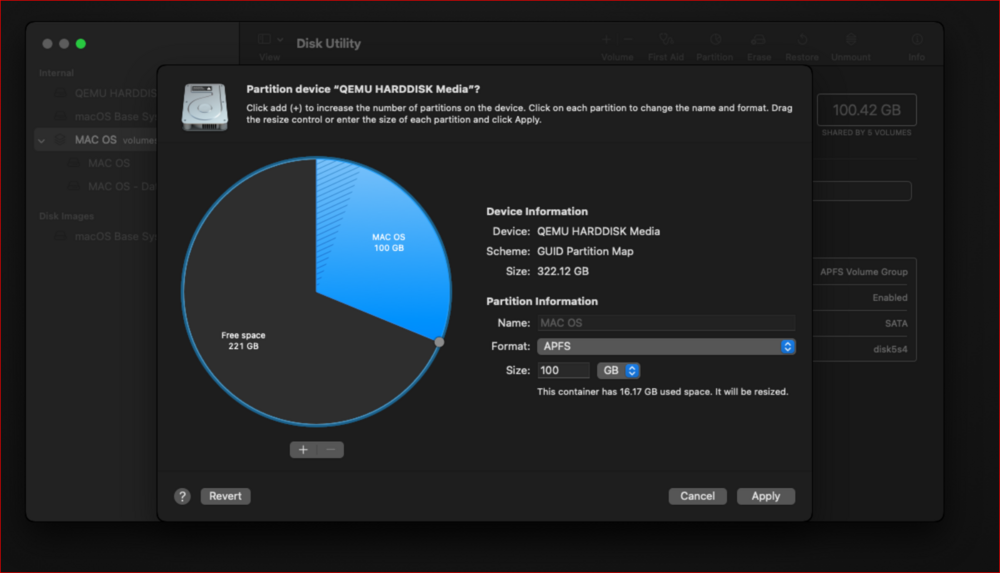
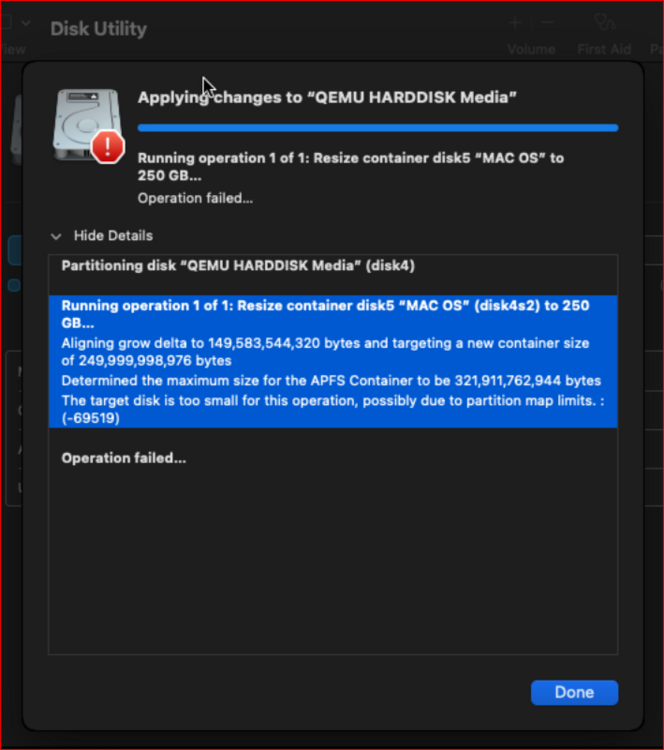
After updating macinthebox my VM works absolutely perfectly. The one thing I am struggling with is resizing the partition so I can directly grab my Time Machine backups from my Macbook. I don't have any experience working with VM's before.... however, I can see how to change the VM disk size in UNRAID. (/mnt/user/domains/Sonoma/macos_disk.img) I get into the recovery partition inside Mac OS and Disk Utility can successfully make the partition smaller, but not bigger I would actually just erase everything and re-do the VM but I can't seem to get rid of it. When I choose "remove VM & disks" it either doesn't respond. Or when I run macinthebox again it simply replaces the exact same installation with data inside fully intact (doesn't erase anything). Thank you,

-
EDIT: updated the container and it now runs perfectly ------------------------------------------------------- Hi all, I hope this post is in the correct place and is intelligible I followed all instructions and as far as I can see my XML is fine and I also ran and re-ran the new macinabox which I think was updated yesterday. I am getting the "Guest has not initialized the display (yet)." My server is running on 12th Gen Intel® Core™ i5-12400 @ 2475 MHz, 32GB RAM. UNRAID 6.12.13. I'm giving it 8 of 12 cores... I'll include my XML (minus the key) and after this the VM log. <?xml version='1.0' encoding='UTF-8'?> <domain type='kvm' xmlns:qemu='http://libvirt.org/schemas/domain/qemu/1.0'> <name>Sonoma</name> <uuid>6bf37a5a-94f8-42bc-9a3d-62049fe4330b</uuid> <metadata> <vmtemplate xmlns="unraid" icon="macinabox.png" os="osx" webui="" name="Linux"/> </metadata> <memory unit='KiB'>8388608</memory> <currentMemory unit='KiB'>8388608</currentMemory> <memoryBacking> <nosharepages/> </memoryBacking> <vcpu placement='static'>8</vcpu> <cputune> <vcpupin vcpu='0' cpuset='2'/> <vcpupin vcpu='1' cpuset='3'/> <vcpupin vcpu='2' cpuset='6'/> <vcpupin vcpu='3' cpuset='7'/> <vcpupin vcpu='4' cpuset='8'/> <vcpupin vcpu='5' cpuset='9'/> <vcpupin vcpu='6' cpuset='10'/> <vcpupin vcpu='7' cpuset='11'/> </cputune> <os> <type arch='x86_64' machine='pc-q35-7.2'>hvm</type> <loader readonly='yes' type='pflash'>/usr/share/qemu/ovmf-x64/OVMF_CODE-pure-efi.fd</loader> <nvram>/etc/libvirt/qemu/nvram/6bf37a5a-94f8-42bc-9a3d-62049fe4330b_VARS-pure-efi.fd</nvram> </os> <features> <acpi/> <apic/> </features> <cpu mode='host-passthrough' check='none' migratable='on'> <topology sockets='1' dies='1' cores='4' threads='2'/> <cache mode='passthrough'/> </cpu> <clock offset='utc'> <timer name='rtc' tickpolicy='catchup'/> <timer name='pit' tickpolicy='delay'/> <timer name='hpet' present='no'/> </clock> <on_poweroff>destroy</on_poweroff> <on_reboot>restart</on_reboot> <on_crash>restart</on_crash> <devices> <emulator>/usr/local/sbin/qemu</emulator> <disk type='file' device='disk'> <driver name='qemu' type='raw' cache='writeback'/> <source file='/mnt/user/domains/Sonoma/Sonoma-opencore.img'/> <target dev='hdc' bus='sata'/> <serial>vdisk1</serial> <boot order='1'/> <address type='drive' controller='0' bus='0' target='0' unit='2'/> </disk> <disk type='file' device='disk'> <driver name='qemu' type='raw' cache='writeback'/> <source file='/mnt/user/isos/Sonoma-install.img'/> <target dev='hdd' bus='sata'/> <serial>vdisk2</serial> <address type='drive' controller='0' bus='0' target='0' unit='3'/> </disk> <disk type='file' device='disk'> <driver name='qemu' type='raw' cache='writeback'/> <source file='/mnt/user/domains/Sonoma/macos_disk.img'/> <target dev='hde' bus='sata'/> <serial>vdisk3</serial> <address type='drive' controller='0' bus='0' target='0' unit='4'/> </disk> <controller type='pci' index='0' model='pcie-root'/> <controller type='pci' index='1' model='pcie-root-port'> <model name='pcie-root-port'/> <target chassis='1' port='0x8'/> <address type='pci' domain='0x0000' bus='0x00' slot='0x01' function='0x0' multifunction='on'/> </controller> <controller type='pci' index='2' model='pcie-root-port'> <model name='pcie-root-port'/> <target chassis='2' port='0x9'/> <address type='pci' domain='0x0000' bus='0x00' slot='0x01' function='0x1'/> </controller> <controller type='pci' index='3' model='pcie-root-port'> <model name='pcie-root-port'/> <target chassis='3' port='0x11'/> <address type='pci' domain='0x0000' bus='0x00' slot='0x02' function='0x1'/> </controller> <controller type='pci' index='4' model='pcie-root-port'> <model name='pcie-root-port'/> <target chassis='4' port='0x12'/> <address type='pci' domain='0x0000' bus='0x00' slot='0x02' function='0x2'/> </controller> <controller type='pci' index='5' model='pcie-root-port'> <model name='pcie-root-port'/> <target chassis='5' port='0x13'/> <address type='pci' domain='0x0000' bus='0x00' slot='0x02' function='0x3'/> </controller> <controller type='pci' index='6' model='pcie-root-port'> <model name='pcie-root-port'/> <target chassis='6' port='0x14'/> <address type='pci' domain='0x0000' bus='0x00' slot='0x02' function='0x4'/> </controller> <controller type='pci' index='7' model='pcie-root-port'> <model name='pcie-root-port'/> <target chassis='7' port='0xa'/> <address type='pci' domain='0x0000' bus='0x00' slot='0x01' function='0x2'/> </controller> <controller type='pci' index='8' model='pcie-to-pci-bridge'> <model name='pcie-pci-bridge'/> <address type='pci' domain='0x0000' bus='0x01' slot='0x00' function='0x0'/> </controller> <controller type='virtio-serial' index='0'> <address type='pci' domain='0x0000' bus='0x03' slot='0x00' function='0x0'/> </controller> <controller type='sata' index='0'> <address type='pci' domain='0x0000' bus='0x00' slot='0x1f' function='0x2'/> </controller> <controller type='usb' index='0' model='ich9-ehci1'> <address type='pci' domain='0x0000' bus='0x00' slot='0x07' function='0x7'/> </controller> <controller type='usb' index='0' model='ich9-uhci1'> <master startport='0'/> <address type='pci' domain='0x0000' bus='0x00' slot='0x07' function='0x0' multifunction='on'/> </controller> <controller type='usb' index='0' model='ich9-uhci2'> <master startport='2'/> <address type='pci' domain='0x0000' bus='0x00' slot='0x07' function='0x1'/> </controller> <controller type='usb' index='0' model='ich9-uhci3'> <master startport='4'/> <address type='pci' domain='0x0000' bus='0x00' slot='0x07' function='0x2'/> </controller> <interface type='bridge'> <mac address='ac:87:a3:5b:17:2f'/> <source bridge='br0'/> <model type='virtio-net'/> <address type='pci' domain='0x0000' bus='0x00' slot='0x03' function='0x0'/> </interface> <serial type='pty'> <target type='isa-serial' port='0'> <model name='isa-serial'/> </target> </serial> <console type='pty'> <target type='serial' port='0'/> </console> <channel type='unix'> <target type='virtio' name='org.qemu.guest_agent.0'/> <address type='virtio-serial' controller='0' bus='0' port='1'/> </channel> <input type='tablet' bus='usb'> <address type='usb' bus='0' port='1'/> </input> <input type='mouse' bus='ps2'/> <input type='keyboard' bus='ps2'/> <graphics type='vnc' port='-1' autoport='yes' websocket='-1' listen='0.0.0.0' keymap='en-us'> <listen type='address' address='0.0.0.0'/> </graphics> <audio id='1' type='none'/> <video> <model type='qxl' ram='65536' vram='65536' vgamem='16384' heads='1' primary='yes'/> <address type='pci' domain='0x0000' bus='0x08' slot='0x01' function='0x0'/> </video> <memballoon model='virtio'> <address type='pci' domain='0x0000' bus='0x05' slot='0x00' function='0x0'/> </memballoon> </devices> <qemu:commandline> <qemu:arg value='-device'/> <qemu:arg value='isa-applesmc,osk=thisiswherethekeygoeswedontpostontheforums'/> <qemu:arg value='-smbios'/> <qemu:arg value='type=2'/> <qemu:arg value='-usb'/> <qemu:arg value='-device'/> <qemu:arg value='usb-tablet'/> <qemu:arg value='-device'/> <qemu:arg value='usb-kbd'/> <qemu:arg value='-cpu'/> <qemu:arg value='Skylake-Server,vendor=GenuineIntel,+hypervisor,+invtsc,kvm=on,+fma,+avx,+avx2,+aes,+ssse3,+sse4_2,+popcnt,+sse4a,+bmi1,+bmi2'/> </qemu:commandline> </domain> 2024-09-23 07:26:14.777+0000: starting up libvirt version: 8.7.0, qemu version: 7.2.0, kernel: 6.1.106-Unraid, hostname: Reliquary LC_ALL=C \ PATH=/bin:/sbin:/usr/bin:/usr/sbin \ HOME=/var/lib/libvirt/qemu/domain-3-Sonoma \ XDG_DATA_HOME=/var/lib/libvirt/qemu/domain-3-Sonoma/.local/share \ XDG_CACHE_HOME=/var/lib/libvirt/qemu/domain-3-Sonoma/.cache \ XDG_CONFIG_HOME=/var/lib/libvirt/qemu/domain-3-Sonoma/.config \ /usr/local/sbin/qemu \ -name guest=Sonoma,debug-threads=on \ -S \ -object '{"qom-type":"secret","id":"masterKey0","format":"raw","file":"/var/lib/libvirt/qemu/domain-3-Sonoma/master-key.aes"}' \ -blockdev '{"driver":"file","filename":"/usr/share/qemu/ovmf-x64/OVMF_CODE-pure-efi.fd","node-name":"libvirt-pflash0-storage","auto-read-only":true,"discard":"unmap"}' \ -blockdev '{"node-name":"libvirt-pflash0-format","read-only":true,"driver":"raw","file":"libvirt-pflash0-storage"}' \ -blockdev '{"driver":"file","filename":"/etc/libvirt/qemu/nvram/6bf37a5a-94f8-42bc-9a3d-62049fe4330b_VARS-pure-efi.fd","node-name":"libvirt-pflash1-storage","auto-read-only":true,"discard":"unmap"}' \ -blockdev '{"node-name":"libvirt-pflash1-format","read-only":false,"driver":"raw","file":"libvirt-pflash1-storage"}' \ -machine pc-q35-7.2,usb=off,dump-guest-core=off,mem-merge=off,memory-backend=pc.ram,pflash0=libvirt-pflash0-format,pflash1=libvirt-pflash1-format \ -accel kvm \ -cpu host,migratable=on,host-cache-info=on,l3-cache=off \ -m 8192 \ -object '{"qom-type":"memory-backend-ram","id":"pc.ram","size":8589934592}' \ -overcommit mem-lock=off \ -smp 8,sockets=1,dies=1,cores=4,threads=2 \ -uuid 6bf37a5a-94f8-42bc-9a3d-62049fe4330b \ -no-user-config \ -nodefaults \ -chardev socket,id=charmonitor,fd=35,server=on,wait=off \ -mon chardev=charmonitor,id=monitor,mode=control \ -rtc base=utc,driftfix=slew \ -global kvm-pit.lost_tick_policy=delay \ -no-hpet \ -no-shutdown \ -boot strict=on \ -device '{"driver":"pcie-root-port","port":8,"chassis":1,"id":"pci.1","bus":"pcie.0","multifunction":true,"addr":"0x1"}' \ -device '{"driver":"pcie-root-port","port":9,"chassis":2,"id":"pci.2","bus":"pcie.0","addr":"0x1.0x1"}' \ -device '{"driver":"pcie-root-port","port":17,"chassis":3,"id":"pci.3","bus":"pcie.0","addr":"0x2.0x1"}' \ -device '{"driver":"pcie-root-port","port":18,"chassis":4,"id":"pci.4","bus":"pcie.0","addr":"0x2.0x2"}' \ -device '{"driver":"pcie-root-port","port":19,"chassis":5,"id":"pci.5","bus":"pcie.0","addr":"0x2.0x3"}' \ -device '{"driver":"pcie-root-port","port":20,"chassis":6,"id":"pci.6","bus":"pcie.0","addr":"0x2.0x4"}' \ -device '{"driver":"pcie-root-port","port":10,"chassis":7,"id":"pci.7","bus":"pcie.0","addr":"0x1.0x2"}' \ -device '{"driver":"pcie-pci-bridge","id":"pci.8","bus":"pci.1","addr":"0x0"}' \ -device '{"driver":"ich9-usb-ehci1","id":"usb","bus":"pcie.0","addr":"0x7.0x7"}' \ -device '{"driver":"ich9-usb-uhci1","masterbus":"usb.0","firstport":0,"bus":"pcie.0","multifunction":true,"addr":"0x7"}' \ -device '{"driver":"ich9-usb-uhci2","masterbus":"usb.0","firstport":2,"bus":"pcie.0","addr":"0x7.0x1"}' \ -device '{"driver":"ich9-usb-uhci3","masterbus":"usb.0","firstport":4,"bus":"pcie.0","addr":"0x7.0x2"}' \ -device '{"driver":"virtio-serial-pci","id":"virtio-serial0","bus":"pci.3","addr":"0x0"}' \ -blockdev '{"driver":"file","filename":"/mnt/user/domains/Sonoma/Sonoma-opencore.img","node-name":"libvirt-3-storage","cache":{"direct":false,"no-flush":false},"auto-read-only":true,"discard":"unmap"}' \ -blockdev '{"node-name":"libvirt-3-format","read-only":false,"cache":{"direct":false,"no-flush":false},"driver":"raw","file":"libvirt-3-storage"}' \ -device '{"driver":"ide-hd","bus":"ide.2","drive":"libvirt-3-format","id":"sata0-0-2","bootindex":1,"write-cache":"on","serial":"vdisk1"}' \ -blockdev '{"driver":"file","filename":"/mnt/user/isos/Sonoma-install.img","node-name":"libvirt-2-storage","cache":{"direct":false,"no-flush":false},"auto-read-only":true,"discard":"unmap"}' \ -blockdev '{"node-name":"libvirt-2-format","read-only":false,"cache":{"direct":false,"no-flush":false},"driver":"raw","file":"libvirt-2-storage"}' \ -device '{"driver":"ide-hd","bus":"ide.3","drive":"libvirt-2-format","id":"sata0-0-3","write-cache":"on","serial":"vdisk2"}' \ -blockdev '{"driver":"file","filename":"/mnt/user/domains/Sonoma/macos_disk.img","node-name":"libvirt-1-storage","cache":{"direct":false,"no-flush":false},"auto-read-only":true,"discard":"unmap"}' \ -blockdev '{"node-name":"libvirt-1-format","read-only":false,"cache":{"direct":false,"no-flush":false},"driver":"raw","file":"libvirt-1-storage"}' \ -device '{"driver":"ide-hd","bus":"ide.4","drive":"libvirt-1-format","id":"sata0-0-4","write-cache":"on","serial":"vdisk3"}' \ -netdev tap,fd=36,id=hostnet0 \ -device '{"driver":"virtio-net","netdev":"hostnet0","id":"net0","mac":"ac:87:a3:5b:17:2f","bus":"pcie.0","addr":"0x3"}' \ -chardev pty,id=charserial0 \ -device '{"driver":"isa-serial","chardev":"charserial0","id":"serial0","index":0}' \ -chardev socket,id=charchannel0,fd=34,server=on,wait=off \ -device '{"driver":"virtserialport","bus":"virtio-serial0.0","nr":1,"chardev":"charchannel0","id":"channel0","name":"org.qemu.guest_agent.0"}' \ -device '{"driver":"usb-tablet","id":"input0","bus":"usb.0","port":"1"}' \ -audiodev '{"id":"audio1","driver":"none"}' \ -vnc 0.0.0.0:0,websocket=5700,audiodev=audio1 \ -k en-us \ -device '{"driver":"qxl-vga","id":"video0","max_outputs":1,"ram_size":67108864,"vram_size":67108864,"vram64_size_mb":0,"vgamem_mb":16,"bus":"pci.8","addr":"0x1"}' \ -device '{"driver":"virtio-balloon-pci","id":"balloon0","bus":"pci.5","addr":"0x0"}' \ -device '************************' \ -smbios type=2 \ -usb \ -device usb-tablet \ -device usb-kbd \ -cpu Skylake-Server,vendor=GenuineIntel,+hypervisor,+invtsc,kvm=on,+fma,+avx,+avx2,+aes,+ssse3,+sse4_2,+popcnt,+sse4a,+bmi1,+bmi2 \ -sandbox on,obsolete=deny,elevateprivileges=deny,spawn=deny,resourcecontrol=deny \ -msg timestamp=on char device redirected to /dev/pts/1 (label charserial0) 2024-09-23T07:26:14.839965Z qemu-system-x86_64: warning: host doesn't support requested feature: CPUID.07H:EBX.hle [bit 4] 2024-09-23T07:26:14.839990Z qemu-system-x86_64: warning: host doesn't support requested feature: CPUID.07H:EBX.rtm [bit 11] 2024-09-23T07:26:14.839993Z qemu-system-x86_64: warning: host doesn't support requested feature: CPUID.07H:EBX.avx512f [bit 16] 2024-09-23T07:26:14.839996Z qemu-system-x86_64: warning: host doesn't support requested feature: CPUID.07H:EBX.avx512dq [bit 17] 2024-09-23T07:26:14.839998Z qemu-system-x86_64: warning: host doesn't support requested feature: CPUID.07H:EBX.avx512cd [bit 28] 2024-09-23T07:26:14.840001Z qemu-system-x86_64: warning: host doesn't support requested feature: CPUID.07H:EBX.avx512bw [bit 30] 2024-09-23T07:26:14.840004Z qemu-system-x86_64: warning: host doesn't support requested feature: CPUID.07H:EBX.avx512vl [bit 31] 2024-09-23T07:26:14.840007Z qemu-system-x86_64: warning: host doesn't support requested feature: CPUID.80000001H:ECX.sse4a [bit 6] 2024-09-23T07:26:14.840010Z qemu-system-x86_64: warning: host doesn't support requested feature: CPUID.0DH:EAX [bit 5] 2024-09-23T07:26:14.840013Z qemu-system-x86_64: warning: host doesn't support requested feature: CPUID.0DH:EAX [bit 6] 2024-09-23T07:26:14.840015Z qemu-system-x86_64: warning: host doesn't support requested feature: CPUID.0DH:EAX [bit 7] 2024-09-23T07:26:14.840843Z qemu-system-x86_64: warning: host doesn't support requested feature: CPUID.07H:EBX.hle [bit 4] 2024-09-23T07:26:14.840849Z qemu-system-x86_64: warning: host doesn't support requested feature: CPUID.07H:EBX.rtm [bit 11] 2024-09-23T07:26:14.840852Z qemu-system-x86_64: warning: host doesn't support requested feature: CPUID.07H:EBX.avx512f [bit 16] 2024-09-23T07:26:14.840855Z qemu-system-x86_64: warning: host doesn't support requested feature: CPUID.07H:EBX.avx512dq [bit 17] 2024-09-23T07:26:14.840857Z qemu-system-x86_64: warning: host doesn't support requested feature: CPUID.07H:EBX.avx512cd [bit 28] 2024-09-23T07:26:14.840860Z qemu-system-x86_64: warning: host doesn't support requested feature: CPUID.07H:EBX.avx512bw [bit 30] 2024-09-23T07:26:14.840863Z qemu-system-x86_64: warning: host doesn't support requested feature: CPUID.07H:EBX.avx512vl [bit 31] 2024-09-23T07:26:14.840866Z qemu-system-x86_64: warning: host doesn't support requested feature: CPUID.80000001H:ECX.sse4a [bit 6] 2024-09-23T07:26:14.840869Z qemu-system-x86_64: warning: host doesn't support requested feature: CPUID.0DH:EAX [bit 5] 2024-09-23T07:26:14.840873Z qemu-system-x86_64: warning: host doesn't support requested feature: CPUID.0DH:EAX [bit 6] 2024-09-23T07:26:14.840876Z qemu-system-x86_64: warning: host doesn't support requested feature: CPUID.0DH:EAX [bit 7] 2024-09-23T07:26:14.841579Z qemu-system-x86_64: warning: host doesn't support requested feature: CPUID.07H:EBX.hle [bit 4] 2024-09-23T07:26:14.841584Z qemu-system-x86_64: warning: host doesn't support requested feature: CPUID.07H:EBX.rtm [bit 11] 2024-09-23T07:26:14.841587Z qemu-system-x86_64: warning: host doesn't support requested feature: CPUID.07H:EBX.avx512f [bit 16] 2024-09-23T07:26:14.841590Z qemu-system-x86_64: warning: host doesn't support requested feature: CPUID.07H:EBX.avx512dq [bit 17] 2024-09-23T07:26:14.841592Z qemu-system-x86_64: warning: host doesn't support requested feature: CPUID.07H:EBX.avx512cd [bit 28] 2024-09-23T07:26:14.841594Z qemu-system-x86_64: warning: host doesn't support requested feature: CPUID.07H:EBX.avx512bw [bit 30] 2024-09-23T07:26:14.841598Z qemu-system-x86_64: warning: host doesn't support requested feature: CPUID.07H:EBX.avx512vl [bit 31] 2024-09-23T07:26:14.841603Z qemu-system-x86_64: warning: host doesn't support requested feature: CPUID.80000001H:ECX.sse4a [bit 6] 2024-09-23T07:26:14.841609Z qemu-system-x86_64: warning: host doesn't support requested feature: CPUID.0DH:EAX [bit 5] 2024-09-23T07:26:14.841613Z qemu-system-x86_64: warning: host doesn't support requested feature: CPUID.0DH:EAX [bit 6] 2024-09-23T07:26:14.841617Z qemu-system-x86_64: warning: host doesn't support requested feature: CPUID.0DH:EAX [bit 7] 2024-09-23T07:26:14.842292Z qemu-system-x86_64: warning: host doesn't support requested feature: CPUID.07H:EBX.hle [bit 4] 2024-09-23T07:26:14.842296Z qemu-system-x86_64: warning: host doesn't support requested feature: CPUID.07H:EBX.rtm [bit 11] 2024-09-23T07:26:14.842299Z qemu-system-x86_64: warning: host doesn't support requested feature: CPUID.07H:EBX.avx512f [bit 16] 2024-09-23T07:26:14.842302Z qemu-system-x86_64: warning: host doesn't support requested feature: CPUID.07H:EBX.avx512dq [bit 17] 2024-09-23T07:26:14.842304Z qemu-system-x86_64: warning: host doesn't support requested feature: CPUID.07H:EBX.avx512cd [bit 28] 2024-09-23T07:26:14.842306Z qemu-system-x86_64: warning: host doesn't support requested feature: CPUID.07H:EBX.avx512bw [bit 30] 2024-09-23T07:26:14.842309Z qemu-system-x86_64: warning: host doesn't support requested feature: CPUID.07H:EBX.avx512vl [bit 31] 2024-09-23T07:26:14.842313Z qemu-system-x86_64: warning: host doesn't support requested feature: CPUID.80000001H:ECX.sse4a [bit 6] 2024-09-23T07:26:14.842319Z qemu-system-x86_64: warning: host doesn't support requested feature: CPUID.0DH:EAX [bit 5] 2024-09-23T07:26:14.842324Z qemu-system-x86_64: warning: host doesn't support requested feature: CPUID.0DH:EAX [bit 6] 2024-09-23T07:26:14.842328Z qemu-system-x86_64: warning: host doesn't support requested feature: CPUID.0DH:EAX [bit 7] 2024-09-23T07:26:14.843004Z qemu-system-x86_64: warning: host doesn't support requested feature: CPUID.07H:EBX.hle [bit 4] 2024-09-23T07:26:14.843008Z qemu-system-x86_64: warning: host doesn't support requested feature: CPUID.07H:EBX.rtm [bit 11] 2024-09-23T07:26:14.843011Z qemu-system-x86_64: warning: host doesn't support requested feature: CPUID.07H:EBX.avx512f [bit 16] 2024-09-23T07:26:14.843013Z qemu-system-x86_64: warning: host doesn't support requested feature: CPUID.07H:EBX.avx512dq [bit 17] 2024-09-23T07:26:14.843016Z qemu-system-x86_64: warning: host doesn't support requested feature: CPUID.07H:EBX.avx512cd [bit 28] 2024-09-23T07:26:14.843018Z qemu-system-x86_64: warning: host doesn't support requested feature: CPUID.07H:EBX.avx512bw [bit 30] 2024-09-23T07:26:14.843021Z qemu-system-x86_64: warning: host doesn't support requested feature: CPUID.07H:EBX.avx512vl [bit 31] 2024-09-23T07:26:14.843025Z qemu-system-x86_64: warning: host doesn't support requested feature: CPUID.80000001H:ECX.sse4a [bit 6] 2024-09-23T07:26:14.843031Z qemu-system-x86_64: warning: host doesn't support requested feature: CPUID.0DH:EAX [bit 5] 2024-09-23T07:26:14.843035Z qemu-system-x86_64: warning: host doesn't support requested feature: CPUID.0DH:EAX [bit 6] 2024-09-23T07:26:14.843039Z qemu-system-x86_64: warning: host doesn't support requested feature: CPUID.0DH:EAX [bit 7] 2024-09-23T07:26:14.843590Z qemu-system-x86_64: warning: host doesn't support requested feature: CPUID.07H:EBX.hle [bit 4] 2024-09-23T07:26:14.843594Z qemu-system-x86_64: warning: host doesn't support requested feature: CPUID.07H:EBX.rtm [bit 11] 2024-09-23T07:26:14.843597Z qemu-system-x86_64: warning: host doesn't support requested feature: CPUID.07H:EBX.avx512f [bit 16] 2024-09-23T07:26:14.843599Z qemu-system-x86_64: warning: host doesn't support requested feature: CPUID.07H:EBX.avx512dq [bit 17] 2024-09-23T07:26:14.843602Z qemu-system-x86_64: warning: host doesn't support requested feature: CPUID.07H:EBX.avx512cd [bit 28] 2024-09-23T07:26:14.843605Z qemu-system-x86_64: warning: host doesn't support requested feature: CPUID.07H:EBX.avx512bw [bit 30] 2024-09-23T07:26:14.843609Z qemu-system-x86_64: warning: host doesn't support requested feature: CPUID.07H:EBX.avx512vl [bit 31] 2024-09-23T07:26:14.843614Z qemu-system-x86_64: warning: host doesn't support requested feature: CPUID.80000001H:ECX.sse4a [bit 6] 2024-09-23T07:26:14.843619Z qemu-system-x86_64: warning: host doesn't support requested feature: CPUID.0DH:EAX [bit 5] 2024-09-23T07:26:14.843623Z qemu-system-x86_64: warning: host doesn't support requested feature: CPUID.0DH:EAX [bit 6] 2024-09-23T07:26:14.843627Z qemu-system-x86_64: warning: host doesn't support requested feature: CPUID.0DH:EAX [bit 7] 2024-09-23T07:26:14.844477Z qemu-system-x86_64: warning: host doesn't support requested feature: CPUID.07H:EBX.hle [bit 4] 2024-09-23T07:26:14.844481Z qemu-system-x86_64: warning: host doesn't support requested feature: CPUID.07H:EBX.rtm [bit 11] 2024-09-23T07:26:14.844483Z qemu-system-x86_64: warning: host doesn't support requested feature: CPUID.07H:EBX.avx512f [bit 16] 2024-09-23T07:26:14.844486Z qemu-system-x86_64: warning: host doesn't support requested feature: CPUID.07H:EBX.avx512dq [bit 17] 2024-09-23T07:26:14.844488Z qemu-system-x86_64: warning: host doesn't support requested feature: CPUID.07H:EBX.avx512cd [bit 28] 2024-09-23T07:26:14.844491Z qemu-system-x86_64: warning: host doesn't support requested feature: CPUID.07H:EBX.avx512bw [bit 30] 2024-09-23T07:26:14.844493Z qemu-system-x86_64: warning: host doesn't support requested feature: CPUID.07H:EBX.avx512vl [bit 31] 2024-09-23T07:26:14.844497Z qemu-system-x86_64: warning: host doesn't support requested feature: CPUID.80000001H:ECX.sse4a [bit 6] 2024-09-23T07:26:14.844502Z qemu-system-x86_64: warning: host doesn't support requested feature: CPUID.0DH:EAX [bit 5] 2024-09-23T07:26:14.844507Z qemu-system-x86_64: warning: host doesn't support requested feature: CPUID.0DH:EAX [bit 6] 2024-09-23T07:26:14.844511Z qemu-system-x86_64: warning: host doesn't support requested feature: CPUID.0DH:EAX [bit 7] 2024-09-23T07:26:14.845182Z qemu-system-x86_64: warning: host doesn't support requested feature: CPUID.07H:EBX.hle [bit 4] 2024-09-23T07:26:14.845186Z qemu-system-x86_64: warning: host doesn't support requested feature: CPUID.07H:EBX.rtm [bit 11] 2024-09-23T07:26:14.845189Z qemu-system-x86_64: warning: host doesn't support requested feature: CPUID.07H:EBX.avx512f [bit 16] 2024-09-23T07:26:14.845191Z qemu-system-x86_64: warning: host doesn't support requested feature: CPUID.07H:EBX.avx512dq [bit 17] 2024-09-23T07:26:14.845194Z qemu-system-x86_64: warning: host doesn't support requested feature: CPUID.07H:EBX.avx512cd [bit 28] 2024-09-23T07:26:14.845197Z qemu-system-x86_64: warning: host doesn't support requested feature: CPUID.07H:EBX.avx512bw [bit 30] 2024-09-23T07:26:14.845201Z qemu-system-x86_64: warning: host doesn't support requested feature: CPUID.07H:EBX.avx512vl [bit 31] 2024-09-23T07:26:14.845206Z qemu-system-x86_64: warning: host doesn't support requested feature: CPUID.80000001H:ECX.sse4a [bit 6] 2024-09-23T07:26:14.845212Z qemu-system-x86_64: warning: host doesn't support requested feature: CPUID.0DH:EAX [bit 5] 2024-09-23T07:26:14.845216Z qemu-system-x86_64: warning: host doesn't support requested feature: CPUID.0DH:EAX [bit 6] 2024-09-23T07:26:14.845220Z qemu-system-x86_64: warning: host doesn't support requested feature: CPUID.0DH:EAX [bit 7] qxl_send_events: spice-server bug: guest stopped, ignoring
-
Hi all, I am in the situation after building my first server a few weeks ago (and learning a lot) that I now want to make some changes due to disk size and performance. I found that disk2 of the array has very low performance and I want to swap the shares that I put specifically on that drive (e.g Nextcloud/Onlyoffice) to disk3 which has much better performance. my server is like this at present parity: 12tb (new disk best performance) disk1: 12tb (identical ^^) disk2: 2tb (15 years old I didn't know how slow this thing is) disk3: 5tb (2.5 inch - medium performance. just put in the array taken from a seagate portable enclosure) If I want to move my Nextcloud share from disk2 to disk3 I assume I can just run unbalanced and shift all the data, then change the share settings to tell it to only use disk3? Additionally i would rather the server uses disk3 before using disk2 due to performance. What happens if I just swap them around when the server is turned off? Thanks, I hope I asked all that clearly.
-
Installing FONTS in openoffice / nextcloud. -- once I cleared the browser cache everthing worked. UGH! I am not going to pretend that was much fun. But in the end I seem to have succeeded in moving about 400 fonts from my OS X install to my NAS. The way I *think* it worked out was ... move all the fonts to /appdata/onlyofficeds/fonts/truetype run the following commands -- I ran them multiple times I think mainly because I didn't remember to clear browser cache after each step to check progress...what I am saying is I am not sure what order to run these commands or even if both are essential.... fc-cache -vf documentserver-generate-allfonts.sh to run the documentserver command you need to be in console -- access that via the container dropdown menu. the cache rebuild seemed happy enough in the general unraid terminal. clear browser cache. ----------------------------------------- [original post] Hello, I have nextcloud and onlyoffice working quite well together. there are a few error messages that I do not quite understand but the overall setup is working fine. I am posting as I need help with FONTS. I cannot get the install to recognise new fonts at all... To get fonts I point the openoffice container to, /mnt/user/appdata/onlyofficeds/fonts /usr/share/fonts/TTF The only fonts that load seem to be system fonts and even if I put new fonts in there nothing happens. Using the console in the onlyoffice container I can see things like this... but can't see Andale Mono in my document editor ... # hrllo sh: 1: hrllo: not found # fc-cache # fc-cache -v /usr/share/fonts: skipping, existing cache is valid: 3 fonts, 1 dirs /usr/share/fonts/truetype: skipping, existing cache is valid: 3 fonts, 1 dirs /usr/share/fonts/truetype/custom: skipping, existing cache is valid: 0 fonts, 0 dirs /usr/local/share/fonts: skipping, existing cache is valid: 0 fonts, 0 dirs /root/.local/share/fonts: skipping, no such directory /root/.fonts: skipping, no such directory /usr/share/fonts/truetype: skipping, looped directory detected /usr/share/fonts/truetype/custom: skipping, looped directory detected /var/cache/fontconfig: cleaning cache directory /root/.cache/fontconfig: not cleaning non-existent cache directory /root/.fontconfig: not cleaning non-existent cache directory fc-cache: succeeded # fc-list /usr/share/fonts/Andale Mono.ttf: Andale Mono:style=Regular,Normal,obyčejné,Standard,Κανονικά,Normaali,Normál,Normale,Standaard,Normalny,Обычный,Normálne,Navadno,Arrunta /usr/share/fonts/truetype/MarkerFelt.ttc: Marker Felt:style=Wide,寬體,Bred,Breit,Leveä,Épais,Allargato,ワイド,넓게,Breed,Amplo,Широкий,宽体,Ancha /usr/share/fonts/MarkerFelt.ttc: Marker Felt:style=Thin,細瘦體,Tynd,Extraschmal,Ohut,Maigre,Fino,シン,얇게,Dun,Smal,Estreito,Узкий тонкий,Tunn,瘦体,Estrecha /usr/share/fonts/MarkerFelt.ttc: Marker Felt:style=Wide,寬體,Bred,Breit,Leveä,Épais,Allargato,ワイド,넓게,Breed,Amplo,Широкий,宽体,Ancha /usr/share/fonts/truetype/MarkerFelt.ttc: Marker Felt:style=Thin,細瘦體,Tynd,Extraschmal,Ohut,Maigre,Fino,シン,얇게,Dun,Smal,Estreito,Узкий тонкий,Tunn,瘦体,Estrecha /usr/share/fonts/truetype/Andale Mono.ttf: Andale Mono:style=Regular,Normal,obyčejné,Standard,Κανονικά,Normaali,Normál,Normale,Standaard,Normalny,Обычный,Normálne,Navadno,Arrunta # Thank you.
-
Hi all, I am trying to install additional fonts in my onlyoffice / nextcloud. However I can't see how to do this. Openoffice has a directory /appdata/onlyofficeds/fonts/ but I can't write to it. Thank you.
-
Thank you.
-
Hi all, This seems like a general question as from my understanding Nextcloud (unsure about openoffice) uses system installed fonts. However I can't see how to do this. Openoffice has a directory /appdata/onlyofficeds/fonts/ but I can't write to it. Thank you. EDIT: not being a big linux user I only just found usr/share/fonts/ but I cannot write to that either...
-
OK thank you for this.
-
Maybe a better and simpler way to say this is that I only want specific directories to be visible inside a share. Also just a note that as I said I am a beginner so if this is completely impractical or just not a good idea please point that out
-
Hi all, This is my first post... I have been searching for some info on this topic and am a beginner user with not a huge amount of server/linux experience. I hope I didn't miss some previous solution or answer to this. What I want to do is to have my overall /mnt/user/*sharename* hidden, but to have directories inside that share publicly visible and shareable. e.g. /mnt/user/myshare = not visible or even 'mountable' (if that is the correct term) /mnt/user/myshare/mydocs = only want mydocs visible and shareable Maybe I am missing something but I see no way to control SMB visibility and share access on a directory by directory basis - at least in the shares menu in unraid. I have some vague intuition this would be possible using simlinks? But just guessing and unsure how to do it if so. Thanks in advance.


