Kraizel
Members
-
Joined
-
Last visited
-
yes of course, I meant when vm is not running or even without any vf passed through just with the plugin installed and vf correctly detected. I guess some kernel parameter is preventing sleep when SR-IOV is enabled.
-
Hi, no it doesnt go into sleep either, I have checked multiple combinations and as long as I have the plugin installed and 7Vf detected (the default on my hardware intel N305) it does not go into sleep mode and actually freezes the system if I try to go into sleep. If I unninstall then plugin then sleep works again. EDIT: I just checked again this morning, I installed the plugin, reboot the system, 7VF detected correctly and only 2 enabled by default, I didn't passthrough any vf yet and system cannot go into sleep, actually I had to hard reset as system froze after trying to go into sleep then I unistalled the plugin, reboot, now system goes into sleep as expected. Thanks
-
Hi, after upgrading to v7 from the latest beta I cannot longer passthrough v card to windows vm as I get the error 43 in the driver. I have intel N305 in terramaster NAS and SR-IOV is supported for this hardwareI also have intel GPU top installed. The plugin detects up to 7 vcards but when I select one of them for my vm I get the 43 driver error. Has anyone here faced this driver error and how did you solve it? Thanks As a note: it was working fine before during the beta phase EDIT: I reinstalled the plugin and the windows vm and now it is working as intended. EDIT 2: One thing I have noticed is that after installing the plugin and passing through 1 VF to a vm the host doesn't go into sleep mode so I guess SR-IOV prevents sleep mode. Is there any way to still use S3 sleep feature when having SR-IOV enabled? thanks
-
Hi, I use rsync via multiple scripts on a daily basis to backup and pull data from a remote server but I alwyas find a little bit annoying setting up the permissions manually to match those in my unraid. Default shares permissions is nobody:users 777 (drwxrwxrwx) for directories and 666 for individual files (-rw-rw-rw) My current rsync command is like this: rsync -rltvzh --progress --chown=nobody:users --chmod=775 remote_ip::rsync_module /mnt/user/dir but this doesn't not produce the same output permission wise so I wonder if anyone uses rsync in a better way. Thanks
-
Hi, one quick question if I remove a pool would I be able to import it afterwards? it's zfs pool. Thanks
-
Hi, I am in unraid v7 and I have a ZFS mirror pool of 2x 14tb drives and accoording to the release note the drives should both spin down and spin up in parallel time but this is not happening to me. The first drive always spindown correctly but the mirror doesnt spindown at all, only when forced via spin down all. Has anybody noticed this? Thanks
-
hi, ohh ok I didn not see the GTV-g thread, I only posted because I read a couple of post above referring to the SR-IOV plugin. I only wanted to point out that the plugin works very well, just in my case the server did not wake up from sleep if plugin was enabled and vgpu passed through other than this it was working perfectly fine. thanks
-
Hi, I tried Sr-IOV plugin and it works, I was able to passthrough my igpu to windows 11 vm, everything recognised perfectly fine in windows and no 403 driver error. My issue was that unraid host behaved not as expected with S3 standby mode, I could not wake up the server. I think when you virtualise the GPU kind of prevents system to go to sleep and this is a must for me as I dont need the server up 24/7, where I live electricity is bloody expensive so I keep it up during weekends and weekdays from 16-24. Then plugin has not been updated since february though so I don't know if it is still maintained.
-
Hi I have a question, how can I disable the admin panel if I dont use ngix proxy manager but only CF tunnel, I know I could put a rule in the firewall but I wonder ifg there is an easier way in the container itself. The official instructions says that i need to delete the admin token and remove the variable from the container.
-
Hi regarding the autofan plugin how can I set a minimun fan rpm if my system only has 1 system fan as cpu is passively cooled. As soon as drives spin down the fan stops which is nice but I would like to keep it at minimun rpm because cpu altakes some airflow from the system fan. thanks
-
Hi, tomorrow I will be replacing my 500gb WD SN700 cache drive for 1 TB nvme drive. Currently I'm using btrfs as filesystem and it is working with no issues at all. I wonder whether going for ZFS for my new cache drive for small home user worth any potential problems and if any what advantages I would have. Again, I emphatise for normal home user (hobbyst) so no super fancy build with tons of drives. Just low powered intel N100 with 2 x 10Tb drives.
-
I have 2 bay NAS where I installed unraid beta and works well so far, I have 2 x 10tb drives availabel + 1TB nvme for cache. I wonder is for such setup woth having 1 parity or just skip it and go for a big 20tb pool.
-
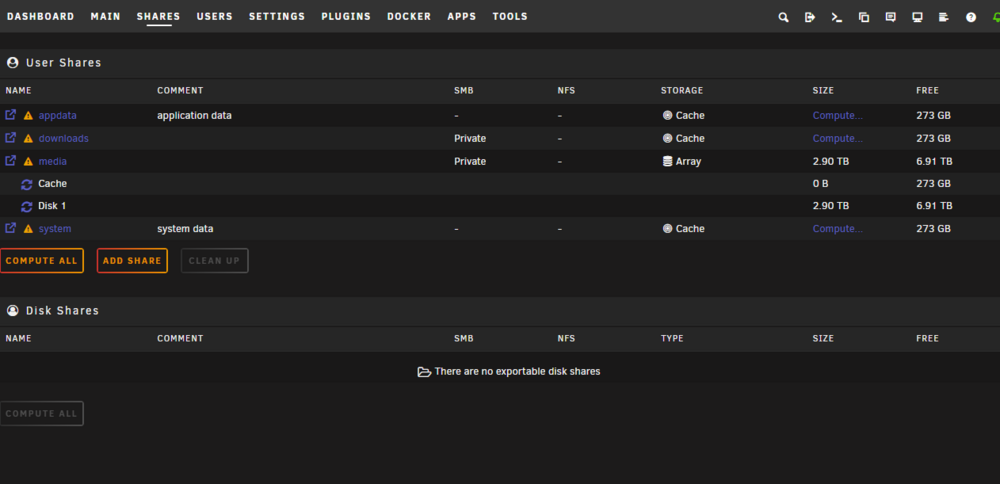
Hi, I am on latest unraid 7 beta 2 and I cannot solve this problem, I was trying to move a folder with midnight commander from my downloads share (located in cache) to my media share (located in disk 1 in array) but it turned up that it never moved the file only like symlink so it was showing up as being in disk1 but the file itself was still in downloads. What I did was to move the file manually with the UI file browser integrated in unraid 7. Now my media share it is showing 2 disks, cache and disk 1 when actually there are no files from cache in disk 1. Any ideas how to solve this? I just want to show the right info which is media >> disk1 only thanks EDIT: for some reason there was a media folder within cache /mnt/cache/media after deleting this /media empty folder no more showing 2 drives in /media share.
-
Hi, I wonder is there any plugin that cleans up the leftovers from uninstalled plugins like app clean for docker files. Thanks
-
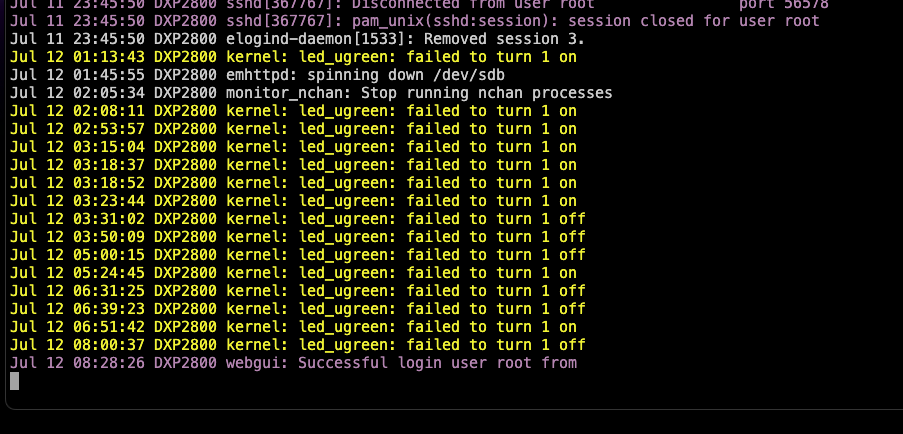
Hi, I will try to replicate this and report back. There is one more thing that I noticed this morning, after my disks had spin down the lights are still on, no off nor pulsing like in regular ugreen, also the logs have the following warnings. Any ideas? Thanks