ahaseros
Members
-
Joined
-
Last visited
-
Hi! Unfortunately, even after successfully updating to the newest BIOS and attempting to boot in legacy mode, the error persists. The plugin screen remains the same, as well as the lspci and modinfo nvidia output. I am attaching my diagnostics below. Thank you for your help! scheherazade-diagnostics-20240712-1719.zip
-
Thank you so much for your response! I have a 750 watt power supply, which I believe should be able to handle a 5600x and a 3050. I have enabled both above 4G decoding and resizable BAR support in the BIOS. I will attempt to update my BIOS and try booting into legacy mode.
-
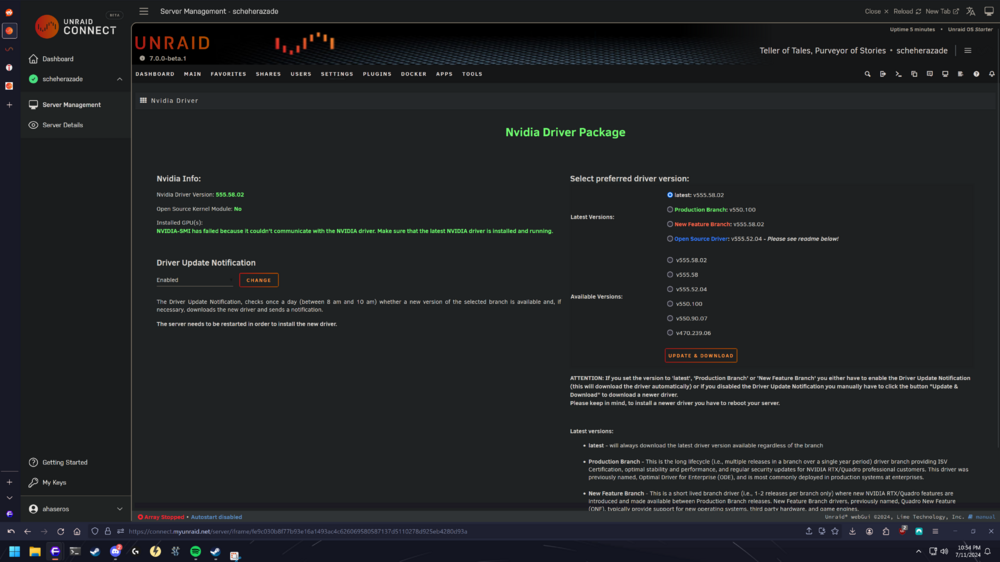
Hello! New unraid user here. I have constructed a NAS including a 3050 6gb low profile card. I am running in to the issue with 'NVIDIA-SMI has failed because it couldn't communicate with the NVIDIA driver. Make sure that the latest NVIDIA driver is installed and running.' I am also having some issues where display cuts out on the card after a short time. I believe that my card is at least getting sufficient power from the pcie slot on my aorus b550i pro ax board, mostly due to the following: 1. running `lspci` reveals: 07:00.0 VGA compatible controller: NVIDIA Corporation GA107 [GeForce RTX 3050 6GB] (rev a1) 2. and running `modinfo nvidia` reveals: lename: /lib/modules/6.8.12-Unraid/kernel/drivers/video/nvidia.ko alias: char-major-195-* version: 555.58.02 supported: external license: NVIDIA firmware: nvidia/555.58.02/gsp_tu10x.bin firmware: nvidia/555.58.02/gsp_ga10x.bin srcversion: 7CC59AD55E0DD69F0C28592 I am attaching my page and my diagnostics as well. Any help would be appreciated. scheherazade-diagnostics-20240711-2254.zip