





SmirkAction
Members
-
Joined
-
Last visited
-
EDIT: Per your tip using the "Filters" option, I tried /Temp Movies/ first but that didn't work and quickly realized I needed to name it the way my container path(s) are set. My Unraid container path(s) for Plex and Radarr/Sonarr are /media/ & /media 2/ . /media is 'Temp Movies' in Radarr, and 'TV Random or Most Recent' in Sonarr. Yeah, I hate that name for 'Temp TV shows too, I am all ears for a better/shorter Share/Plex name. And the container path for Sonarr/Radarr for my permanent 'Movies' and 'Full TV Series' as seen on my Plex Shares is /media 2/. Sorry for the delayed reply. I often have so many irons in the fire and forget to check back on a question I asked when my ADHD brain was working on that problem, at that time. This is kind of how I have it set, but I wasn't aware of the custom filters. As of now my Movies and Temp Movies are all on the same page. Thanks for the tip, I'll give it a try and will probably report back the results in another 17 days or so.
-
Question: Is it possible to set up Radarr to keep my multiple movie directories separated (Temp Movies & Movies)? This is how I host them to my Plex from my Unraid shares. Hi all, I picked Unraid as my first NAS because of the great community support, so I hope this is the right place to ask. TL;DR: Can Radarr be configured to reflect how I host my Plex media, which uses two movie directories: Temp Movies and Movies? I’ve seen similar questions where the “easy answer” is to create two separate Radarr configs. But how exactly? Does that mean running a second Radarr Docker container? If so, does it need to come from a different repository? I’m a bit confused. Details: On Unraid, I currently have three shares for Plex: TV Shows Movies Temp Movies I only recently started using Radarr (and Sonarr) to manually manage media—deleting files, monitoring for different versions, and moving files between the two movie directories. My Radarr setup looks like this: Plex Media: /mnt/user/Plex Media/Network Media/Temp Movie/ Existing Movie Directory: /mnt/user/Plex Media/Network Media/Movies/ (Yes, that naming is messy—originally everything went into “Plex Media,” but when I added the second directory I didn’t rename it. But Plex still reads the share fine.) Radarr now manages all my movies, but it lumps them together in one big list. What I’d really like is for Radarr to show them separately, matching how Plex organizes them into Temp Movies and Movies. Question: Is there a way to configure Radarr to handle multiple movie directories like Plex does, or is the only option to run multiple Radarr instances?
-
I just picked up a long over due 16TB USB 3.0 drive intended to use as a 2nd redundancy backup for my eventual 3-2-1-1-0 backup setup (or 3-2-1). I intend to have it as a backup for my Arrays important data ( which also holds a folder for my Appdata backup via Unraid plugin). 16TB should exceed what I plan to use my server for. Maybe years later I my upgrade. I am very new to Unraid (7 months uptime) and also very new to Linux, I want the simplest solution for backing up on a schedule to this external drive. I see two options and I am thinking of using DirSyncPro as it seems like a good choice. I also see it not only has a Unraid plugin/docker, but also a Windows app. So here's what I am thinking, one of tow options: I already have all the data/media files I need shared from my Unraid server to my home network. So maybe connecting that USB external drive to a PC that is running nearly 24/7 (NUC MiniBee) and have DirSyncPro run as a Windows program. I like this idea most (if possible) as I am used to a similar setup as I used in years past on my Windows entry level server for 12 years called SyncBackPro I just think running DirSyncPro to capture the mapped/shared drives is easier than managing it from Unraid. Not that I don't want to learn it or think it's probably great, I just have so much I want to do on my new server, and as a result, I get to overwhelmed and don't do give my Unraid the love it deserves. Mount that 16TB USB drive to my Unraid (which am sure is a process) and setup DirSyncPro to backup to it. Again, assuming any of this is possible So what is better/easier, and if not DirSyncPro, what/how would you do it? Remember, I strive for simplicity. 🫠
-
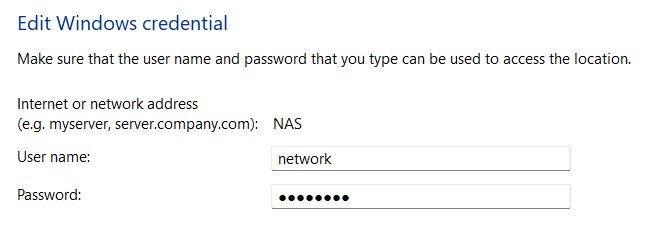
I can't believe I have been struggling with this for months. I wasn't that concerned about it because it was only accessing my Unraid shares from my laptop, which I rarely need to. What is weird is my Unraid (NAS) shows up on my network from my laptop, but I simply could not connect to it. I tried all the stuff Google led me to like enable guest logins in Group Policy, changing registry settings, and a few other options. But what is weird, is it worked at one time. I am not sure when it stopped, but this was the fix. Thank you. I made a user called network and gave it a different password.
-
Precursor: Unraid is my first real NAS aside from a 3 generation Windows PC setup running a continually growing "Stripe Raid" as my internal storage. Dumb, I know, it is why I knew a genuine NAS was inevitable. I always referred to as my HTPC. It housed my Plex server as well my ARR programs and NZBGet (now running SABnzb). Not only was it my "media server" but it was still just as one of my homes PC's on my network. All my important networks files between my Laptop and the HTPC would be backed up running a program called SyncBackPro (from the always on HTPC) once a week to a mirrored backup onto an external 5TB USB drive. Suffice to say, I not only outgrew that drive, but I knew the Windows setup needed a real NAS. So yes, I'm an Windows users of many years and consider myself an intermediate user, but I am still just an 'Interface/GUI/ guy. I knew that most NAS setups are Linux based and a learning curve will follow (and it sure has), so I chose Unraid for it's user simplicity for n00bs like me and great support. With that said, thank you for that and thank you in advance for any help you can lend on this post. With that said, my Unraid is running the latest build 7.1.4 (as of this post). All my ARR's are running smooth as well as Plex. But this is the tip of the iceberg, I want to really start using my home server for hosting more than just my Plex. I fully want my own cloud storage for one, but I am sure more will come as time progresses. My Question: If I understand correctly in simplest terms, a 3-2-1 backup is the best practice for file protection redundancy. And if I also understand, my Unraid Parity inside my Array is my "1", correct? If so then I assume my '2" can be a set up to a (just bought today) 18TB Seagate USB drive. Great, but I have one cavoite; I still want my networked Window's PC's to be able to back up to it as well, To do that, the plan was to partition a small portion of it for just that, and the remaining larger partition will be for my Unraid backup. I honestly have no idea, but can a partitioned drive have more than on file system? So my question is: As stated in my Precursor above, I am a GUI/Interface guy. I know rsync is widely used in Unraid (Linux) and I know a few Dockers work as a slick interface using it's commands. So that is what I would like to use. The two I am looking at are LuckyBackup and Duplicacy. Those 2 have great setup videos and writeups online and I feel they should work for my needs, but I am open to other options. I want to setup that aforementioned 18TB USB drive on my network. If Unraid runs a file system xsf (zfs for my cache), does it matter what file system my USB storage device runs if I did use it to back up my Windows as well (NTSF)? I am currently running a Netgear R7000 (Nighthawk) router running a custom DD-WRT firmware. As of now, aside from no 2.5/10Ghz/s speeds, it does fine for my needs. It has a USB-3.0 port on it and it can be setup to have it used as a SMB/NFS network backup storage. So here's the kicker: is that a wise choice to have my 18TB USB drive connected to my router to have as an accessible backup storage location for both my network PC's as well as my Unraid's backup? If so, can you point me in the best place to learn the best (easiest preferred) place to set that up? For reference (is it matters), my current Unraid setup is as follows with my my specs listed in my sig: My NAS (Unraid build) is currently running a 8TB media storage dIsc, with a 8TB parity to complete my Array. I am using two 500GB NVM as my Cache, one recently added a protected drive per a SpaceInavders tutorial and is mirrored to the other. I fully intend to at least double my 8TB media storage to 16TB and for me that should easily suit my needs. Then, eventually when that money tree I planted starts growing, I will have a 2nd offsite backup to them make it Currently my "3" in my 3-2-1 backup setup. That is what a 3-2-1 backup essentially is, right? Right now, I am just taking it one step at a time. Thank you in advance for any assistance you can lend or point me to! -TJ
-
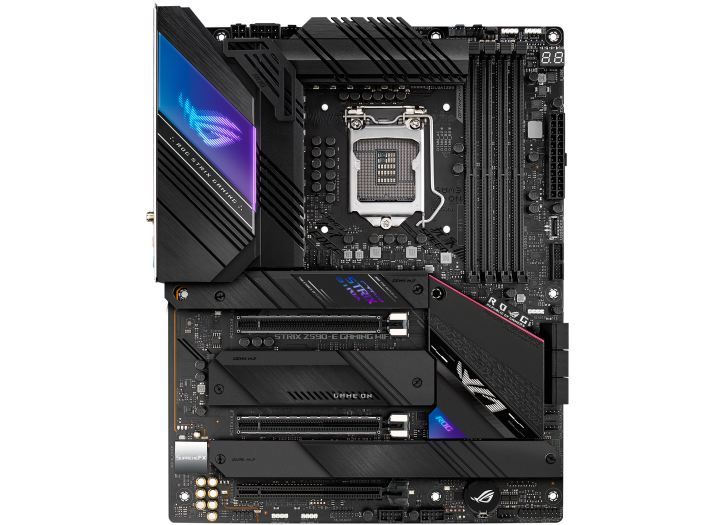
Not like it matters not, but noticed you said I never a listed my mobo model. Sorry, I thought this was it 'Intel Z590 LGA 1200 ATX' that I listed at the beginning of my post. But that was taken off the mobo's home page. My server was off at the time, I couldn't get the specs from my dashboard. From my dashboard: Model: Custom M/B: ASUSTeK COMPUTER INC. ROG STRIX Z590-E GAMING WIFI Version Rev 1.xx s/n 210382440000535 BIOS: American Megatrends Inc. Version 1903 Dated 08/30/2023 CPU: 11th Gen Intel® Core™ i5-11400F @ 2.60GHz HVM: Not Available IOMMU: Enabled Cache: L1 Cache: 288 KiB, L1 Cache: 192 KiB, L2 Cache: 3 MiB, L3 Cache: 12 MiB Memory: 16 GiB DDR4 (max. installable capacity 64 GiB) Network: bond0: fault-tolerance (active-backup), mtu 1500 Kernel: Linux 6.12.24-Unraid x86_64 OpenSSL: 3.5.0 Uptime: 9 hours, 24 minutes
-
A merge meaning it's passing through the cache appdata first them moves to the Array? This is what I am looking for, maximum read/write speeds for my arr programs to have Sonarr/Radarr and SabNZB work best by writing the files to my cache appdata, then link it to the data/Array after post prossing.
-
I'm past that. I have it working and will mark this solved. Thank you for the response. How I have it, is both Crucial drives are placed, differently, one in the original PNY location and one in the PCIe adapter. I have them running in a zfs pool on a mirrored raid. I had no protection before on my cache pool, so it was a long overdue for an update. I may use that 2nd NMVe slot on my MB in the future, but onest ly if I added another SSD it for be just a standard SATA,. But with that said, I did ask a follow up question for step two of this issue if you care to read, or chime in. Thank you. Question 2:
-
First off, Unraid is all very new to me, and a learning curve. With that said, I am very grateful for the great community here, Discord and Reddit. Currently I am only running 4 dockers right now, Sonarr, Radarr, SabNZB, and Plex , 4 others are a project in the works, Prowlarr, Immich, Overseer, Next cloud (if I decide against Immich). But noticed in those early setup days, I was writing my /config docker appdata to /mnt/user on the first 3, but not Plex, plex Reads/Writes to my /mnt/cache/appdata. My question is, can I use the Move tool to move all the actually appdata from user (my array disk this whole time) to my /mnt/cache/appdata? Of course I will have to also reconfigure my Docker Containers settings to reflect the folder new locations. But am just looking for the simplest way to achieve this. Manually move the files, of use the Mover function if possible. Thank you inadvance!
-
I think I figured this out. I found a tip that said if a MB supports 2 NVMe slots, one might be disabled by default. So I ended up putting it back the way I had it with one NVMe drive onusing the PCIe adapter, and the other in the original location of the PNY drive that came with my rig that I replaced with a Crucial. Now all I need to do is figure out the best way to use my 2nd Crucial drive as a protected/backup of my original that is mainly used for Appdata/Docker config files and high speed read/write for my Arr usenet apps.

-
Unfortunately it's not being recognized as part of my pool and if I try to mount it it warns me that it will erase it. So I just rebooted in Maintenance mode thinking I could manually mount it, but the options is now gone. I did mount the second drive, not sure if I should have or if it matters.
-
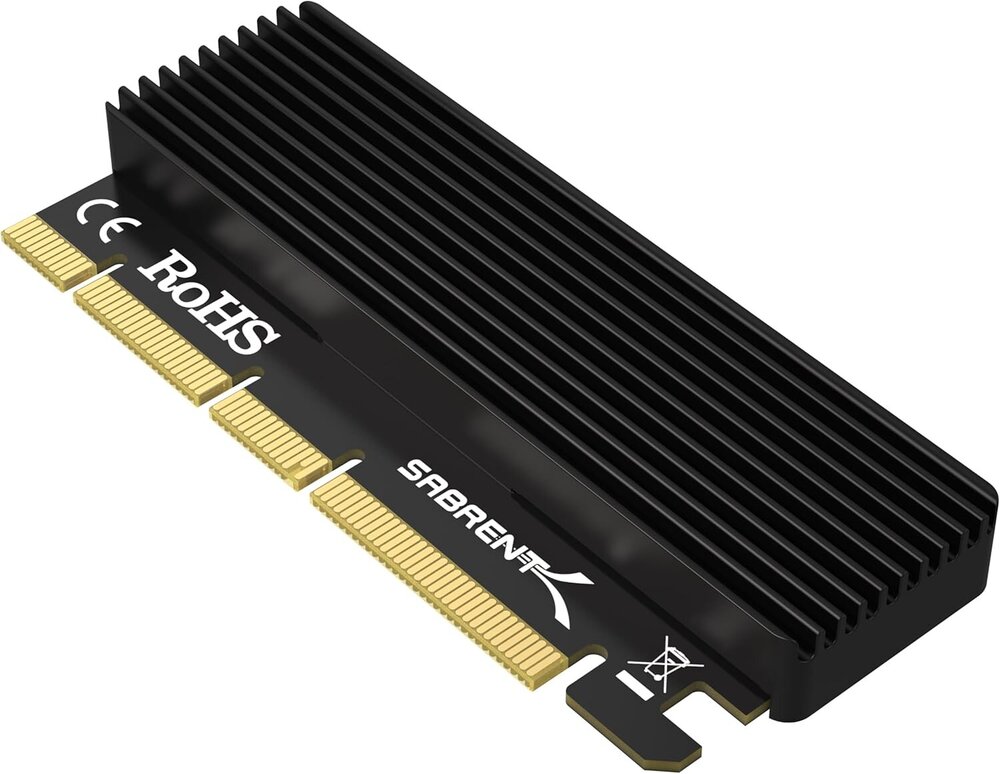
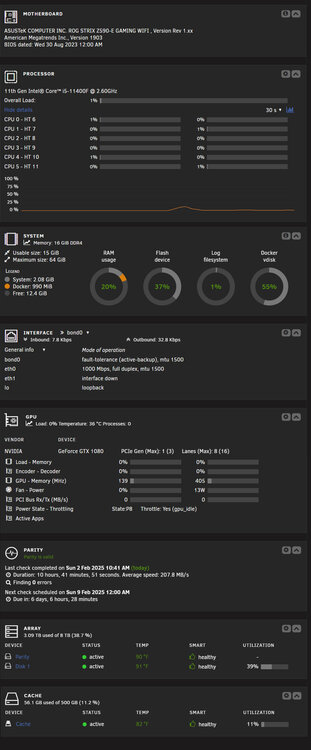
I am hoping for quick response here as my server is down as I just realized something about my Intel Z590 LGA 1200 ATX motherboards setup (attached image). TL:DR at the bottom, but I feel these details matter. I bought a prebuilt rig mainly for the Nvidia GTX 1080 it came with to use for Plex transcoding. This is also my first real server build and experience with Linux, Cache pools, arrays, parity's etc. A long ways from my many years of running a Windows OS (7, then 10, then 11) on a striped raid, hosting my Plex for many years. I knew a striped raid was a ticking timebomb, so I wanted a genuine NAS and settled on Unraid as I new I wanted a great product with good support for a n00b like me. I knew th rig purchased that was to be my new hardware already came with a "500GB SSD" boot drive (Currently running Windows ) and wanted that for running a cache pool. At the time I wasn't aware that it was actually a NVMe drive. NVMe is very new to me and I am learning it's benefits over traditional SSD's more each time I dig into my server setup/config. But I quicky realized the brand PNY was known for failures and I also had no parity/backup cache. So I bought 2 new 500GB Crucial CT500P3PSSD8's, one for my new Cache pool, and one for a protected/backup (per Space Invaders setup video). At this time I was only assuming my motherboard only had one slot for a NVMe, so I bought a PCIe adapter (see attached image)and setup my new Crucial drive , after a careful mover operation from my old PNY Cache drive, to my array data drive, then back to the new 500GB Crucial drive, the plan was to then replace the old PNY drive with the 2nd Crucial drive in the "onboard" NVMe slot. That time being right now. So as my server is shut down and I am removing the cover for what I think is the existing PNY 500Gb NVMe drive, I find it's was an empty slot. After some head scratching, I see another smaller cover just about my new PCIe adapter holding my new Crucial drive. I remove it to find where the existing (now empty and formatted) PNY NVMe drive was the whole time. So in otherwards, I have 2 onboard NVMe slots, not one like I previously thought. Naturally I'd like to just use them both. What all needs to be done to take the cache pool running on a PCIe adapter plugged into my MB, to just run it in one of the two onboard NVMe slots? TL:DR can I just take my exiting 500GB NVMe currently married to my motherboard using a PCIe adapter, and move it to one of the two (I just realized I have) and it will read just fine, or will I have to change the configuration of how it's connected to my system now?
-
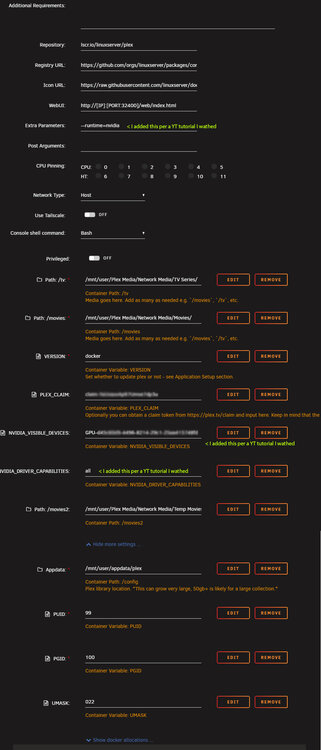
Precursor, to why this post will be long, I have a tenancy to over explain as I feel details are important and can avoid answering questions to things I already did to trouble shoot. So here is a TL;DR version: I had Plex server (official Linux repository) working, and the Nvidia plugin configured and showing in my Plex settings page. But after months on Plex being the only Docker I was using, I decided to move all my usenet/arrs from my Windows PC, to all be running off my Unraid NAS. During this time and lots of trial and errors and new cache set-ups, I broke something, and now Plex has no transcode or Nvidia Visible Devices as options in my Docker setup page (Advanced view). Please read on. If not, you can skip to Stage 3) at the bottom and the images I shared of my dashboard and Plex's current settings if you feel you can help me out. Full disclosure; this is my first dedicated server/NAS and also my first experience using and learning a Linux based system. It's why I went with Unraid, as I knew for a n00b like me, it would be the easiest to learn and know it has great support as I have already utilized like here, reddit & Discord. I have already received much love and support on all those platforms since I first set it up August of 2024. Fast forward to now. My setup is installed on a prebuilt rig that I bought specifically for this NAS, and mainly for the GTX GeForce 1080 GPU as I knew I wanted to set it up for transcoding in Plex. Below is a screenshot of my specs. Bear in mind, some of this may be upgraded or added to later like RAM to 32GB, a bigger or 2nd SSD/Cache drive, and a larger/2nd pool drive than the 8TB I have now that is already half full. Stage 1) After I installed Unraid and had it up and running on this rig (still on a 30 day trial) I then moved my 3.2TB's of media to my array (basically only TV Series and Movies). I then wanted to move my Plex server previously running on a Windows System to run from this more robust rig, and with the ability to now transcode potentially bigger files like 4k that I typically never had in my collection. If I recall, followed the official guide HERE, as well as more than a few videos found on YouTube. I had it all set up to the point my settings in Plex saw my GPU as an option in the Transcode settings . I can't say the transcode was working as it should, but I was seeing "Transcode" on my Plex Dashboard when playing videos. However, I use a FireTV on both my TV's when at home, and the Plex app from my phone when on the road and those devices convert the media just fine and unless I was playing media on the official Plex app on Windows HTPC, Transcoding wasn't needed. S I put a pin in it, and never went any further. Mainly because at that point I wasn't using my 500GB NVM SSD as a cache. So basically, it was getting no use. Stage 2) I wanted to move all my operations from my old HTPC where my Plex server used to live, as well as the media is read, and for my usenet/arr apps. I started first by setting up my Cache and shares to now use my SSD for temp read/write files like for my Docker config and appdata. At this time the only Docker I had was Plex, and the Nvidia plugin. So next step was to add Sonarr, Radarr and NZBGet (being used at that time) and SABnzb. This took some time, and a lot of trial and error. I eventually got this all working as it should using the Thrash-Guides setup, and I owe it all to a helpful reddit user, who after a few back and forth comments and DM's, suggested we connect on Discord. When we did, he kindly spent 2.5 hours with a screen share a live chat. I owe him dearly. All arr programs and SAB are not only working flawlessly, but my speeds using the same 1G ISP service I have for years, were like upwards of 12x faster. To compare when running usenet on my Windows HTPC, then processing and sending the media through my network to my NAS array, my average speeds were 6-12MB/s, compared to now I have capped as high as 110MB/s. I can't believe I lived with my downloads that slow and for all 14 years (circa) in the usenet metaverse. But some of this was setup errors on my end, mostly because I was writing my temp NZBget downloads to an external 320GB old 5400RPM, Micro USB connected HDD. Yes, one of my biggest blunders, and I accept my stupidity as a hard lesson learned. Stage 3) During my trial and errors, before I got help from the kind 'reddit_user' on Discord I was having an issue where Plex wasn't loading and in the setup page it was no longer showing an IP:port. It may have been a simple fix, but everything I tried wasn't working so I decided to uninstall it, and reinstall. Only thing is, I forgot per the official tutorial on the forum, I was using the Linux Repository Plex Docker and it was already preconfigured and supported to use the Nvidia plugin showing my GPU on my dashboard and in Plex. So when I reinstalled Plex, I forgot I used the Linux version and per the tutorial it matters, and mistakenly installed the binhex-plexpass. I used that version mainly as I am using all binhex repository Dockers for my arr's; Radarr, Sonarr, and installed, but not set-up, Prowlarr just to stay consistent and they seem to be the most popular and recommended. I quickly realized in the setup page I wasn't seeing the options in the for Transcode: and Nvidia Visible Devices: So I re-read the tutorial and installed the official Linux one (again). So technically, I currently have 2 Plex dockers binhex and the Linux version with the Linux reconfigured to handle my media, and the binhex still installed, but is stopped/disabled. Once I got the Linux Plex up and running again and working with my library I quickly found out although Plex was working fine, and seeing my media (and my GeForce GTX 1080 in the transcode settings page) , it would not play any large files using the WEB GUI (movies in the G's size range), but could play smaller files like tv shows. It would just hang-up on the loading screen and never play. So to test Plex was working fine I played those same movies from my phone and my 4K FireTV and they worked just fine. So at this point I knew I broke something in my Plex setup. II decided to ignore trying to get the Transcode/Nvidia setup working since I temp disconnected all my Plex user shares, and the media all plays fine for me using the 4K FireTV that is connected to my home theater, and what I prefer to use for my entertainment, for now. So that's why I am here. What I am not sure of is, the videos and tutorial all stress to install the Nvidia Driver plugin first, then reboot the server, then install the Plex Docker. Is this my issue, do I need to removed both Plex Dockers, and reboot, or both Plex, and Nvidia plugin/driver and reboot, reinstall Nvidia, then Plex (Linux) for it all to work like it did the first time? Please note, I added in yellow text the Extra Parameters: per some YouTube I wathced. But I didn't have to do this the first time, the Plex Docker already had them in place. Thank you in advance

-
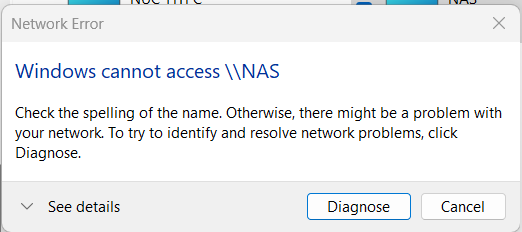
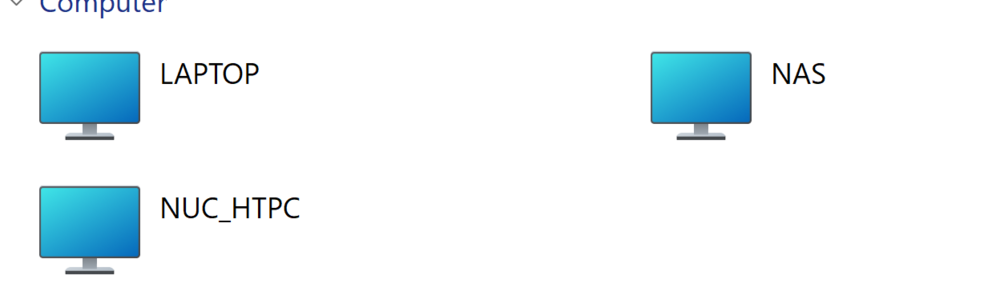
For what it's worth, I tabled my last issue I recently discovered I had on my new Unraid setup (and very new to Linux in general) and I can't fix it, until this recent network problem gets resolved. I don't know what changes I made, or things I did as of recently but my two Windows 11 PC's on my network named NUC_HTPC (hardwired) & LAPTOP (on the WiFi of the same Network/WiFi as it always has been) I can see my NAS on the network from but Windows machines, but I cannot connect to it. I tried all the usual normal stuff like disabling all firewalls and anti-virus programs, but still nothing, I get the error(s) seen below. Until I learn more, my setup was always simple. The problem is, that initial intro to Linux/Unraid setup was like 6 months ago, and I can't recall what I did then to make it work, and have little time to figure out what changed that is now not letting it nconnect, not to mention my aforementioned previous Plex setup issues. I did a search and found many similar problems, but none of them seem to have what I am hoping is just something simple I changed and I am just missing. Below are screenshots from my Windows network page(s). The only thing different between my LAPTOP and NUC_HTPC is my NUC_HTPC, see itself on the network, so I obviously have something set differently than on my laptop, but I am not concerned about that now, or should I be? But on both, when I select my NAS, I get the error shown below. So, where do I start, what logs/Diag report can I sgare that will help move this troubleshooting along? Thank you kindly in advance for any help that you can lend.

-
I appreciate the response. I had a rough night and struggling at the office. If I feel motivated I will review your response when I get home.


