





gvrx
Members
-
Joined
-
Last visited
-
For the moment, it runs flawlessly. I'm pretty sure it was extremely corrupted the docker image as most apps were getting "Not available" on version info
-
Yeah, I've been getting this information with Common Problems plugin, but I've never been able to solve it. I've changed to single storage, then secondary storage, started the Mover, but I still get it to this day. I am really in the dark here.
-
It's on an SSD. I've downloaded the diagnostics, before nuking the docker.img. I couldn't download/install enything anymore. tower-diagnostics-20250423-1706.zip
-
Hello everyone! For 2-3 weeks my docker apps are updating and installing extremely slow. I seriously have no idea what to do at the moment, as every change I make, takes forever. Thanks!
-
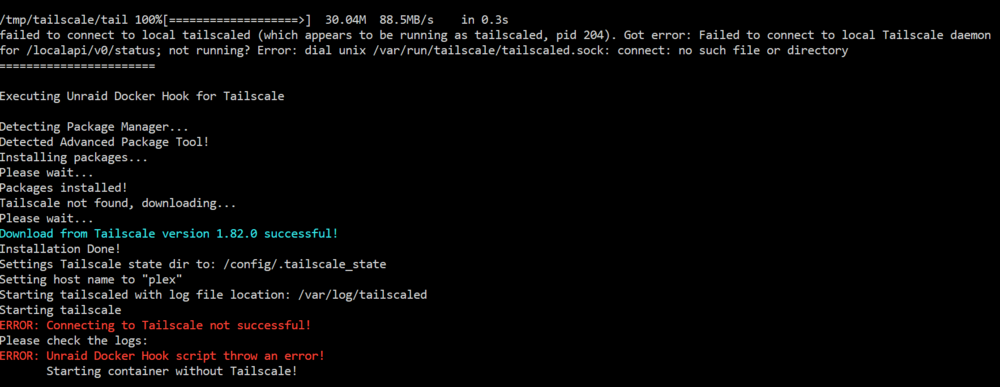
Hello there! I've been following SpaceInvaderOne's setup for Tailscale Plugin. All good until I had to enable the option in the apps. I get the following error and I have no idea how to move forward from this. Thanks!
-
That worked flawlessly! Thank you for the quick response, and thank you to the Unraid community! Cheers!
-
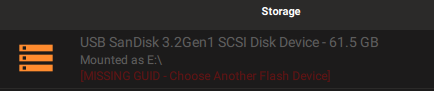
I'm currently trying to replace my super big USB Stick with a small one, so I chose from Spaceinvader One's video, the SanDisk 64 Go Ultra Fit, USB 3.2 one, to be more precise. Using the Unraid USB Creator tool, I found out that is has no GUID. Is there anything I can do to use it? Have I ordered a fake stick? (even though it was ordered from Amazon, sold by Amazon) Thanks!
-
No error, the fiile showed up just fine

-
Here they are! Thank you for the fast response! Gather Command.txt Supervisor log.txtOMG It worked. Finally! So basically I've removed the fixed IP like you've said, (using bridge) and removed the IP from the servertest.ini file, from the line "server_browser_announced_ip=" I left it blank. Now it shows up and running. Thank you so much! Cheers!Hello everyone! I hope I don't post in the wrong topic. Since my first day of Unraid, I am unable to add torrents in the Start state. Every single torrent I add is Paused. Things I've done: 1. Prowlarr/Radarr/Sonarr->Settings->Qbittorrent "Initial State: Start" 2. All the settings in qBittorrent are triple checked, nothing seems out of ordinary. What should I check? Adding them in ForceStart state is not an option for me, cuz they will seed indefinitely. Thank you!Sorry for the late reply, I ran into some problems with my Unraid and was unable to further test the PZ server. I've tried everything and it still refuses to run. Let's recap a bit: 1. On the docker app I've set the fixed ip (with .69 at the end, as recommended), set the Validate installation to "true", the UDP - Game Port: 16261-16262 2. I've enabled the Port Forwarding for the two ports mentioned above (here i'm doing it right, because I've successfully PF for Valheim and Plex, and they work) 3. I've edited the .ini file by changing its extension to .txt and setting all the needed lines to "Open=true, Public=true etc." Here I don't understand the "server_browser_announced_ip=" line. Should I put my public ip found on "whatsmyip" website, or which one? I've followed the guide and set it to my public ipv4. 4. In game: the server doesn't show up, trying to manually join by ip doesn't work either. (i've tried using all the ip's beforementioned, no results. I am totally out of solutions. Thank you for your help and contributions to the CA, ich777 !Hello! I am having troubles setting up the server for ProjectZomboid. The current docker app doesn't have the "TCP- Player Ports" line like in the tutorial from unraid site. I've followed all the steps and I can't seem to be able to start it. Things I've done: 1.install app 2.config the servertest.ini file 3.open ports 16261-16265 with both UDP and TCP 4.Restart docker app 5.Server not showing up in the list (yes, i check "psw protected servers, empty servers, different game version servers") PS. I've managed to make valheim server run immediatelly, with no issues. This one seems a bit more complicated. Sorry I am really noob at this, any help would be appreciated! Thank you!



