





Kimaro
Members
-
Joined
-
Last visited
Everything posted by Kimaro
-
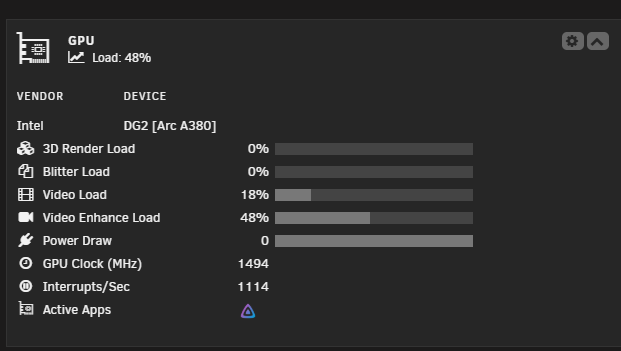
Ah, my bad. I've set up the syslog server now incase it crashes. I've used the Local syslog, but do you want me to do the mirror to boot drive? Did not know about the memory clock, that's a good one. I'll change it if it crashes again as I'll have to tear down my monitor I use on my PC, and it's not something I can do in 5 minutes. Thank you for the help.1 day ago I noticed that I was unable to use jellyfin when I was out and about. When I got home I noticed that nothing was working and that the whole server had hardlocked, I restarted it and thought nothing more of it. But today it hardlocked again, and I had not even been using it at the time. Then it happened again, just a few hours later, this time while I was listening to music. So something is 100% happening, and I don't know what. I've attached my diagnostics from both of todays crashes. bulgasari-diagnostics-20260405-1857.zipbulgasari-diagnostics-20260406-0043.zip I've had these things happened on and off, last time was because I had installed the vrising server, it just couldn't handle it for some reason, which was weird, but I didn't have any issues after I stopped running it, until yesterday. The previous time this happened, I had a 5600G in the computer, and apparently, the CPU died as I could not boot into Unraid anymore until after I had switched to my new CPU.I just installed DumbAssets but none of the currency Environment Variables are working, I tried mine (SEK), and tried the examples on the website, none worked apart from the default. SITE_TITLE does not work either. So the environments that does not work are: SITE_TITLE CURRENCY_CODE CURRENCY_LOCALE I've tried everything else and they seem to work without any issues, those 3 are not working. Also, dark mode button seem to not do anything at all either.I mean even the docker containers themselves can't look at them. Some are fully under no access. Like I said, dockers like jellyfin, influxdb, deluge, postgres, cryptpad weren't even able to start up because they had no access to files. I had to change the permissions so they could gain access to them...I started noticing a few days ago that permissions were changing quite randomly on a whim and had to go in and change them, but today a lot of files for dockers that makes them work have been changing permissions to no access for seemingly no reason. Had files from jellyfin, influxdb, deluge, postgres, cryptpad, and probably more just not work at all, most likely after appdata backup did it's backup last night. I can't figure out what is happening and would love some help, I've included my diagnostics. bulgasari-diagnostics-20250622-1437.zipAh, okay, thanks!I'm not getting any power draw on my GPU, i'm also wondering, is there any way I can output this towards grafana? Would love to get that to work if someone knows a way.
 I'm trying to access the database from the console of mysql but I am getting an access denied for my user. The password is the random generated one I received and the username and everything is correct. Unsure on what is happening as I can't access it neither from the console nor from DBeaver.
 I keep trying to get this to work, I've followed the steps multiple times and I always get stuck at the same place. This is the log I get on the document server. * Reloading nginx configuration nginx ...done. ==> /var/log/onlyoffice/documentserver/converter/err.log <== ==> /var/log/onlyoffice/documentserver/converter/out.log <== [2024-07-22T21:59:27.103] [WARN] nodeJS - update cluster with 1 workers [2024-07-22T22:00:17.695] [WARN] nodeJS - update cluster with 1 workers [2024-07-22T22:00:17.705] [WARN] nodeJS - worker 1038 started. [2024-07-22T22:00:17.708] [WARN] nodeJS - update cluster with 1 workers [2024-07-22T22:07:26.859] [WARN] nodeJS - update cluster with 1 workers [2024-07-22T22:07:26.870] [WARN] nodeJS - worker 932 started. [2024-07-22T22:07:26.873] [WARN] nodeJS - update cluster with 1 workers [2024-07-22T22:09:12.219] [WARN] nodeJS - update cluster with 1 workers [2024-07-22T22:09:12.231] [WARN] nodeJS - worker 1118 started. [2024-07-22T22:09:12.235] [WARN] nodeJS - update cluster with 1 workers ==> /var/log/onlyoffice/documentserver/docservice/err.log <== ==> /var/log/onlyoffice/documentserver/docservice/out.log <== [2024-07-22T21:59:31.042] [WARN] nodeJS - Express server listening on port 8000 in production-linux mode. Version: 6.4.2. Build: 6 [2024-07-22T22:00:16.265] [WARN] nodeJS - Express server starting... [2024-07-22T22:00:16.268] [WARN] nodeJS - Failed to subscribe to plugin folder updates. When changing the list of plugins, you must restart the server. https://nodejs.org/docs/latest/api/fs.html#fs_availability [2024-07-22T22:00:16.384] [WARN] nodeJS - Express server listening on port 8000 in production-linux mode. Version: 6.4.2. Build: 6 [2024-07-22T22:07:27.442] [WARN] nodeJS - Express server starting... [2024-07-22T22:07:27.445] [WARN] nodeJS - Failed to subscribe to plugin folder updates. When changing the list of plugins, you must restart the server. https://nodejs.org/docs/latest/api/fs.html#fs_availability [2024-07-22T22:07:27.559] [WARN] nodeJS - Express server listening on port 8000 in production-linux mode. Version: 6.4.2. Build: 6 [2024-07-22T22:09:11.623] [WARN] nodeJS - Express server starting... [2024-07-22T22:09:11.626] [WARN] nodeJS - Failed to subscribe to plugin folder updates. When changing the list of plugins, you must restart the server. https://nodejs.org/docs/latest/api/fs.html#fs_availability [2024-07-22T22:09:11.742] [WARN] nodeJS - Express server listening on port 8000 in production-linux mode. Version: 6.4.2. Build: 6 ==> /var/log/onlyoffice/documentserver/metrics/err.log <== ==> /var/log/onlyoffice/documentserver/metrics/out.log <== sets: {}, pctThreshold: [ 90 ] } 22 Jul 21:46:59 - [894] reading config file: ./config/config.js 22 Jul 21:46:59 - server is up INFO 22 Jul 21:53:42 - [888] reading config file: ./config/config.js 22 Jul 21:53:42 - server is up INFO 22 Jul 21:59:26 - [862] reading config file: ./config/config.js 22 Jul 21:59:26 - server is up INFO 22 Jul 22:07:26 - [894] reading config file: ./config/config.js 22 Jul 22:07:26 - server is up INFO ==> /var/log/onlyoffice/documentserver/nginx.error.log <== 2024/07/22 20:06:30 [error] 6346#6346: *2 connect() failed (111: Connection refused) while connecting to upstream, client: 192.168.0.70, server: , request: "GET /example/ HTTP/1.1", upstream: "http://127.0.0.1:3000/", host: "192.168.0.110:8082", referrer: "http://192.168.0.110:8082/welcome/" 2024/07/22 20:06:30 [error] 6346#6346: *2 connect() failed (111: Connection refused) while connecting to upstream, client: 192.168.0.70, server: , request: "GET /example/ HTTP/1.1", upstream: "http://127.0.0.1:3000/", host: "192.168.0.110:8082", referrer: "http://192.168.0.110:8082/welcome/" And this is what I get on the community server + sleep 1 + mysqladmin ping -h onlyoffice-mysql-server:3306 -P 3306 -u onlyoffice_user --password=my_password --silent mysqladmin: [Warning] Using a password on the command line interface can be insecure. and finally, here's the log from the mysql. 2024-07-23 00:05:20+02:00 [Note] [Entrypoint]: Entrypoint script for MySQL Server 5.7.28-1debian9 started. 2024-07-23 00:05:21+02:00 [Note] [Entrypoint]: Switching to dedicated user 'mysql' 2024-07-23 00:05:21+02:00 [Note] [Entrypoint]: Entrypoint script for MySQL Server 5.7.28-1debian9 started. mysqld: [Warning] World-writable config file '/etc/mysql/conf.d/onlyoffice.cnf' is ignored. 2024-07-22T22:05:21.494387Z 0 [Warning] TIMESTAMP with implicit DEFAULT value is deprecated. Please use --explicit_defaults_for_timestamp server option (see documentation for more details). 2024-07-22T22:05:21.496506Z 0 [Note] mysqld (mysqld 5.7.28) starting as process 1 ... 2024-07-22T22:05:21.501246Z 0 [Note] InnoDB: PUNCH HOLE support available 2024-07-22T22:05:21.501266Z 0 [Note] InnoDB: Mutexes and rw_locks use GCC atomic builtins 2024-07-22T22:05:21.501271Z 0 [Note] InnoDB: Uses event mutexes 2024-07-22T22:05:21.501276Z 0 [Note] InnoDB: GCC builtin __atomic_thread_fence() is used for memory barrier 2024-07-22T22:05:21.501302Z 0 [Note] InnoDB: Compressed tables use zlib 1.2.11 2024-07-22T22:05:21.501311Z 0 [Note] InnoDB: Using Linux native AIO 2024-07-22T22:05:21.501656Z 0 [Note] InnoDB: Number of pools: 1 2024-07-22T22:05:21.501788Z 0 [Note] InnoDB: Using CPU crc32 instructions 2024-07-22T22:05:21.503679Z 0 [Note] InnoDB: Initializing buffer pool, total size = 128M, instances = 1, chunk size = 128M 2024-07-22T22:05:21.513669Z 0 [Note] InnoDB: Completed initialization of buffer pool 2024-07-22T22:05:21.516334Z 0 [Note] InnoDB: If the mysqld execution user is authorized, page cleaner thread priority can be changed. See the man page of setpriority(). 2024-07-22T22:05:21.561898Z 0 [Note] InnoDB: Highest supported file format is Barracuda. 2024-07-22T22:05:21.805528Z 0 [Note] InnoDB: Creating shared tablespace for temporary tables 2024-07-22T22:05:21.806019Z 0 [Note] InnoDB: Setting file './ibtmp1' size to 12 MB. Physically writing the file full; Please wait ... 2024-07-22T22:05:21.959368Z 0 [Note] InnoDB: File './ibtmp1' size is now 12 MB. 2024-07-22T22:05:21.963244Z 0 [Note] InnoDB: 96 redo rollback segment(s) found. 96 redo rollback segment(s) are active. 2024-07-22T22:05:21.963254Z 0 [Note] InnoDB: 32 non-redo rollback segment(s) are active. 2024-07-22T22:05:21.963818Z 0 [Note] InnoDB: 5.7.28 started; log sequence number 143895124 2024-07-22T22:05:21.964111Z 0 [Note] InnoDB: Loading buffer pool(s) from /var/lib/mysql/ib_buffer_pool 2024-07-22T22:05:21.964162Z 0 [Note] Plugin 'FEDERATED' is disabled. 2024-07-22T22:05:21.974556Z 0 [Note] Found ca.pem, server-cert.pem and server-key.pem in data directory. Trying to enable SSL support using them. 2024-07-22T22:05:21.974571Z 0 [Note] Skipping generation of SSL certificates as certificate files are present in data directory. 2024-07-22T22:05:21.975796Z 0 [Warning] CA certificate ca.pem is self signed. 2024-07-22T22:05:21.975928Z 0 [Note] Skipping generation of RSA key pair as key files are present in data directory. 2024-07-22T22:05:22.021384Z 0 [Note] Server hostname (bind-address): '*'; port: 3306 2024-07-22T22:05:22.021427Z 0 [Note] IPv6 is available. 2024-07-22T22:05:22.021445Z 0 [Note] - '::' resolves to '::'; 2024-07-22T22:05:22.021467Z 0 [Note] Server socket created on IP: '::'. 2024-07-22T22:05:22.091772Z 0 [Warning] Insecure configuration for --pid-file: Location '/var/run/mysqld' in the path is accessible to all OS users. Consider choosing a different directory. 2024-07-22T22:05:22.223834Z 0 [Note] InnoDB: Buffer pool(s) load completed at 240723 0:05:22 2024-07-22T22:05:22.419605Z 0 [Note] Event Scheduler: Loaded 0 events 2024-07-22T22:05:22.420070Z 0 [Note] mysqld: ready for connections. Version: '5.7.28' socket: '/var/run/mysqld/mysqld.sock' port: 3306 MySQL Community Server (GPL)
