





drphungky
Members
-
Joined
-
Last visited
-
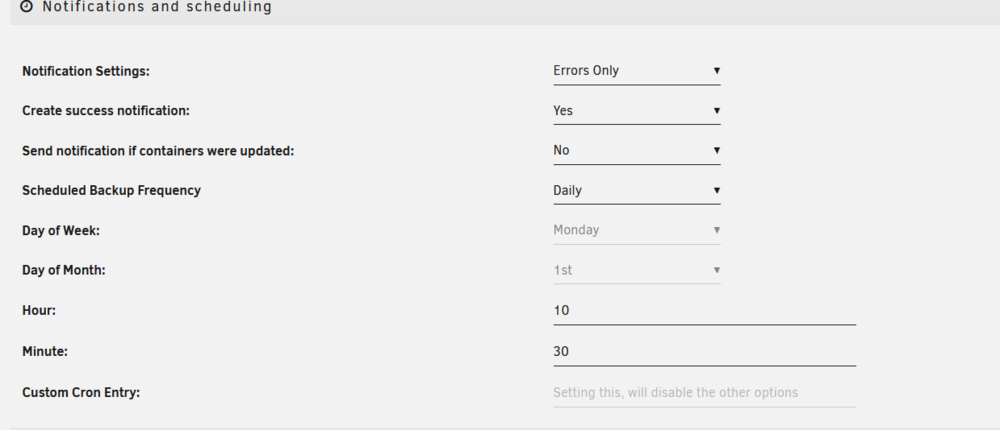
In case anyone has the same question as me and can't find a solution, the answer was that I had minute blank in my original settings when it was set to weekly. Then, when I was troubleshooting and made it supposed to run in a couple minutes, I didn't realize my Unraid system time was set to the wrong timezone. So two separate errors, but the one that could probably trip up other people was leaving minute blank. Setting it to 0 or to 1 should work.
-
Can anyone help me figure out why the backups won't run when scheduled but work fine when run manually? Am I not filling out the time in the right format or something? Not sure this will help, but this is the log from the last manual backup: 88c50cb6-03c9-4dce-a55c-b89f00238621 It should've run multiple times since then, and I even changed it to daily and set the time to be about to occur. You can see it's set for 10:30 and I set that at 10:28 and waited, but nothing ran. I originally had it set at 4 in the morning on Mondays.
-
Correct, I am. It has run fine for a while now with containers enabled, but none actually turned on and running. I was able to use the SMB functionality and watch media files using VLC with no issues as well. Any idea what might cause failures once I turn any specific container on? They're all writing to /mnt/user/appdata which is on my cache drive, but other than that I don't know what they'd have in common besides being containers. Something with bios I should check?
-
It crashed again with Radarr, Sonarr, and SABNZBD enabled, with Plex off. So multiple different containers have caused the issue: Plex by itself, and at least one of the prior ones. I currently have it running with containers enabled but none on, and it has not crashed yet. The issue with Intel i915 drivers was supposedly corrected in 12.6, but is there a chance that's an issue? https://docs.unraid.net/unraid-os/release-notes/6.12.0/
-
To clarify, I only had the Plex Container running when it crashed last night. I'll try some other containers and see if there are issues with them, which will let me know if it's the containers running or a particular one.
-
After working fine for a few months, I have been dealing with my server crashing randomly and being unusable for the last few months, and have been trying to troubleshoot to no avail. I am at my wits end. Because the crashes seemed to be sudden and related to demand, I originally thought it might be a hardware issue. I have: Run memtest on all ram sticks for a long time Tested all hdds with all passses Replaced the thumbdrive Replaced the PSU Replaced the motherboard Note: I am also sure this is not a power issue as my gaming PC is on the same circuit I have also checked bios settings after googling (I think everything is right here but def could be an issue) At this point, I am fairly certain this is a software issue. I recently learned how to just leave my server running with an SMB share up, so with VMs and containers disabled, it ran fine for four days, including while stress testing using multiple files on multiple clients. I turned containers back on, and ONLY the Plex container on, and it ran fine for two days. including using Plex. It crashed last night over night when no one was using it. I am at a loss. I don't even know what to do next other than a complete server nuke, or start pulling HDDs or RAM sticks that have tested clean. I've attached the server logs, but it doesn't seem like they offer any help since it's a sudden shutdown. I'd really appreciate help planning how to troubleshoot next. Thanks! (edit: just realized my specs aren't in the log) MB: Z490-A Pro (MS-7C75) CPU: Intel i9-10900 2.80 gz RAM: 128gb DDR4 Drives attached via an Adaptec HBA syslog
