





rddz48
Members
-
Joined
-
Last visited
Everything posted by rddz48
-
My sandisk 32GB flash drive must have died, I can't read it on windows or linux systems... As said my latest backup is old and of no use I think. Data is most important of course, it's on a ZFS 4x16TB pool. Apps and VM's I can recreate. What is the best way to recover from this situation? I don't think mine is the first USB drive to fail.... if this topic is already covered I would appreciate a link too. Thanks, Richard
-
EDIT: STOP READING! All this below on account of the tailscale client on my workstation messing up. It seemed to be connected from the client side but not really, at least not 'connected' state on my tailnet management page. So something's wrong there. Disconnecting it solved the issue below. Sorry, don't know how to delete a post, if a mod can please...;-) And apologies to the CONNECT pluging ofc.... I have two unraid boxes, both on a local subnet 192.168.5.x. Up and until this morning I could reach both from my workstation on another subnet 192.168.1.x. Pretty much out of the blue the plex container on one of the boxes stopped working. That alerted me to the situation that I now can't access the GUI or even ping that one machine from my workstation. From another pc and a vm on the 192.168.5.x subnet everything is as should be, no problem. The other machine and containers are accessible from my workstation as usual. I think the event that triggered this situation might be the updating of plugins I did just before the plex container stopped being accessible from my workstation. One of those plugins was the Unraid CONNECT plugin (gpu statistics and NVIDIA driver were the others if I recall correctly). The other machine didn't have this plugin installed so it wasn't updated ofc. I don't even use the CONNECT plugin afaik, not sure why I installed it but probably just curious;-) So not sure there is a relationship but it's the only thing I can think of so far. Does this make any sense to people more in the knowing what the CONNECT plugin does and how it works? Any other suggestions welcome too ofc. Weirdest thing for me is I can't even ping the NIC in that one machine from another (local) subnet, but no problem from the subnet the machine is on. (The other machine still working as usual can be pinged from both local subnets, so it's not in my router). Regards, Richard EDIT I removed the CONNECT plugin and restarted the machine, but the issue persisted. Can't reach GUI or ping from outside the local subnet the machine is on.
-
Thanks! Feeling a lot more sure now to do this;-)
-
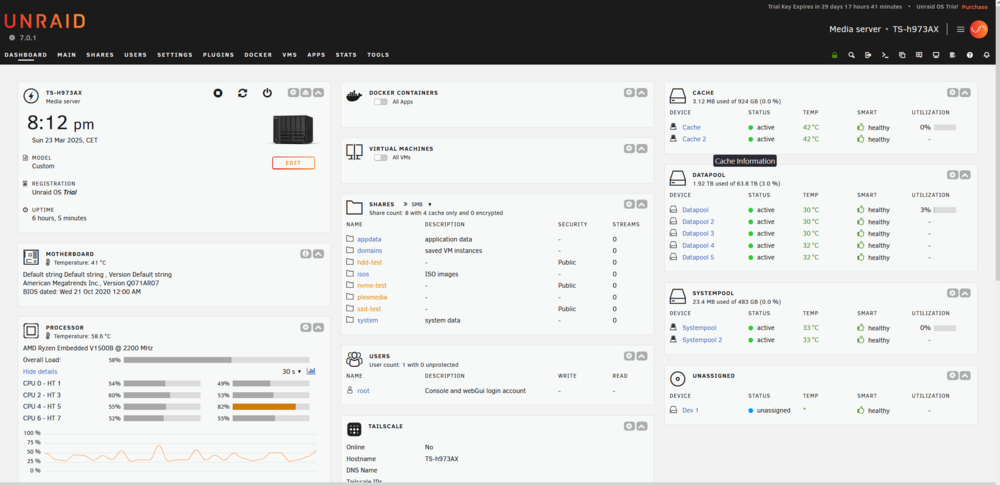
I converted my QNAP TS-h973AX to UNRAID. Initially configuring UNRAID on a trial license to test things. But I'm really happy with the QNAP running UNRAID so will decommission my other UNRAID system that has a pro lifetime license on it's flashdrive. So now I need to: 1) transfer the pro license to the flash drive in the QNAP, or 2) copy the configuration/setup made on that 'trial' flash drive to the flashdrive that has the pro license, to put it in the QNAP Not sure option 2 is valid and what contents of the 'trial' flashdrive I'd have to copy to the 'pro' flashdrive to make it all work as configured? Transferring a license to another flashdrive is limited to once a year I think, so option 2 might be my preffered option, saving the license transfer in case the USB stick should fail. Hope I made my situation/options clear, not a native english speaker;-) Any tips/suggestions will be highly appreciated! Thanks and regards, Richard
-
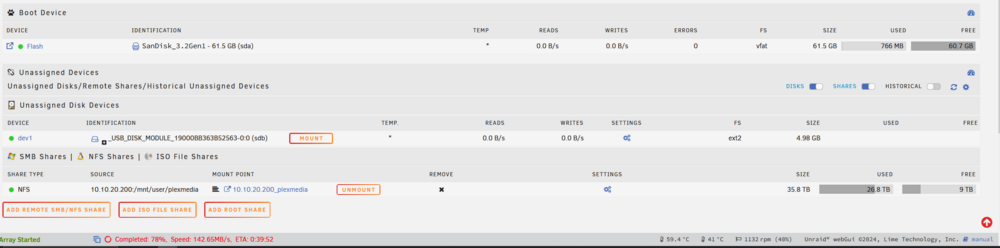
I was told by someone yesterday (and could not believe it) that you don't need to do anything other than insert an Unraid flash drive into one of the back usb ports of the TS-h973AX. Today I can confirm this from own experience. No opening the case, messing with the glued DOM or getting into the BIOS by means of a tty port header on the MB. It just booted and runs fine so far. I had usual issues with the Unraid USB Creator and a new 64GB Sandisk, so prepared the Sandisk with Rufus to have it formatted with 'large FAT32' making it a non-bootable. Then just copied the unzipped 7.0.1 download onto it. Maybe avoiding the USB Creator is part of the 'magic' but that's what I felt seeing the GUI appear. The TS-h973AX DOM appears as Dev1, best left alone ofc. If you'd pull the Unraid Flash drive it will boot into QuTS again...... But why...? Currently copying my media back onto the RAIDZ1 I created on Unraid;-) Regard, R.
-
Thanks again for the quick response and help👍 My understanding now is to format a newly created pool to zfs you have to set fs=zfs in it's config. After formatting be sure to change back to the default fs=auto. At least before rebooting the machine or you might run into the issue I had. Mabye this is just relevant for hba controllers or more specifically the lsi sas-2008?!? Probably something like this is/will be in the docs which I ofc didn't read (tfm....)😅
-
Dang! That's it. At least my interpretation of Reimport was to Remove (not Erase!) the pools and then create them again with ofc the same name and drive assignments and fs=auto. This brought back the pools online and Array could be started. Is there a more direct GUI or CLI command to reimport the pools, or is remove/create the way to go? Thanks anyways, now to test if they survive another reboot..... EDIT: yes the zfs pools survived rebooting, so all good now.
-
Wanting to try ZFS with beta 7 on my (now) test system I run into the following issue. Setting up and running two pools formatted with zfs is fine. I created a pool with 4xSSD and another pool with 5xHDD. The SSD pool ('flashy') is 2x vdef mirrors, the HDD pool ('rusty') is RAIDZ1. Issue is that after reboot the Array does not start automatically and doing so manually gives an error message: Wrong Pool State flashy - too many wrong or missing devices rusty - too many wrong or missing devices The SAS controller and attached drives are recognized in System Devices and drives and partitions appear to be present in the /dev directory from terminal. Removing the pools the drives are available to create new pools, however after reboot the pools are again in the Wrong State. Never had an issue with this hardware when running version 6 (latest updates). Any ideas/tips would be appreciated;-) Diagnostics attached. unraid-ts140-diagnostics-20241105-1336.zip
-
I too have this issue, both on 6.12.13 and after upgrading to 7.0.2 beta. My other (test) server on the same network/subnet and dns settings does not have the issue, checking updates for plugins and containers is fast as ever. Most annoying is that pulling a new app/container sometimes takes so long the process times out. I'm sure that earlier the problem wasn't there, it came more or less 'out of the blue' (for me at least;-). I might create a new usb and start from scratch. Thing is I had to transfer my Pro license already on account my new machine only boots UEFI and my USB key was created with legacy boot. So transferring twice in a couple of weeks...... don't know.

