





phirephoto
Members
-
Joined
-
Last visited
Everything posted by phirephoto
-
Hi, I have a few folders on a share I want to be stored on the cache drive. Is it possible to store just select folders on the share on the cache drive and not a whole share? 7.0.0-beta.2 if that matters (Sorry I didn't see a 7 Forum - and checked with a friend who's a great resource as he's been using unraid for a while and he didn't see anything obvious on 6 either.) Thanks!
-
Gotcha, thanks. I didn't expect that to be 'shown' as drive usage 😄
-
Oh - gotcha. So - that shows Drive3 as empty - as well as drive 4. But array devices shows 55 GB used on disk 3 and 200+ on disk4? Just concerning me a bit :-D Thanks!



-
Sorry not sure what you mean by the highlighted icons? Thanks
-
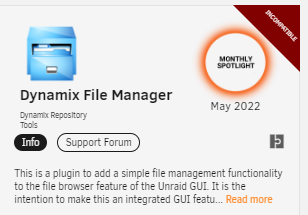
Hi, It shows as not compatible? Maybe since I'm on Beta?
-
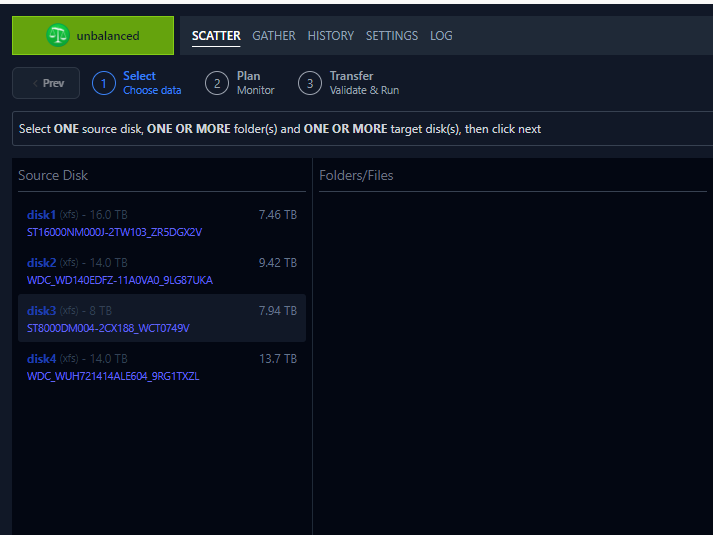
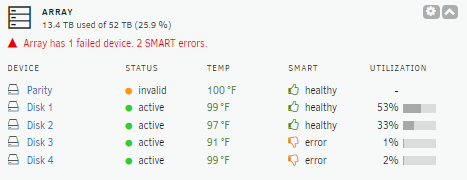
Hi All, Running 7.0.0-beta.2 - I'm going to replace an array drive and use a different drive (array drive is spindle, new drive will be SSD and be a cache drive). So I want to make sure all data is off the array drive. I THOUGHT I could access for example \\IP\DRIVE3 (I named my drives DRIVE1, DRIVE2, DRIVE3, DRIVE4). but I don't see DRIVE3 as a share - I'm thinking before I knew what I was doing, I created the DRIVE1 & 2 share manually. I installed / Ran unbalanced - it seemed to run for a bit. It now shows no folders under Disk3 (I did take disk 3 out of the array if that matters - I want to make sure no files are put on disk3 - is that the issue? The array shows 1% utilization and array devices shows it's used 55GB, so I'm concerned there's still data on there? Thanks

-
Thanks Any suggestions on what to try / check? Some setting in BIOS that I may have missed that's common with NAS's?
-
Hello All, I have Unraid running on a QNAP TS-563 / 7.0.0-beta.2. I have a 2 TB SSD connected via external esata. Unraid just doesn't recognize it. I don't see anything obvious in the BIOS (or unless I missed it a way to even see if the BIOS lists drives), but it's not seen in Unraid. I had a 128GB esata drive that was recognized but it was bad to begin with so I stopped using it. Anything to suggest or anything I'm missing? I tried googling but not seeing any suggestions on it with that particula QNAP setup. Attached diags in case it's of any use. Thanks tower-diagnostics-20240825-0713.zip
-
My friend was able to remote in and square it away.. looks like perhaps 2 of the drives are actually bad Thanks for the help - wish I knew what he did, but apparently it was user error in how I set things up and the bad drive causing some wonkyness. All the data is still there, looks like I had a combination of data on the pool and the drive itself
-
Added back the 4tb drive - one of the 4 TB drives was a PITA to get out and I couldn't get it back in. Can't tell if the connector is bad or the caddy is bad but I don't want to force it in. Pool devices show unmountable. If I try to add a share or modify a share, it only allows me to include disk 1 tower-diagnostics-20240816-1434.zipHere's the latest diags. Thanks again

-
I don't believe I had the 4TB drive assigned to the pool so shouldn't be. I formatted all drives with the default - I want to say XFS? (it's whatever it defaulted to when you select format.) Thanks
-
Ok - so I figured maybe the problem is one of the 4GB drives that came with the NAS was having in issue. I wasn't 'using' them so I removed them and rebooted. It now reboots in 3-4 minutes.. I now have the 3 drives from my older NAS - 8 TB, 14 & 12TB. Now the NAS comes online in about 3 minutes, but I have no arrays, no pools. I can't create a pool - won't let me choose any drives for the pool. And the three drives (???) say one is not present and 2 are unmountable? (But there's only three drives...) Here's the latest logs. Thanks tower-diagnostics-20240816-1048.zip

-
tower-diagnostics-20240815-1204.zipThanks - here's the diags. The errors for /mnt seem to have gone away, but I timed it: Rebooted at 11:26 AM, came back online 12:03 PM.
-
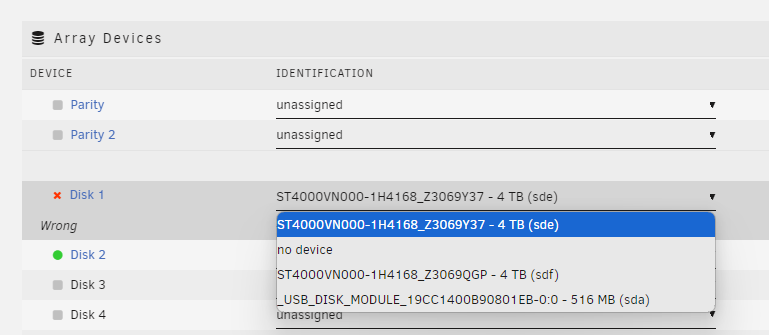
Awesome, thanks! Two last questions.. I'm now getting in my logs: Aug 15 09:57:29 Tower emhttpd: error: get_fs_sizes, 7823: No such file or directory (2): statfs: /mnt/user/isos Aug 15 09:57:29 Tower emhttpd: error: get_fs_sizes, 7823: No such file or directory (2): statfs: /mnt/user/system Aug 15 09:57:30 Tower emhttpd: error: get_fs_sizes, 7823: No such file or directory (2): statfs: /mnt/user/appdata Aug 15 09:57:30 Tower emhttpd: error: get_fs_sizes, 7823: No such file or directory (2): statfs: /mnt/user/domains Aug 15 09:57:30 Tower emhttpd: error: get_fs_sizes, 7823: No such file or directory (2): statfs: /mnt/user/isos Aug 15 09:57:30 Tower emhttpd: error: get_fs_sizes, 7823: No such file or directory (2): statfs: /mnt/user/system Aug 15 09:57:31 Tower emhttpd: error: get_fs_sizes, 7823: No such file or directory (2): statfs: /mnt/user/appdata Aug 15 09:57:31 Tower emhttpd: error: get_fs_sizes, 7823: No such file or directory (2): statfs: /mnt/user/domains Aug 15 09:57:31 Tower emhttpd: error: get_fs_sizes, 7823: No such file or directory (2): statfs: /mnt/user/isos Aug 15 09:57:31 Tower emhttpd: error: get_fs_sizes, 7823: No such file or directory (2): statfs: /mnt/user/system If I go to Shares, they look like they're there. I did a cleanup, that didn't seem to help. I never created these so I'm guessing they're 'stock'? And last I hope for now Booting up seems to take 30-40 minutes. My HDMI cable is flakey so I have a new one on the way. But it appears it hangs on "Verifying bzfirmware checksum." and sits for a good 20-30 minutes. NAS is a QNAP TS-563 ThanksWill new config wipe any data on the drives? The wording "So that disks appear as new disks" has me a bit concerned.. Thanks!Hi All, 7.0.0.0 -2. I had two non parity drives. Slot 1 - had no data on it. Slot 2 in an array / pool by itself. I removed the drive from slot 1 to replace it with a larger drive. Now I can't seem to change anything or get the array to start - Unraid seems to want the old drive. Old drive was a 4TB, new drive is 14TB. Array device showing just the 2 4TB drives, which should be 2 14tb drives... If I go to disk 1 it gives me no choices. Disk 2 shows correctly the 8TB drive that's in slot 2. Thanks!
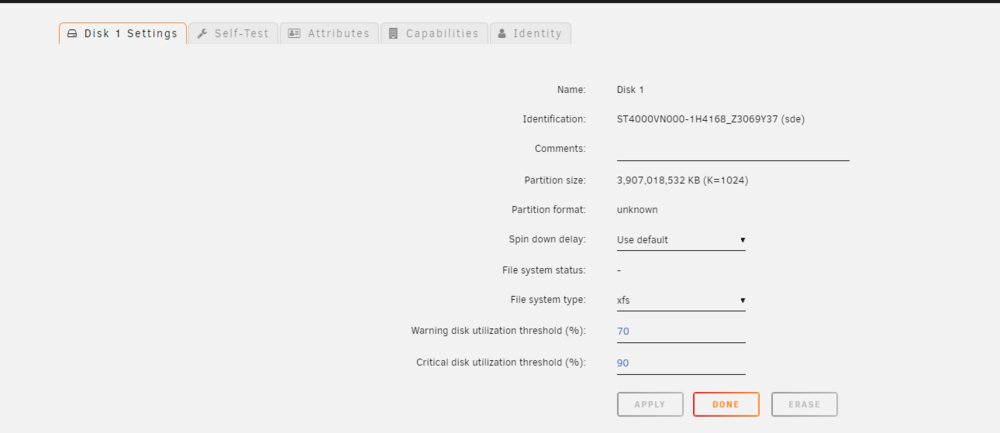
 Hi, I'm looking to migrate over my data from my Terramaster NAS to a QNAP nas I have that's now running Unraid. Trying to figure out how to best do this. Right now I only really have one 'extra' drive. The drives on my Terramaster are single drives - each one is its own share. I'd like to have all the drives on the QNAP be 1 pool. So ideally I need to put the 'new' drive in the QNAP, copy the data from TM to QNAP, then when that drive is empty, put it in the QNAP, format the drive, add that drive to the pool, copy data from the next drive in the TM to the pool in the QNAP, once that drive is empty, move it to the QNAP, format, add it to the pool, etc - will this work? I also would like to have a parity drive - but won't have the parity drive for a week or two. Will I be able to add that parity drive later and preserve the data currently on the QNAP (once migrated)? Just want to make sure I go about this the right way without losing data. Running 7.0.0 2 if it matters Thanks


