





tjm
Members
-
Joined
-
I probably have to click 'Sync' then, even though it doesn't say that in the instructions. Right? Is there someone I should reach out to to get the instructions updated?

-
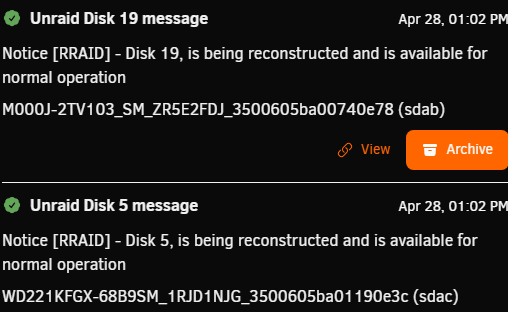
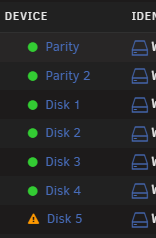
I followed these steps to get them rebuilt, and I did get notifications that they are being rebuilt: But I dont see a progress status notification or anything. And the 'main' page just has them listed with exclamation marks: Is there somewhere I can see progress? Or something else I need to do?
-
Thanks again. What are the next steps I should take from here to get back up-and-running? Thanks!
-
Sorry, I'm not sure I know how do to that. Could you provide more in-depth instructions? Thanks!
-
Diags attached rraid-diagnostics-20260428-0738.zip
-
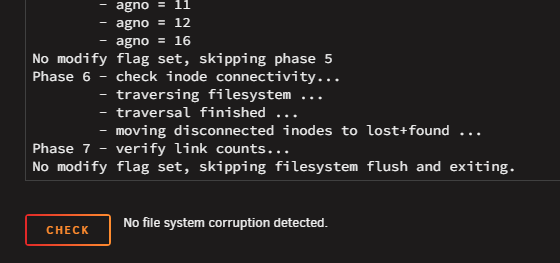
There is no "fix" option, just a "check" option since there doesn't seem to be any corruption:
-
d5: Phase 1 - find and verify superblock... Phase 2 - using internal log - zero log... - scan filesystem freespace and inode maps... - found root inode chunk Phase 3 - for each AG... - scan (but don't clear) agi unlinked lists... - process known inodes and perform inode discovery... - agno = 0 - agno = 1 - agno = 2 - agno = 3 - agno = 4 - agno = 5 - agno = 6 - agno = 7 - agno = 8 - agno = 9 - agno = 10 - agno = 11 - agno = 12 - agno = 13 - agno = 14 - agno = 15 - agno = 16 - agno = 17 - agno = 18 - agno = 19 - agno = 20 - process newly discovered inodes... Phase 4 - check for duplicate blocks... - setting up duplicate extent list... - check for inodes claiming duplicate blocks... - agno = 0 - agno = 1 - agno = 2 - agno = 3 - agno = 5 - agno = 6 - agno = 9 - agno = 10 - agno = 12 - agno = 13 - agno = 7 - agno = 4 - agno = 14 - agno = 15 - agno = 17 - agno = 18 - agno = 16 - agno = 8 - agno = 11 - agno = 19 - agno = 20 No modify flag set, skipping phase 5 Phase 6 - check inode connectivity... - traversing filesystem ... - traversal finished ... - moving disconnected inodes to lost+found ... Phase 7 - verify link counts... No modify flag set, skipping filesystem flush and exiting. d19: Phase 1 - find and verify superblock... Phase 2 - using internal log - zero log... - scan filesystem freespace and inode maps... - found root inode chunk Phase 3 - for each AG... - scan (but don't clear) agi unlinked lists... - process known inodes and perform inode discovery... - agno = 0 - agno = 1 - agno = 2 - agno = 3 - agno = 4 - agno = 5 - agno = 6 - agno = 7 - agno = 8 - agno = 9 - agno = 10 - agno = 11 - agno = 12 - agno = 13 - agno = 14 - agno = 15 - agno = 16 - process newly discovered inodes... Phase 4 - check for duplicate blocks... - setting up duplicate extent list... - check for inodes claiming duplicate blocks... - agno = 1 - agno = 3 - agno = 7 - agno = 4 - agno = 5 - agno = 0 - agno = 6 - agno = 14 - agno = 8 - agno = 9 - agno = 13 - agno = 10 - agno = 2 - agno = 15 - agno = 11 - agno = 12 - agno = 16 No modify flag set, skipping phase 5 Phase 6 - check inode connectivity... - traversing filesystem ... - traversal finished ... - moving disconnected inodes to lost+found ... Phase 7 - verify link counts... No modify flag set, skipping filesystem flush and exiting.
-
I tried rebooting as it didnt seem like there were many other options. But d5 & d19 are still showing 'device disabled, contents emulated'. What should I do?
-
i dont. what should i do to get this unstuck?
-
I tried stopping and restarting array but it seems to be stuck at this: "Array Stopping•Retry unmounting user share(s)..."
-
Logs have been zero'ed. Is that it? Do I now stop the array and restart in normal mode?
-
d5: Phase 1 - find and verify superblock... bad primary superblock - bad CRC in superblock !!! attempting to find secondary superblock... .found candidate secondary superblock... verified secondary superblock... writing modified primary superblock sb root inode value 18446744073709551615 (NULLFSINO) inconsistent with calculated value 128 resetting superblock root inode pointer to 128 sb realtime bitmap inode value 18446744073709551615 (NULLFSINO) inconsistent with calculated value 129 resetting superblock realtime bitmap inode pointer to 129 sb realtime summary inode value 18446744073709551615 (NULLFSINO) inconsistent with calculated value 130 resetting superblock realtime summary inode pointer to 130 Phase 2 - using internal log - zero log... ERROR: The filesystem has valuable metadata changes in a log which needs to be replayed. Mount the filesystem to replay the log, and unmount it before re-running xfs_repair. If the filesystem is a snapshot of a mounted filesystem, you may need to give mount the nouuid option. If you are unable to mount the filesystem, then use the -L option to destroy the log and attempt a repair. Note that destroying the log may cause corruption -- please attempt a mount of the filesystem before doing this. d19: Phase 1 - find and verify superblock... bad primary superblock - bad CRC in superblock !!! attempting to find secondary superblock... .found candidate secondary superblock... verified secondary superblock... writing modified primary superblock sb root inode value 18446744073709551615 (NULLFSINO) inconsistent with calculated value 128 resetting superblock root inode pointer to 128 sb realtime bitmap inode value 18446744073709551615 (NULLFSINO) inconsistent with calculated value 129 resetting superblock realtime bitmap inode pointer to 129 sb realtime summary inode value 18446744073709551615 (NULLFSINO) inconsistent with calculated value 130 resetting superblock realtime summary inode pointer to 130 Phase 2 - using internal log - zero log... ERROR: The filesystem has valuable metadata changes in a log which needs to be replayed. Mount the filesystem to replay the log, and unmount it before re-running xfs_repair. If the filesystem is a snapshot of a mounted filesystem, you may need to give mount the nouuid option. If you are unable to mount the filesystem, then use the -L option to destroy the log and attempt a repair. Note that destroying the log may cause corruption -- please attempt a mount of the filesystem before doing this.
-
I'm assuming I should attempt a "fix" from here?
-
d5: Phase 1 - find and verify superblock... bad primary superblock - bad CRC in superblock !!! attempting to find secondary superblock... .found candidate secondary superblock... verified secondary superblock... would write modified primary superblock Primary superblock would have been modified. Cannot proceed further in no_modify mode. Exiting now.d19: Phase 1 - find and verify superblock... bad primary superblock - bad CRC in superblock !!! attempting to find secondary superblock... .found candidate secondary superblock... verified secondary superblock... would write modified primary superblock Primary superblock would have been modified. Cannot proceed further in no_modify mode. Exiting now.
-
Hey Everyone - I had an unclean shutdown and 2 of my disks are showing "unmountable". Diagnostics are attached. How should I fix this? Thanks! rraid-diagnostics-20260426-1411.zip

