





tjm
Members
-
Joined
Everything posted by tjm
-
Not even mounted, just share added
-
Alright. I think there is both good news and bad news. The good news is that when I rename the UD folder and reinstall it, I am able to start and stop the array. However, as soon as I re-add 1 of my SMB shares back in, I am able to stop the array but not start it again. I think this is where I may have gotten myself into trouble a few weeks ago by listening to AI. I remember AI mentioning "shadow shares" or "phantom shares" where I had UD uninstalled completely (and no SMB shares mounted) but it was still showing a /mnt/remotes/Windows_SomeFolder If I remember correctly, AI told me to delete the "shadow share" using rm -rf /mnt/remotes/Windows_SomeFolder So, I guess - how majorly have I screwed up? And how do I fix it?
-
I can attach diagnostics (see attached). But I'm not sure if they "demonstrate that" or not. What I can tell you is that I renamed the plugins following the advise here: And with all the other plugins "turned on" but that one "turned off", I am able to stop and start array: unraid-diagnostics6.zip

-
Alright, the issue seems to be with Unassigned Devices. What should I do from here to fix this?
-
alright, rebuild is complete and ive rebooted so im no longer in safe mode. i am still having the issue where i can stop the array but not start the array. please let me know what steps i can take so we can resolve this. thanks!
-
i can and will for sure do this. but until we figure out what plugin is causing the array not to start, wont rebooting put me back in the situation of - 'i can stop, but not start the array'? now disk5 will be working. so thats progress. but i still wont be able to start array without rebooting each time, right? awesome, ill try to update these
-
Yes, rebooting in safe mode allowed me to start array with disk5 attached. It is currently doing a Data-Rebuild I assume I should let the Data-Rebuild run until it is complete, yes? And then what should I do after this to 'get out' of safe mode and return to normal mode?
-
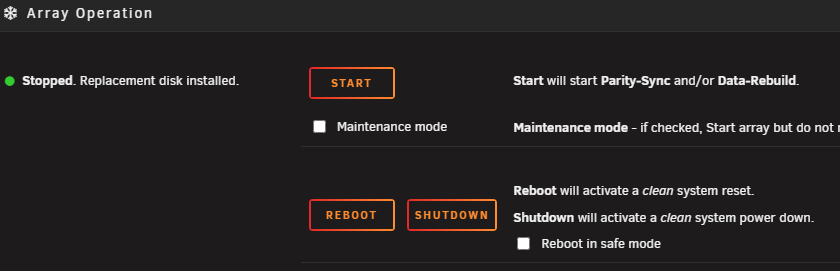
oh, and a 'reboot in safe mode' button too. sorry.
-
i do not. the only options i have when array is stopped are: start maintenance mode checkbox reboot shutdown i have not tried recently, but when i was trying a few weeks ago, even checking the 'maintenance mode' box and trying to start, the array wont start
-
here are diagnostics from after clicking the 'start' button 3 times, but before rebooting, if it helps unraid-diagnostics5.zip
-
I cannot. I can stop array, and I can assign disk5. It is no longer showing 'stale config', just 'array stopped' at this step. But I cannot start.
-
gladly. and appreciate all your help with this. unraid-diagnostics4.zip
-
Yes. As soon as I set disk5 to "unassigned", the message at the bottom went from 'Array Stopped - stale configuration' to just 'Array Stopped' and it did let me start array.
-
Only 1 browser open to the server, Brave.
-
attached are new diagnostics. i did reboot as i am attempting to get the array to start. but it is telling me " Array Stopped•stale configuration" what should i do from here? unraid-diagnostics3.zip
-
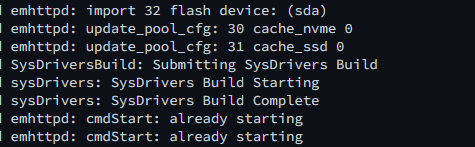
Alright, following back up on this. Disk5 I have attempted to add this back to the array. It says "All existing data on this device will be OVERWRITTEN when array is Started" which I think is fine (?). So I am attempting to start the array Array not Starting To add disk5 back in, I stopped the array and now I am attempting to start it. It won't start. Clicking the 'Start' button more than once causes the page to refresh and it 'jumps' to the top of the 'Main' tab, but nothing else happens. This is what is shown in syslog: But I've given it as long as ~20 minute before and it does not start. Live MemTest I ran this on about half the installed ram, and it came back without any errors.
-
thats a good question. i imagine the answer is yes. but i can deal with that later.
-
-
Command Line, but it is very likely that AI was giving me the wrong advice Alright, so it sounds to me like I should stick disk5 back in and Disk-Rebuild should run? No, I have not done memtest recently as this is only doable during boot, right? Since I cant hook it up to a monitor right now, I have no way to catch it during boot.
-
Regarding the silent crash, if it helps. * I did mirror syslog onto flash for a while there, but there would be hours without any events. For example, if it were to crash right now (1545 14FEB2026), syslog would (of course) show information from me restarting it right now, but the last event prior to that was around 0800 13FEB2026. And I cant plug her in to a monitor right now.
-
when i went to move disk5 from the first machine to the shelf, i had to use interposers as mentioned. so at first, unraid started doing Disk-Rebuild which I believe is correct and as expected. but, sometime between 50% and 80% through the Disk-Rebuild process, Unraid silently crashed where I was trying to go to the url and it was telling me 'no connection'. in fact, its been silently crashing a lot. and it looks to be Docker related since I disabled Docker entirely about 5 days ago and it hasn't happened since. but yeah, silently crashed and then I was asking AI what to do and she pointed me in the direction of xfs_repair but even when forcing it, it was throwing that 117 error. so shes the reason why im ultimately on UFS Explorer and copying things. if there was a better way for me to have done this, please I am all for learning. thanks!
-
i can get you one, but ufs explorer is copying right now so it may be a couple hours before i can send you this
-
alright, i apologize. i thought i was being more thorough. please see attached for complete diagnostics. but to answer your question, no disk5 is not currently attached. when i was trying to attach it, i was trying to run xfs_repair with a few different flags but it kept coming back with error 117 so i plugged it into a windows machine and it didnt see anything on the drive, so im running UFS Explorer, which did find a bunch of the now-missing data and am copying it back onto the array unraid-diagnostics2.zip
-
Thats one of the other issues that I'm having, that I didnt mention here because I honestly didnt think it was related. But the issue with disk5 is this - I had it in 1 chassis. A jonsbo.... something?? But it was getting hot in there because the jonsbo cases pack the drives right next to each other. So I took disk5 out of there and was moving it to a shelf networked via SAS. but I need to use an interposer and therefore unraid was not recognizing it as the same disk. so ive gone through all sorts of headache with disk5 too - and I was potentially going to post something about it later. but i didnt think it was related to this so was hoping to get this resolved before addressing that. but if we want to hop into it all at the same time, yes disk5 is disabled because of the above.
-
2 remote mounts. SMB. Neither set to automount.

