





tjm
Members
-
Joined
Everything posted by tjm
-
Hey Everyone! I am having a couple issues and hoping to get some help as I seem to have hit a wall. The first couple issues I am having may be related, but I would say the first one is my 'high priority' issue: My system boots and I have it set to start my array automatically at startup. If I then go and stop the array, the array wont start again. Syslog shows 'already starting' or something similar if I click the 'start' button more than once. I have given it as long as 20 or 25 minutes to start before, no luck. Rebooting will then start the array, which is the 'workaround' Possibly related to this, but I cant say for sure. When I do reboot, it is taking approximately 5 minutes to reboot which seems like a really long time. Any suggestions would be appreciated. I've attached some of the diagnostics data. unraid-diagnostics.zip
-
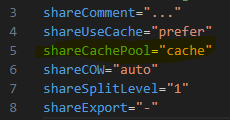
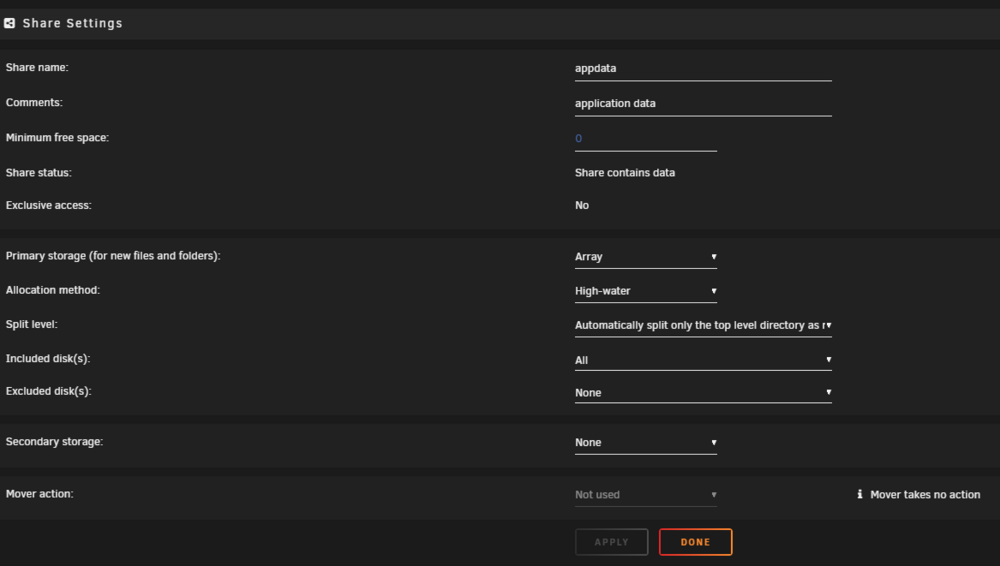
see attached for diagnostics. when going through the diagnostics, I do see in appdata.cfg for example, that it says shareCachePool="cache": im just not sure where to change this in the gui as i dont see it listed under any of these options: rraid-diagnostics-20240818-1552.zip
-
Hey yall! When I run the "fix common problems" plugin it is telling me that me shared are refencing a non existent pool cache. But I do not see anywhere in the share where this is referenced. I checked many of the old posts/forums, but I cannot seem to find an answer to this. TIA for your help.
