





wizenthorne
Members
-
Joined
-
Last visited
Everything posted by wizenthorne
-
Is there another place I should be posting this issue? I was directed to come here.
-
Action Centre stopped triggering for me. Action Centre no longer triggers on its own. In the Docker tab it correctly displays containers which are ready to update. Pinning an app seems to trigger the Action Centre after a few minutes, but this is the only "fix" I've found. I'm not exactly sure when the issue started but it was sometime after the 7.2.4 update.
-
Action Centre no longer triggers on its own. In the Docker tab it correctly displays containers which are ready to update. Pinning an app seems to trigger the Action Centre after a few minutes, but this is the only "fix" I've found. I'm not exactly sure when the issue started but it was sometime after the 7.2.4 update. I've done some searching around the forums but couldn't find anyone else with this issue.
-
Thank you for this! Worked just fine!
-
Have you have any luck since your last post?
-
First I want to thank you for putting these install templates together! I am encountering an error that appears as soon as I attempt to load the webpage: We're sorry, but something went wrong. In the log for the maybe_web docker it says: FATAL -- : URI::InvalidURIError (bad URI (is not URI?): "127.0.0.1:6379/1") I already had redis running on that port and if I turn off the redis docker I get a page telling me I need to configure redis, so I am pretty sure it's connecting to redis. I'm just unsure what that error message means. Does anyone have any ideas? When I search those error messages I cannot find anything related to Maybe. EDIT: I ended up having to change the redis url to redis://(Unraid Server IP):6379/1 and switch the Network from maybe-stack to Bridge.
-
Oh okay, that's good to know. I was unaware they it keeps breaking. I'll check in with the Plex forums. Thank you!
-
The GPU is set instead of auto. Non-HDR transcoding works fine. Thank you for the response. Do you have any other ideas?
-
Problem: Transcoding from 4k HDR10 to anything else will trigger the GPU for a moment then it falls back to CPU. Unraid: 7.0.0 GPU: Nvidia RTX 2070 Super Nvidia Driver Version: 565.77 (multi-transcode unlocked with patch) Plex Version: 1.41.4.9463 (running in Docker with GPU passthrough confirmed working) Details: - Plex will successfully transcode multiple 1080p to 720 or any other resolution and shows these transcodes working from the CLI when I run 'watch nvidia-smi' - The 'watch nvidia-smi' monitor will show the Plex transcode briefly when attempting to transcode from 4k HDR to 1080p but after a few seconds the GPU transcode will fall back to CPU and it will disappear from the GPU monitor. - I have tested with both Dolby Vision and non-DV HDR videos. - I have tested with HDR mapping on and off in Plex settings. - Plex is correctly configured to use the Nvidia GPU, shows the proper GPU in the settings, and successfully transcodes 1080p videos using the GPU. Has anyone else been able to get their NVIDIA RTX GPU to transcode from 4k HDR to 1080p? If so, do you have any suggestions for me as to why it keeps falling back to CPU on my machine? I have done extensive searching here and after many hours have been unable to find a solution. Thank you for your time reading this.
-
Thanks, everyone, for all of your insight into the benefits of using the Tailscale service versus something like Headscale running on Unraid. In the even that the Tailscale servers do go down for a period of time, if devices have already connected, would those connections be maintained until an IP changes on a device? I assume once the DNS is resolved the magicDNS service is no longer required until the IP changes?
-
Is Headscale going to be discussed at all, or with this partnership is there a plan to allow Tailscale to run self-hosted without needing to phone home or connect to a third-party Tailscale server? Everyone here is a self-hosting enthusiast and while Tailscale is cool, it is not a self-hosted product as far as I can tell.
-
So I did try rebooting with the internal drive unplugged and reformat the internal drive using UD. Neither solution worked. It would seem my last option is probably to move my files off the external, format, then move them back. Is it possible the problem I'm having is due to the external being formatted to ntfs instead of xfs?
-
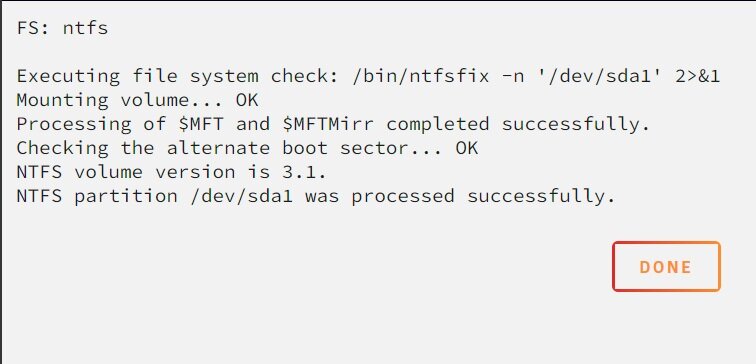
This is what the external that won't mount after a reboot reports.
-
External had no errors. The internal reported errors. It attempted to fix. Did a reboot. Still not mounting the external. Ran the check again on internal. Still errors so I did the extra step (forgot what it was called) and that fixed it. Rebooted. Still won't automount the external. I'll probably do your suggestions slightly out of order because I don't have anything critical on the internal one so I'll probably just format and see if that fixes the issue without disconnecting it.
-
Also after I started my array the option to dismount became unavailable until I hit the double-arrow refresh button again. Edit: So It makes me wonder if somehow the array starting is causing the initial mount option to become disabled.
-
Okay, so hitting that did end up activating the Mount option. Is there a script I need to enable to force this after a reboot?
-
My apologies. Which one is the double-arrow icon?
-
I am also attaching a new log I request right after the reboot and before I unplugged and plugged in the external drive, just in case it logged something about the mount information. ud_diagnostics-20240827-120745.zip

-
That 16TB drive is the one that will show a greyed out MOUNT button on reboot, but will mount when I unplug it and plug it back in.

-
Two years later and it still works like a charm! Thank you for enhancing my Unraid and Plex experience!
-
Thank you for your response! Here is the log zip you requested. ud_diagnostics-20240827-102148.zip
-
I have two drives mounted through Unassigned Disk Devices. The internal drive will automount but the external drive won't unless I unplug it then plug it back in. This is the only way I can get it to mount. After I reboot, one of the drives automounts correctly but the other doesn't and the MOUNT is greyed out. I have to unplug the usb cable then plug it back in and the drive will auto-mount correctly. Does this happen to anyone else? I've got the drive correctly set for automount and all of the settings are identical to the drive which does properly mount. Drives have unique identifiers, etc. Both are set to automount. The external drive won't let me mount at all unless I unplug it and plug it back in, then it automounts. The log doesn't show any errors. It gets to "Unraid emhttpd: read SMART /dev/sda" and that's the final line.
-
EDIT: I've been told this will be fixed in the next update. When I click run on a game it gets to Decompress Game Core and then stops at 99%. It has a dump.rdb in the redis folder. I tried deleting that and running again but it still stops at 99%. All roms do this. I tried with a different browser with the same result.



