





Dudi
Members
-
Joined
-
Last visited
-
Need to wait a bit more for final confirmation but looks like the system flash drive was the culprit for all this. Even though I was using a pretty new and furtermore a max endurance microsd for that purpose, I tried another sdcard now and ever since the system keeps running.
-
Yes the files is there. mover.old
-
-
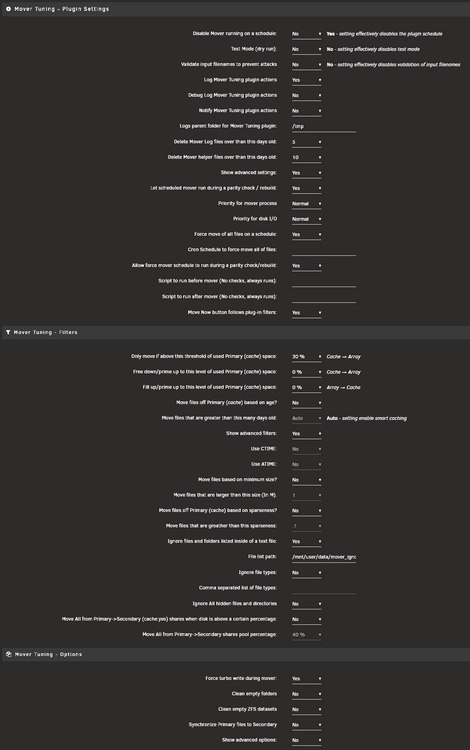
Using Unraid 7.1.2. The mover is set to run hourly but a threshold of 30% for the cache drive is set in the tuner settings
-
my syslog gets spammed with: crond[2412]: failed parsing crontab for user root: /usr/local/sbin/mover.old start 2>/dev/null what could cause that?
-
I checked the BIOS settings even though the server has been running for many many months before without a single crash. Now it has crashed again and here is the syslog. It looks like it has something to do with the GPU syslog syslog-previous loch-nas-diagnostics-20250517-1150.zip
-
As my server lately froze many times when using the web interface I would like to ask for some help. With freezes I mean the server totally crashes and there is no possibility to connect to it anymore. No SSH connection, no WebUI, not even pinging the server IP gives any response. Only a power cycle brings it back. It doesn't really matter what I do in the WebUI as it happened somehow randomly, but only if I use the WebUI as far as I can tell. I have now set up a syslog server to grab some syslog files when it happens again but for now I don't have those logfiles. All I have is the diagnostics as attached. Maybe someone can already find an issue within those files? loch-nas-diagnostics-20250515-0745.zip
-
That seems to be indeed the solution. I wish Ihad known that before.
-
I see. Gonna rebuild it with docker.img now and will check how this goes. Thank you.
-
So after losing half of my hair and getting 2 years older in the last 24 hours I decided to beg for help now. Let me give a brief summary of what is going on on my server. It all started with a simple task. My zfs cache pool was using 2 nvme drives in mirror mode. I simply wanted to change that to stripe mode. It took me a lot of console acrobatic and finally I manged to get my zfs cache pool to be running as a zfs striped pool. So far so good. I did a backup of my appdata before all these hassles of course. I was using a docker.img file before. Trying to to copy the docker.img back to my newly created appdata spectacularly failed for an unknown reason. Docker service just did not came up. It just told me the service can not be started. Ok I decided to take this chance to renew my docker using folders instead of docker.img this time and I used the "previous apps" function to restore ally containers. So far so good, but ever since my entire server is f*ed up. The docker service seems to make server uncontrollable. The entire GUI starts to become irresponsible. When I'm lucky I can use all the functions not related to docker within the GUI but as soon as I wan to use the docker tab it starts freezing. After restoring containers , the entire GUi just freezes (but not always, as I said sometimes I can control all tabs but not the docker tab). I can connect via ssh and I have access to all the data but not restarting the server is not possible, even though I send the command it remains on. Stopping the docker service or any container is also just a dream. Only thing I can do is hard power off (hello rebuild parity). I am out of ideas now... ps: sorry for typos...wrote it on cellphone loch-nas2-diagnostics-20240921-1653.zip
-
Actually it is a subfolder of appdata. I have appdata only on cache drive with daily backups of it to the array. the cache is zfs in order to make snapshots of my appdata. I created a subfolder in appdata and could not convert it. But now it seems to work again. To be honest, I am not sure if I realy forgot to re-anable destructive mode after I have re-installed zfs master.
-
The plugin no longer offers me the function to convert a folder to a dataset when I hit the "actions" button. The only option I got is renaming. What could that be? I have recently changed my array pool from zfs to xfs but kept the cache pool (where I cannot convert anymore) at zfs
-
I got it also working but I needed to load the nct6775 module manually by modprobe nct6775
-
Thanks for your help. After that didn't work I decided to not spend more time in trying to repair it and formatted the cache drive.
-
it gives no output at all

