





peewee67
Members
-
Joined
-
Last visited
-
I love the idea and appreciate your effort! However in the current state it doesn't provide much additional use upon appdatabackup. It serves as a record for all the docker container settings which i could use to manually recreate all my containers, but with the restore of docker containers through docker-compose, the use of the docker interface options in Unraid will be limited after a restore, like missing shortcuts to the Webui and the console per container. Also shares, installed plugins and it's settings, virtual machines and all the user settings of Unraid itself are still missing in the backup, so it's not a bare-metal-restore tool yet. But it would be awesome if it would develop into that though.
-
Update: i managed to mount the cache drive in read-only, copy the contents to an array disk, format the cache drive, and punt the backup back. See details below. I came to my Unraid server being unrepsonsive and all docker and VMS stopped, SMB shares still working. It's an Intel NUC with one nvme0n 512GB drive cache, and one WD Red 8TB drive for the arrya, no parity. dmesg shows an BTRFS critical error, i don't know what to do next, help :-) [ 171.074461] BTRFS: error (device nvme0n1p1: state A) in __btrfs_free_extent:3110: errno=-117 Filesystem corrupted [ 171.074470] BTRFS info (device nvme0n1p1: state EA): forced readonly [ 171.074473] BTRFS info (device nvme0n1p1: state EA): leaf 122585088 gen 470682 total ptrs 153 free space 4349 owner 2 [ 171.074656] I/O error, dev loop2, sector 0 op 0x1:(WRITE) flags 0x800 phys_seg 0 prio class 2 [ 171.074658] item 31 key (596771348480 168 4096) itemoff 14587 itemsize 53 [ 171.074660] extent refs 1 gen 391795 flags 1 [ 171.074662] ref#0: extent data backref root 5 objectid 27178 offset 13238718464 count 1 [ 171.074664] item 32 key (596771352576 168 102400) itemoff 14534 itemsize 53 [ 171.074666] extent refs 1 gen 470681 flags 1 [ 171.074665] BTRFS error (device loop2): bdev /dev/loop2 errs: wr 0, rd 0, flush 1, corrupt 0, gen 0 [ 171.074667] ref#0: extent data backref root 5 objectid 666178 offset 30353338368 count 1 [ 171.074670] item 33 key (596771454976 168 40960) itemoff 14481 itemsize 53 [ 171.074670] BTRFS warning (device loop2): chunk 13631488 missing 1 devices, max tolerance is 0 for writable mount [ 171.074672] extent refs 1 gen 470681 flags 1 [ 171.074674] ref#0: [ 171.074673] BTRFS: error (device loop2) in write_all_supers:4094: errno=-5 IO failure (errors while submitting device barriers.) [ 171.074674] extent data backref root 5 objectid 666178 offset 30517137408 count 1 [ 171.074676] BTRFS info (device loop2: state E): forced readonly [ 171.074681] item 34 key (596771495936 168 20480) itemoff 14428 itemsize 53 [ 171.074682] BTRFS error (device loop2: state EA): Transaction aborted (error -5) [ 171.074683] extent refs 1 gen 470681 flags 1 [ 171.074685] ref#0: [ 171.074684] BTRFS: error (device loop2: state EA) in btrfs_sync_log:3146: errno=-5 IO failure BTRFS critical (device nvme0n1p1: state EA): unable to find ref byte nr 596772597760 parent 0 root 5 owner 666178 offset 45822738432 slot 108 [ 144.343343] BTRFS error (device nvme0n1p1: state EA): failed to run delayed ref for logical 596772597760 num_bytes 65536 type 178 action 2 ref_mod 1: -2 [ 144.343348] BTRFS: error (device nvme0n1p1: state EA) in btrfs_run_delayed_refs:2184: errno=-2 No such entry [ 144.343359] BTRFS: error (device nvme0n1p1: state EA) in btrfs_replay_log:2084: errno=-2 No such entry (Failed to recover log tree) [ 144.359371] BTRFS error (device nvme0n1p1: state EA): open_ctree failed Solved: managed to mount the cache drive read only and copy the contents to an array disk, formatted the nvme drive, and copied the contents back. mkdir /mnt/temp mount -o ro,relatime,skip_balance,space_cache=v2 /dev/nvme0n1p1 /mnt/temp cp -a /mnt/temp /mnt/user/backup_nvme edited /boot/config/disk.cfg and set startArray="no" reboot umount -f /dev/nvme0n1p1 mkfs.btrfs -f /dev/nvme0n1p1 edited /boot/config/disk.cfg and set startArray="yes" reboot mount -o ro,relatime,skip_balance,space_cache=v2 /dev/nvme0n1p1 /mnt/temp cp -a /mnt/user/backup_nvme /mnt/temp
-
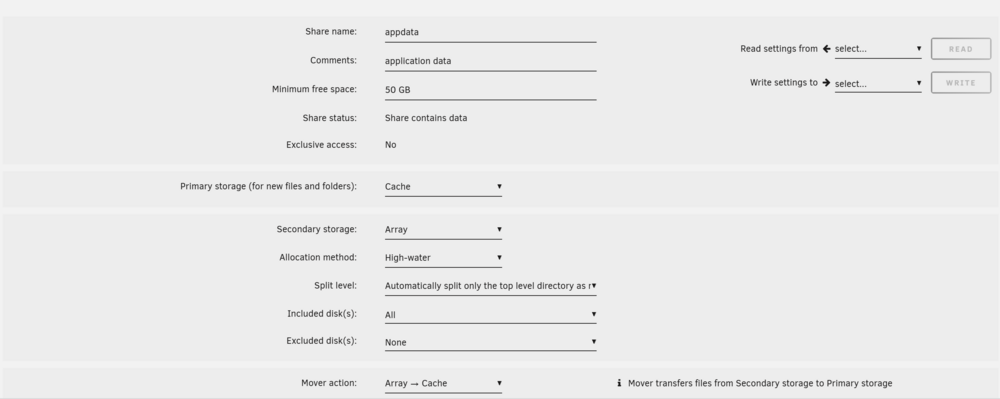
Yes, the mover tuning plugin was part of the problem because "Test mode (Dry run)" was set to yes. And i have learned that i had to set "Rebalance Shares" in the Mover options to "Yes" in addition to setting the "Mover action" to "Array->cache" in the Share settings of the share appdata. After i had set those two options and started the mover, i saw all contents of /mnt/disk/appdata in the array indeed move to /mnt/cache/appdata in cache. After that i set "Secondary storage" in the Share settings op appdata to "None" to keep the Docker data always in the cache pool. Now i also know im good if i keep referring to /mnt/user/appdata when installing docker containers, Unraid keeps track where files in /mnt/user/appdata point to, depending on the Share settings and the cache/move status. The help text to the option "Rebalance shares" is somewhat confusing, it reads "This will move files from shares to their primary and secondary storage if spread elsewhere. May imply moving older files from Primary->Secondary or Secondary->Primary if allowed (cache:prefer or cache:yes) to free some space." , it means (if i'm not mistaken) "This will move files from shares to their primary or secondary storage if spread elsewhere, the direction of movement is based on the "Mover action" setting in the Share settings. May imply moving older files from Primary->Secondary or Secondary->Primary if allowed (based on the Mover action) to free some space.". Also it doesn't help that the terms "primary" and "secondary" storage are used in the help text, and in the "Mover action" the terms "cache" and "array" used. It would make more sense to me if the "Mover action" options were titled "primary -> secondary" and "secondary -> primary". So, in the end to get al the appdata files from the array to cache, - i set Mover action to Array->Cache in the settings of the share - i set "Rebalance shares" to yes - i started the mover and saw the appdata folder in the array (/mnt/disk/appdata) empty and the /mnt/cache/appdata folder fill - after the mover was done, i set the Secondsry storage to "none" in the share settings.
-
I have set up my Appdata like so: 1. if i browse the files via File Manager, i see an appdata folder on /mnt/cache, plus an appdata folder on /mnt/user0, with different contents? 2. If i start the mover, i see files moving FROM cache to Array instead of the other way around, while there is plenty of room on the cache pool. ? i'm confused to what location the 'appdata' share is pointing (cache or array), why mover seems to be moving files away from cache, and what paths i should define in docker setups, /mnt/user/appdata or /mnt/cache/appdata.

-
Update, well that was easy: - Add a 'Custom' VM and paste the contents of the xml file - Put the qcow2 file in the spot mentioned in the xml file - start the VM
-
I have to restore a VM backup made with this plugin, but i only find two files per backup in the backup folder: - 20250208_0500_VMname.xml - 20250208_0500_disk1.qcow2 so no files with an .img extension. How can i restore my VM based on these two files?
-
I created a separate topic (about losing my Nvme cache drive in which i request how the caching and mover mechanism works. In this post i'd like to ask for your help to find the cause of losing the drive. In Pool Devices the device shows Missing I *think* the unassigned disk device 'ssd' wasn't there before: The nvme device does show up in System Devices Dmesg states: nvme nvme0: Device not ready; aborting reset, CSTS=0x3 From what i have read, the above could mean the controller on the Toshiba Nvme is still working but the filesystem on it is toast. I have a new nvme on the way but would hate to find out it's not the Nvme at fault. Any hints appreciated. unraid-diagnostics-20250210-1151.zip




-
I have been reading up on the mover process (the post below among others) but i seem to be missing a point. If for Appdata the primary storage is set to Cache and secondary to Array, Docker container configs and everything else in /appdata is primarily stored on the cache drive(s) in the cache pool for performance reasons and will be moved to the array later (i understand databases for instance won't get moved while in use) . If then the cache pool dying beyond recovery results in de contents of /appdata being lost, what is the purpose of the mover process in the first place? I mean, it's not much use moving the contents to the array if i can't access it directly from the array in some way? I had databases for Docker containers running on the cache pool also (because of the performance reasons), is that a good or bad practice?
-
They were all 'stored' in /appdata in the cache pool, consisting of 1 (now missing) nvme disk. But if that means they now all will be missing, what is the purpose of the mover process to begin with? I'll read up om the mover process in the mean time.
-
My cache drive died (Toshiba Nvme 256 GB, linux error ( nvme nvme0: Device not ready; aborting reset, CSTS=0x3). When setting up Unraid, i read about the (nightly) 'mover' process, and didn't pay any perticular interest into my share settings. I installed two dozen docker containers and 1 VM since, all docker containers using the /mnt/cache/appdata paths. If i now delete the cache pool with the missing nvme disk and restart the array, will i have all Docker and VM data back from say yesterday because Unradi is then running solely on the array? And if i put in a new Nvme and recreate a cache pool, will the contents of appdata automatically will moved back from the array to the cache? Luckily i had appdata and vm backups running, but just curious if i could delete the cache pool and run on the array for the few days awaiting the new nvme.
-
I would like to have the ability to set bandwith parameters when creating a docker container from the (advanced view) gui. It should be easy to add a tc command into the container. And/or the ablity to route traffic through another (vpn) container easily. The reason i wish this is that i could set a tailscale exit node through one of my docker containers when watching iptv on my laptop, thus circumventing geo blocks and managing bandwith when mobile.
-
Edit: is it correct that the Wbeui doesn't work if a vpn connectiopn cannot be established? Currentlu i am only able to connect to the Webui if i set VPN_ENABLED to no. Despite changing the WEBUI_PORT from 8080 to 8090 multiple times, and adding a port mapping 8090:8090, and the log stating "[info] qBittorrent process listening on port 8090" , the damn container isn't listening on 8090. Please note that the line -l net.unraid.docker.webui='http://[IP]:[PORT:8080]' stays at 8080 no matter what you do. Update log: docker run -d --name='binhex-qbittorrentvpn' --net='bridge' -e TZ="Europe/Berlin" -e HOST_OS="Unraid" -e HOST_HOSTNAME="Sufferd" -e HOST_CONTAINERNAME="binhex-qbittorrentvpn" -e 'VPN_ENABLED'='no' -e 'VPN_USER'='a' -e 'VPN_PASS'='a' -e 'VPN_PROV'='custom' -e 'VPN_CLIENT'='openvpn' -e 'STRICT_PORT_FORWARD'='yes' -e 'ENABLE_PRIVOXY'='no' -e 'ENABLE_SOCKS'='no' -e 'SOCKS_USER'='admin' -e 'SOCKS_PASS'='socks' -e 'LAN_NETWORK'='10.0.0.0/24' -e 'WEBUI_PORT'='8090' -e 'VPN_INPUT_PORTS'='' -e 'VPN_OUTPUT_PORTS'='' -e 'DEBUG'='false' -e 'VPN_OPTIONS'='' -e 'ENABLE_STARTUP_SCRIPTS'='no' -e 'USERSPACE_WIREGUARD'='no' -e 'NAME_SERVERS'='84.200.69.80,37.235.1.174,1.1.1.1,37.235.1.177,84.200.70.40,1.0.0.1' -e 'PUID'='99' -e 'PGID'='100' -e 'UMASK'='000' -l net.unraid.docker.managed=dockerman -l net.unraid.docker.webui='http://[IP]:[PORT:8080]' -l net.unraid.docker.icon='https://raw.githubusercontent.com/binhex/docker-templates/master/binhex/images/qbittorrent-icon.png' -p '8118:8118/tcp' -p '9118:9118/tcp' -p '8090:8090/tcp' -p '58946:58946/tcp' -p '58946:58946/udp' -v '/mnt/user/appdata/binhex-qbittorrentvpn':'/config':'rw' -v '/mnt/user/Familie/Onze downloads/':'/data':'rw' -v 'binhex-shared':'/shared':'rw' --sysctl="net.ipv4.conf.all.src_valid_mark=1" 'binhex/arch-qbittorrentvpn' b05e3279008f9ac9ee1bf06ee52bc79ce751c119437df827db4a7e723b860eb2 The command finished successfully!
-
Thanks!, all that was needed was to run 'fstrim -v /' in the VM, thanks alot!
-
peewee67 joined the community
-
Short introduction: i have been a Synology user for 15 years. Lately i realized i'm using more and more Docker containers and VMs for my needs, and less the built in Synology tools. So i'm giving Unraid a try on a second hand Intel Nuc i bought, and i'm very impressed and conside rmaking the move to Unraid. I have set up a VM with a qcow2 VMdisk of 100GB with a xfs filesystem. I nearly filled that VM disk experimenting but need around 30G as a baseline. I'm not bothered by the 'Capacity' of 100GB that the Vdisk could claim over time, but i would like to get the 'Allocation' number back down to the 30GB which is currently in use. I have added discard='unmap' to the XML of the VM and started the TRIM process from the Unraid settings. I also ran a xfs_fsr defrag in the VM, but the allocation doesn't come down in Unraid. Is there anything else i should do? As far as i understand, i won't be needing to shrink the VM disk or the volumes inside it to make this happen, because when i epxanded the Vdisk earlier, the allocation only shot up once i started filling the vdisk with data.




