





WalkerZ
Members
-
Joined
-
Last visited
-
Maybe other factors at work - I threw the SMART report into AI and got this: The most important line in the entire report: 0x07 0x008 1 100 --- Percentage Used Endurance IndicatorThat says 100% endurance used in the Device Statistics log — this is separate from attribute 202 and comes straight from the drive's internal wear tracking. Combined with attribute 173 (Ave_Block-Erase_Count = 1501), this drive has genuinely consumed its rated write endurance. This drive may just be EOL?
-
I'm getting SMART warning notifications on my Crucial MX500 CT1000MX500SSD1, Firmware version M3CR020: 202 Percent lifetime remain FAILING NOW 100 which is the well-documented --- Incorrect SMART attribute label for Crucial SSDs - displayed as opposite of true meaning https://www.smartmontools.org/ticket/1627 Attribute 202: Percentage Lifetime Remaining (Percentage Lifetime Used on PCIe) https://www.crucial.com/support/articles-faq-ssd/ssds-and-smart-data How are you dealing with this annoyance, if you're in the same situation? I've tried adding Attribute 202 in Device > SMART Settings > SMART Attribute notifications (so I can disable notifications) but it won't take it. Crucial apparently has no firmware update for this. Is my only option to live with the annoying notifications, or to replace the SSD?
-
Thank you @Michael_P With the help of ChatGPT, I traced it back to my Calibre-LAN container. It appears it blew through the default 4GB setting during some conversions I was running. I upped the memory allocation to 6GB and am rebooting the system.
-
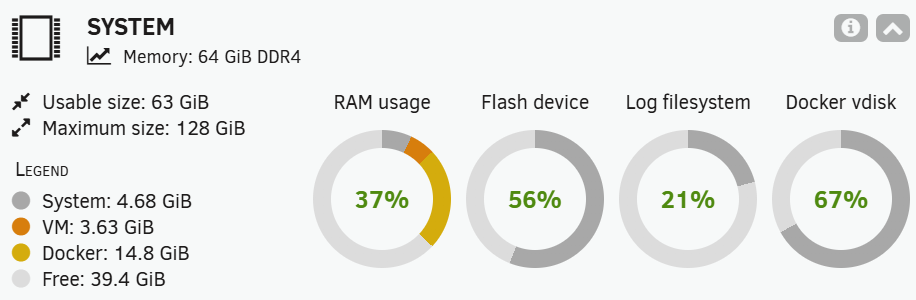
Hi, Today I received an alert with "Out Of Memory errors detected on your server". Anonymized Diagnostics are attached. System status appears OK. I haven't rebooted yet, as per @Squid recommendations. Any advice on what I should look at, and how to proceed? Thanks! running OS 7.2.4 z-unraid-diagnostics-20260415-1144.zip
-
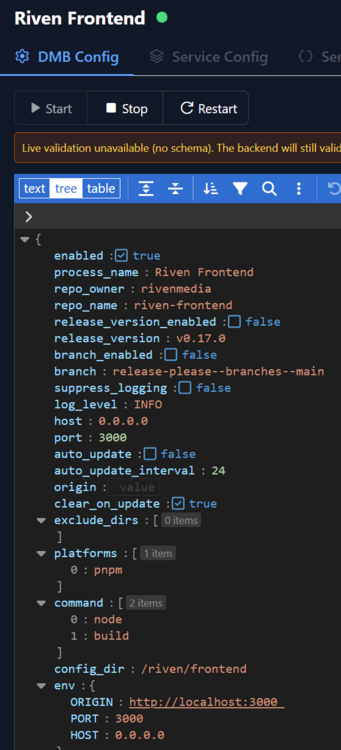
Thanks, and Happy New Year! On the config changes, I was referring to the code window (attached). As I was trying to clear the cross-site post error, I tried changing the code in that window, but it always reverted. The other thing I notice in the Riven Front End, is that Zilean seems to stop (red button). If I restart it goes green but inevitably after some time when I look, the service shows stopped again. Does decypharr work with DMM and symlinks in the same way Riven does? Can they be used together? Is DUMB worth converting to, if other than this issue DMB is working OK for me? I was assuming the code base was parallel, and the only difference was that DUMB has Plex included. But it sounds like from your post, that DUMB may have more developed code. Is that right?
-
I've had DMB installed for months and it seems to be working just fine. I've changed the owner directory settings as documented. The riven and zurg directories in /mnt/user/DMB/dmb are populated with movies and shows symlinks. DMB Dashboard loads properly. All the running configs code displays properly - I'm not sure I'm supposed to make any changes in the code, but when I've tried experimentally, any edits are not saved. In Riven, when I try to save settings, I see this message: "Cross-site POST form submissions are forbidden" I access Riven at http://192.168.1.241:3066 I've changed from the default port 3000 because NPM uses port 3000 already. I'm pretty sure the Cross-site POST error is new because in the past I was able to set up Riven properly. I am able to request media in Riven successfully. No reverse proxies in my setup. It's just me accessing DMB/Riven locally. Here's my docker run: docker run -d --name='dmb' --net='bridge' --pids-limit 2048 -e TZ="America/New_York" -e HOST_OS="Unraid" -e HOST_HOSTNAME="redacted" -e HOST_CONTAINERNAME="dmb" -e 'TZ'='America/New_York' -e 'RIVEN_FRONTEND_ENV_ORIGIN'='http://192.168.1.241:3066' -e 'ZURG_INSTANCES_REALDEBRID_API_KEY'='redacted' -e 'DMB_LOG_LEVEL'='INFO' -e 'PUID'='99' -e 'PGID'='100' -l net.unraid.docker.managed=dockerman -l net.unraid.docker.webui='http://[IP]:[PORT:3066]' -l net.unraid.docker.icon='https://github.com/I-am-PUID-0/DMB/assets/36779668/d0cbc785-2e09-41da-b226-924fdfcc1f21?raw=1' -p '5050:5050/tcp' -p '3005:3005/tcp' -p '3066:3000/tcp' -v '/mnt/user/appdata/dmb':'/config':'rw' -v '/mnt/user/appdata/DMB/log':'/log':'rw' -v '/mnt/user/appdata/DMB/zurg/RD':'/zurg/RD':'rw' -v '/mnt/user/appdata/DMB/postgres/data':'/postgres_data':'rw' -v '/mnt/user/appdata/DMB/riven/data':'/riven/backend/data':'rw' -v '/mnt/user/DMB/dmb/zurg/mnt':'/data':'rw,shared' -v '/mnt/user/DMB/dmb/riven/mnt':'/mnt':'rw' -v '/mnt/user/DMB/zilean/data':'/zilean/app/data':'rw' -v '/mnt/user/DMB/zilean/wwwroot/':'/zilean/wwwroot':'rw' -v '/mnt/user/appdata/DMB/pgadmin/data':'/pgadmin/data':'rw' --device='/dev/fuse:/dev/fuse:rwm' --shm-size=128MB -it --cap-add SYS_ADMIN --security-opt apparmor:unconfined --restart=unless-stopped --restart=on-failure 'iampuid0/dmb:latest' Can anyone see if I'm doing something wrong, or point me in the right direction to solve the Cross-site POST error?
-
I have the User Scripts Enhanced plugin installed. All the features including exports seem to work fine, with the exception of Export Config. If I select: Settings > User Scripts Enhanced > Export Config, it returns "Error: File not found." Any suggestions on what could be causing this error? Thanks.
-
Fix Common Problems surfaced this warning - Event: Fix Common Problems - Unraid Subject: Warnings have been found with your server.(Unraid) Description: Investigate at Settings / User Utilities / Fix Common Problems Importance: warning * Share backups is set for both included (disk2) and excluded (disk1,disk3) disks I've been working on my backups strategy. I have a "backups" share where my critical Unraid array files are backed up as well as several external computers. I want to copy that share to an unassigned drive for redundancy. I was having problems backing up because some of the backup streams would occur during the main rclone backup of the share. This would cause the rclone process to never finish. So, the new strategy is to install a new drive (disk2) dedicated to the backups share. That new drive is formatted as btrf so it can be snapshotted. The unassigned drive is formatted as exFAT because I want to be able to grab that drive (it's an external drive) and run with it in a disaster, in any available machine. Anyway, the new setup seems to be working properly to backup the share to the external drive using the snapshot capability of rclone. However, I wonder if I set up the included / excluded drives for the share properly. My intent is that the backups share only lives on disk2 and is not spread out across any other drives (for the proper snapshot). I tried to set it up so that disk2 is the sole home of any backups share files, and no other array files live there. Is there a better way to set up the share? Yes, I also back up the backups share to Backblaze using Duplicacy.
-
Trying to install ddns-updater to support deSEC as DuckDNS seems to be having some downtime. I keep getting an error: ''' Running version latest built on 2024-12-24T09:20:36.130Z (commit 78f3061) 🔧 Need help? ☕ Discussion? https://github.com/qdm12/ddns-updater/discussions/new/choose 🐛 Bug? ✨ New feature? https://github.com/qdm12/ddns-updater/issues/new/choose 💻 Email? [email protected] 💰 Help me? https://www.paypal.me/qmcgaw https://github.com/sponsors/qdm12 2025-08-19T15:10:22-04:00 INFO Settings summary: ├── HTTP client | └── Timeout: 10s ├── Update | ├── Period: 5m0s | └── Cooldown: 5m0s ├── Public IP fetching | ├── HTTP enabled: yes | ├── HTTP IP providers | | └── all | ├── HTTP IPv4 providers | | └── all | ├── HTTP IPv6 providers | | └── all | ├── DNS enabled: yes | ├── DNS timeout: 3s | └── DNS over TLS providers | └── all ├── Resolver: use Go default resolver ├── Server | ├── Listening address: :8000 | └── Root URL: / ├── Health | └── Server listening address: 127.0.0.1:9999 ├── Paths | ├── Data directory: /updater/data | ├── Config file: /updater/data/config.json | └── Umask: system default ├── Backup: disabled └── Logger ├── Level: info └── Caller: hidden 2025-08-19T15:10:22-04:00 INFO reading JSON config from file /updater/data/config.json 2025-08-19T15:10:22-04:00 INFO file not found, creating an empty settings file 2025-08-19T15:10:22-04:00 ERROR cannot write configuration to file: open /updater/data/config.json: permission denied 2025-08-19T15:10:22-04:00 INFO Shutdown successful ''' The only mod to the template is to add my TZ. The install exits and leaves no files or folders in Appdata. Anybody seeing this?
-
Just ran into this issue, and adding --dns=127.0.0.1 to extra parameters worked. Fix came from:
-
Hi, first of all - awesome container and VM! It installed without problem, restored HA from backup, and away you go! I had some discovery around enabling my old Conbee II as /dev/serial/by-id/, but that was just a wrinkle. I did run into one issue to let you know about. The default VM Name is "Home Assistant", which presented a problem when I tried to install the vm-babysitter app to back up my VMs. That app, and I'm guessing perhaps others, does not work with spaces in the VM Name and the VM path. I tried to rename the VM and paths to "Home-Assistant" but in the end it was easier to nuke the whole container + VM and re-install from fresh with the name with a dash in it. Save yourself some trouble and create the VM name with no spaces in it.
-
Thank you, @PeteAsking for a great app! I've been spinning up my Unraid NAS and getting my Unifi Network Application back was on my hot list. I spent a few hours fiddling around with the new linuxserver containers with several speedbumps, and then decided to start over with your container. I modified some of my other containers' ports so I didn't have to change any in this template. The app came up right out of the box without any fuss. I restored from my last backup. My three APs were stuck on adopting so I power cycled the APs and then set the inform host as @decibelio99 suggested. Perfect! Thanks so much.


