





ChirpyTurnip
Members
-
Joined
-
Last visited
-
Mine updated and now all my folders in the Docker view are gone. They still show in the dashboard view, and they are there in the settings, but on the docker tab there is only a legacy view. Clicking "Add Folder" does nothing. Have clear cache and reloaded (not restarted Unraid) but no joy.... :-( Also have the problem of many dialogue messages / buttons have no visible text. It looks very promising....just going to be some teething pain. ;-)
-
So, it has been a minute. Where am I at? After building a new machine based on a Core Ultra CPU I'm happy to report that everything is back on one machine, two copies of frigate, all of the *-arrs (with Gluetun), and so on and so forth. Absolutely stable, as it should be, on both 6x and 7x. Currently uptime is nearly 21 days, no issues at all! The old machine that was so very crash prone is now my desktop PC (on which I write now) and it too is rock solid. My ultimate suspicion? That the microcode changes in the BIOS for the core i7 bug made the Linux OS unstable....but running Windows no issues. With new HW Unraid is also happy.... So sorted FINALLY I think!
-
Same here. In System Dynamix hitting "Detect" returns nothing....but running "sensors" from the console gives me this: it8689-isa-0a40 Adapter: ISA adapter in0: 1.44 V (min = +0.00 V, max = +3.06 V) in1: 1.99 V (min = +0.00 V, max = +3.06 V) in2: 2.02 V (min = +0.00 V, max = +3.06 V) in3: 2.02 V (min = +0.00 V, max = +3.06 V) in4: 1.04 V (min = +0.00 V, max = +3.06 V) in5: 1.13 V (min = +0.00 V, max = +3.06 V) in6: 1.99 V (min = +0.00 V, max = +3.06 V) 3VSB: 3.31 V (min = +0.00 V, max = +6.12 V) Vbat: 3.14 V fan1: 1607 RPM (min = 10 RPM) Array Fan: 1923 RPM (min = 0 RPM) Array Fan: 1415 RPM (min = 0 RPM) temp1: +30.0°C (low = +127.0°C, high = +127.0°C) sensor = thermistor temp2: +48.0°C (low = +127.0°C, high = +127.0°C) sensor = thermistor temp3: +59.0°C (low = +127.0°C, high = +127.0°C) sensor = AMD AMDSI temp4: +32.0°C (low = +0.0°C, high = +127.0°C) sensor = thermistor temp5: +44.0°C (low = +0.0°C, high = -125.0°C) sensor = thermistor temp6: +44.0°C (low = +0.0°C, high = -125.0°C) sensor = thermistor intrusion0: ALARM acpitz-acpi-0 Adapter: ACPI interface temp1: +16.8°C nvme-pci-0200 Adapter: PCI adapter Composite: +33.9°C (low = -20.1°C, high = +83.8°C) (crit = +88.8°C) Sensor 2: +54.9°C k10temp-pci-00c3 Adapter: PCI adapter Tctl: +59.0°C Tccd1: +57.2°C amdgpu-pci-1000 Adapter: PCI adapter vddgfx: 1.42 V vddnb: 1.02 V edge: +42.0°C PPT: 63.13 W gigabyte_wmi-virtual-0 Adapter: Virtual device temp1: +30.0°C temp2: +48.0°C temp3: +59.0°C temp4: +32.0°C temp5: +44.0°C temp6: +44.0°C nvme-pci-0d00 Adapter: PCI adapter Composite: +38.9°C (low = -273.1°C, high = +81.8°C) (crit = +84.8°C) Sensor 1: +38.9°C (low = -273.1°C, high = +65261.8°C) Sensor 2: +43.9°C (low = -273.1°C, high = +65261.8°C) So it does have k10, and it definitely can return data....but other than that nothing.... Also running 7 RC2, prior to that 6.12x - neither worked. 😞
-
Yup. Check out my tale of woe here: Kernel Bug Error Nothing has improved for me - but I've pretty much eliminated everything except CPU (previously replaced) and the MB. I now have a new AMD machine (sadly only running a 7600X - so less than half the compute power of the i7, and no GPU transcoding) but this machine can now do all my Frigate work + Arr apps. The CCTV storage is local, but the Arr apps write back to the main Unraid machine via NFS shares. In the new year I plan to convert the failing Unraid server into a WIndows machine (new desktop PC) and then I will build a Core Ultra-based machine as my new main Unraid platform. According to Lime Tech there should be support for Arc GPUs from v7.1, this should be a small hop from 7.0 once that is released so hopefully early next year. If the flakey Unraid machine stays up with with just storage + Plex as loads I will keep it running until 7.1 is available, if it stays really bad then I will move early and the bandwidth impaired will get minimal transcoding. So we will see....personallly I'm leaning towards this being another CPU problem....but it might work fine under WIndows....so we shall see! In the meantime I think I will soon upgrade both Unraid systems as I hear there is a nasty NFS bug - I've not come across this yet, but after a nightmare run of late I don't really need to stumble into another cesspit of despair!
-
So they were fully isolated and not sharing at all.....each had it's own TPU, own pool, own config folder. And the nice thing about Frigate is that it integrates really well in Home Assistant....Blue Iris is very complex but a bit of a dog when it comes to detection and a big memory hog - which is one of the reasons I move to Frigate, which needed docker, which brought me to Unraid. I have been a bit busy this weekend with very little time to do much. But, I can report that both Frigate instances have been moved to the AMD machine, and for now, both are happy, and very much running as they should be! The AMD machine has nothing else on it yet, but for now it is showing all the right signs. It was a literal transplant of the configuration except for needing to set AMD flags instead of Intel flags - so nothing else is different except that we've moved from Intel to AMD. Certainly it is running the machine harder - the CPU is permanently at 20% (give or take) but then to be fair an AM5 7600 is about half the compute power of an i7 14700K so it's probably not that bad. On the other side the Intel machine is also happier and more stable - without Frigate there is it not crashing either. I've gradually been putting the old config back (vpn_bridge for GlueTun), back to ipvlan, etc just to see if anything unstable comes back, but so far so good. If this turns out to be *the* fix then I'm pretty sure I will never buy another Intel again. Now I just wish I could get the Fan Control stuff working....but I've posted that on their support forum - will control the fans down to 0 rpm, but won't bring them up again, or stop before 0 rpm, even if you set the minimum to 50% / 128. So somethings are going better, but I'm still finding problems where ever I look!
-
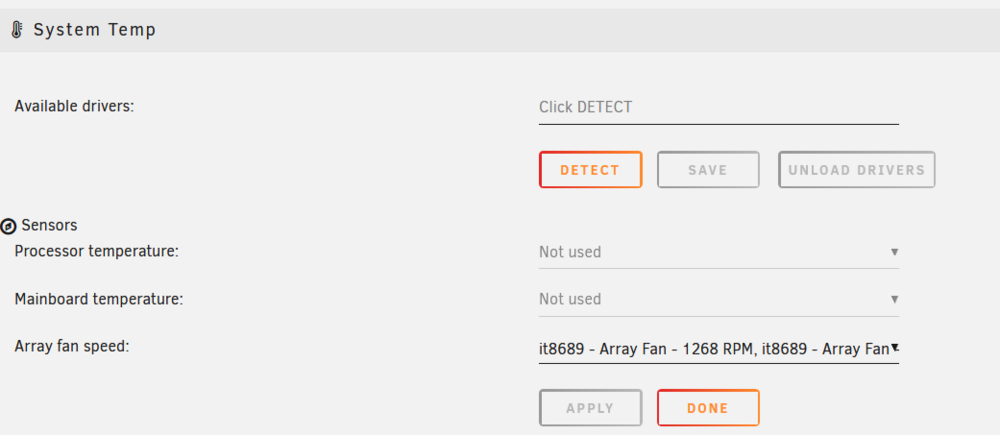
So I have two interesting problems - I have installed it87 and Dynamix System Temperature on a Gigabyte B650M Gaming Plus Wifi board. PROBLEM #1: If I run sensors I get this: root@Skadi:~# sensors amdgpu-pci-1000 Adapter: PCI adapter vddgfx: 1.25 V vddnb: 1.02 V edge: +37.0°C PPT: 29.17 W nvme-pci-0200 Adapter: PCI adapter Composite: +34.9°C (low = -20.1°C, high = +83.8°C) (crit = +88.8°C) Sensor 2: +45.9°C k10temp-pci-00c3 Adapter: PCI adapter Tctl: +39.6°C Tccd1: +30.0°C it8689-isa-0a40 Adapter: ISA adapter in0: 780.00 mV (min = +0.00 V, max = +3.06 V) in1: 1.99 V (min = +0.00 V, max = +3.06 V) in2: 2.02 V (min = +0.00 V, max = +3.06 V) in3: 2.03 V (min = +0.00 V, max = +3.06 V) in4: 1.03 V (min = +0.00 V, max = +3.06 V) in5: 1.12 V (min = +0.00 V, max = +3.06 V) in6: 1.99 V (min = +0.00 V, max = +3.06 V) 3VSB: 3.31 V (min = +0.00 V, max = +6.12 V) Vbat: 3.12 V fan1: 1352 RPM (min = 10 RPM) Array Fan: 1268 RPM (min = 0 RPM) Array Fan: 1013 RPM (min = 0 RPM) temp1: +31.0°C (low = +127.0°C, high = +127.0°C) sensor = thermistor temp2: +54.0°C (low = +127.0°C, high = +127.0°C) sensor = thermistor temp3: +39.0°C (low = +127.0°C, high = +127.0°C) sensor = AMD AMDSI temp4: +34.0°C (low = +0.0°C, high = +127.0°C) sensor = thermistor temp5: +37.0°C (low = +0.0°C, high = -125.0°C) sensor = thermistor temp6: +39.0°C (low = +0.0°C, high = -125.0°C) sensor = thermistor intrusion0: ALARM acpitz-acpi-0 Adapter: ACPI interface temp1: +16.8°C (crit = +20.8°C) nvme-pci-0d00 Adapter: PCI adapter Composite: +39.9°C (low = -273.1°C, high = +81.8°C) (crit = +84.8°C) Sensor 1: +39.9°C (low = -273.1°C, high = +65261.8°C) Sensor 2: +44.9°C (low = -273.1°C, high = +65261.8°C) But Dynamix System Temp returns nada: I would have expected it to detect something since sensors definitely returns a pile of data! What am I missing? PROBLEM #2: I had a go at Dynamix Fan Control: Set BIOS fan mode to PWM Set Fan speed to Full Set Fan Stop = Disabled Set Fan Alarm = Disabled In system Temp (as per above) it detects the CPU fan and the two case fans. I can click Detect on PWM2 and PWM3 and it finds the fans, and turns then down to 0. And then nothing....but fat nothing. Fans will not come back to any sort of speed. I have tried setting a minimum PWM of 50 or 128 - it will always spin the fan down and then stop. So, it definitely can control, but it doesn't succeed in restarting the fan, or reducing it down to a lower speed (like it ramps down, but it doesn't hold at say 50 or 128). I've tried with Fan Alarm Enabled/Disabled and Fan Stop Enabled/Disabled. The result is always the same. Other interesting points to note: Once the fan drops to zero Dynamic System Temp loses the two array fans (it shows only CPU). Dynamix Fan Controller will continue to try and control fans (spin up to some value like 63%), but this always fails. In addition it actually starts (unsuccessfully) trying to play with PWM1 - the CPU fan. This is the only fan still reporting rpm at this point....but why does it try to control the wrong fan? I get the sense that this should work....but I'm not having a lot of luck!
-
No joy I'm afraid. The Proxmox script is looking for file paths that just don't exist in a default Debian install. Getting this running may be a lot harder than running a script. And even then, there is no guarantee of success.... 😞 I've also been reading through the other thread(s) specifically on Frigate. There is a suspicion that it might be something at the kernel or CPU level....on my side it was rock solid until it wasn't....and really aside from some networking changes (which we now know don't make the problem better or worse), more/less docker containers (which don't seem to have any affect), and changes to disk / addition of an HBA (also ruled out), and more plugins (also ruled out as I crash in safe mode), the *only* other things that have changed are my old CPU died and got replaced (but I was stable after that for a month), and the adoption of the latest Intel microcode through a BIOS update. This problem has been so perplexing - but I am glad we can now firmly park it on Frigate's interaction with the host - and I'm grateful to have been pointed to the other thread as it makes it clear this is a random 'me' thing. It may yet come to pass that it runs fine on a AM5 7000 series CPU, and just not on an Intel Core i7 system. If Frigate-2 stays up I'm going to try moving Frigate-1 to the AMD host as well. It is only a matter of moving over one HDD, so not a major effort. The put the burn on that machine I've just kicked off a parity check - it doesn't need to finish, but if it runs for the day 18+ hours without any issues that might point to better stability, because the other one won't go for more than a few hours without collapsing. After that there's also the other detection modes to try - there are reports in the other thread some combinations of CPU/GPU/OpenVimo/Yolo8 work better than others...
-
I'm going to make a start on this now. I can report that using the CPU/GPU and openvino as the detector made things much worse (unless I did something wrong). Within a few minutes I could log into Unraid via GUI or SSH but could not get anywhere beyond authentication (no GUI, no console prompt). Also, before it burned to the ground again it crashed and many of the docker containers were tagged as 'unhealthy'. So the Frigate container is now off and everything is (so far) calm, On the new AMD-based machine the Frigate Docker is still running with no issues (four cameras, versus six). But it will go when the other instance goes....no point having non-standard configurations. The only downside of any VM is that you have another host to maintain, patch etc.... I'll get working and loop back if I manage to stick the landing (or not). 🙂
-
Just saw your linux-based VM...that might indeed be a better option! Something to look at after work....
-
So on v7 it still crashes. I've unplugged the TPU, so will try CPU detection now.... I don't really want to run a low resolution camera feed as that means no clear images (which is the point). I don't really want to go back to Blue Iris either where it is running on a Windows VM, or worse yet, natively on Windows - but we might yet end up there....
-
Well dang! I have memory to burn, and feeds are not super high resolution (except for a 180 camera). Moving to CPU/GPU detection might be the answer....that's a pity...the coral.ai unit really lowered the CPU%.
-
Pinned. And upgraded to Unraid v7RC1 now.
-
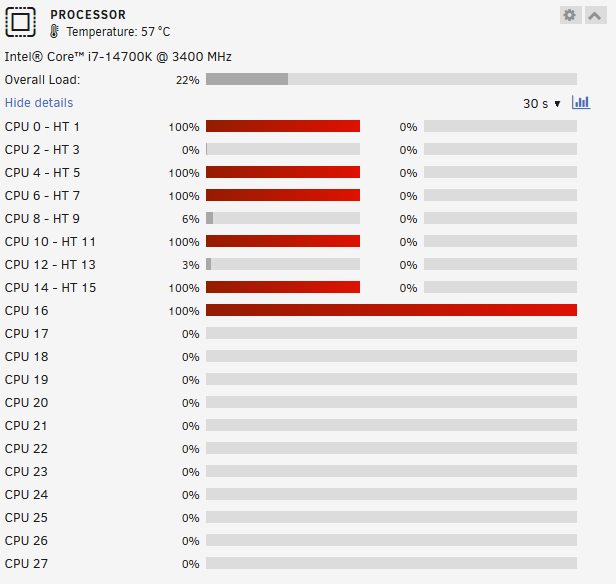
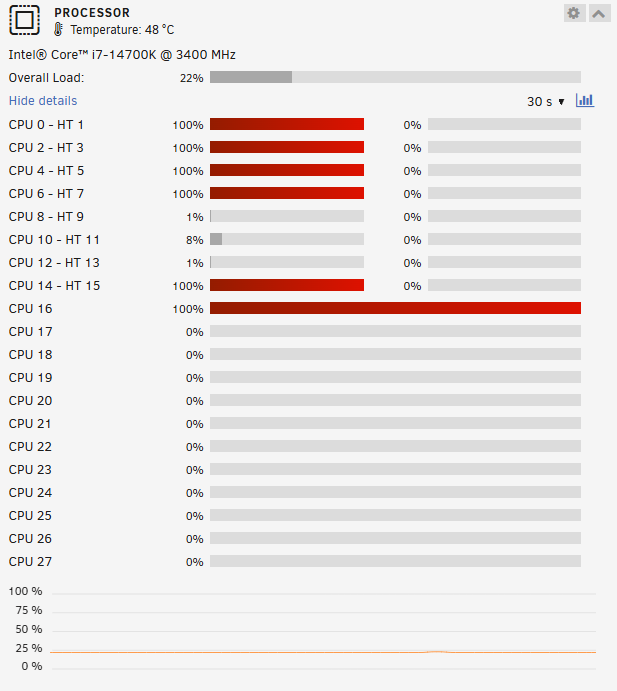
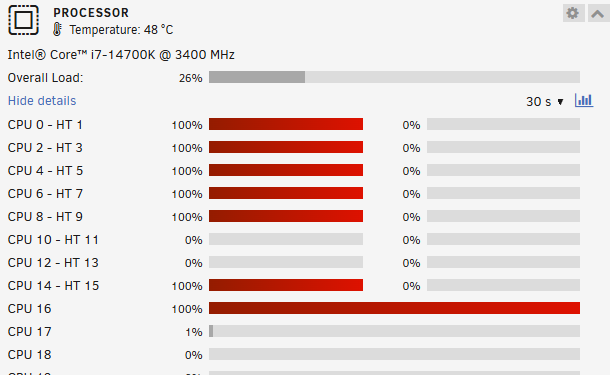
So a fun new problem today.....it's always nice when things mix it up a little...lets you focus on something else for a bit! This morning I get up, sign in and see what's what. This is new: Locked CPU cores. Oh...and docker is running, but all the containers bar one are stopped, and the docker tab opens but nothing loads - you just get the unraid 'wave', and Apps doesn't load at all. Can get to tools and see the log - looks like we had a crash when AppBackup was running: Dec 12 00:01:28 Svalbard kernel: veth7196d3b: renamed from eth0 Dec 12 00:01:28 Svalbard kernel: veth3a161a9: renamed from eth0 Dec 12 00:01:28 Svalbard kernel: vethe140ebc: renamed from eth0 Dec 12 00:01:31 Svalbard kernel: vethdcf506a: renamed from eth0 Dec 12 00:02:08 Svalbard kernel: veth4b3afd2: renamed from eth0 Dec 12 00:02:08 Svalbard kernel: veth6aec7d4: renamed from eth0 Dec 12 00:02:19 Svalbard kernel: veth56d4257: renamed from eth0 Dec 12 00:02:22 Svalbard kernel: vethbdb3af6: renamed from eth0 Dec 12 00:02:30 Svalbard kernel: vethf7bebb7: renamed from eth0 Dec 12 00:02:31 Svalbard kernel: veth6493f9c: renamed from eth0 Dec 12 00:02:41 Svalbard kernel: veth2a00935: renamed from eth0 Dec 12 00:02:45 Svalbard kernel: vethd666ffc: renamed from eth0 Dec 12 00:02:48 Svalbard kernel: veth2a06c9e: renamed from eth0 Dec 12 00:04:05 Svalbard kernel: BUG: kernel NULL pointer dereference, address: 0000000000000020 Dec 12 00:04:05 Svalbard kernel: #PF: supervisor read access in kernel mode Dec 12 00:04:05 Svalbard kernel: #PF: error_code(0x0000) - not-present page Dec 12 00:04:05 Svalbard kernel: PGD 0 P4D 0 Dec 12 00:04:05 Svalbard kernel: Oops: 0000 [#1] PREEMPT SMP NOPTI Dec 12 00:04:05 Svalbard kernel: CPU: 14 PID: 1346 Comm: arc_evict Tainted: P O 6.1.118-Unraid #1 Dec 12 00:04:05 Svalbard kernel: Hardware name: Gigabyte Technology Co., Ltd. Z790M AORUS ELITE AX/Z790M AORUS ELITE AX, BIOS F10 09/27/2024 Dec 12 00:04:05 Svalbard kernel: RIP: 0010:buf_hash_remove+0x2b/0x83 [zfs] Dec 12 00:04:05 Svalbard kernel: Code: 1f 44 00 00 53 48 89 fb 48 8b 57 10 48 8b 7f 30 48 89 de e8 5b fe ff ff 48 8b 15 d7 07 22 00 48 23 05 c8 07 22 00 48 8d 14 c2 <48> 8b 0a 48 39 cb 74 06 48 8d 51 20 eb f2 48 8b 4b 20 48 89 0a 31 Dec 12 00:04:05 Svalbard kernel: RSP: 0018:ffffc90000cdfd48 EFLAGS: 00010286 Dec 12 00:04:05 Svalbard kernel: RAX: 000000000009c334 RBX: ffff8881809f5400 RCX: 0000000000000000 Dec 12 00:04:05 Svalbard kernel: RDX: 0000000000000020 RSI: ce70e04a9d9425bb RDI: 2b1292b03e72bbdb Dec 12 00:04:05 Svalbard kernel: RBP: ffffffffa110e400 R08: 9ae16a3b2f90408f R09: 9ae16a3b2f90404f Dec 12 00:04:05 Svalbard kernel: R10: ffff8881611dc140 R11: 0000000000032d40 R12: ffffffffa110e280 Dec 12 00:04:05 Svalbard kernel: R13: 0000000000000000 R14: 0000000000000001 R15: 0000000000000001 Dec 12 00:04:05 Svalbard kernel: FS: 0000000000000000(0000) GS:ffff88907f780000(0000) knlGS:0000000000000000 Dec 12 00:04:05 Svalbard kernel: CS: 0010 DS: 0000 ES: 0000 CR0: 0000000080050033 Dec 12 00:04:05 Svalbard kernel: CR2: 0000000000000020 CR3: 000000000420a000 CR4: 0000000000750ee0 Dec 12 00:04:05 Svalbard kernel: PKRU: 55555554 Dec 12 00:04:05 Svalbard kernel: Call Trace: Dec 12 00:04:05 Svalbard kernel: <TASK> Dec 12 00:04:05 Svalbard kernel: ? __die_body+0x1a/0x5c Dec 12 00:04:05 Svalbard kernel: ? page_fault_oops+0x329/0x376 Dec 12 00:04:05 Svalbard kernel: ? do_user_addr_fault+0x12e/0x465 Dec 12 00:04:05 Svalbard kernel: ? common_interrupt+0xb7/0xd0 Dec 12 00:04:05 Svalbard kernel: ? exc_page_fault+0xfb/0x11d Dec 12 00:04:05 Svalbard kernel: ? asm_exc_page_fault+0x22/0x30 Dec 12 00:04:05 Svalbard kernel: ? buf_hash_remove+0x2b/0x83 [zfs] Dec 12 00:04:05 Svalbard kernel: ? buf_hash_remove+0x19/0x83 [zfs] Dec 12 00:04:05 Svalbard kernel: arc_change_state.constprop.0+0x195/0x347 [zfs] Dec 12 00:04:05 Svalbard kernel: arc_evict_state+0x30d/0x701 [zfs] Dec 12 00:04:05 Svalbard kernel: ? random_get_pseudo_bytes+0xc4/0xf8 [spl] Dec 12 00:04:05 Svalbard kernel: arc_evict_cb+0x424/0x564 [zfs] Dec 12 00:04:05 Svalbard kernel: ? _raw_spin_unlock_irq+0x1a/0x2f Dec 12 00:04:05 Svalbard kernel: ? sigprocmask+0x6e/0x8e Dec 12 00:04:05 Svalbard kernel: zthr_procedure+0x89/0x12c [zfs] Dec 12 00:04:05 Svalbard kernel: ? zrl_is_locked+0x15/0x15 [zfs] Dec 12 00:04:05 Svalbard kernel: ? __thread_exit+0x13/0x13 [spl] Dec 12 00:04:05 Svalbard kernel: thread_generic_wrapper+0x57/0x65 [spl] Dec 12 00:04:05 Svalbard kernel: kthread+0xe4/0xef Dec 12 00:04:05 Svalbard kernel: ? kthread_complete_and_exit+0x1b/0x1b Dec 12 00:04:05 Svalbard kernel: ret_from_fork+0x1f/0x30 Dec 12 00:04:05 Svalbard kernel: </TASK> Dec 12 00:04:05 Svalbard kernel: Modules linked in: wireguard curve25519_x86_64 libcurve25519_generic libchacha20poly1305 chacha_x86_64 poly1305_x86_64 ip6_udp_tunnel udp_tunnel libchacha tun nft_compat nf_tables xt_nat xt_tcpudp xt_conntrack xt_MASQUERADE nf_conntrack_netlink nfnetlink xfrm_user xfrm_algo iptable_nat nf_nat nf_conntrack nf_defrag_ipv6 nf_defrag_ipv4 xt_addrtype br_netfilter bridge xfs nfsd auth_rpcgss oid_registry lockd grace sunrpc md_mod tcp_diag inet_diag it87(O) hwmon_vid ip6table_filter ip6_tables iptable_filter ip_tables x_tables efivarfs 8021q garp mrp stp llc macvtap macvlan tap igb r8169 realtek zfs(PO) i915 intel_rapl_msr intel_rapl_common x86_pkg_temp_thermal intel_powerclamp zunicode(PO) coretemp zzstd(O) iosf_mbi drm_buddy kvm_intel ttm zlua(O) drm_display_helper btusb btrtl zavl(PO) btbcm drm_kms_helper icp(PO) btintel kvm bluetooth crct10dif_pclmul crc32_pclmul drm crc32c_intel ghash_clmulni_intel sha512_ssse3 sha256_ssse3 sha1_ssse3 zcommon(PO) aesni_intel znvpair(PO) Dec 12 00:04:05 Svalbard kernel: crypto_simd cryptd ecdh_generic spl(O) rapl mei_pxp mei_hdcp gigabyte_wmi wmi_bmof ecc intel_cstate mpt3sas i2c_i801 intel_gtt nvme intel_uncore agpgart i2c_smbus mei_me i2c_algo_bit nvme_core ahci i2c_core mei libahci raid_class syscopyarea scsi_transport_sas sysfillrect sysimgblt fb_sys_fops thermal fan video tpm_crb tpm_tis tpm_tis_core wmi tpm backlight intel_pmc_core acpi_tad acpi_pad button unix [last unloaded: igb] Dec 12 00:04:05 Svalbard kernel: CR2: 0000000000000020 Dec 12 00:04:05 Svalbard kernel: ---[ end trace 0000000000000000 ]--- Dec 12 00:04:05 Svalbard kernel: RIP: 0010:buf_hash_remove+0x2b/0x83 [zfs] Dec 12 00:04:05 Svalbard kernel: Code: 1f 44 00 00 53 48 89 fb 48 8b 57 10 48 8b 7f 30 48 89 de e8 5b fe ff ff 48 8b 15 d7 07 22 00 48 23 05 c8 07 22 00 48 8d 14 c2 <48> 8b 0a 48 39 cb 74 06 48 8d 51 20 eb f2 48 8b 4b 20 48 89 0a 31 Dec 12 00:04:05 Svalbard kernel: RSP: 0018:ffffc90000cdfd48 EFLAGS: 00010286 Dec 12 00:04:05 Svalbard kernel: RAX: 000000000009c334 RBX: ffff8881809f5400 RCX: 0000000000000000 Dec 12 00:04:05 Svalbard kernel: RDX: 0000000000000020 RSI: ce70e04a9d9425bb RDI: 2b1292b03e72bbdb Dec 12 00:04:05 Svalbard kernel: RBP: ffffffffa110e400 R08: 9ae16a3b2f90408f R09: 9ae16a3b2f90404f Dec 12 00:04:05 Svalbard kernel: R10: ffff8881611dc140 R11: 0000000000032d40 R12: ffffffffa110e280 Dec 12 00:04:05 Svalbard kernel: R13: 0000000000000000 R14: 0000000000000001 R15: 0000000000000001 Dec 12 00:04:05 Svalbard kernel: FS: 0000000000000000(0000) GS:ffff88907f780000(0000) knlGS:0000000000000000 Dec 12 00:04:05 Svalbard kernel: CS: 0010 DS: 0000 ES: 0000 CR0: 0000000080050033 Dec 12 00:04:05 Svalbard kernel: CR2: 0000000000000020 CR3: 000000015ebfa000 CR4: 0000000000750ee0 Dec 12 00:04:05 Svalbard kernel: PKRU: 55555554 Dec 12 00:04:05 Svalbard kernel: note: arc_evict[1346] exited with irqs disabled Dec 12 00:32:50 Svalbard emhttpd: spinning down /dev/sdd Dec 12 01:03:25 Svalbard emhttpd: spinning down /dev/sde Dec 12 01:03:27 Svalbard emhttpd: read SMART /dev/sde As to the CPU locking, top returns: top - 06:58:28 up 9:15, 0 users, load average: 19.02, 18.76, 17.97 Tasks: 636 total, 1 running, 635 sleeping, 0 stopped, 0 zombie %Cpu(s): 3.6 us, 0.7 sy, 0.0 ni, 78.1 id, 17.6 wa, 0.0 hi, 0.0 si, 0.0 st MiB Mem : 64082.5 total, 569.5 free, 10164.9 used, 53348.1 buff/cache MiB Swap: 2048.0 total, 2014.0 free, 34.0 used. 53033.9 avail Mem PID USER PR NI VIRT RES SHR S %CPU %MEM TIME+ COMMAND 20777 root 20 0 1240368 18272 8404 S 100.0 0.0 402:23.88 unpackerr 12200 root 20 0 0 0 0 S 5.6 0.0 43:57.54 unraidd0 7527 root 20 0 0 0 0 D 1.7 0.0 12:30.74 mdrecoveryd 14632 root 20 0 4559768 92920 38868 S 0.3 0.1 0:30.29 dockerd 25476 root 20 0 96460 17032 9936 S 0.3 0.0 0:00.02 php-fpm 25498 root 20 0 95916 14456 7904 S 0.3 0.0 0:00.01 php-fpm 27345 root 20 0 95916 14844 8288 S 0.3 0.0 0:00.02 php-fpm 28084 root 20 0 95996 30948 24156 S 0.3 0.0 0:00.15 update_3 1 root 20 0 2592 1808 1688 S 0.0 0.0 0:01.06 init 2 root 20 0 0 0 0 S 0.0 0.0 0:01.43 kthreadd Which is odd for a couple of reasons - firstly the there's only one thread holding the CPU high so why are the multiple cores high. So I kill the process: Ending process 20777... Checking... Process 20777 could not be gently killed... will use SIGKILL... Process 20777 ()... Success... And my reward is that the CPU stays high: CPU10 is released, but now CPU2 has gone high. And top still thinks there's nothing happening: top - 07:04:08 up 9:21, 0 users, load average: 18.17, 18.70, 18.23 Tasks: 636 total, 1 running, 635 sleeping, 0 stopped, 0 zombie %Cpu(s): 0.1 us, 0.4 sy, 0.0 ni, 78.2 id, 21.3 wa, 0.0 hi, 0.0 si, 0.0 st MiB Mem : 64082.5 total, 561.8 free, 10171.1 used, 53349.6 buff/cache MiB Swap: 2048.0 total, 2014.0 free, 34.0 used. 53027.7 avail Mem PID USER PR NI VIRT RES SHR S %CPU %MEM TIME+ COMMAND 12200 root 20 0 0 0 0 S 7.3 0.0 44:19.24 unraidd0 7527 root 20 0 0 0 0 D 2.0 0.0 12:36.75 mdrecoveryd 4060 root 20 0 6204 2188 1880 S 0.3 0.0 0:02.50 blazer_usb 7505 root 20 0 279852 5080 4360 S 0.3 0.0 1:11.19 emhttpd 28084 root 20 0 95996 30948 24156 S 0.3 0.0 0:00.81 update_3 1 root 20 0 2592 1808 1688 S 0.0 0.0 0:01.06 init 2 root 20 0 0 0 0 S 0.0 0.0 0:01.43 kthreadd 3 root 0 -20 0 0 0 I 0.0 0.0 0:00.00 rcu_gp 4 root 0 -20 0 0 0 I 0.0 0.0 0:00.00 rcu_par_gp 5 root 0 -20 0 0 0 I 0.0 0.0 0:00.00 slub_flushwq Do we trust top or do we trust the dashboard? Personally I'm with top - so then given that the dashboard is updating why is it lying? Then, on top of this docker has curled up it's toes and died: And the logs having nothing to say: Dec 12 06:53:14 Svalbard webGUI: Successful login user root from 192.168.2.101 Dec 12 07:00:01 Svalbard Plugin Auto Update: Checking for available plugin updates Dec 12 07:00:09 Svalbard Plugin Auto Update: Community Applications Plugin Auto Update finished Dec 12 07:01:14 Svalbard emhttpd: cmd: /usr/local/emhttp/plugins/open.files/scripts/killprocess 20777 But the parity check, now at 29%, is still running....which would normally have packed up and gone home by now. What to do? OK....let's go to Settings > Docker > Disable...then we can restart docker...nope....just the unraid wave again. The staus bar says "Services starting...." but it never ends. Now Docker is set to "n" but it's status is still "Running". The logs say: Dec 12 07:01:14 Svalbard emhttpd: cmd: /usr/local/emhttp/plugins/open.files/scripts/killprocess 20777 Dec 12 07:07:29 Svalbard ool www[17934]: /usr/local/emhttp/plugins/dynamix/scripts/emcmd 'cmdStatus=Apply' Dec 12 07:07:29 Svalbard emhttpd: Starting services... Dec 12 07:07:29 Svalbard emhttpd: shcmd (27301): /etc/rc.d/rc.samba restart Dec 12 07:07:29 Svalbard winbindd[14469]: [2024/12/12 07:07:29.359923, 0] ../../source3/winbindd/winbindd_dual.c:1964(winbindd_sig_term_handler) Dec 12 07:07:29 Svalbard winbindd[14469]: Got sig[15] terminate (is_parent=1) Dec 12 07:07:29 Svalbard wsdd2[14466]: 'Terminated' signal received. Dec 12 07:07:29 Svalbard wsdd2[14466]: terminating. Dec 12 07:07:31 Svalbard root: Starting Samba: /usr/sbin/smbd -D Dec 12 07:07:31 Svalbard root: /usr/sbin/wsdd2 -d -4 Dec 12 07:07:31 Svalbard wsdd2[21498]: starting. Dec 12 07:07:31 Svalbard root: /usr/sbin/winbindd -D Dec 12 07:07:31 Svalbard emhttpd: shcmd (27306): /etc/rc.d/rc.avahidaemon restart Dec 12 07:07:31 Svalbard root: Stopping Avahi mDNS/DNS-SD Daemon: stopped Dec 12 07:07:31 Svalbard avahi-daemon[14538]: Got SIGTERM, quitting. Dec 12 07:07:31 Svalbard avahi-daemon[14538]: Leaving mDNS multicast group on interface eth0.IPv4 with address 192.168.6.2. Dec 12 07:07:31 Svalbard avahi-dnsconfd[14547]: read(): EOF Dec 12 07:07:31 Svalbard avahi-daemon[14538]: avahi-daemon 0.8 exiting. Dec 12 07:07:31 Svalbard root: Starting Avahi mDNS/DNS-SD Daemon: /usr/sbin/avahi-daemon -D Dec 12 07:07:31 Svalbard avahi-daemon[21571]: Found user 'avahi' (UID 61) and group 'avahi' (GID 214). Dec 12 07:07:31 Svalbard avahi-daemon[21571]: Successfully dropped root privileges. Dec 12 07:07:31 Svalbard avahi-daemon[21571]: avahi-daemon 0.8 starting up. Dec 12 07:07:31 Svalbard avahi-daemon[21571]: Successfully called chroot(). Dec 12 07:07:31 Svalbard avahi-daemon[21571]: Successfully dropped remaining capabilities. Dec 12 07:07:31 Svalbard avahi-daemon[21571]: Loading service file /services/sftp-ssh.service. Dec 12 07:07:31 Svalbard avahi-daemon[21571]: Loading service file /services/smb.service. Dec 12 07:07:31 Svalbard avahi-daemon[21571]: Loading service file /services/ssh.service. Dec 12 07:07:31 Svalbard avahi-daemon[21571]: Joining mDNS multicast group on interface eth0.IPv4 with address 192.168.6.2. Dec 12 07:07:31 Svalbard avahi-daemon[21571]: New relevant interface eth0.IPv4 for mDNS. Dec 12 07:07:31 Svalbard avahi-daemon[21571]: Network interface enumeration completed. Dec 12 07:07:31 Svalbard avahi-daemon[21571]: Registering new address record for 192.168.6.2 on eth0.IPv4. Dec 12 07:07:31 Svalbard emhttpd: shcmd (27307): /etc/rc.d/rc.avahidnsconfd restart Dec 12 07:07:31 Svalbard root: Stopping Avahi mDNS/DNS-SD DNS Server Configuration Daemon: stopped Dec 12 07:07:31 Svalbard root: Starting Avahi mDNS/DNS-SD DNS Server Configuration Daemon: /usr/sbin/avahi-dnsconfd -D Dec 12 07:07:31 Svalbard avahi-dnsconfd[21580]: Successfully connected to Avahi daemon. Dec 12 07:07:32 Svalbard emhttpd: shcmd (27312): /etc/rc.d/rc.docker stop Dec 12 07:07:32 Svalbard avahi-daemon[21571]: Server startup complete. Host name is Svalbard.local. Local service cookie is 3045481838. Dec 12 07:07:33 Svalbard avahi-daemon[21571]: Service "Svalbard" (/services/ssh.service) successfully established. Dec 12 07:07:33 Svalbard avahi-daemon[21571]: Service "Svalbard" (/services/smb.service) successfully established. Dec 12 07:07:33 Svalbard avahi-daemon[21571]: Service "Svalbard" (/services/sftp-ssh.service) successfully established. So it definitely did something.... While we wait lets go to AppBackup to see if there's anything in its log....Settings > AppBackup yields a blank page but after a few minutes it comes up. Check the log, and it still thinks it is running...so hit stop and copy the log: [12.12.2024 00:00:02][ℹ️][Main] 👋 WELCOME TO APPDATA.BACKUP!! :D [12.12.2024 00:00:03][ℹ️][Main] Backing up from: /mnt/user/appdata, /mnt/cache/appdata [12.12.2024 00:00:03][ℹ️][Main] Backing up to: /mnt/scratch/archive_unraid/appdata_backups/ab_20241212_000003 [12.12.2024 00:00:03][ℹ️][Main] Selected containers: Calibre, Fenrus, Jellyfin, Mealie, Overseerr, PhotoPrism, Plex, PostgreSQL15, Starr, TubeSync, frigate-1, syncthing, tautulli [12.12.2024 00:00:03][ℹ️][Main] Saving container XML files... [12.12.2024 00:01:24][ℹ️][Main] Auto-Update for 'Bazarr' is enabled and update is available! Schedule update after backup... [12.12.2024 00:01:24][ℹ️][Main] Auto-Update for 'Calibre' is enabled and update is available! Schedule update after backup... [12.12.2024 00:01:24][ℹ️][Main] Auto-Update for 'Czkawka' is enabled but no update is available. [12.12.2024 00:01:24][ℹ️][Main] Auto-Update for 'Fenrus' is enabled but no update is available. [12.12.2024 00:01:24][ℹ️][Main] Auto-Update for 'Flaresolverr' is enabled but no update is available. [12.12.2024 00:01:24][ℹ️][Main] Auto-Update for 'frigate-1' is enabled but no update is available. [12.12.2024 00:01:24][ℹ️][Main] Auto-Update for 'Jellyfin' is enabled but no update is available. [12.12.2024 00:01:24][ℹ️][Main] Auto-Update for 'Jellystat' is enabled but no update is available. [12.12.2024 00:01:24][ℹ️][Main] Auto-Update for 'lidarr' is enabled and update is available! Schedule update after backup... [12.12.2024 00:01:24][ℹ️][Main] Auto-Update for 'Mealie' is enabled but no update is available. [12.12.2024 00:01:24][ℹ️][Main] Auto-Update for 'Overseerr' is enabled but no update is available. [12.12.2024 00:01:24][ℹ️][Main] Auto-Update for 'PhotoPrism' is enabled but no update is available. [12.12.2024 00:01:24][ℹ️][Main] Auto-Update for 'Plex' is enabled but no update is available. [12.12.2024 00:01:24][ℹ️][Main] Auto-Update for 'PostgreSQL15' is enabled but no update is available. [12.12.2024 00:01:24][ℹ️][Main] Auto-Update for 'Prowlarr' is enabled but no update is available. [12.12.2024 00:01:24][ℹ️][Main] Auto-Update for 'qBittorrent' is enabled but no update is available. [12.12.2024 00:01:24][ℹ️][Main] Auto-Update for 'Radarr' is enabled but no update is available. [12.12.2024 00:01:24][ℹ️][Main] Auto-Update for 'Readarr' is enabled but no update is available. [12.12.2024 00:01:24][ℹ️][Main] Auto-Update for 'SABnzbd' is enabled but no update is available. [12.12.2024 00:01:24][ℹ️][Main] Auto-Update for 'Sonarr' is enabled but no update is available. [12.12.2024 00:01:24][ℹ️][Main] Auto-Update for 'syncthing' is enabled but no update is available. [12.12.2024 00:01:24][ℹ️][Main] Auto-Update for 'tautulli' is enabled but no update is available. [12.12.2024 00:01:24][ℹ️][Main] Auto-Update for 'TubeSync' is enabled but no update is available. [12.12.2024 00:01:24][ℹ️][Main] Auto-Update for 'Unpackerr' is enabled but no update is available. [12.12.2024 00:01:24][ℹ️][Main] Method: Stop all container before continuing. [12.12.2024 00:01:24][ℹ️][Calibre] Stopping Calibre... done! (took 4 seconds) [12.12.2024 00:01:28][ℹ️][Fenrus] Stopping Fenrus... done! (took 0 seconds) [12.12.2024 00:01:28][ℹ️][PhotoPrism] Stopping PhotoPrism... done! (took 0 seconds) [12.12.2024 00:01:28][ℹ️][TubeSync] Stopping TubeSync... done! (took 3 seconds) [12.12.2024 00:01:31][ℹ️][Starr][Bazarr] Stopping Bazarr... done! (took 10 seconds) [12.12.2024 00:01:41][ℹ️][Starr][Readarr] Stopping Readarr... done! (took 2 seconds) [12.12.2024 00:01:43][ℹ️][Starr][lidarr] Stopping lidarr... done! (took 4 seconds) [12.12.2024 00:01:47][ℹ️][Starr][Radarr] Stopping Radarr... done! (took 5 seconds) [12.12.2024 00:01:52][ℹ️][Starr][Sonarr] Stopping Sonarr... done! (took 3 seconds) [12.12.2024 00:01:55][ℹ️][Starr][Prowlarr] Stopping Prowlarr... done! (took 4 seconds) [12.12.2024 00:01:59][ℹ️][Starr][qBittorrent] Stopping qBittorrent... done! (took 6 seconds) [12.12.2024 00:02:05][ℹ️][Starr][SABnzbd] Stopping SABnzbd... done! (took 3 seconds) [12.12.2024 00:02:08][ℹ️][Starr][GluetunVPN] Stopping GluetunVPN... done! (took 0 seconds) [12.12.2024 00:02:08][ℹ️][PostgreSQL15] Stopping PostgreSQL15... done! (took 0 seconds) [12.12.2024 00:02:08][ℹ️][Jellyfin] Stopping Jellyfin... done! (took 11 seconds) [12.12.2024 00:02:19][ℹ️][tautulli] Stopping tautulli... done! (took 3 seconds) [12.12.2024 00:02:22][ℹ️][Plex] Stopping Plex... done! (took 8 seconds) [12.12.2024 00:02:30][ℹ️][Mealie] Stopping Mealie... done! (took 1 seconds) [12.12.2024 00:02:31][ℹ️][frigate-1] Stopping frigate-pembroke... done! (took 10 seconds) [12.12.2024 00:02:41][ℹ️][syncthing] Stopping syncthing... done! (took 4 seconds) [12.12.2024 00:02:45][ℹ️][Overseerr] Stopping Overseerr... done! (took 3 seconds) [12.12.2024 00:02:48][ℹ️][Main] Starting backup for containers [12.12.2024 00:02:48][ℹ️][Calibre] Should NOT backup external volumes, sanitizing them... [12.12.2024 00:02:48][ℹ️][Calibre] Calculated volumes to back up: /mnt/user/appdata/calibre [12.12.2024 00:02:48][ℹ️][Calibre] Backing up Calibre... [12.12.2024 00:02:49][ℹ️][Calibre] Backup created without issues (took 00:00:01 (hours:mins:secs)) [12.12.2024 00:02:49][ℹ️][Calibre] Verifying backup... [12.12.2024 00:02:49][ℹ️][Calibre] Verification ended without issues (took 00:00:00 (hours:mins:secs)) [12.12.2024 00:02:49][ℹ️][Calibre] Installing planned update for Calibre... [12.12.2024 00:03:04][ℹ️][Fenrus] Should NOT backup external volumes, sanitizing them... [12.12.2024 00:03:04][ℹ️][Fenrus] Calculated volumes to back up: /mnt/user/appdata/fenrus/data [12.12.2024 00:03:04][ℹ️][Fenrus] Backing up Fenrus... [12.12.2024 00:03:04][ℹ️][Fenrus] Backup created without issues (took 00:00:00 (hours:mins:secs)) [12.12.2024 00:03:04][ℹ️][Fenrus] Verifying backup... [12.12.2024 00:03:04][ℹ️][Fenrus] Verification ended without issues (took 00:00:00 (hours:mins:secs)) [12.12.2024 00:03:04][ℹ️][PhotoPrism] Should NOT backup external volumes, sanitizing them... [12.12.2024 00:03:04][ℹ️][PhotoPrism] Calculated volumes to back up: /mnt/user/appdata/photoprism [12.12.2024 00:03:04][ℹ️][PhotoPrism] Backing up PhotoPrism... [12.12.2024 07:23:01][❌][PhotoPrism] tar creation failed! Tar said: But....spoiler alert.....it still thinks its running. Jump back to console: root@Svalbard:~# docker container list CONTAINER ID IMAGE COMMAND CREATED STATUS PORTS NAMES 0ca070369ca0 golift/unpackerr "/unpackerr" 4 days ago Up 10 hours Unpackerr d96d888e2e34 flaresolverr/flaresolverr "/usr/bin/dumb-init …" 4 days ago Up 10 hours Flaresolverr 32a5d349b413 cyfershepard/jellystat "docker-entrypoint.s…" 4 days ago Up 10 hours (healthy) Jellystat But no amount of kill commands will make anything stop. So we have zombies. And the only solution for that is a reboot....so that's now the only way out from here. In the meantime though on the dashboard all of a sudden the docker listing is back, with everything stopped and three 'unknown' containers (presumably the ones I tried to kill). The system is also super slow....things appear but it takes a super long time... Interestingly the parity check is still running, the read speeds are still updating, but the progress is stuck at 4.65TB / 29.1% - so that also isn't right. That should have progressed by now.... And the CPU keeps locking up: It is a sick sick machine. But not in anyway that is possible to meaningfully diagnose....so far.... Can't reboot now either - not from console and not from GUI..... :-(

-
Definitely getting closer..... Just had another crash, but it was non-fatal: Dec 11 13:05:19 Svalbard emhttpd: read SMART /dev/sdc Dec 11 13:54:53 Svalbard emhttpd: spinning down /dev/sdc Dec 11 14:42:52 Svalbard kernel: ------------[ cut here ]------------ Dec 11 14:42:52 Svalbard kernel: WARNING: CPU: 12 PID: 32398 at fs/dcache.c:430 retain_dentry+0x52/0xa5 Dec 11 14:42:52 Svalbard kernel: Modules linked in: wireguard curve25519_x86_64 libcurve25519_generic libchacha20poly1305 chacha_x86_64 poly1305_x86_64 ip6_udp_tunnel udp_tunnel libchacha tun nft_compat nf_tables xt_nat xt_tcpudp xt_conntrack xt_MASQUERADE nf_conntrack_netlink nfnetlink xfrm_user xfrm_algo iptable_nat nf_nat nf_conntrack nf_defrag_ipv6 nf_defrag_ipv4 xt_addrtype br_netfilter bridge xfs md_mod tcp_diag inet_diag it87(O) hwmon_vid ip6table_filter ip6_tables iptable_filter ip_tables x_tables efivarfs 8021q garp mrp stp llc macvtap macvlan tap igb r8169 realtek zfs(PO) i915 zunicode(PO) zzstd(O) intel_rapl_msr intel_rapl_common x86_pkg_temp_thermal intel_powerclamp coretemp iosf_mbi drm_buddy kvm_intel ttm zlua(O) drm_display_helper zavl(PO) icp(PO) drm_kms_helper btusb btrtl btbcm kvm btintel bluetooth crct10dif_pclmul drm crc32_pclmul crc32c_intel ghash_clmulni_intel sha512_ssse3 sha256_ssse3 sha1_ssse3 aesni_intel zcommon(PO) crypto_simd cryptd znvpair(PO) rapl ecdh_generic spl(O) ecc Dec 11 14:42:52 Svalbard kernel: mei_hdcp mei_pxp intel_gtt intel_cstate gigabyte_wmi wmi_bmof mpt3sas agpgart i2c_algo_bit i2c_i801 nvme intel_uncore mei_me i2c_smbus ahci i2c_core nvme_core mei raid_class libahci scsi_transport_sas syscopyarea sysfillrect sysimgblt fb_sys_fops thermal fan tpm_crb video tpm_tis tpm_tis_core wmi tpm backlight intel_pmc_core acpi_tad acpi_pad button unix [last unloaded: igb] Dec 11 14:42:52 Svalbard kernel: CPU: 12 PID: 32398 Comm: lsof Tainted: P O 6.1.118-Unraid #1 Dec 11 14:42:52 Svalbard kernel: Hardware name: Gigabyte Technology Co., Ltd. Z790M AORUS ELITE AX/Z790M AORUS ELITE AX, BIOS F10 09/27/2024 Dec 11 14:42:52 Svalbard kernel: RIP: 0010:retain_dentry+0x52/0xa5 Dec 11 14:42:52 Svalbard kernel: Code: 74 18 eb e9 48 8b 43 60 48 89 df 48 8b 40 20 ff d0 0f 1f 00 85 c0 74 e4 eb d3 ff 4b 5c 0f ba e0 13 72 49 a9 00 04 08 00 74 02 <0f> 0b 0d 00 00 08 00 89 03 65 48 ff 05 fe ea dc 7e f7 03 00 00 70 Dec 11 14:42:52 Svalbard kernel: RSP: 0018:ffffc9002debbd98 EFLAGS: 00010206 Dec 11 14:42:52 Svalbard kernel: RAX: 0000000000600c00 RBX: ffff88841b174900 RCX: 0000000000000064 Dec 11 14:42:52 Svalbard kernel: RDX: 0000000000000001 RSI: 0000000000000001 RDI: ffff88841b174900 Dec 11 14:42:52 Svalbard kernel: RBP: ffffc9002debbe65 R08: 00000000009461d4 R09: 000000000000000a Dec 11 14:42:52 Svalbard kernel: R10: 0000000000000000 R11: 0000000000000000 R12: 0000000000000001 Dec 11 14:42:52 Svalbard kernel: R13: ffffffff812b1d42 R14: ffff88841b174900 R15: ffff88841b174900 Dec 11 14:42:52 Svalbard kernel: FS: 00001540446a8e00(0000) GS:ffff88907f300000(0000) knlGS:0000000000000000 Dec 11 14:42:52 Svalbard kernel: CS: 0010 DS: 0000 ES: 0000 CR0: 0000000080050033 Dec 11 14:42:52 Svalbard kernel: CR2: 00005590cfeb8000 CR3: 00000004b5f4e000 CR4: 0000000000750ee0 Dec 11 14:42:52 Svalbard kernel: PKRU: 55555554 Dec 11 14:42:52 Svalbard kernel: Call Trace: Dec 11 14:42:52 Svalbard kernel: <TASK> Dec 11 14:42:52 Svalbard kernel: ? __warn+0xab/0x122 Dec 11 14:42:52 Svalbard kernel: ? report_bug+0x109/0x17e Dec 11 14:42:52 Svalbard kernel: ? retain_dentry+0x52/0xa5 Dec 11 14:42:52 Svalbard kernel: ? handle_bug+0x41/0x6f Dec 11 14:42:52 Svalbard kernel: ? exc_invalid_op+0x13/0x60 Dec 11 14:42:52 Svalbard kernel: ? asm_exc_invalid_op+0x16/0x20 Dec 11 14:42:52 Svalbard kernel: ? tid_fd_update_inode+0x4d/0x4d Dec 11 14:42:52 Svalbard kernel: ? retain_dentry+0x52/0xa5 Dec 11 14:42:52 Svalbard kernel: dput+0x41/0x17b Dec 11 14:42:52 Svalbard kernel: proc_fill_cache+0x110/0x156 Dec 11 14:42:52 Svalbard kernel: ? compat_filldir+0x17a/0x17a Dec 11 14:42:52 Svalbard kernel: proc_readfd_common+0x16b/0x1bc Dec 11 14:42:52 Svalbard kernel: ? tid_fd_update_inode+0x4d/0x4d Dec 11 14:42:52 Svalbard kernel: iterate_dir+0x94/0x149 Dec 11 14:42:52 Svalbard kernel: __do_sys_getdents64+0x6b/0xd8 Dec 11 14:42:52 Svalbard kernel: ? compat_filldir+0x17a/0x17a Dec 11 14:42:52 Svalbard kernel: do_syscall_64+0x65/0x7b Dec 11 14:42:52 Svalbard kernel: entry_SYSCALL_64_after_hwframe+0x6e/0xd8 Dec 11 14:42:52 Svalbard kernel: RIP: 0033:0x154044908283 Dec 11 14:42:52 Svalbard kernel: Code: 89 df e8 20 05 fb ff 48 83 c4 08 48 89 e8 5b 5d c3 66 0f 1f 44 00 00 b8 ff ff ff 7f 48 39 c2 48 0f 47 d0 b8 d9 00 00 00 0f 05 <48> 3d 00 f0 ff ff 77 05 c3 0f 1f 40 00 48 8b 15 61 0b 11 00 f7 d8 Dec 11 14:42:52 Svalbard kernel: RSP: 002b:00007ffde2feab28 EFLAGS: 00000293 ORIG_RAX: 00000000000000d9 Dec 11 14:42:52 Svalbard kernel: RAX: ffffffffffffffda RBX: 00000000004c8c80 RCX: 0000154044908283 Dec 11 14:42:52 Svalbard kernel: RDX: 0000000000008000 RSI: 00000000004c8cb0 RDI: 0000000000000004 Dec 11 14:42:52 Svalbard kernel: RBP: 00000000004c8c84 R08: 0000154044a1a2d0 R09: 0000154044a1a2d0 Dec 11 14:42:52 Svalbard kernel: R10: 0000000000000000 R11: 0000000000000293 R12: ffffffffffffff88 Dec 11 14:42:52 Svalbard kernel: R13: 0000000000000002 R14: 0000000000433dd0 R15: 0000154044a9b000 Dec 11 14:42:52 Svalbard kernel: </TASK> Dec 11 14:42:52 Svalbard kernel: ---[ end trace 0000000000000000 ]--- Dec 11 14:43:02 Svalbard kernel: ------------[ cut here ]------------ Dec 11 14:43:02 Svalbard kernel: WARNING: CPU: 10 PID: 314 at fs/dcache.c:472 dentry_lru_isolate+0x44/0xb1 Dec 11 14:43:02 Svalbard kernel: Modules linked in: wireguard curve25519_x86_64 libcurve25519_generic libchacha20poly1305 chacha_x86_64 poly1305_x86_64 ip6_udp_tunnel udp_tunnel libchacha tun nft_compat nf_tables xt_nat xt_tcpudp xt_conntrack xt_MASQUERADE nf_conntrack_netlink nfnetlink xfrm_user xfrm_algo iptable_nat nf_nat nf_conntrack nf_defrag_ipv6 nf_defrag_ipv4 xt_addrtype br_netfilter bridge xfs md_mod tcp_diag inet_diag it87(O) hwmon_vid ip6table_filter ip6_tables iptable_filter ip_tables x_tables efivarfs 8021q garp mrp stp llc macvtap macvlan tap igb r8169 realtek zfs(PO) i915 zunicode(PO) zzstd(O) intel_rapl_msr intel_rapl_common x86_pkg_temp_thermal intel_powerclamp coretemp iosf_mbi drm_buddy kvm_intel ttm zlua(O) drm_display_helper zavl(PO) icp(PO) drm_kms_helper btusb btrtl btbcm kvm btintel bluetooth crct10dif_pclmul drm crc32_pclmul crc32c_intel ghash_clmulni_intel sha512_ssse3 sha256_ssse3 sha1_ssse3 aesni_intel zcommon(PO) crypto_simd cryptd znvpair(PO) rapl ecdh_generic spl(O) ecc Dec 11 14:43:02 Svalbard kernel: mei_hdcp mei_pxp intel_gtt intel_cstate gigabyte_wmi wmi_bmof mpt3sas agpgart i2c_algo_bit i2c_i801 nvme intel_uncore mei_me i2c_smbus ahci i2c_core nvme_core mei raid_class libahci scsi_transport_sas syscopyarea sysfillrect sysimgblt fb_sys_fops thermal fan tpm_crb video tpm_tis tpm_tis_core wmi tpm backlight intel_pmc_core acpi_tad acpi_pad button unix [last unloaded: igb] Dec 11 14:43:02 Svalbard kernel: CPU: 10 PID: 314 Comm: kswapd0 Tainted: P W O 6.1.118-Unraid #1 Dec 11 14:43:02 Svalbard kernel: Hardware name: Gigabyte Technology Co., Ltd. Z790M AORUS ELITE AX/Z790M AORUS ELITE AX, BIOS F10 09/27/2024 Dec 11 14:43:02 Svalbard kernel: RIP: 0010:dentry_lru_isolate+0x44/0xb1 Dec 11 14:43:02 Svalbard kernel: Code: ef e8 d3 d1 62 00 89 c2 b8 03 00 00 00 85 d2 74 7b 83 7b dc 00 8b 43 80 74 40 89 c2 81 e2 00 04 08 00 81 fa 00 00 08 00 74 02 <0f> 0b 25 ff ff f7 ff 89 43 80 65 48 ff 0d 34 e8 dc 7e f7 43 80 00 Dec 11 14:43:02 Svalbard kernel: RSP: 0018:ffffc90000cd7ab8 EFLAGS: 00010206 Dec 11 14:43:02 Svalbard kernel: RAX: 0000000000888c40 RBX: ffff88841b174980 RCX: ffffc90000cd7b78 Dec 11 14:43:02 Svalbard kernel: RDX: 0000000000080400 RSI: ffff888109889888 RDI: ffff88841b174958 Dec 11 14:43:02 Svalbard kernel: RBP: ffff88841b174958 R08: 0000000000000000 R09: 0000000000000014 Dec 11 14:43:02 Svalbard kernel: R10: ffff888106454380 R11: ffff888145095240 R12: ffff888109889888 Dec 11 14:43:02 Svalbard kernel: R13: ffffc90000cd7b78 R14: ffffffff8125cee6 R15: ffff88841b174980 Dec 11 14:43:02 Svalbard kernel: FS: 0000000000000000(0000) GS:ffff88907f280000(0000) knlGS:0000000000000000 Dec 11 14:43:02 Svalbard kernel: CS: 0010 DS: 0000 ES: 0000 CR0: 0000000080050033 Dec 11 14:43:02 Svalbard kernel: CR2: 00000000004d8098 CR3: 000000000420a000 CR4: 0000000000750ee0 Dec 11 14:43:02 Svalbard kernel: PKRU: 55555554 Dec 11 14:43:02 Svalbard kernel: Call Trace: Dec 11 14:43:02 Svalbard kernel: <TASK> Dec 11 14:43:02 Svalbard kernel: ? __warn+0xab/0x122 Dec 11 14:43:02 Svalbard kernel: ? report_bug+0x109/0x17e Dec 11 14:43:02 Svalbard kernel: ? dentry_lru_isolate+0x44/0xb1 Dec 11 14:43:02 Svalbard kernel: ? handle_bug+0x41/0x6f Dec 11 14:43:02 Svalbard kernel: ? exc_invalid_op+0x13/0x60 Dec 11 14:43:02 Svalbard kernel: ? asm_exc_invalid_op+0x16/0x20 Dec 11 14:43:02 Svalbard kernel: ? d_lru_shrink_move+0x38/0x38 Dec 11 14:43:02 Svalbard kernel: ? dentry_lru_isolate+0x44/0xb1 Dec 11 14:43:02 Svalbard kernel: ? dentry_lru_isolate+0x20/0xb1 Dec 11 14:43:02 Svalbard kernel: __list_lru_walk_one+0x90/0x123 Dec 11 14:43:02 Svalbard kernel: list_lru_walk_one+0x60/0x7d Dec 11 14:43:02 Svalbard kernel: ? d_lru_shrink_move+0x38/0x38 Dec 11 14:43:02 Svalbard kernel: prune_dcache_sb+0x46/0x73 Dec 11 14:43:02 Svalbard kernel: super_cache_scan+0xf4/0x17c Dec 11 14:43:02 Svalbard kernel: do_shrink_slab+0x188/0x2a1 Dec 11 14:43:02 Svalbard kernel: shrink_slab+0x1f9/0x267 Dec 11 14:43:02 Svalbard kernel: shrink_node+0x334/0x588 Dec 11 14:43:02 Svalbard kernel: balance_pgdat+0x4e9/0x6a2 Dec 11 14:43:02 Svalbard kernel: ? update_cfs_rq_load_avg+0x176/0x189 Dec 11 14:43:02 Svalbard kernel: ? update_load_avg+0x46/0x398 Dec 11 14:43:02 Svalbard kernel: kswapd+0x2f0/0x333 Dec 11 14:43:02 Svalbard kernel: ? _raw_spin_rq_lock_irqsave+0x20/0x20 Dec 11 14:43:02 Svalbard kernel: ? balance_pgdat+0x6a2/0x6a2 Dec 11 14:43:02 Svalbard kernel: kthread+0xe4/0xef Dec 11 14:43:02 Svalbard kernel: ? kthread_complete_and_exit+0x1b/0x1b Dec 11 14:43:02 Svalbard kernel: ret_from_fork+0x1f/0x30 Dec 11 14:43:02 Svalbard kernel: </TASK> Dec 11 14:43:02 Svalbard kernel: ---[ end trace 0000000000000000 ]--- Dec 11 14:54:15 Svalbard kernel: vetha28b7f0: renamed from eth0 Dec 11 14:54:17 Svalbard kernel: eth0: renamed from vethb9c7ce8 Dec 11 14:54:35 Svalbard kernel: usb 2-9.1: reset SuperSpeed USB device number 5 using xhci_hcd Dec 11 14:54:35 Svalbard kernel: usb 2-9.1: LPM exit latency is zeroed, disabling LPM. Dec 11 15:10:47 Svalbard emhttpd: read SMART /dev/sdc The system has been up for 6.5 hours but not Frigate: The crash happened a minute or two after a detection, and the crash happened, and then a few minutes later Frigate restarted. What *really* interesting is that this time the parity sync didn't stop....normally it is immediately dead. That will probably still happen, but for now it is still hanging in there.... Next time it dies I will remove one of the frigate drives to put into the test machine (so I can run it there too), reset the this problem machine's BIOS settings all back to defaults (except for some boot options - since the settings changes have all made no difference), and then I might upgrade to v7 for the newer kernel...

-
And.....we're dead. A hard crash this time. Completely fell off the network again. The last syslog entry offers a potential clue: Dec 11 08:25:08 Svalbard kernel: veth6c58b38: renamed from eth0 Dec 11 08:25:10 Svalbard kernel: eth0: renamed from veth970b4eb Anyway...where to from here: Power saving in the BIOS is disabled (as best I can tell) I'm already running usbcore.autosuspend=-1 as a boot option, so that's not a fix The Unraid flash is on a USB2 bus, so separate from USB3 (where the TPU is). Aside from the UPS, the (now single) TPU, and the boot flash there's no other USB devices. I've tried the TPU mapping as both /dev/bus/usb and also as /dev/bus/usb/002/004 but the bus numbering keeps changing so it's not a static setting. ls /dev/serial/by-id returns nothing as there is no /dev/serial path lsusb -t returns: /: Bus 02.Port 1: Dev 1, Class=root_hub, Driver=xhci_hcd/9p, 20000M/x2 |__ Port 8: Dev 2, If 0, Class=Hub, Driver=hub/4p, 5000M |__ Port 9: Dev 3, If 0, Class=Hub, Driver=hub/4p, 5000M |__ Port 1: Dev 5, If 0, Class=Vendor Specific Class, Driver=usbfs, 5000M /: Bus 01.Port 1: Dev 1, Class=root_hub, Driver=xhci_hcd/16p, 480M |__ Port 5: Dev 2, If 0, Class=Hub, Driver=hub/4p, 480M |__ Port 6: Dev 3, If 0, Class=Hub, Driver=hub/4p, 480M |__ Port 3: Dev 5, If 0, Class=Mass Storage, Driver=usb-storage, 480M |__ Port 9: Dev 4, If 0, Class=Hub, Driver=hub/4p, 480M |__ Port 10: Dev 6, If 0, Class=Hub, Driver=hub/4p, 480M |__ Port 4: Dev 8, If 0, Class=Human Interface Device, Driver=usbfs, 1.5M |__ Port 11: Dev 7, If 0, Class=Human Interface Device, Driver=usbhid, 12M |__ Port 14: Dev 9, If 0, Class=Wireless, Driver=btusb, 12M |__ Port 14: Dev 9, If 1, Class=Wireless, Driver=btusb, 12M lsusb returns: Bus 002 Device 005: ID 18d1:9302 Google Inc. Bus 002 Device 003: ID 0bda:0411 Realtek Semiconductor Corp. Hub Bus 002 Device 002: ID 0bda:0411 Realtek Semiconductor Corp. Hub Bus 002 Device 001: ID 1d6b:0003 Linux Foundation 3.0 root hub Bus 001 Device 004: ID 0bda:5411 Realtek Semiconductor Corp. RTS5411 Hub Bus 001 Device 005: ID 0951:1666 Kingston Technology DataTraveler 100 G3/G4/SE9 G2/50 Bus 001 Device 003: ID 05e3:0608 Genesys Logic, Inc. Hub Bus 001 Device 002: ID 05e3:0608 Genesys Logic, Inc. Hub Bus 001 Device 009: ID 8087:0033 Intel Corp. Bus 001 Device 007: ID 048d:5702 Integrated Technology Express, Inc. ITE Device Bus 001 Device 008: ID 0665:5161 Cypress Semiconductor USB to Serial Bus 001 Device 006: ID 0bda:5411 Realtek Semiconductor Corp. RTS5411 Hub Bus 001 Device 001: ID 1d6b:0002 Linux Foundation 2.0 root hub The lsusb -v of the Google devices returns (with no serial number): Bus 002 Device 005: ID 18d1:9302 Google Inc. Device Descriptor: bLength 18 bDescriptorType 1 bcdUSB 3.10 bDeviceClass 0 bDeviceSubClass 0 bDeviceProtocol 0 bMaxPacketSize0 9 idVendor 0x18d1 Google Inc. idProduct 0x9302 bcdDevice 1.00 iManufacturer 0 iProduct 0 iSerial 0 bNumConfigurations 1 Configuration Descriptor: bLength 9 bDescriptorType 2 wTotalLength 0x0060 bNumInterfaces 1 bConfigurationValue 1 iConfiguration 0 bmAttributes 0x80 (Bus Powered) MaxPower 896mA Interface Descriptor: bLength 9 bDescriptorType 4 bInterfaceNumber 0 bAlternateSetting 0 bNumEndpoints 6 bInterfaceClass 255 Vendor Specific Class bInterfaceSubClass 255 Vendor Specific Subclass bInterfaceProtocol 255 Vendor Specific Protocol iInterface 0 Endpoint Descriptor: bLength 7 bDescriptorType 5 bEndpointAddress 0x01 EP 1 OUT bmAttributes 2 Transfer Type Bulk Synch Type None Usage Type Data wMaxPacketSize 0x0400 1x 1024 bytes bInterval 0 bMaxBurst 15 Endpoint Descriptor: bLength 7 bDescriptorType 5 bEndpointAddress 0x02 EP 2 OUT bmAttributes 2 Transfer Type Bulk Synch Type None Usage Type Data wMaxPacketSize 0x0400 1x 1024 bytes bInterval 0 bMaxBurst 15 Endpoint Descriptor: bLength 7 bDescriptorType 5 bEndpointAddress 0x03 EP 3 OUT bmAttributes 2 Transfer Type Bulk Synch Type None Usage Type Data wMaxPacketSize 0x0400 1x 1024 bytes bInterval 0 bMaxBurst 15 Endpoint Descriptor: bLength 7 bDescriptorType 5 bEndpointAddress 0x81 EP 1 IN bmAttributes 2 Transfer Type Bulk Synch Type None Usage Type Data wMaxPacketSize 0x0400 1x 1024 bytes bInterval 0 bMaxBurst 15 Endpoint Descriptor: bLength 7 bDescriptorType 5 bEndpointAddress 0x82 EP 2 IN bmAttributes 2 Transfer Type Bulk Synch Type None Usage Type Data wMaxPacketSize 0x0400 1x 1024 bytes bInterval 0 bMaxBurst 15 Endpoint Descriptor: bLength 7 bDescriptorType 5 bEndpointAddress 0x83 EP 3 IN bmAttributes 3 Transfer Type Interrupt Synch Type None Usage Type Data wMaxPacketSize 0x0040 1x 64 bytes bInterval 1 bMaxBurst 0 Binary Object Store Descriptor: bLength 5 bDescriptorType 15 wTotalLength 0x0016 bNumDeviceCaps 2 USB 2.0 Extension Device Capability: bLength 7 bDescriptorType 16 bDevCapabilityType 2 bmAttributes 0x00000002 HIRD Link Power Management (LPM) Supported SuperSpeed USB Device Capability: bLength 10 bDescriptorType 16 bDevCapabilityType 3 bmAttributes 0x00 wSpeedsSupported 0x000c Device can operate at High Speed (480Mbps) Device can operate at SuperSpeed (5Gbps) bFunctionalitySupport 2 Lowest fully-functional device speed is High Speed (480Mbps) bU1DevExitLat 0 micro seconds bU2DevExitLat 0 micro seconds Device Status: 0x0000 (Bus Powered) Not sure if that's useful or not..... In the meantime running again, and waiting for the next crash. If it happens again I'm pulling the TPU out completely and running on CPU-based detection. Interestingly when I did that on the other instance yesterday I *still* had to runb it as privileged as it wouldn't connect to the cameras without that....unexpected I think as I though privileged was only for the TPU - however it is possible that it is also needed for the Intel GPU access....



