





manilx
Members
-
Joined
-
Last visited
Everything posted by manilx
-
One more: there should be an option to delete backups I no longer want.....
-
Another thing I mentioned previously. Upon install and 1st run it created the /mnt/user/bombvault folder indiscrimenantly! On both servers I had to cli delete the folder because it created a share which even being empty could not be deleted via GUI. Do not create this folder! Let the user create one and define in settings or create it when defined in settings
-
Spoke to soon, in fact I was thinking that it was a live backup, the VM's where shutdown/restarted. I don't like it to be like this. It does not warn me that it will shutdown/restart it just does this.
-
After I checked all the VM's I found a .bombault.tmp in the domain folders. Deleted that, fixed as mentioned above the wrong disk setting and now ALL VM's did a live backup just fine!!!!!! How's that 😉
-
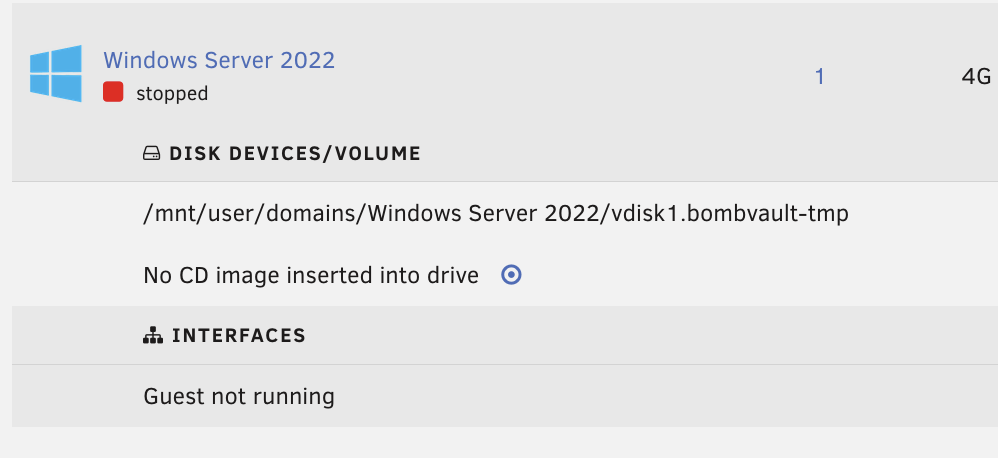
I've just seen that my VM disk was changed!!!!!! Had to manually edit the yaml to correct this
-
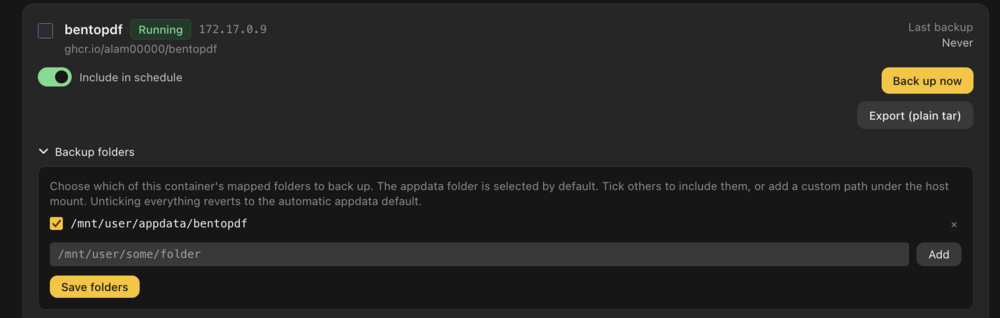
I don't see that. What I see for example is this: This container has no appdata, the folder shown here does not exist. When I delete it, it is put in there again.
-
I have deleted all and would have to reinstall/config from scratch now 😉
-
And Home Assistant, this I really don't want to shutdown during backup (I don't with scripts backup, just use zfs snapshit): <domain type='kvm' id='3'> <name>Home Assistant</name> <uuid>654b4761-b1dc-4680-8fd0-b6be94d7a0f4</uuid> <metadata> <vmtemplate xmlns="http://unraid" name="Linux" icon="Hassio_2.png" os="linux" iconold="Hassio_2.png" webui="http://192.168.2.40:8123"/> </metadata> <memory unit='KiB'>4194304</memory> <currentMemory unit='KiB'>4194304</currentMemory> <memoryBacking> <nosharepages/> </memoryBacking> <vcpu placement='static'>4</vcpu> <resource> <partition>/machine</partition> </resource> <os> <type arch='x86_64' machine='pc-q35-9.2'>hvm</type> <loader readonly='yes' type='pflash' format='raw'>/usr/share/qemu/ovmf-x64/OVMF_CODE-pure-efi.fd</loader> <nvram format='raw'>/etc/libvirt/qemu/nvram/654b4761-b1dc-4680-8fd0-b6be94d7a0f4_VARS-pure-efi.fd</nvram> </os> <features> <acpi/> <apic/> </features> <cpu mode='host-passthrough' check='none' migratable='on'> <topology sockets='1' dies='1' clusters='1' cores='2' threads='2'/> <cache mode='passthrough'/> </cpu> <clock offset='utc'> <timer name='hpet' present='no'/> <timer name='hypervclock' present='no'/> <timer name='pit' tickpolicy='delay'/> <timer name='rtc' tickpolicy='catchup'/> </clock> <on_poweroff>destroy</on_poweroff> <on_reboot>restart</on_reboot> <on_crash>restart</on_crash> <devices> <emulator>/usr/local/sbin/qemu</emulator> <disk type='file' device='disk'> <driver name='qemu' type='qcow2' cache='writeback' discard='ignore'/> <source file='/mnt/zfs/domains/Home Assistant/vdisk1.img' index='1'/> <backingStore/> <target dev='hdc' bus='virtio'/> <serial>vdisk1</serial> <boot order='1'/> <alias name='virtio-disk2'/> <address type='pci' domain='0x0000' bus='0x03' slot='0x00' function='0x0'/> </disk> <controller type='usb' index='0' model='ich9-ehci1'> <alias name='usb'/> <address type='pci' domain='0x0000' bus='0x00' slot='0x07' function='0x7'/> </controller> <controller type='usb' index='0' model='ich9-uhci1'> <alias name='usb'/> <master startport='0'/> <address type='pci' domain='0x0000' bus='0x00' slot='0x07' function='0x0' multifunction='on'/> </controller> <controller type='usb' index='0' model='ich9-uhci2'> <alias name='usb'/> <master startport='2'/> <address type='pci' domain='0x0000' bus='0x00' slot='0x07' function='0x1'/> </controller> <controller type='usb' index='0' model='ich9-uhci3'> <alias name='usb'/> <master startport='4'/> <address type='pci' domain='0x0000' bus='0x00' slot='0x07' function='0x2'/> </controller> <controller type='pci' index='0' model='pcie-root'> <alias name='pcie.0'/> </controller> <controller type='pci' index='1' model='pcie-root-port'> <model name='pcie-root-port'/> <target chassis='1' port='0x8'/> <alias name='pci.1'/> <address type='pci' domain='0x0000' bus='0x00' slot='0x01' function='0x0' multifunction='on'/> </controller> <controller type='pci' index='2' model='pcie-root-port'> <model name='pcie-root-port'/> <target chassis='2' port='0x9'/> <alias name='pci.2'/> <address type='pci' domain='0x0000' bus='0x00' slot='0x01' function='0x1'/> </controller> <controller type='pci' index='3' model='pcie-root-port'> <model name='pcie-root-port'/> <target chassis='3' port='0xa'/> <alias name='pci.3'/> <address type='pci' domain='0x0000' bus='0x00' slot='0x01' function='0x2'/> </controller> <controller type='pci' index='4' model='pcie-root-port'> <model name='pcie-root-port'/> <target chassis='4' port='0xb'/> <alias name='pci.4'/> <address type='pci' domain='0x0000' bus='0x00' slot='0x01' function='0x3'/> </controller> <controller type='pci' index='5' model='pcie-root-port'> <model name='pcie-root-port'/> <target chassis='5' port='0xc'/> <alias name='pci.5'/> <address type='pci' domain='0x0000' bus='0x00' slot='0x01' function='0x4'/> </controller> <controller type='virtio-serial' index='0'> <alias name='virtio-serial0'/> <address type='pci' domain='0x0000' bus='0x02' slot='0x00' function='0x0'/> </controller> <controller type='sata' index='0'> <alias name='ide'/> <address type='pci' domain='0x0000' bus='0x00' slot='0x1f' function='0x2'/> </controller> <interface type='bridge'> <mac address='ac:87:a3:7b:92:f0'/> <source bridge='br0'/> <target dev='vnet2'/> <model type='virtio-net'/> <alias name='net0'/> <address type='pci' domain='0x0000' bus='0x01' slot='0x00' function='0x0'/> </interface> <serial type='pty'> <source path='/dev/pts/2'/> <target type='isa-serial' port='0'> <model name='isa-serial'/> </target> <alias name='serial0'/> </serial> <console type='pty' tty='/dev/pts/2'> <source path='/dev/pts/2'/> <target type='serial' port='0'/> <alias name='serial0'/> </console> <channel type='unix'> <source mode='bind' path='/run/libvirt/qemu/channel/3-Home Assistant/org.qemu.guest_agent.0'/> <target type='virtio' name='org.qemu.guest_agent.0' state='connected'/> <alias name='channel0'/> <address type='virtio-serial' controller='0' bus='0' port='1'/> </channel> <input type='tablet' bus='usb'> <alias name='input0'/> <address type='usb' bus='0' port='1'/> </input> <input type='mouse' bus='ps2'> <alias name='input1'/> </input> <input type='keyboard' bus='ps2'> <alias name='input2'/> </input> <graphics type='vnc' port='5902' autoport='yes' websocket='5702' listen='0.0.0.0' keymap='en-us' sharePolicy='ignore'> <listen type='address' address='0.0.0.0'/> </graphics> <audio id='1' type='none'/> <video> <model type='qxl' ram='131072' vram='65536' vram64='64512' vgamem='65536' heads='1' primary='yes'/> <alias name='video0'/> <address type='pci' domain='0x0000' bus='0x00' slot='0x1e' function='0x0'/> </video> <watchdog model='itco' action='reset'> <alias name='watchdog0'/> </watchdog> <memballoon model='virtio'> <alias name='balloon0'/> <address type='pci' domain='0x0000' bus='0x04' slot='0x00' function='0x0'/> </memballoon> </devices> <seclabel type='dynamic' model='dac' relabel='yes'> <label>+0:+100</label> <imagelabel>+0:+100</imagelabel> </seclabel> </domain>
-
This is one: <domain type='kvm' id='7'> <name>Windows Server 2022</name> <uuid>8ab129f6-30ae-2191-b439-4e06ad06e17d</uuid> <metadata> <vmtemplate xmlns="http://unraid" name="Windows Server 2016" iconold="windows.png" icon="windows.png" os="windows2016" webui="" storage="default"/> </metadata> <memory unit='KiB'>4194304</memory> <currentMemory unit='KiB'>4194304</currentMemory> <memoryBacking> <nosharepages/> </memoryBacking> <vcpu placement='static'>1</vcpu> <resource> <partition>/machine</partition> </resource> <os> <type arch='x86_64' machine='pc-i440fx-9.2'>hvm</type> <loader readonly='yes' type='pflash' format='raw'>/usr/share/qemu/ovmf-x64/OVMF_CODE-pure-efi.fd</loader> <nvram format='raw'>/etc/libvirt/qemu/nvram/8ab129f6-30ae-2191-b439-4e06ad06e17d_VARS-pure-efi.fd</nvram> </os> <features> <acpi/> <apic/> <hyperv mode='custom'> <relaxed state='on'/> <vapic state='on'/> <spinlocks state='on' retries='8191'/> <vpindex state='on'/> <synic state='on'/> <stimer state='on'/> <vendor_id state='on' value='none'/> </hyperv> </features> <cpu mode='host-passthrough' check='none' migratable='on'> <topology sockets='1' dies='1' clusters='1' cores='1' threads='1'/> <cache mode='passthrough'/> </cpu> <clock offset='localtime'> <timer name='hpet' present='no'/> <timer name='hypervclock' present='yes'/> </clock> <on_poweroff>destroy</on_poweroff> <on_reboot>restart</on_reboot> <on_crash>restart</on_crash> <devices> <emulator>/usr/local/sbin/qemu</emulator> <disk type='file' device='disk'> <driver name='qemu' type='qcow2' cache='writeback' discard='unmap'/> <source file='/mnt/user/domains/Windows Server 2022/vdisk1.bombvault-tmp' index='2'/> <backingStore type='file' index='3'> <format type='qcow2'/> <source file='/mnt/user/domains/Windows Server 2022/vdisk1.qcow2'/> <backingStore/> </backingStore> <target dev='hdc' bus='virtio'/> <serial>vdisk1</serial> <boot order='1'/> <alias name='virtio-disk2'/> <address type='pci' domain='0x0000' bus='0x00' slot='0x06' function='0x0'/> </disk> <disk type='file' device='cdrom'> <driver name='qemu' type='raw'/> <source index='1'/> <target dev='hdb' bus='sata'/> <readonly/> <alias name='sata0-0-1'/> <address type='drive' controller='0' bus='0' target='0' unit='1'/> </disk> <controller type='usb' index='0' model='ich9-ehci1'> <alias name='usb'/> <address type='pci' domain='0x0000' bus='0x00' slot='0x07' function='0x7'/> </controller> <controller type='usb' index='0' model='ich9-uhci1'> <alias name='usb'/> <master startport='0'/> <address type='pci' domain='0x0000' bus='0x00' slot='0x07' function='0x0' multifunction='on'/> </controller> <controller type='usb' index='0' model='ich9-uhci2'> <alias name='usb'/> <master startport='2'/> <address type='pci' domain='0x0000' bus='0x00' slot='0x07' function='0x1'/> </controller> <controller type='usb' index='0' model='ich9-uhci3'> <alias name='usb'/> <master startport='4'/> <address type='pci' domain='0x0000' bus='0x00' slot='0x07' function='0x2'/> </controller> <controller type='pci' index='0' model='pci-root'> <alias name='pci.0'/> </controller> <controller type='sata' index='0'> <alias name='sata0'/> <address type='pci' domain='0x0000' bus='0x00' slot='0x03' function='0x0'/> </controller> <controller type='virtio-serial' index='0'> <alias name='virtio-serial0'/> <address type='pci' domain='0x0000' bus='0x00' slot='0x04' function='0x0'/> </controller> <interface type='bridge'> <mac address='52:54:00:45:86:4a'/> <source bridge='br0'/> <target dev='vnet6'/> <model type='virtio-net'/> <alias name='net0'/> <address type='pci' domain='0x0000' bus='0x00' slot='0x02' function='0x0'/> </interface> <serial type='pty'> <source path='/dev/pts/0'/> <target type='isa-serial' port='0'> <model name='isa-serial'/> </target> <alias name='serial0'/> </serial> <console type='pty' tty='/dev/pts/0'> <source path='/dev/pts/0'/> <target type='serial' port='0'/> <alias name='serial0'/> </console> <channel type='unix'> <source mode='bind' path='/run/libvirt/qemu/channel/7-Windows Server 2022/org.qemu.guest_agent.0'/> <target type='virtio' name='org.qemu.guest_agent.0' state='connected'/> <alias name='channel0'/> <address type='virtio-serial' controller='0' bus='0' port='1'/> </channel> <input type='tablet' bus='usb'> <alias name='input0'/> <address type='usb' bus='0' port='1'/> </input> <input type='mouse' bus='ps2'> <alias name='input1'/> </input> <input type='keyboard' bus='ps2'> <alias name='input2'/> </input> <graphics type='vnc' port='5900' autoport='yes' websocket='5701' listen='0.0.0.0' sharePolicy='ignore'> <listen type='address' address='0.0.0.0'/> </graphics> <audio id='1' type='none'/> <video> <model type='qxl' ram='65536' vram='16384' vgamem='16384' heads='1' primary='yes'/> <alias name='video0'/> <address type='pci' domain='0x0000' bus='0x00' slot='0x1e' function='0x0'/> </video> <memballoon model='virtio'> <alias name='balloon0'/> <address type='pci' domain='0x0000' bus='0x00' slot='0x05' function='0x0'/> </memballoon> </devices> <seclabel type='dynamic' model='dac' relabel='yes'> <label>+0:+100</label> <imagelabel>+0:+100</imagelabel> </seclabel> </domain> And the other one, worked live for one backup than didn't: <domain type='kvm' id='6'> <name>Tailscale</name> <uuid>ac760bc7-e0f7-1a61-6539-cc62a39a9a01</uuid> <metadata> <vmtemplate xmlns="http://unraid" name="Debian" iconold="tailscale.png" icon="tailscale.png" os="debian" webui="" storage="default"/> </metadata> <memory unit='KiB'>1048576</memory> <currentMemory unit='KiB'>1048576</currentMemory> <memoryBacking> <nosharepages/> </memoryBacking> <vcpu placement='static'>1</vcpu> <resource> <partition>/machine</partition> </resource> <os> <type arch='x86_64' machine='pc-q35-9.2'>hvm</type> </os> <features> <acpi/> <apic/> </features> <cpu mode='host-passthrough' check='none' migratable='on'> <topology sockets='1' dies='1' clusters='1' cores='1' threads='1'/> <cache mode='passthrough'/> </cpu> <clock offset='utc'> <timer name='hpet' present='no'/> <timer name='hypervclock' present='no'/> </clock> <on_poweroff>destroy</on_poweroff> <on_reboot>restart</on_reboot> <on_crash>restart</on_crash> <devices> <emulator>/usr/local/sbin/qemu</emulator> <disk type='file' device='disk'> <driver name='qemu' type='qcow2' cache='writeback' discard='unmap'/> <source file='/mnt/zfs/domains/Tailscale/vdisk1.qcow2' index='1'/> <backingStore/> <target dev='hdc' bus='virtio'/> <serial>vdisk1</serial> <boot order='1'/> <alias name='virtio-disk2'/> <address type='pci' domain='0x0000' bus='0x03' slot='0x00' function='0x0'/> </disk> <controller type='usb' index='0' model='ich9-ehci1'> <alias name='usb'/> <address type='pci' domain='0x0000' bus='0x00' slot='0x07' function='0x7'/> </controller> <controller type='usb' index='0' model='ich9-uhci1'> <alias name='usb'/> <master startport='0'/> <address type='pci' domain='0x0000' bus='0x00' slot='0x07' function='0x0' multifunction='on'/> </controller> <controller type='usb' index='0' model='ich9-uhci2'> <alias name='usb'/> <master startport='2'/> <address type='pci' domain='0x0000' bus='0x00' slot='0x07' function='0x1'/> </controller> <controller type='usb' index='0' model='ich9-uhci3'> <alias name='usb'/> <master startport='4'/> <address type='pci' domain='0x0000' bus='0x00' slot='0x07' function='0x2'/> </controller> <controller type='pci' index='0' model='pcie-root'> <alias name='pcie.0'/> </controller> <controller type='pci' index='1' model='pcie-root-port'> <model name='pcie-root-port'/> <target chassis='1' port='0x8'/> <alias name='pci.1'/> <address type='pci' domain='0x0000' bus='0x00' slot='0x01' function='0x0' multifunction='on'/> </controller> <controller type='pci' index='2' model='pcie-root-port'> <model name='pcie-root-port'/> <target chassis='2' port='0x9'/> <alias name='pci.2'/> <address type='pci' domain='0x0000' bus='0x00' slot='0x01' function='0x1'/> </controller> <controller type='pci' index='3' model='pcie-root-port'> <model name='pcie-root-port'/> <target chassis='3' port='0xa'/> <alias name='pci.3'/> <address type='pci' domain='0x0000' bus='0x00' slot='0x01' function='0x2'/> </controller> <controller type='pci' index='4' model='pcie-root-port'> <model name='pcie-root-port'/> <target chassis='4' port='0xb'/> <alias name='pci.4'/> <address type='pci' domain='0x0000' bus='0x00' slot='0x01' function='0x3'/> </controller> <controller type='pci' index='5' model='pcie-root-port'> <model name='pcie-root-port'/> <target chassis='5' port='0xc'/> <alias name='pci.5'/> <address type='pci' domain='0x0000' bus='0x00' slot='0x01' function='0x4'/> </controller> <controller type='virtio-serial' index='0'> <alias name='virtio-serial0'/> <address type='pci' domain='0x0000' bus='0x02' slot='0x00' function='0x0'/> </controller> <controller type='sata' index='0'> <alias name='ide'/> <address type='pci' domain='0x0000' bus='0x00' slot='0x1f' function='0x2'/> </controller> <interface type='bridge'> <mac address='52:54:00:19:f6:e6'/> <source bridge='br0'/> <target dev='vnet5'/> <model type='virtio-net'/> <alias name='net0'/> <address type='pci' domain='0x0000' bus='0x01' slot='0x00' function='0x0'/> </interface> <serial type='pty'> <source path='/dev/pts/1'/> <target type='isa-serial' port='0'> <model name='isa-serial'/> </target> <alias name='serial0'/> </serial> <console type='pty' tty='/dev/pts/1'> <source path='/dev/pts/1'/> <target type='serial' port='0'/> <alias name='serial0'/> </console> <channel type='unix'> <source mode='bind' path='/run/libvirt/qemu/channel/6-Tailscale/org.qemu.guest_agent.0'/> <target type='virtio' name='org.qemu.guest_agent.0' state='connected'/> <alias name='channel0'/> <address type='virtio-serial' controller='0' bus='0' port='1'/> </channel> <input type='tablet' bus='usb'> <alias name='input0'/> <address type='usb' bus='0' port='1'/> </input> <input type='mouse' bus='ps2'> <alias name='input1'/> </input> <input type='keyboard' bus='ps2'> <alias name='input2'/> </input> <graphics type='vnc' port='5901' autoport='yes' websocket='5700' listen='0.0.0.0' keymap='pt' sharePolicy='ignore'> <listen type='address' address='0.0.0.0'/> </graphics> <audio id='1' type='none'/> <video> <model type='virtio' heads='1' primary='yes'/> <alias name='video0'/> <address type='pci' domain='0x0000' bus='0x00' slot='0x1e' function='0x0'/> </video> <watchdog model='itco' action='reset'> <alias name='watchdog0'/> </watchdog> <memballoon model='virtio'> <alias name='balloon0'/> <address type='pci' domain='0x0000' bus='0x04' slot='0x00' function='0x0'/> </memballoon> </devices> <seclabel type='dynamic' model='dac' relabel='yes'> <label>+0:+100</label> <imagelabel>+0:+100</imagelabel> </seclabel> </domain>
-
P.S. One VM, which did backup live just fine now has the same error as above and does no longer backup. I can't shutdown this one for backup. I'm seeing the progress here but I'll stop for now and revisit in a few months time. It's in alpha stage in my feeling right now. And backups are to critical a thing......
-
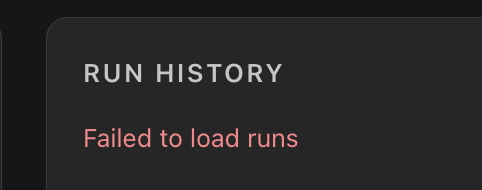
On my second server I also backed up but I have this in the dashboard: Corrupted sqlite db?
-
Hallo 😉 you done a lot! Tested latest version: Docker backups with additional folders OK. One thing here, if the container has no data folder it says it is backed up but no backup is created, should be mentioned in the interface somehow (one expects the config/yaml to be nacked up anyway as the backup plugin does). VM backups, Graceful works but I have 2 VM's that do not backup live:

-
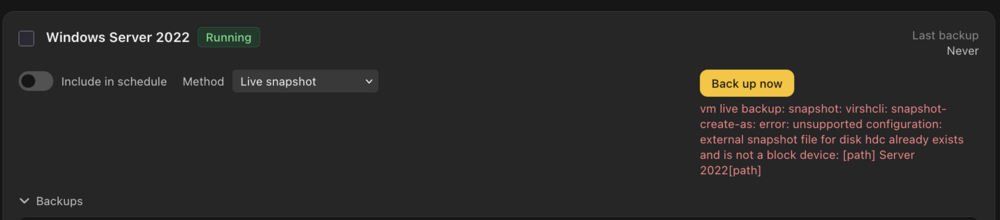
VM live backups still broken:
-
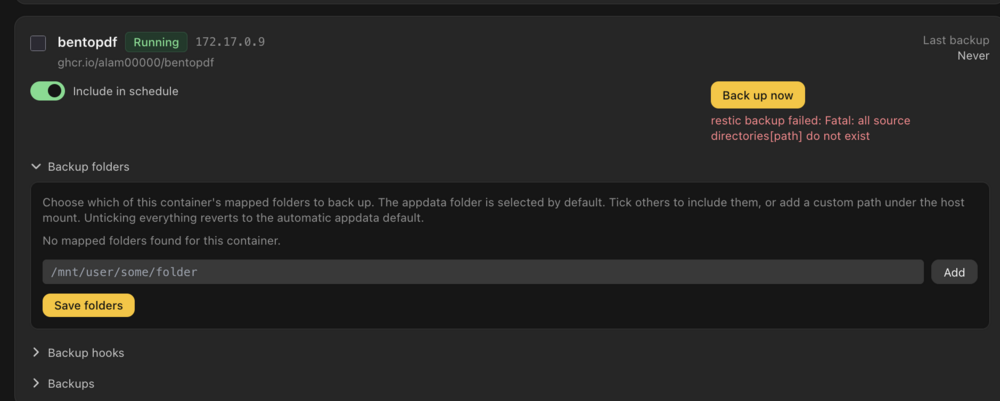
Just tried latest update, still get errors on containers, which do not have an appdata folder. But it should just back up the settings!
-
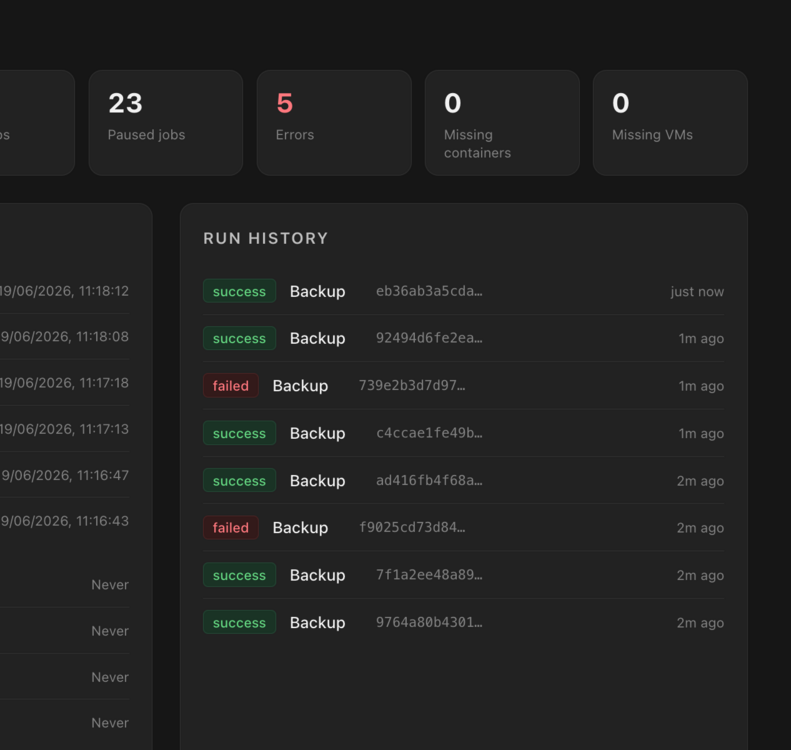
Backed up all my containers on 2 servers. Both did run without any error message displayed. But on the dashboard i get some with error. Problem is I can't tell which one it is and I can't display the error. Not useful.... Looking at them I see that some have no backups attached. When I force a backup on those I get: restic backup failed: Fatal: all source directories[path] do not exist
-
P.S. backup hooks. In Backrest i can run a shell script as hook that shuts down certain containers (databases) before the backup and restarts them after. Something like this is needed.
-
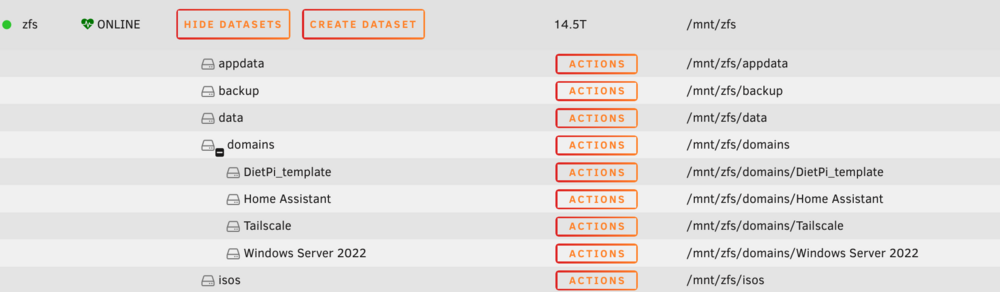
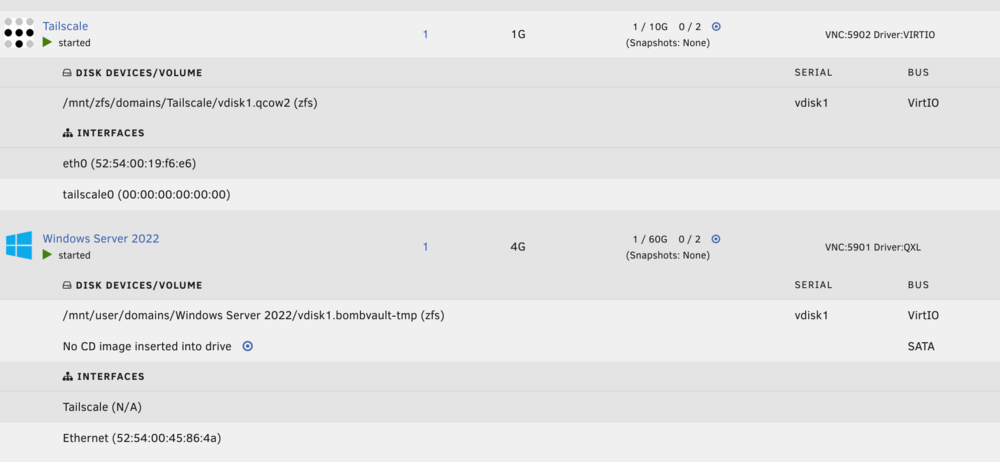
This is the error I get on VM backups: vm live backup: snapshot: virshcli: snapshot-create-as: error: unsupported configuration: external snapshot file for disk hdc already exists and is not a block device: [path] Server 2022[path] In this server I have only a zfs pool on which all resides: My vm backup script uses zfs snapshots to backup.
-
Tried backing up a Windows Server vm (live). Failed. No indication anywhere why..... Done my testing for now. Back to working backups ;) Shows promises but has a longer way to go.
-
Big question regarding docker backups: which folders are backed by default, appdata i guess, what about other bind mounts? They should backup also ( and ideally be able to choose to include/exclude). If bind mounts are excluded there should another option to backup select folders.....
-
Did a flash back: ok VM (stopped) backup (via snapshot): OK And VM wasn't started.
-
Did a test container backup. I didn't find any display of progression. Finished. It started the container, which was stopped before the backup. Shouldn't. Deleted it, also appdata. Restored it, again no feedback until the end. restored OK and started, shouldn't.
-
Reinstalled. Set HTTP_ONLY to true. Webui defaults to https. I have to manually change https://[IP]:[PORT:3443]/
-
P.S Actually I'm using Backrest for all but VM's.... Also restic under the hood.
-
will try..... Sorry for the bluntness 😉
-
tried it, ssh connection test was OK. But when trying to backup VM I get an "error 400" on some vm's. Didn't want to fiddle around and uninstalled as I'm backing up via scripts anyway. There as a new Bombvault datastore created on m main zfs volume, which I had to delete via cli! Nowhere is a mention of a datastore being created.... Waiting on some more users trying this before I hand over control of my server......


