whisp
Members
-
Joined
-
Last visited
-
Bug in the netronome Unraid template: it shows "unhealthy" on a default install. ExtraParams hardcodes a Postgres healthcheck: --health-cmd='pg_isready -U netronome' --health-interval=5s --health-retries=5 --health-timeout=5s But the template's default DB type is sqlite (NETRONOME__DB_TYPE=sqlite). With sqlite there's no Postgres listening, so pg_isready fails every time → container is permanently flagged unhealthy even though netronome is running fine on :7575. The netronome image itself defines no HEALTHCHECK, so this comes entirely from the template. Fix: drop the pg_isready healthcheck for sqlite installs, or replace it with an HTTP check against the web UI, e.g. --health-cmd='wget -qO- http://localhost:7575/ >/dev/null || exit 1'.
-
Updated from 7.3, no issue. Also, I just want to take a moment to commend the Unraid team on this blitz of security updates. You guys are on a roll with all these updates recently, great to see! Bravo!
-
Hmm, how does Bitlocker do it?
-
I'm migrating to an internal boot and was actually surprised I couldn't do an encrypted boot drive. This is the perfect opportunity to convert to encrypted as I hadn't already since I have to reformat the drive anyways. What gives here?
-
Upgraded, no issues. Also very nice touch with the Nvidia driver update, and plugin updates ran before you restart to install. Well done.
-
Got it, that's good feedback. I can revise the script to have a larger cooldown to account for that. Still need to figure out why QBT is doing this and why recently though -_-
-
All of this was working despite gluetun restarts and FCP warnings. Gluetun has never worked without restarting itself at least once every 24 hours due to it's overzealous healthchecks, And I have scripts to restart qbitorrent and gluetun if necessary to keep things going while I'm away. Qbitorrent worked fine with gluetuns flakiness, it was only once I have this many torrents that it started freezing. Is the SSD dropping recent or has that been going on for awhile?
-
Fair enough, here you are. citadel-diagnostics-20260218-1255.zip
-
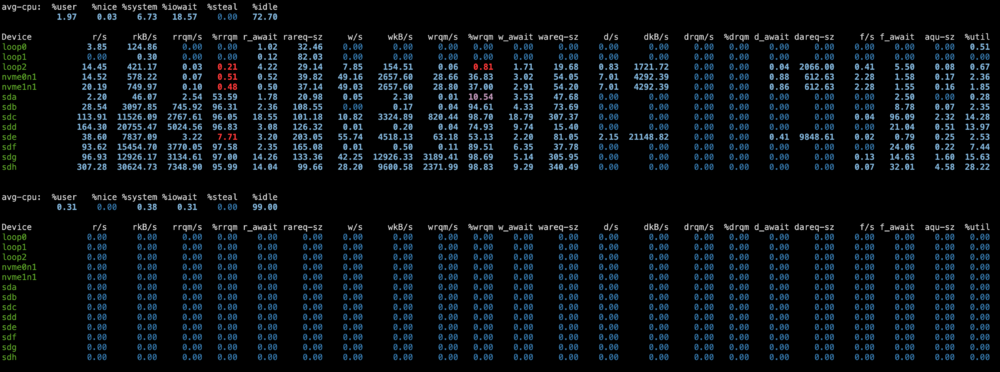
Hello, I really need some help here. I recently started cross-seeding with Qui around 1,000 torrents, and now am up to 1,500 including the cross seeded torrents, and qbitorrent is freezing every couple of minutes and coming back after 10 seconds or so requiring a webpage reload. It's causing chaos for the trackers, and obviously nothing can finish downloading let alone upload. I think it's an IO wait issue, but below are the full details (yes I've been using chatgpt to help, but to no avail): Storage layout: 5× HDD array (individual disks mounted as /mnt/disk1–/mnt/disk5) WD Pro NAS drives capable for 280MB/s SSD pool where torrent files are moved to before mover moves them to the array. NVMe pool for Docker Torrent client: qBittorrent from the community store VPN: Gluetun container (qB runs behind it) Public torrents paused; private seeding active Typical upload low, sometimes zero when issue occurs. qBittorrent WebUI becomes unresponsive. Container remains running No crash logs, in fact nothing in logs after startup language. After reload, forced-seeded torrents revert to “Seeding” Trackers sometimes show “skipping announce (unreachable)” docker exec into container sometimes hangs The concern is whether qB is crashing or something else is stalling it. Confirmed: no memory exhaustion or CPU limitation. docker exec -it qbittorrent sh -lc ' pid=$(pidof qbittorrent-nox); echo "PID=$pid"; awk "/open files/ {print}" /proc/$pid/limits; echo -n "FD in use: "; ls /proc/$pid/fd | wc -l ' Output: Max open files: 40960 FD in use: 298 Container not in D state when hung. iostat -x sample output: Device r/s rkB/s w/s wkB/s r_await w_await aqu-sz %util sdc 357 64372 139 58500 50ms 13ms 20.02 100% sdg 232 57772 143 58500 7ms 4ms 2.32 55% NVME pool largely idle. lsof -l 2>/dev/null | grep "/mnt/disk4/" | head -80 Results in: Multiple large MKV files open b3sum reading 52GB remux file rsync writing multi-GB file shfs readers on Plex media files All network tests to tracker url's worked fine and returned 200 including pinging the announce URL with my passkey. Given: ~1300 torrents loaded HDD array (non-striped) Heavy background hashing and rsync activity qB behind VPN container Intermittent WebUI stalls without crash Is this expected behavior under HDD saturation, or should qB remain responsive even when backend disk I/O is blocked? It feels like I need to move my entire array onto SSD's but this just seems ridiculous. Is there anyway to setup this up avoiding the FUSE layer and user space? Thank you, --------------- Edit: adding some data that was output at the exact moment it's frozen. root@Citadel:~# PID=$(pidof qbittorrent-nox) cat /proc/$PID/stack [<0>] do_sys_poll+0x3af/0x4a0 [<0>] __do_sys_ppoll+0x8b/0xd0 [<0>] do_syscall_64+0x68/0xe0 [<0>] entry_SYSCALL_64_after_hwframe+0x76/0x7e root@Citadel:~# ps -o pid,comm,state,wchan:30 -p $(pidof qbittorrent-nox) PID COMMAND S WCHAN 3970704 qbittorrent-nox S do_sys_poll root@Citadel:~# iostat -x 1 3 Linux 6.12.54-Unraid (Citadel) 02/19/2026 x8664_ (16 CPU) citadel-diagnostics-20260218-1255.zip
-
Hello, I'm trying to use my Unraid machine as an exit node, however I want to assign Tailscale to a VPN already setup and active in Unraid. This VPN is setup using the default VPN Manager within Unraid. In using your plugin though, I don't see any options at all in the exit node drop down. Recognizing VPN's installed and allowing us to select them would be a great feature if you could put it on the roadmap for this plugin! In the meantime, would something along the lines of this suffice or be recommended? I'd love any input you have on how to accomplish this. # Allow IPv4 forwarding echo "net.ipv4.ip_forward=1" >> /etc/sysctl.conf sysctl -p # Add NAT rule for forwarding Tailscale traffic through Host's VPN gateway iptables -t nat -A POSTROUTING -o wg1 -j MASQUERADE Thank you, host-diagnostics-20250605-2236.zip
-
You can specify whatever folders you want. The plugin isn't hard coded to one directory.

-
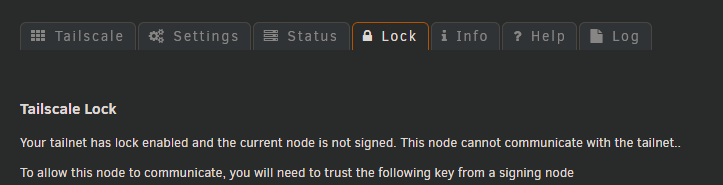
Citadel-tailscale-diag-20250327-225850.zip Attached are all the diagnostics. Netbios is off and there are no devices using a subnet. I had a previous tailscale installation that I uninstalled (unraid 6.x.x). I updated to 7.0.1 and reinstalled the plugin and my machine was going crazy. Pages wouldn't load, couldn't generate diagnostic data, unraid webui intermittently not loading. Problems -immediately- resolve when the plugin was uninstalled. I then installed the preview version to see if it resolves any issues, and now the unraid webapp is behaving normally except for a few things. 1. Tailscale is still picking up data from my previous installation... as you can see I had Tailscale lock enabled and it thinks the machine is still locked even though that previous tailscale has been completely deleted as a tailscale network altogether. The entire account that had that network has been deleted. I successfully authenticated the new network, it's showing up in tailscale as a machine connected, but in the plugin ui as you can see it says the machine is still locked and I cannot edit many settings such as assigning this machine as an exit node. 2. The apps page won't load. The plugin isn't installed- loads fine, the plugin is installed- it stops working. Also Unraid connect throws up connection errors after tailscale is installed, but this is less of an issue given tailscale would replace unraid connect generally. What was updated in preview that makes it much more stable in 7? Why is Tailscale picking up an old installation despite being logged into an entirely different account? Why isn't this old data cleaned out upon plugin uninstallation? What's up with the app store freaking out? I honestly felt like the native tailscale integration in 7 would have brought more stability, but it seems to have been the opposite for some reason citadel-diagnostics-20250328-0935.zip

-
That's what I did and I think that problem is solved now. Noted on the FUSE path. I'll keep an eye out on future container installs to hard path the pool name if mnt/user isn't default. I didn't think about this since every other container I've installed defaulted to the FUSE path. I've had the container running for 12 hours now. I've set the backups to 48, I'll let you know if it indeed generates 48 backups. P.S. For anyone else worried about this, I've installed the appdata backup plugin to address this. This will backup all docker container configs and their data to a source of your choosing on whatever schedule you need.
-
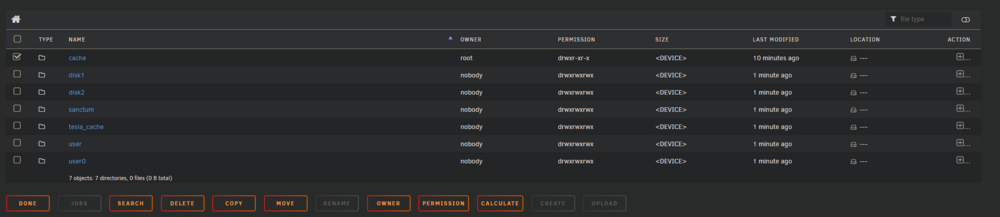
Ich, it seems you're right. Somehow Cache is writing to memory in rootfs... A little chat with my assistant 4.5: # df -h /mnt/cache Filesystem Size Used Avail Use% Mounted on rootfs 16G 1.9G 14G 12% /mnt Absolutely no idea how this cache got orphaned. I haven't created or deleted pools or arrays since I first installed unraid. I apologize if this is a noob question but why have the default server files directory writing to mnt/cache/.../?
-
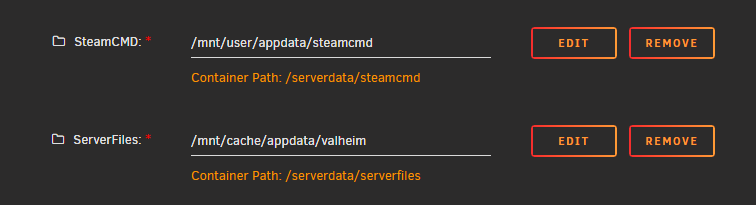
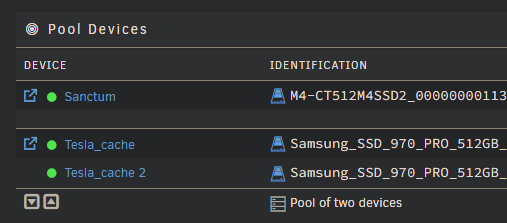
Yeah it was running for several days. Here's a screenshot of the folder config, it's default settings from the image I did not modify these paths. Tesla_cache is the name of the NVME drive that all of Docker is installed on. Tesla cache is a raid 1 pool that serves as my primary hard drive for docker, unraid, everything. No movers touching it. This checkmarked cache folder is currently where the valheim worlds are stored. Again just the default setting of the container mnt/cache/appdata/valheim.