





AnotherAsian123
Members
-
Joined
-
Last visited
-
Thank you for the pointer. I will proceed with an RMA and hopefully that will fix the issue.
-
Hi Guys, I have an i9 14900k with an ASUS ProArt Z790 Creator WIFI, with BIOS 3202. My Unraid version is 7.3.2. I can't quite tell whether these logs in my syslog is pointing towards the i9 13th/14th gen stability issue or not and whether i need to immediately RMA the CPU. Sep 1 23:42:15 TheServer kernel: WARNING: CPU: 12 PID: 9219 at kernel/exit.c:905 do_exit+0x3f/0x8e0 Sep 1 23:42:15 TheServer kernel: Modules linked in: br_netfilter xt_connmark xt_conntrack ip6table_mangle iptable_mangle xt_MASQUERADE xt_tcpudp xt_mark tun nf_tables nfnetlink ip6table_nat iptable_nat nf_nat nf_conntrack nf_defrag_ipv6 nf_defrag_ipv4 md_mod nvidia_uvm(PO) nct6775 nct6775_core hwmon_vid ip6table_filter ip6_tables iptable_filter ip_tables x_tables bridge stp llc bonding tls xe drm_gpuvm drm_gpusvm_helper gpu_sched drm_exec drm_suballoc_helper iwlmvm mac80211 intel_rapl_msr intel_rapl_common x86_pkg_temp_thermal intel_powerclamp coretemp nvidia_drm(PO) nvidia_modeset(PO) kvm_intel led_class i915 nvidia(PO) libarc4 btusb kvm btrtl btbcm drm_buddy btintel i2c_algo_bit drm_ttm_helper iwlwifi drm_display_helper ttm ghash_clmulni_intel drm_client_lib bluetooth aesni_intel drm_kms_helper rapl mei_hdcp mei_pxp cfg80211 crc16 intel_cstate wmi_bmof drm ixgbe thunderbolt cec intel_uncore mei_me intel_gtt mei i2c_i801 agpgart tpm_crb i2c_smbus rfkill tpm_tis libie_fwlog i2c_core tpm_tis_core xfrm_algo tpm mdio thermal video fan Sep 1 23:42:15 TheServer kernel: libaescfb wmi ecdh_generic backlight acpi_tad ecc acpi_pad button zfs(PO) spl(O) Sep 1 23:42:15 TheServer kernel: CPU: 12 UID: 0 PID: 9219 Comm: mdunraidd0 Tainted: P D O 6.18.38-Unraid #1 PREEMPT(voluntary) Sep 1 23:42:15 TheServer kernel: Tainted: [P]=PROPRIETARY_MODULE, [D]=DIE, [O]=OOT_MODULE Sep 1 23:42:15 TheServer kernel: Hardware name: ASUS System Product Name/ProArt Z790-CREATOR WIFI, BIOS 3202 05/07/2026 Sep 1 23:42:15 TheServer kernel: RIP: 0010:do_exit+0x3f/0x8e0 Sep 1 23:42:15 TheServer kernel: Code: 8b 1d ed 05 fe 01 65 48 8b 2d d5 05 fe 01 48 89 6c 24 18 48 89 fd 9c 58 0f ba e0 09 72 02 0f 0b 48 83 bb 40 08 00 00 00 74 02 <0f> 0b f6 43 2e 20 74 14 48 8b bb e8 05 00 00 48 85 ff 74 08 48 89 Sep 1 23:42:15 TheServer kernel: RSP: 0018:ffffc9000f8ffed8 EFLAGS: 00010286 Sep 1 23:42:15 TheServer kernel: RAX: 0000000000000286 RBX: ffff8881e3322180 RCX: 0000000000000000 Sep 1 23:42:15 TheServer kernel: RDX: 000000000000270f RSI: 0000000000002710 RDI: 000000000000000b Sep 1 23:42:15 TheServer kernel: RBP: 000000000000000b R08: 0000000000000000 R09: 0000000000000000 Sep 1 23:42:15 TheServer kernel: R10: 00aaaaaa00aaaaaa R11: 0000000000000003 R12: ffff8881e3322180 Sep 1 23:42:15 TheServer kernel: R13: ffffc9000f8ffc88 R14: 0000000000000004 R15: 0000000000000002 Sep 1 23:42:15 TheServer kernel: FS: 0000000000000000(0000) GS:ffff8890fc096000(0000) knlGS:0000000000000000 Sep 1 23:42:15 TheServer kernel: CS: 0010 DS: 0000 ES: 0000 CR0: 0000000080050033 Sep 1 23:42:15 TheServer kernel: CR2: 0000000000423388 CR3: 0000000005818003 CR4: 0000000000772ef0 Sep 1 23:42:15 TheServer kernel: PKRU: 55555554 Sep 1 23:42:15 TheServer kernel: Call Trace: Sep 1 23:42:15 TheServer kernel: <TASK> Sep 1 23:42:15 TheServer kernel: ? __pfx_kthread+0x10/0x10 Sep 1 23:42:15 TheServer kernel: make_task_dead+0x10d/0x110 Sep 1 23:42:15 TheServer kernel: rewind_stack_and_make_dead+0x16/0x20 Sep 1 23:42:15 TheServer kernel: RIP: 0000:0x0 Sep 1 23:42:15 TheServer kernel: Code: Unable to access opcode bytes at 0xffffffffffffffd6. Sep 1 23:42:15 TheServer kernel: RSP: 0000:0000000000000000 EFLAGS: 00000000 ORIG_RAX: 0000000000000000 Sep 1 23:42:15 TheServer kernel: RAX: 0000000000000000 RBX: 0000000000000000 RCX: 0000000000000000 Sep 1 23:42:15 TheServer kernel: RDX: 0000000000000000 RSI: 0000000000000000 RDI: 0000000000000000 Sep 1 23:42:15 TheServer kernel: RBP: 0000000000000000 R08: 0000000000000000 R09: 0000000000000000 Sep 1 23:42:15 TheServer kernel: R10: 0000000000000000 R11: 0000000000000000 R12: 0000000000000000 Sep 1 23:42:15 TheServer kernel: R13: 0000000000000000 R14: 0000000000000000 R15: 0000000000000000 Sep 1 23:42:15 TheServer kernel: </TASK> Sep 1 23:42:15 TheServer kernel: ---[ end trace 0000000000000000 ]--- I am seeing my docker daemon constantly fail to start and i need to restart my server multiple times just to get it going. I do see some small success with deleting the vdisk. My parity checks have slowed from ~130MB/s to <50KB/s and will hang at like only a few % complete, <10% complete. Any attempts to stop the parity check at this point will just hang the webui and i have to reload the webui to get it navigatable again, but the parity check will be stuck in a non-progression state even after the reload. If anyone has any troubleshooting tips, or can point me in the right direction of isolation, i would be eternally grateful. I have so far tried to: update bios, turn down ram speeds, boot in safe mode, remove dockers and plugins. theserver-diagnostics-20260901-2351.zip
-
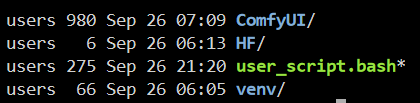
Thanks for letting me know, when you say to use the "user_script.bash" method. Did you mean to just create that bash script file in the base directory of the docker? I couldn't find the run folder you mentioned. I've done it like this, would it work? I've just copied the script you provided in the Git.
-
Hello, As a new user to Unraid, I have been trying to get this working and install the ComfyUI Impact Pack. For any other noobs like myself, the fix that worked for me was opening the console of the docker and running the following: sudo apt-get update && sudo apt-get upgrade sudo apt-get -y install libgl1-mesa-glx sudo apt-get -y install libglib2.0-0 The Github https://github.com/ltdrdata/ComfyUI-Impact-Pack specifies that both linux packages are dependencies so I just installed both to make sure. Error went away afterwards. Hope this helps.
