





Hypnosis4u2nv
Members
-
Joined
-
Last visited
Everything posted by Hypnosis4u2nv
-
Rebooted the NAS and everything loaded back.
-
I found a manual fix that would allow me to re-mount them without rebooting Unraid. Sharing in case anyone runs into this issue down the road. We should have the option to be able to hot swap drives not part of an array or pool without having to unmount or reboot Unraid. Open terminal mount | grep disks Find the unmounted drives, copy their path and names umount -l /mnt/disks/<drive name>Now you can mount as normal in unassigned devices.
-
These were external drives that I schucked and put into a DAS. I'd love to reformat them but current HD prices have kept me from getting another drive to move the data to and perform a format.
-
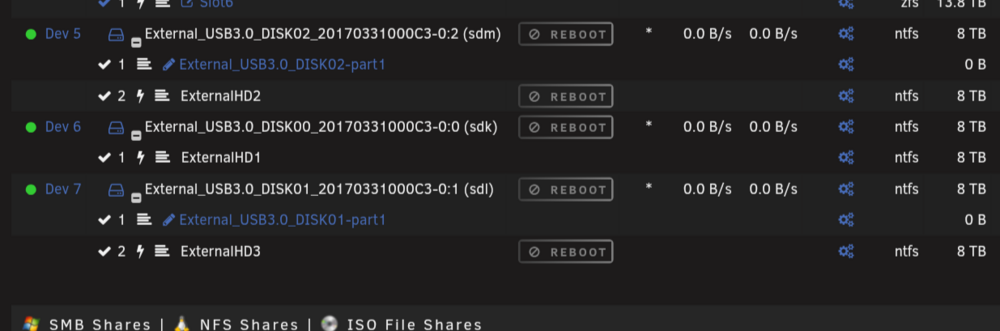
Yes. This is what they should when reattached.
-
I have it installed. But help in what way?
-
I should have been more specific and mentioned that these are unassigned drives that it's happening to.
-
I have my UNRAID (7.2.7) NAS on a UPS and have a DAS connected to it. When I power down the DAS, Unraid won't auto-mount or let me mount the drives unless I reboot Unraid. Is there some setting/script that I can use to have UNRAID ignore the lost connection and just remount the drives when the power turns on again? Yeah, I can connect the DAS to the UPS and not shut it down, but I need to move it around from time to time to other devices when I'm moving large amounts of data since transfers are faster on a direct connection.
-
My auto update didn't run last night. There's a few updates to some of the containers that should have triggered, but upon inspection those containers lost their link with the App store. Normally, the app store would show "Installed" on the specific app, but that's no longer the case. Not quite sure what happened or how to get them linked again so they can see the updates from the Apps store.
-
Is there a guide on how to apply the settings for cache mover?
-
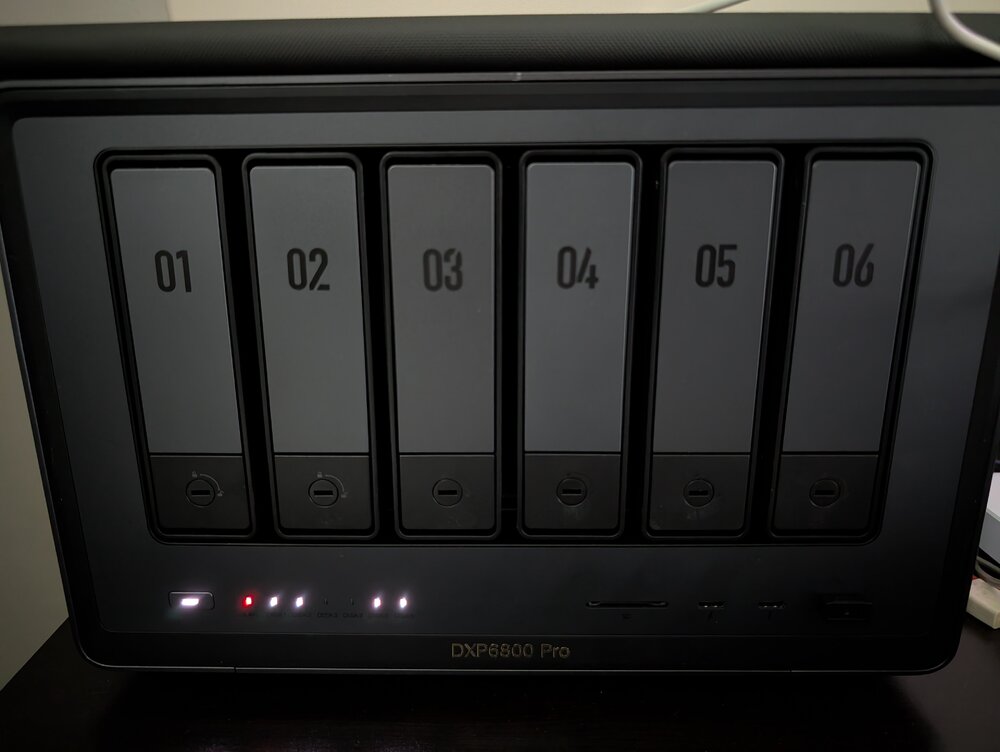
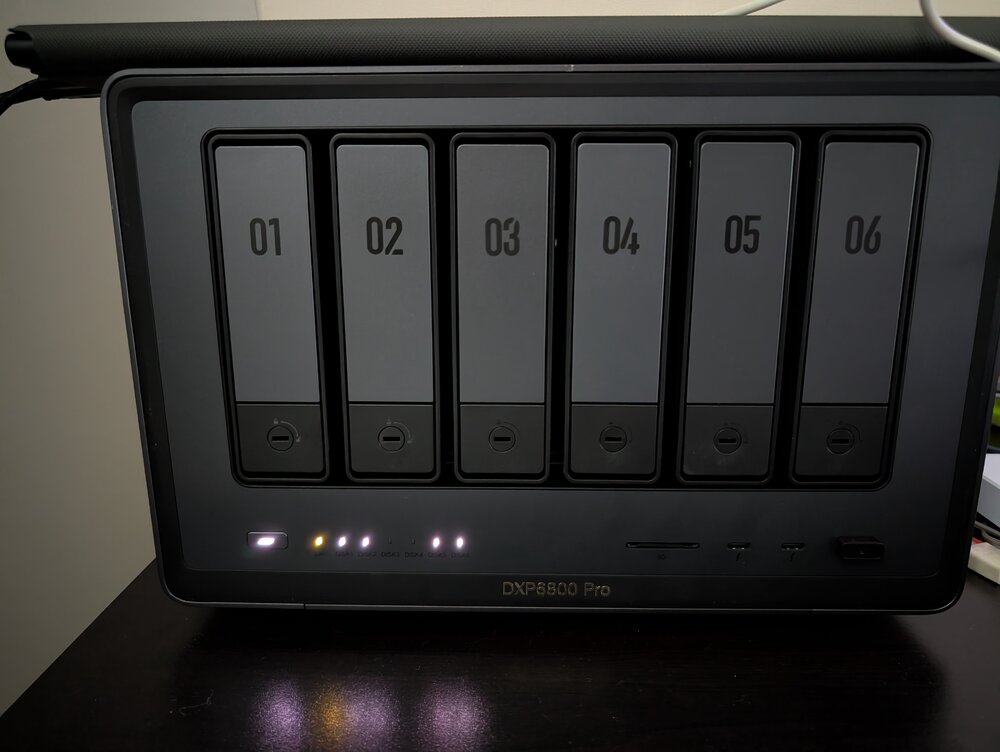
Is there anyway to reset the plugin? After unmounting drives and mounting, the LED on the NAS never changes back to green. Although it does change to red upon removal/unmount of the drives.
-
I tested out kopia and decided it wasn't something I wanted, so I removed it. Appcleaner finds a leftover: kopia: /mnt/user/appdata/ Obviously I want to get rid of it but don't want to delete my entire appdata folder with it, which makes using the plug in risky while it's there. Any idea how I can get it to stop showing up?
-
Some tiles refuse to show information when running a theme.
.png.69db79e6d39f28c7017fabb32ed33f89.png)
.png.5a8cb8974eab3227f2ab2c04c687ab43.png)
-
I'm having issues with the Theme engine. After a day or two my settings get reverted back to default and I can no longer change the theme in the settings.
-
Sorry about that. I'll post current just in case it's caught in the logs. Edit: I got a no response alert around 8:30am this morning from notifiarr that it could not connect to UNRAID. unraid-diagnostics-20250220-1240.zip
-
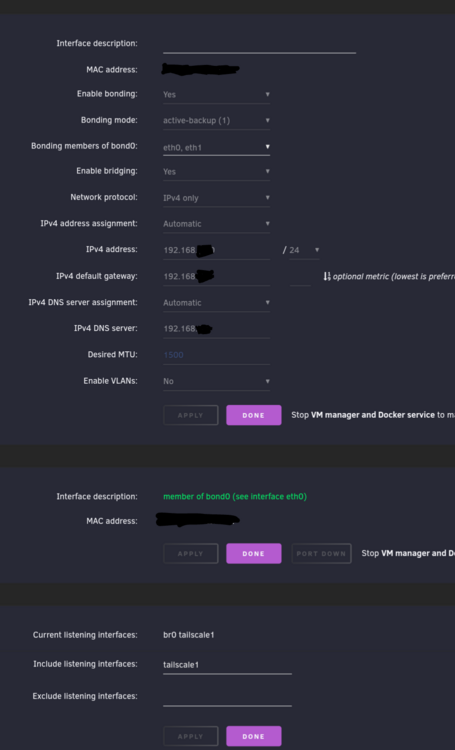
I'd like some help troubleshooting why UNRAID is losing network connection randomly. Happens every few days or so. System UNRAID 7.0.0 and patched UGREEN DXP6800 Pro 64GB Ram Static IP assigned LED flashes green when in normal operation. Flashed red when there is an issue, network not available. I correct it by physically pulling the network cable out and reinserting it. After a a minute, network is back up.
-
Haha.. Thanks, I was just coming back to say exactly that. After running some transfers it loaded up the RAM. You're avatar is perfect for my misundertanding!
-
I have 64Gb od memory and my server is no where close to utilizing half of it, so I'd like to allocate more of the ram to the ZFS Cache. I can't seem to get the cache limits to stick (or at least show up utilized on the dash). In Tools->System Drivers i set the ZFS cache with the following script (I commented the original values in the event I need to go back to default): # LimeTech - Default ARC size is MemTotal/8 (in bytes) # default 8395400192 # using 12GB ZFS Cache min and 32GB max below in bytes options zfs zfs_arc_min=12884901888 options zfs zfs_arc_max=34359738368 Dash shows the following: I tried without setting the min value and the results were the same. Any ideas?
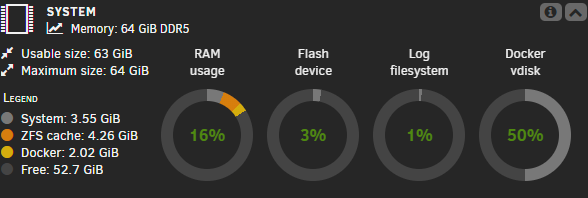
-
Thanks and I will keep that in mind for the future. It appears the Moving Tuner was the issue. After I uninstalled it, I was able to get it working. Thanks and happy New Year!
-
Apologize in advance if I'm in the wrong forum. Running 7rc2. I swapped SSD drives for my cache and added another one so that I would have some redudancy in case of failure. So I have Cache and Cache 2. I had transferred the appdata and system daya on the original drives to my array. Now I'm trying to get the data back onto the cache drives but nothing is happening. I set those share folders to move from Array->Cache. I stop the docker and VM services. When I click on Move, nothing happens and the Move button is relit. Am I missing a step here?
-
It's good thing that I have a few spare drives around to play with different NAS OS's to find one that works for me the best while I'm on a trial license. All my issues were user error and because I didn't understand how disks are handled in Unraid even though I did understand that parity only works with drives of the same size or larger. The biggest contributing factor was that I was totally wrong on how Unassigned disks work in the OS. I assumed that they HAD to be assigned to the array in order for me to use them. Once I figured that they didn't have to be assigned, I could use the 8TB drives in parity while also using the 14TB drives outside of the array and it wouldn't give me the issue of the biggest disk not in the parity slot.
-
Seems I misunderstood how the parity settings works on Unraid. I thought assigning two drives to parity and parity 2 would sync between the two, instead its Parity + Disk Slot. Duh. Thanks for the help.
-
I'm new to UnRaid and testing things out at the moment during the free trial. If I remove the 14TB drives, will I be able to add the 8TB drives as parity, then add the 14TB drives back in? I know it sounds a bit weird, but I only need the 8TB for parity rather than the 14TB. Is there some way to work around that?
-
Diagnostics Attached unraid-diagnostics-20241029-1151.zip
-
I have two identical drives and have been pulling my head out trying to get this sorted. What I have tried. - Several formats in xfs and zfs - Cleared Disks - HPA is disabled - Destructive Formats - Switching position of drives in parity slots - Assigning cleared drives with no file system Am I missing something here?
.thumb.png.83f2a1dba8149f0ceaf29f80a4909641.png)
.thumb.png.090dbac2fddf6d544ff4c1982d0c837c.png)

.png.69db79e6d39f28c7017fabb32ed33f89.png)
.png.5a8cb8974eab3227f2ab2c04c687ab43.png)



.png.f638b32fe004f77abccc88c41d7b17d8.png)
.png.fe8f2cc02116fa68ffeda987871de646.png)