Kraganov
Members
-
Joined
-
Last visited
-
So let me begin with, I already managed to solve it, but I thought I'd share it here, for anyone running into the same issue. So, I upgraded yesterday from 7.1.4 to 7.2.2, upon which everything seemed to have restarted correctly... My VMs were running, I saw expected traffic from the unraid server on the firewall, SSH was working..... but I couldn't access the WebGUI. When I tried, I was getting a connection reset. Found some other threads reporting similar issues that made me worried....so went out to take diag and started to sift through the syslog.txt file. The following log line showed me something didn't go very well : rc.nginx: Nginx server daemon... Failed. Following this comment I stopped and restarted nginx which showed me what exactly went wrong: /etc/rc.d/rc.nginx start rc.nginx: Starting Nginx server daemon... Enter PEM pass phrase: A week ago, I had implemented a new certificate, but yesterday I had also noticed, that when I opened the WebGUI, somehow the old certificate was still being used, despite showing to use the new one in the WebGUI. But I didn't think much of it, considered it would fix itself after the upgrade and subsequent reboot. This new cert was installed with a passphrase enabled...and this was clearly what was the issue when rebooting... The Passphrase had to be manually entered to start the WebGUI. Long story short : After upgrading an unraid server that has a certificate with passphrase, manually start nginx and enter said passphrase
-
I guess I now I sort of fixed it. So, as I said, after I changed to the desired fix IP, the same thing start happening to the new VM. Also to note : When I deployed the new VM with virtio-net interface driver, it also worked. So I guess it can't be changed after initial boot of the VM. So now... Deployed new Home Assistant VM from scratch Set it to user br0.4 and virtio-net interface. Added the MAC address to my DHCP server so it could give out the desired "static" IP Booted HomeAssistant VM, restored backup, now works as designed without workaround. conclusion : Issue is solved, however cause was not found.
-
@Vr2Io so I just did try this and it's super strange: Deployed new VM, it gets DHCP IP : ping works normal. Install full backup...everything appears to work normal. Change to static IP....BAM same issue returns.
-
Yeah I might try that...Not sure when I can do that yet though. Might be something for early next week, but will try sooner
-
So we both agree I shouldn't be seeing what I'm seeing 😁 Next step, find out why I see what I don't want to see 😋 I mean my workaround works..... But this thing is bugging me... Oh by the way forgot to say: initial implementation was HA container on docker and there the issue doesn't exist despite using same unraid interface
-
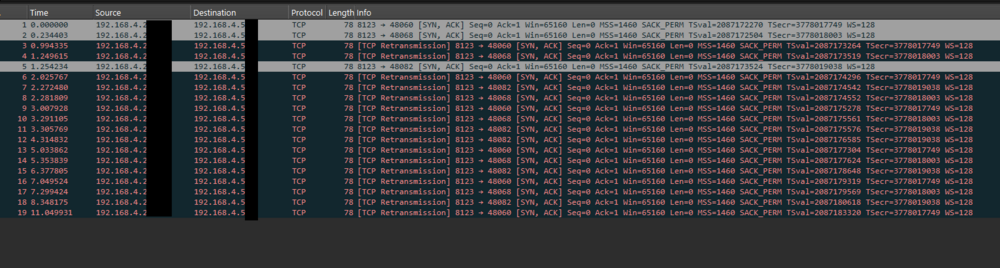
@Vr2Io I'm sorry, local traffic shouldn't route to the gateway. But I know what I see, it's not that I don't understand networking. What I don't understand is why it is happening and thus also not how to fix it. I run my home/office network as if it was a large enterprise network...but this has me beaten. I can find anything about some thing like this happening anywhere, but it is exactly what it happening. Let me show you: Default gateway is 192.168.4.1 and is my PA-440 firewall. I ran a pcap to capture traffic between my phone and the server 192.168.4.5x = my phone starting web session to HA 192.168.4.2x = HA responding to it. So this is the flow: 192.168.4.5x sends SYN directly to the HA IP/MAC 192.168.4.2x is in the same subnet, but sends the responds to the IP of my phone but to the MAC of my firewall, because my firewall sees ONLY the SYN-ACK, which it should NEVER see. I agree with you that it's probably related to HA, but I didn't get much help there. I post here because maybe similar things have happened with other VMs or Virtual Appliances that might help to find the direction to look at.
-
Tests done to confirm the issue : Joined IOT VLAN with phone, attempted to connect to the Home Assistant website, while taking captures on my firewall: My firewall does not see the TCP SYN packet (expected), but does receive (and blocks as per normal behavior) the TCP SYN-ACK packet from the Home Assistant server. Tested Connections between a VM on Br0 (so untagged!!) and another management VLAN VM running from my laptop. Direct connections were being made. Log verifications and packet captures on the firewall all confirm that the Home Assistant VM is sending all Local LAN traffic to its default gateway Tests done to attempt to fix this issue: I ran with a couple of different drivers, but then connectivity to the VM was not possible, so I found only the e1000 to actually work. Several reboots to attempt to fix the issue didn't play a role either What was not done: I didn't try fenagling around with settings in the VM, simply because access to them is very limited and before I do that, I want to at least have an idea what kind of problem I'm dealing with. My google-fu is usually up to par, but now I'm turning blanks Workaround currently in place : I have a U-Turn Source NAT in place that will Change the source IP of the traffic, to an IP that lives on my firewall, so that the traffic HAS to return via my firewall and not go directly.
-
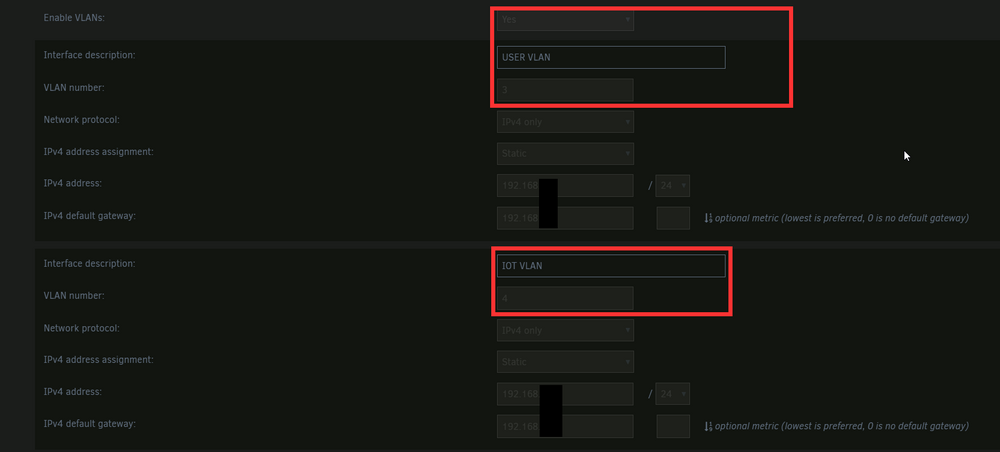
So, I actually opened this topic before on the Home Assistant community, but the feedback didn't help me much in the end. So I'm now trying it again here and will add everythin I did learn or discuss in that post, here in one single post. I had installed uraid Home assistant docker, but soon I decided to migrate to HA OS VM to get the full capabilities. And it all seemed to be working fine initially, except that one Overkiz integration to my Somfy Connexoon box, which works of local API. Now my networking here it a bit more than the average home user, so I will start with explaining the setup : - Unifi Core Switch: Aggregate to Palo Alto Networks PA-440 firewall, tags all VLANs except management (USER, IOT tagged) - Aggregate to Unifi Access Switch downstairs, tags all VLANs except management (USER, IOT tagged): Access switch has a directly connected Somfy box in IOT VLAN (untagged) Aggregate to UnRaid server, tags all VLANs except management. (USER, IOT tagged) On UnRaid, I have my physical interface configured with subinterfaces/VLANs: The VM in itself is configured with br0.4 and the e1000 driver (which seems the only one that works) The VM then creates the corresponding interface and 2 others for its internal docker system, from what I understand. So I have both the Home Assistant VM and the Somfy box in the IOT VLAN 4. Both can see each others MAC addresses and there is no port isolation configured on the network. And now here comes the issue: The VM sends all traffic for the IOT VLAN to the interface of the firewall/default gateway, rather than directly to the device. This causes assymetric routing and causes the connections to break. Basically what happens is the follwing: in arp IP .1 (default gateway) - MACADDR A IP .X (SOMFY) - MACADDR B Normal traffic processing sends traffic for IP.X to MACADDR B. But in this case we have : SEND: HA VM > FW > SOMFY (unexpected behavior) Return: SOMFY > HA VM (expected behavior) The firewall expects to see the returning flow and will otherwise block the session, while the local devices can see HA and will send responses directly. What I want to find out is how I can fix this behavior. As I have already done several tests to confirm the issue and actually have a functional, but undesired workaround in place, I will explain them in the first comment to this post.