hooded_capers
Members
-
Joined
-
Last visited
-
Alright, great news! The issue here was what I suspected, system resources taken up by docker container(s) and therefore freezing. The first fix was CPU pinning where I left cores 0, 4 free for the system. Since then, after discussing with Perplexity AI, I have moved to CPU isolation where I have exclusively dedicated cores 0, 4 to Unraid for system stability. I'll see over time if that detracts from overall system performance, which in that case, I'll just pin CPU cores again. SOLVED!
-
Thanks for taking a look and for your time! System is STILL running stable. I'm gonna mark this thread as solved soon.
-
Already ran entire parity check twice, no worries about that. 2nd time was with everything stopped and in safe mode. Passed Ran memtest, all clear Has nothing to do with Docker, in my case it's looking like system resources issues with the CPU, which CPU pinning was the solution for Previously it would crash in under an hour, maybe 2 hours max once I ran dockers and they were doing some work. Now it's been up almost 24h without a crash Appreciate your time, though in my case it's just a system resource usage issue which CPU pinning solved (using 2/4 cores max)
-
Wishing you luck brother, after 4 days of troubleshooting I seemed to have fixed my own issue with Unraid freezing after running docker apps / pausing parity check. Turns out for me CPU pinning was the solution. I highly recommend you to buy a premium subscription to Perplexity.ai with Sonnet 3.5 model in the settings. It's a complete game changer. It's like chatGPT but it's the only AI bot that searches the web EXTENSIVELY for every single question you ask it. Absolute life changer. It gave me the idea to try CPU pinning because system resources were competing against each other. No way I would've come up with that idea myself. You can upload the whole log file in there and it will read it. Actually let me attach it here for you, here's what Perplexity said regarding your issue: AI_breakdown.txt
-
Hey, how's your Unraid system? Stable? I noticed I have some non-default CPU settings as well so I'm about to try it to see if that will help with system stability. My Unraid keeps freezing/crashing when I pause parity checks and when I run some operations on dockers (archiving videos off the web)
-
Seen some people with Ryzen CPUs on here where changing the C-State setting helped them. Fingers crossed man. I'm having similar issues but with intel i7 3770k.
-
Try to disable all dockers (stop & disable auto-start) and boot in safe mode with GUI. Then run it for 24-48 hours. See if it becomes stable. If it does then it could be a hardware issue (RAM, motherboard, PSU) as these steps should rule out software issues.
-
Have you tried a memtest? From their official website as it's the latest version. Could be a RAM issue.
-
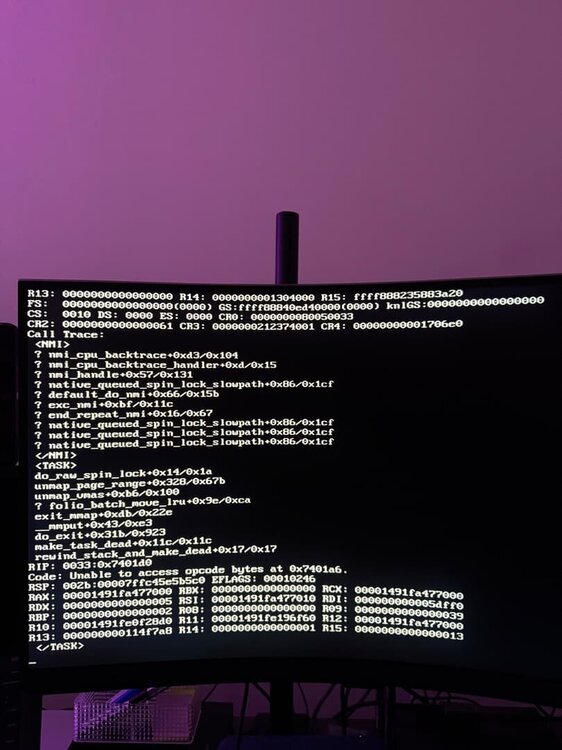
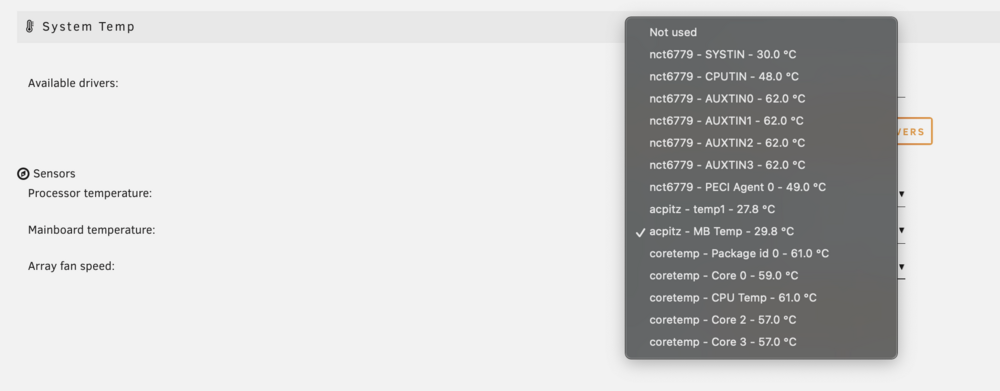
Hello, I setup a new Unraid server recently - last time I used it for only a few days. So, I'm running into the entire WebUI/dockers freezing, and the server becoming completely unresponsive. It does this when pausing the parity check (cancelling it doesn't seem to break Unraid), and also when putting some strain on the system when running dockers. I was archiving a bunch of videos off Youtube with Pinchflat and it did this. It even did it on a single file download with MeTube. (I included a detailed log analysis done by AI (Claude Sonnet 3.5) below. It seems pretty accurate and it's blaming my RAM) My specs are: Inte i7 3770k 4x4GB DDR3 RAM (from 2 different vendors) 5x 12TB HDDs (WD Red Plus) 1x 500GB SSD (Crucial) Nvidia GTX 750 Ti (unused in Unraid but plugged in) 800W Corsair power supply (Bronze) All optimal BIOS settings (and RAM speed = auto, tried with 1333 MHz as well. The RAM is rated for 1600 MHz) 2 Memtest tests passed (#1 - Unraid, and #2 - 2 passes of Memtest.org one that ran for 3 hours) Latest Unraid version Temps seemed fine (see attached photo) This PC used to work very well for me in the past, when this was simply a gaming PC, however now this PC is performing very poorly. I did buy new RAM sticks (4x 8GB) while I wait to figure this out. Any ideas? I looked a LOT online and couldn't find a solution. Much appreciated. Notes - When I ran Unraid for first time, it had issues with the 1TB new SSD I connected. Unsupported/unmountable drive. Couldn't format it either. I swapped it to a 500GB SSD and formatted it after that no issues. But it was strange as that 1TB SSD was bought a year ago and it was mostly sitting in storage EDIT (Sunday, Nov. 10, 4 AM) I've been running a parity check for 17 hours now, in safe mode with all dockers disabled, no issues. This is my 2nd parity check on the system that went this long - first one I got to 100% without any issues (on fresh install, normal boot, no dockers). Once this check finishes I'll run another parity check and pause it to see if if Unraid still freezes. EDIT (Sunday, Nov. 10, 2 PM) Parity check in safe mode with all dockers/plugins off concluded successfully after 20 hours or so (no corrections made). However, after running Pinchflat docker app for about 30 minutes (and processing about 500 videos), the OS crashed once again (same issue as in the pic). I did reset the BIOS to defaults and set all CPU timings to Auto, which I thought was causing these issues, but I guess not. New RAM coming tomorrow. EDIT (Sunday, Nov. 10, 7:30 PM) So after discussing my logs with Perplexity several times over the last few days, it finally gave me an idea that something about the CPU caused issues. Something about CPU being overloaded, and it suggested to try pinning some CPU cores to the docker container and limiting total number of available CPUs. So I did just that, and it's been running smoothly for about 2 hours now, but I'm gonna wait about 48 hours before I call this solved. EDIT (Monday, Nov. 11, 2:30 PM) 0 crashes since yesterday running Pinchflat and handling thousands of downloads. Looks like CPU pinning solved it. Will mark as solved within 48h. I can entirely attribute this fix to AI even though it took many days of troubleshooting and conversations with AI, but it gave me the idea about CPU pinning! storage-server-diagnostics-20241109-1016.zip AI_logs-analysis.txt