





Velazquez
Members
-
Joined
-
Last visited
-
Hi all, Was doing some digging and the closest I could find was a post in 2016 about using the Dynamix S3 Sleep Plugin. My concern is that the changelog shows it hasn't been updated since March 2023 and so I'm worried I might his some unexpected compatibility issues in using it with the latest Unraid OS especially since I don't have an Unraid Array but a ZFS Pool. I have 2 questions that are for different scenarios in what I'm facing: 1. Is it possible to schedule the Unraid Server to begin shutting down at a scheduled time? Goal: Server turns on automatically at a scheduled time (BIOS/Wake on LAN), Once Unraid boots it starts the "Array", and then at a scheduled time Unraid shuts down the server 2. Does anybody know of a way for Unraid to be brought to a Shutdown state while leaving the machine powered on? Goal: in the event It is discovered that there is no Wake on Lan function on motherboard, but only the "Power on" on power failure in the bios. Would it be possible for Unraid to Start all it's services (The "Array") and then at the scheduled time, Bring all services down where it is in nearly-off state as everything is down "Most importantly the ZFS Pool" and then Externally via a smart switch the power is cut off so that the next day at a scheduled time, the switch cuts on which triggers the bios to do a full power-on? In case anybody is wondering, this is for a 36 hard drive server that I don't have a free circuit-breaker power socket for along with a 1548Wh Backup-Battery system that for whatever strange reason only supports 400W input. So while powered on the battery slowly drains since it can't supply itself enough power by design. Since the server has 2 PSUs, this wasn't a issue as I originally planned on having it plugged into the wall for one and the battery for the other in case of power failure, but since I don't have a circuit that isn't already feeding high-power devices (Other servers and stuff I have), I'm stuck with plugging it through the battery while it shares the same circuit as the fridge 🙂.
-
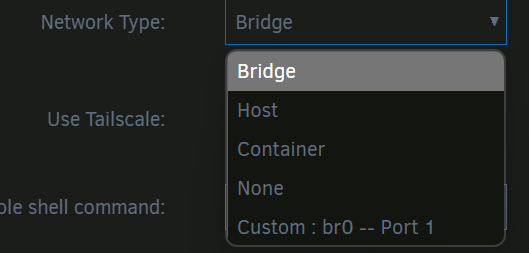
Hi All, I'm actually very shocked about this, I tried searching and went through the Unraid documentation, and the network type section for the docker part of unraid was the most bare thing I've seen with no real information about the different selections. So I'm hoping someone could explain each option to me as I only understand host and bridge somewhat but have no idea of the others. Please also correct me if I'm wrong on the explaination I give on the two mentioned: Bridge: The default used, allows you to specify a port on your unraid server and BRIDGE that port to the port ON the docker container. Basically your linking a port from the server to a port on the container. For example I could make port 8001 on the Unraid server be linked to port 80 on the docker container. So for docker settings, his would be Container port = 80, Host Port = 8001. Host: My understanding is that the docker container will use the ports directly. So instead of doing the bridging, it takes ownership and manages the port itself on the unraid server for that docker container to use? I'm unsure what truly distinguishes this from bridge and assume maybe this allows the container to potentially open up further ports itself or maybe close them when it wants. Container: No idea None: No network access at all. Custom: If my internet searches were any good, I think this is how you create a special, internal network for docker containers to use. So if you wanted different docker containers to communicate directly with each other vs the network traffic from one container having to leave the server, go to the router, and then back to the server to go to another docker container, I believe the traffic routes directly inside the Unraid server on this special custom network. If anybody could let me know if I'm misunderstanding anything, explain the container option, and lastly, tell me if there is anyway for docker containers to get macvlans (Separate ip addresses). that would be great!
-
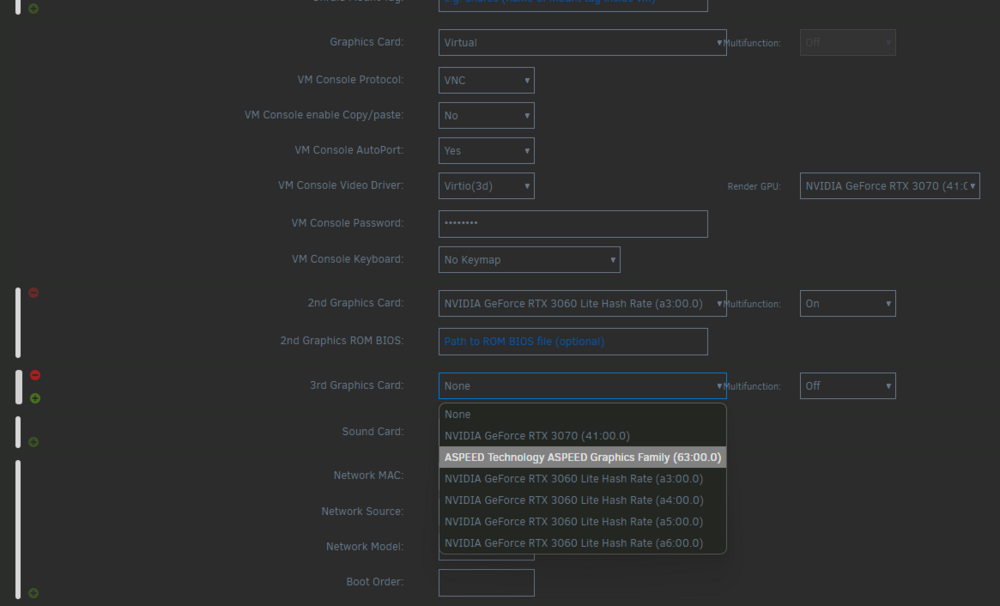
After some adjustments, I am only able to get the very first GPU working. If I add any more, the rocky linux OS is never able to boot. Really hoping to see some progress on this with the actual NVIDIA drivers someday
-
Man, and another post where no solution was given. I have this same issue from trying to add --hostname to the extra run but had cut off the host part, so the container rename itself mid-creation and that messed up everything. It's upsetting there's no obvious way to edit a docker container or to at least do it manually
-
Hi guys, Starting with a screenshot as I'm planning on creating a Rocky Linux VM machine for Davinci Resolve: When Unraid put out beta 2 of 7.1, they explained that by enabling the Nouveau driver and then selecting "Virtual" in graphics Card section and setting the VM console driver field to "Virtio(3d)" you could virtualize the GPU so the VM machine could use it while the rest of unraid could use it. What I want to know is can I expand this to all the GPUs I have in my system? I have this on my testing machine so if a dev needs me to destroy (virtual chops and breaks) in the system to test this to get it working, do let me know. After setting up the initial virtual GPU, the other settings look like they are taking a GPU away from the rest of unraid which is what I don't want, I would want to virtualize all of them. Regarding my end goal here, upfront is to simply be able to have the linux OS be able to fully use ALL my nvidia GPUs without forbidding their usage with the rest of my unraid system. I should be able to boot the linux system up, do my DaVinci Resolve work and rendering, close the application and then have a docker container use the GPUs for other work without haZving to detach or reattach stuff. I have achieved this with Ubuntu in a docker container. I currently have on my other unraid machine, Ubuntu in a docker container and went through months of painful work to get the Ubuntu Container to work fully with DaVinci Resolve where it can use ALL the Nvidia GPUs, and fully function (encode h.264, h.265) with the timeline display working. It works a lot of the time but I sometimes hit limits that could be related to either the nature of the container (activation resets) or the power of my cards (I encode 8k HDR). I'm hoping that I can achieve this setup in a full fledge Linux VM running Rocky Linux which is DaVinci Resolve's recommended linux OS while still allowing my GPUs to be used by the rest of Unraid resources (Not needing to detach and re-attach).
-
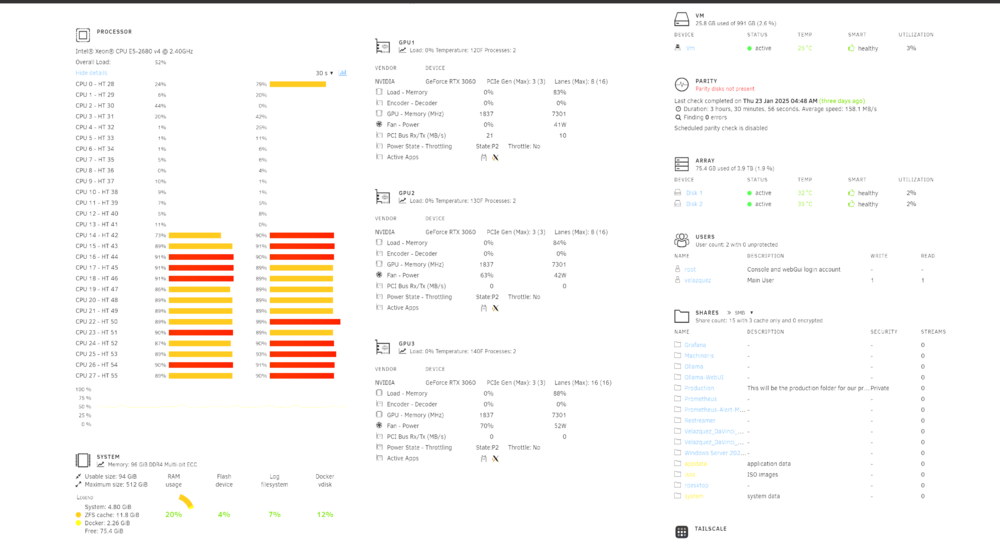
Hi guys, I wanted to know if anybody is experiencing this and if I'm maybe confused and don't understand what I am looking at: First apologies for the white tint of the images, not sure why my screenshot app was making this at that time. Here on the bottom left, I am not using much Ram allegedly, the specific thing I want to look at is docker, which is at about 2GB of ram. But when I go to the docker tab to look at what the resources are that my docker containers are using, I see this: One of the docker containers is actually using 60+GBs of Ram (I was running a 70b model if your wondering). My question is if this is a bug for the dashboard? shouldn't this have been reported in the section that told me docker was using 2GB of ram or am I mistaken? It goes up when I'm using my crypto docker images, not sure why not when I'm doing A.I stuff.

-
Thanks JorgeB, restarting the server fixed the reporting, and I was able to then reformat them through the GUI. That was a wild bug, I think since my other applications were reading the same space issue, there's no telling what would of happen after I went past 3TB of data on my apps.
-
Thanks, that got me a little closer. It allowed me to clear only 1 of the disk, the one with mount button. It does not give me the same partition clearing option for the other hard drives. I can confirm after clearing the partition on the one, the size is properly reported again. This seems like I might have to go through some CLI tools potentially? It's the hard drives with the pool marking on them that are what is left
-
Thanks, I want to nuke those drives specifically and mount them as individual drives? I already have a separate array running and a few pools/SSDs for specific things. These 3TB HDs I intend to use individually for testing/working with certain stuff, so they won't be in an array. I tried looking for anything that would give me a formatting option so I can start over with these hard drives, but can't seem to find it. Tried with array off and in maintenance mode to see if the menu options would change, nothing.
-
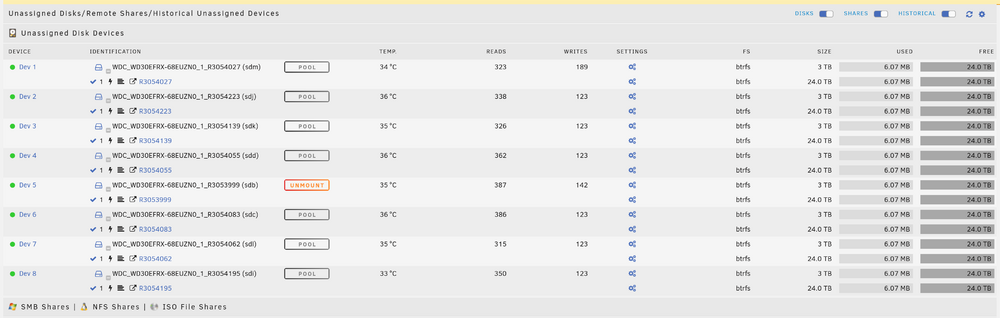
Hi guys, Has anybody experienced this mounting a bunch of 3TB hard drives outside the array? I'm not sure what I did. originally, I was going to put them in a pool but realized it wouldn't let me mount them as separate drives in it, so I deleted the pool and then mounted each individually under the "Unassigned Disk Drives" section. I don't know why one drive has the unmount button while the rest has pool, so maybe I stumbled upon a bug. Anyway to fix this? My docker applications are reporting each hard drive to be 20TB each which is scary.
-
Hi Guys, Hope I am not crazy, I am in the processes of creating a docker container of Ubuntu to run Davinci Resolve, I need to add my docker run flags to get the application working properly with the three 3060 RTX cards in my server. I have done this to 99% working order in Unraid on the 6.x.x firmware and am doing it again on the new 7.0 to see what has changed and any compatibility issues I may face. And right out the gate, unless I'm crazy, the docker container configuration section no longer has the docker extra param sections? I use to put these there: --runtime nvidia --gpus all --security-opt seccomp=unconfined Did these move somewhere else? is this something that has to manually be done now as a custom variable? I believe it was this and another field you could even put commands that would execute right after the container is made (like apt upgrades and installs). These aren't there anymore when I load up a container in Unraid 7rc2

-
Did anybody (Dev, involved community member, somebody) ever figured this out? I have been spending days trying to understand how to get the sysbox thing going in Docker in Unraid. My end goal is to enable "runc" in a docker container I am running that essentially runs RockyLinux with VNC support so I can access it with some GUI through the web browser to eventually get Nvidia + Davinci Resolve running in it. I understand systemd was very discouraged and so nestybox's sysbox runc is the best way to overcome that. Don't why it's so hard to find any info on getting this going in Unraid, preferably natively (Want to avoid the Docker in Docker method, would love to just be able to add "--runtime=sysbox-runc" to the docker run argument (extra parameters in unraid docker container setup)



