



Skip to content
View in the app

A better way to browse. Learn more.

Unraid

A full-screen app on your home screen with push notifications, badges and more.

To install this app on iOS and iPadOS
  1. Tap the Share icon in Safari
  2. Scroll the menu and tap Add to Home Screen.
  3. Tap Add in the top-right corner.
To install this app on Android
  1. Tap the 3-dot menu (⋮) in the top-right corner of the browser.
  2. Tap Add to Home screen or Install app.
  3. Confirm by tapping Install.

Ahrimaan

Members
  • Joined

  • Last visited

  1. Same issue here, when trying to query the GraphQL Endpoint from Unraid connect, i get the "CORS" Error too. Tried to add allowed headers localy but it does not work. Seems like the apollo server on unraid is not configured properly
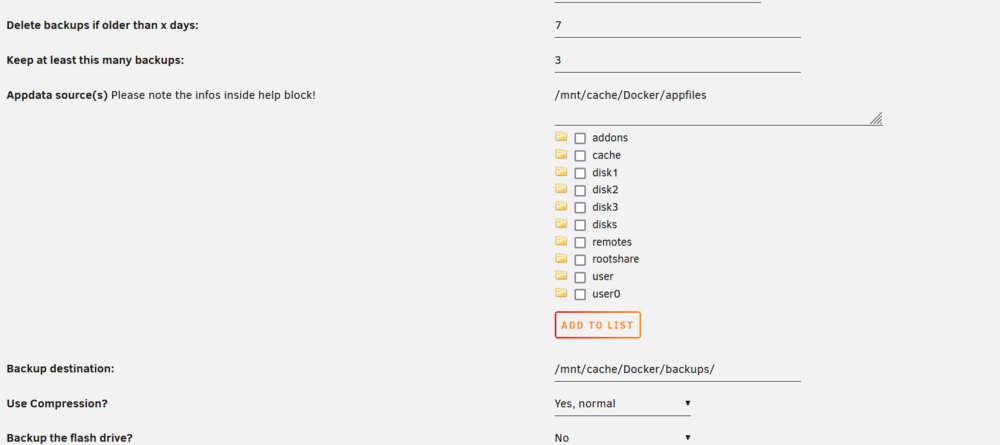
  2. Hi, i have an issue i don't understand: I setup some paths, hit save and ran inot the issue of having external volumes. Ok fine, just switch back and set the checkbox "External too" and whoops. where is the checkbox ?

Account

Navigation

Search

Search

Configure browser push notifications

Chrome (Android)
  1. Tap the lock icon next to the address bar.
  2. Tap Permissions → Notifications.
  3. Adjust your preference.
Chrome (Desktop)
  1. Click the padlock icon in the address bar.
  2. Select Site settings.
  3. Find Notifications and adjust your preference.