





fleps
Members
-
Joined
-
Last visited
-
I didn't find an official topic for this, sorry if this is somehow against the rules. If not, well, maybe we can start a thread about it! Thanks to the Theme Engine plugin creator to make this possible!! Colors slightly inspired on my VSCode Theme. This took a lot of work / inspector. As a FE Dev, I can only say I cried a little seeing some of the html structures Next probably I will try to customize the login page.
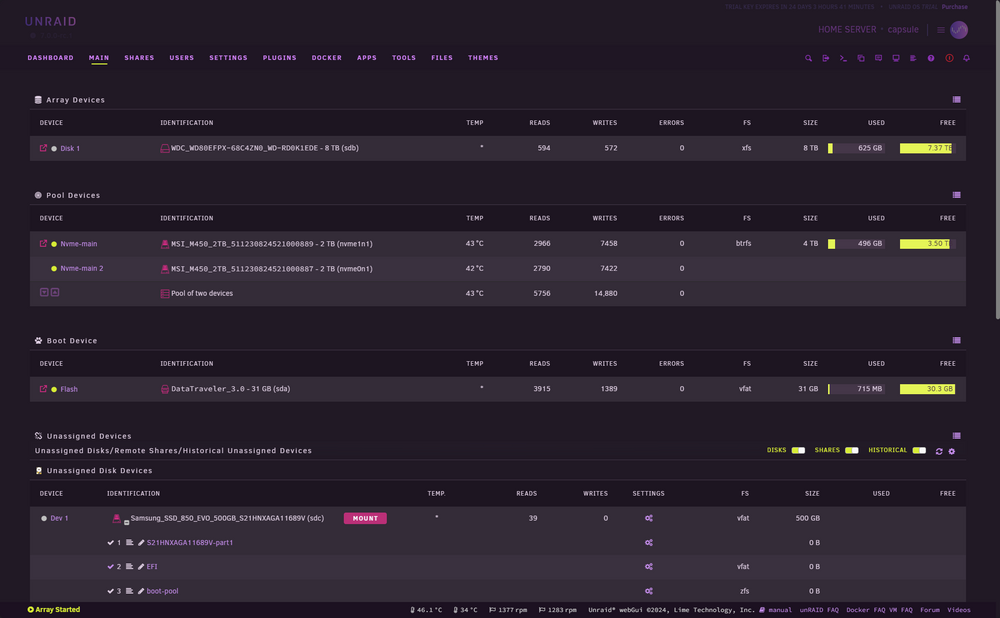
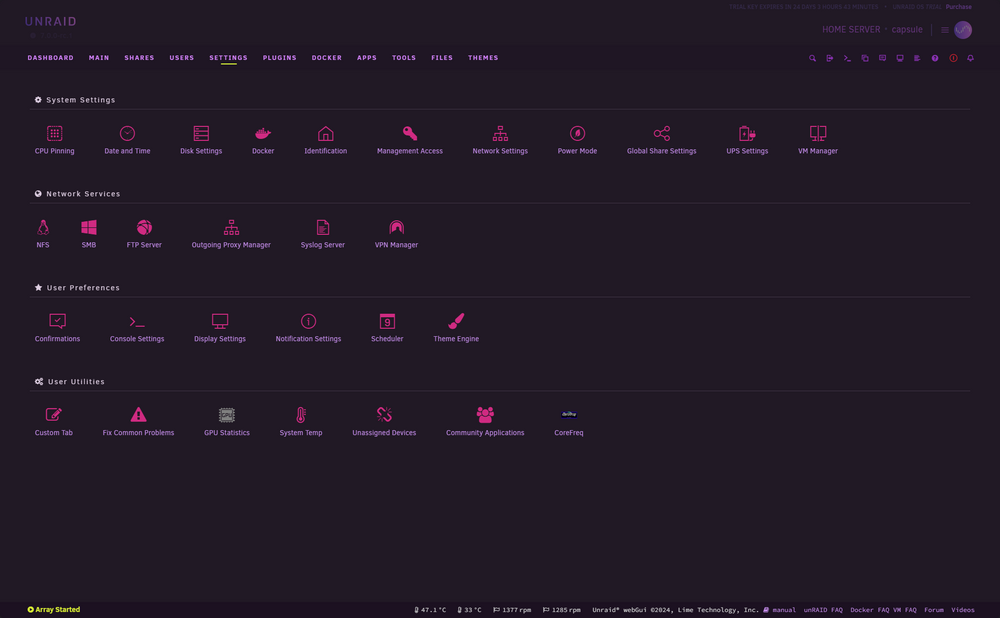
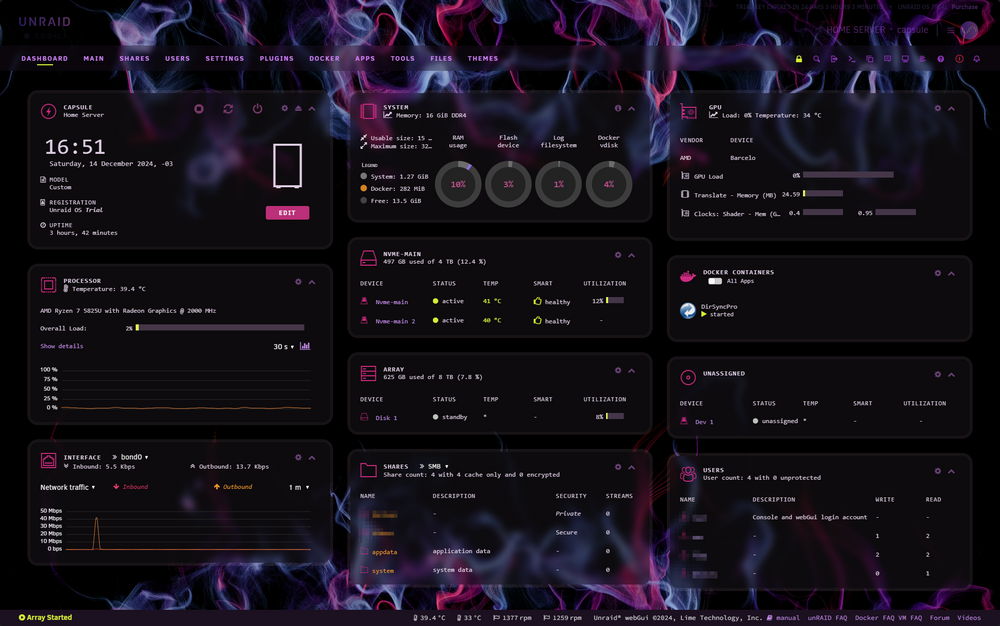
-
THANK YOU FOR THIS PLUGIN. Allowed to make it look like something not from 20 years ago
-
Ok, I'm pretty sure I did something wrong the first time I installed it, as this time around the path when selecting to install was what you mentioned before, /mnt/POOLNAME/appdata/dirsyncpro I installed it normally, was able to load my job from /appdata where I saved it before, changed some config, saved, analyzer + sync worked fine, restarted, container auto-started, opened Gui, job + schedulers are there. All is fine now, sorry to waste your time, was totally something I did wrong, first time dealing with NAS/Dockers. Thanks a lot for the help!
-
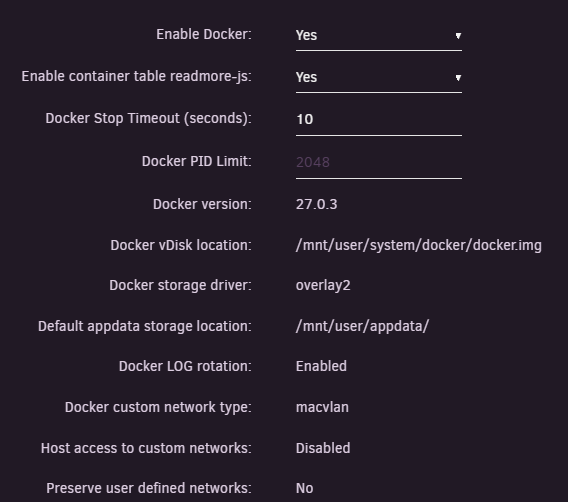
Yes it makes sense, thanks for trying to help. Weird thing is, this is my global docker settings: I completely uninstalled DirSyncPro now and unraid reboot to try to install again. Is there a "cache" somewhere that will try to install on that directory again? I'm installing it via the App official place inside Unraid, nothing manual. Edit: I also deleted the /mnt/local after uninstalling DirSyncPro as everything was still there! Weird.
-
My setting is /mnt/local, not usr/local. And checking it, /mnt/local I can't see where it is located, it seems it's an "on runtime" place created on system boot, and somehow, it's where DirSyncPro is actually installed?? If this isn't a "on disk" location, then what's actually happening is that on system reboot DirSyncPro is just being reseted / reinstalled? This is so confusing, I'll digg into my Unraid settings to see if I modified anything about docker installation (although I have other plugins installed and none are on this directory)
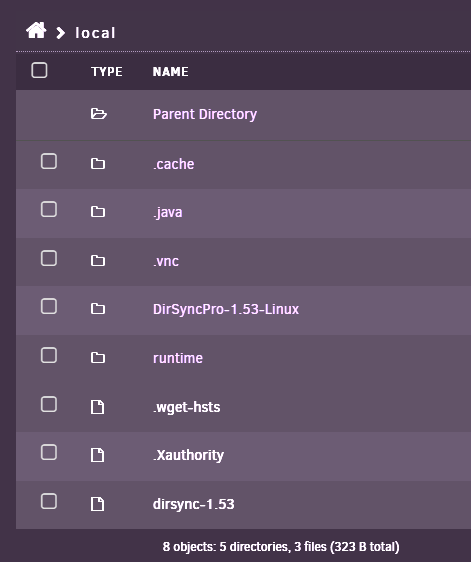
-
Weird, I don't remember touching this anywhere. Is there a global config for this somewhere? /mnt/cache doesn't exist on my NAS when I go to files. I'm on Unraid 7.0.0-rc.1, maybe they changed this? Anyway, if I don't have any movers this shouldn't matter, does it? This time around I saved the config file on another place, mnt/user/appdata Should this be ok? Am I assuming incorrectly that the docker settings/configs (the job itself, the schedule auto-start, etc) should survive a system reboot, docker update, system update?
-
I don't have any movers, I don't use the cache > array approach on my NAS. My pool is my main storage with 2 nvmes in raid 0, no movers / secondary storage configured. An HDD is my secondary disk, which is not marked as secondary storage anywhere and I don't have movers configured anywhere (that is confirmed by the fact that none of the usual system directories on my main pool exist on this disk) I'm using DirSyncPro to daily backup (copy/sync, not move) my Pool to Disk1. It worked all fine, I opened the GUI, created the job, configured it, ran the analyzer and some manual triggers, setup the schedule, setup to start the schedule automatically on the Gui, then closed the Gui and setup the container/docker itself to auto-start on Unraid settings. This is what I have on the container settings, the only thing I changed was the Source Directory to / and the permissions o read/write as I'm using this to backup my main storage to a secondary disk. When I hit to save the job on DirSyncPro, it shows it's "home" location /dirsyncpro, which is where I saved the job the first time (but according to the screenshot above it seems the real location is /mnt/local?)

-
Hi Where is the correct location for me to save the DirSyncPro jobs I create to make sure they don't disappear?? I saved my job at the normal location that appears when you hit Save inside the tool (it shows as /dirsyncpro, which if I understood correctly it's actually /mnt/local?) Clearly this isn't a good place because 2 days after the job disappeared and the docker has the default "job" only when opening it (I think the tool was auto-updated or something? Or was my other plugin Fix Commons Problems?) On the app settings source directory is /, and data is /mnt/local. Sorry if this is a stupid question, I'm new to this stuff. Thanks
-
My comment was not towards the plugin creators, I think you missed that. They do an amazing job fixing things the "OS" should have by default. It was towards Unraid team. We shouldn't need a plugin to simple read system sensors in 2024, specially for a Ryzen 5000 series CPU. And I would argue that be able to read CPU temps on a NAS device is pretty important. This is not a free tool made by some small indie dev that was launched 2 months ago. It's a paid system with almost 20 years. (the irony: I tested a bunch of these homelab / server systems like CasaOS, ZimaOS, Umbrel, they all read my CPU temp out of the box)
-
Somehow fixing sensors implementation OOTB would make Unraid to be as large as Ubuntu?
-
Well, found a solution: - manually created /boot/config/plugins/dynamix.system.temp/drivers.conf with it87 k10temp - edited /boot/config/plugins/dynamix.system.temp/sensors.conf chip "k10temp-pci-00c3" label "temp1" "CPU Temp" chip "it8613-isa-0a30" label "temp1" "MB Temp" Saved, went to the sensors, it87 k10temp were already on the field, clicked SAVE, then loaded the 2 labeled ones on the "sensors" section for CPU/MB temps. Didn't even needed to restart. Thanks for the plugin, it is TRULLY BIZARRE that in 2024 unRAID doesn't have CPU temp natively like any free HomeNAS/Server tool does and we need to install plugins, runs commands, edit files and all this manually.
-
Solution: - manually created /boot/config/plugins/dynamix.system.temp/drivers.conf with it87 k10temp - edited /boot/config/plugins/dynamix.system.temp/sensors.conf chip "k10temp-pci-00c3" label "temp1" "CPU Temp" chip "it8613-isa-0a30" label "temp1" "MB Temp" Saved, went to the sensors, it87 k10temp were already on the field, clicked SAVE, then loaded the 2 labeled ones on the "sensors" section for CPU/MB temps. Thanks for the plugin, it is TRULLY BIZARRE that in 2024 unRAID doesn't have CPU temp natively like any free HomeNAS/Server tool does and we need to install plugins, runs commands, edit files and all this manually.
-
My Detect doesn't detect anything, even after installing the plugin and restarting, and also running sensors-detect. This is what I see when I run sensors: it8613-isa-0a30 Adapter: ISA adapter in0: 770.00 mV (min = +0.91 V, max = +0.97 V) in1: 1.23 V (min = +1.30 V, max = +1.44 V) in2: 1.85 V (min = +0.14 V, max = +1.45 V) in4: 352.00 mV (min = +2.48 V, max = +1.83 V) in5: 154.00 mV (min = +1.13 V, max = +0.37 V) 3VSB: 2.18 V (min = +3.17 V, max = +0.90 V) Vbat: 3.17 V +3.3V: 3.28 V Array Fan: 1157 RPM (min = 33 RPM) Array Fan: 961 RPM (min = -1 RPM) temp1: +36.0°C (low = -78.0°C, high = +26.0°C) sensor = thermistor temp2: +36.0°C (low = +101.0°C, high = +73.0°C) temp3: +38.0°C (low = +1.0°C, high = -86.0°C) intrusion0: ALARM nvme-pci-0100 Adapter: PCI adapter Composite: +42.9°C (low = -0.1°C, high = +82.8°C) (crit = +84.8°C) Sensor 1: +60.9°C (low = -273.1°C, high = +65261.8°C) Sensor 2: +42.9°C (low = -273.1°C, high = +65261.8°C) k10temp-pci-00c3 Adapter: PCI adapter Tctl: +38.4°C amdgpu-pci-0600 Adapter: PCI adapter vddgfx: 687.00 mV vddnb: 762.00 mV edge: +38.0°C PPT: 6.00 W nvme-pci-0500 Adapter: PCI adapter Composite: +43.9°C (low = -0.1°C, high = +82.8°C) (crit = +84.8°C) Sensor 1: +60.9°C (low = -273.1°C, high = +65261.8°C) Sensor 2: +43.9°C (low = -273.1°C, high = +65261.8°C)
-
My NAS reports ITE IT8613E Super IO Sensors when I run sensors-detect. I installed this plugin, then Dynamix temp plugin, I run detect, nothing. I restarted, noted that now my Dashboard has a "FANS" area with my fans speeds, but the temperature info for CPU/MB are empty, and running Dynamic detector finds nothing still, even tho the fans part shows it8613 How is this supposed to be used??
-
Hi, I also have a NAS with ITE IT8613E Super IO Sensors, but this seems to be used only for fans - when installing the ITE drivers plugin and restarting, Dynamix Temp now sees fans from IT8613E. But on my Drivers list, k10temp is shown as the temperature sensor, as my NAS uses a Ryzen 7 5825U CPU. How can I show this CPU temperature? I don't understand why it's so complicated to UnRAID have this by default, other NAS solutions with Linux in the background (like Ubuntu) can show this CPU temp by default.




