





Harleyman
Members
-
Joined
-
Last visited
Everything posted by Harleyman
-
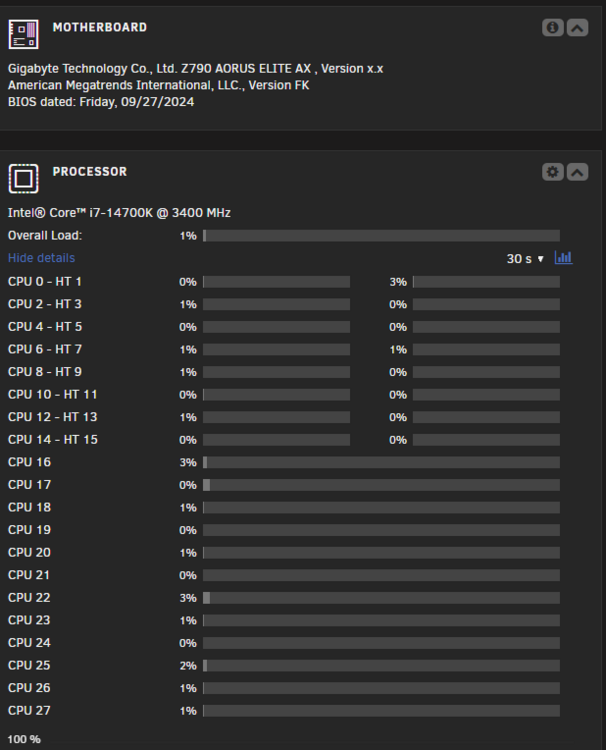
Thanks for the information ConnerVT below is my final build. I have one slot left for a graphics card and I have a NVIDIA P4000 QUADRO and a newer NVIDIA RTX 4000 I can add to it, but with the newer Motherboard, I& and the memory the Intel built in Video card is doing good. Only during the Parity-Checking and when I move a lot of Media files off my old plex server do I see any real CPU spikes and those are normally less than 50%, running normally with just local and remote streams, it's less than 5% then. Thanks for the reply. -Tony GIGABYTE Z790 AORUS Elite AX 1.0 Intel LGA 1700 ATX Motherboard, 4X DDR5~128GB, 3X PCI-E x16, 4X M.2, 6X SATA, 5X USB 3.2, 1x USB-C, 4X USB 2.0 Intel® Core™ i7-14700K @ 3400 MHz Thermaltake TH120 ARGB Sync V2 CPU Liquid Cooler Thermaltake Toughpower GF A3 1050W Power Supply Memory: 64 GiB DDR5 ASUS XG-C100C 10G Network Adapter PCI-E x4 Card LSI Logic Controller Card - 9207-8i 8Port Internal SAS/SATA 6Gb/s PCI Express Raid Information: (2) Western Digital Red Plus 10 TB for my Parity Drives (2) Western Digital Red Plus 10 TB for my Disk 1 and 2 (2) HGST Ultrastar He10 10 TB for my Disk 3 and 4 (2) Seagate IronWolf 8TB for my Disk 5 and 6 Cache Disk: (2) SanDisk SSD PLUS 2 TB Unassigned Disk: Dev 1 T-FORCE 2TB 2.5 SSD Dev 2 T-FORCE 2TB 2.5 SSD Dev 3 Samsung SSD 970 EVO Plus 2TB
-
Hello I'm a new user to UNRAID and I was wanting to get some feed back on what system board, processor and memory you all would suggest for my build. What I plan on doing is making it a Plex Server, I currently have about 38 TB of space and my current Linux headless server running my Plex Media server. It in a tower PC, I bought a cast that will hold the drives, that I going to use. I have it setup now with (2) 10 TB parity drives and have (4) 10 TB drives and (2) 8 TB drives for my array giving me a total of 56 TB of array storage. I have (2) 2TB setup for my Cache drives and (1) 2 TB NVMe drive on my system board, because it only has one M.2 slot. The current system board I have, came out of a Dell Precision 3630 it is an ATX board that how I got it to work in the case I have, it has a Intel® Xeon® E-2286G CPU @ 4.00GHz with 64 GiB DDR4 Single-bit ECC memory on it. I running a 10 GB network card. I do stream away from the house some but not much. The Dell 7000 Tower, I'm currently running my plex server today is a lot newer PC and it runs great, but just no raid, if I lose a drive. I'm still on the trial with the UNRAID server, but have been moving Media to it and running plex on it testing and I don't think that older system board will allow me to have someone running a couple of steam at home and also running a couple of remote streams as well. With the test and moving media to the UNRAID server and streaming local, I noticed some slight freezing when plex may be recording or if I coping media to the server. I was think of a system board that would give me at least (2) Nvme slots and 2 full height PCIe x16 slots and a couple of PCIe x4 slots and would probably stay with ECC Memory if that is suggest bu UNRAID, I know it is suggested by TrueNAS, I know and intel board and processor and should I look at bumping up to the new DDR5 Memory. I may set up some file shares on it, but it mostly going to be a Plex Media Server, and I may play around with VM some later on. I just don't want to pay for UNRAID and have to pay again if I upgrade the system board. A idea's or suggestions would be great, I can swap the board out over the weekend before I purchase UNRAID. Like I said I new to UNRAID, have done Red Hat, TrueNAS and just want to give UNRAID a shot. Thanks in advance, Tony
