





SickPup404
Members
-
Joined
-
Last visited
Everything posted by SickPup404
-
Thanks very much!
-
Good morning, I currently have a stable UR 7.3.1 with USB boot & license. I've been lurking a bit and think I'd like to move to internal boot and TPM license. I've looked through many pages of posts and I guess I might just be missing some key details. I currently have two possible "targets" for the boot: WD Black SN770 1TB; currently used for NVME Cache and contains all AppData. About 88GB used. WD Black SN770 1TB; currently used for NVME VM/Docker and contains ISO's, VM's, and the docker.img/libvirt.img. About 333GB used. Was thinking of trying to put it on the NVME Cache where AppData is housed, but is there a difference in the ease of making the changes? It doesn't really matter to me which one get's used. How do I go about carving out a partition/space to put the boot, how much should I allocate, etc? Any links to some instructions for a dummy/noob like myself? Sorry for the (probably) very basic questions, but I'm not sure how much of the "heavy lifting" I need to do before using the tool to switch to internal boot. TIA!
-
Good morning, Just hopefully a quick question. I have a share that over time has spread across 10 drives. I also have the drives set to spin down after 30 minutes. When I access the share, the drives spin up one at a time which can take what seems like a minute or more. Is there a setting to have all drives in a share spin up at once? Or maybe I would be better off consolidating the data and restricting the share to a few (1-3) specific drives? Thanks! Steve
-
I have a question on the backup process. I have a few servers set up pointing to separate config folders and separate ports. They all seem to be working fine, except the only one that appears to get the backups done is in the first one I set up. All of them have the backup hours and purge days set to the default 12/14. In the logs on the docker, it shows all of the scripts have the same PID. Is it possible that the backups are all running and just sending everything to the first backups folder? Or maybe the last server to start is the last set of scripts (if they get overwritten)? I'm not 100% sure if I set them up correctly for multiple instances (when installing, i just update name, title, ports and config folders). Whenever there's an update to the container for the server jar, I have to manually copy it to the other config folders. Any suggestions are greatly appreciated! Sample log: Created by... ___. .__ .__ \_ |__ |__| ____ | |__ ____ ___ ___ | __ \| |/ \| | \_/ __ \\ \/ / | \_\ \ | | \ Y \ ___/ > < |___ /__|___| /___| /\___ >__/\_ \ \/ \/ \/ \/ \/ https://hub.docker.com/u/binhex/ 2025-10-06 09:13:16.390700 [info] Host is running unRAID 2025-10-06 09:13:16.404721 [info] System information: Linux 21599087d801 6.12.24-Unraid #1 SMP PREEMPT_DYNAMIC Sat May 3 00:12:52 PDT 2025 x86_64 GNU/Linux 2025-10-06 09:13:16.418234 [info] Application name: 'minecraftserver' 2025-10-06 09:13:16.431188 [info] Base image release tag: '2025092801' 2025-10-06 09:13:16.445050 [info] Output image release tag: '1.21.9-01' 2025-10-06 09:13:16.462793 [info] PUID defined as '99' 2025-10-06 09:13:16.489106 [info] PGID defined as '100' 2025-10-06 09:13:16.529392 [info] UMASK defined as '000' 2025-10-06 09:13:16.550098 [info] Permissions already set for '/config' 2025-10-06 09:13:16.572842 [info] Deleting files in /tmp (non recursive)... 2025-10-06 09:13:16.589441 [info] CREATE_BACKUP_HOURS defined as '12' 2025-10-06 09:13:16.605943 [info] PURGE_BACKUP_DAYS defined as '14' 2025-10-06 09:13:16.621473 [info] ENABLE_WEBUI_CONSOLE defined as 'yes' 2025-10-06 09:13:16.636201 [info] ENABLE_WEBUI_AUTH defined as 'yes' 2025-10-06 09:13:16.650632 [info] WEBUI_USER defined as [REDACTED] 2025-10-06 09:13:16.665838 [info] WEBUI_PASS defined as [REDACTED] 2025-10-06 09:13:16.680721 [info] WEBUI_CONSOLE_TITLE defined as 'Minecraft Java Server 1' 2025-10-06 09:13:16.697477 [info] CUSTOM_JAR_PATH defined as '/config/minecraft/minecraft_server.jar' 2025-10-06 09:13:16.769840 [info] JAVA_VERSION defined as 'latest' 2025-10-06 09:13:16.797693 [info] JAVA_INITIAL_HEAP_SIZE defined as '2048M' 2025-10-06 09:13:16.812668 [info] JAVA_MAX_HEAP_SIZE defined as '2048M' 2025-10-06 09:13:16.827162 [info] JAVA_MAX_THREADS defined as '2' 2025-10-06 09:13:16.841825 [info] JAVA_CUSTOM_ARGS not defined,(via -e JAVA_CUSTOM_ARGS) 2025-10-06 09:13:16.857593 [info] STARTUP_CMD not defined (via -e STARTUP_CMD) 2025-10-06 09:13:16.876767 [info] Starting Supervisor... 2025-10-06 09:13:17,083 INFO Included extra file "/etc/supervisor/conf.d/minecraft-server.conf" during parsing 2025-10-06 09:13:17,083 INFO Set uid to user 0 succeeded 2025-10-06 09:13:17,088 INFO RPC interface 'supervisor' initialized 2025-10-06 09:13:17,088 INFO supervisord started with pid 7 2025-10-06 09:13:18,090 INFO spawned: 'backup-script' with pid 141 2025-10-06 09:13:18,091 INFO spawned: 'purge-script' with pid 142 2025-10-06 09:13:18,091 INFO spawned: 'start-script' with pid 143 2025-10-06 09:13:18,092 INFO reaped unknown pid 8 (exit status 0) 2025-10-06 09:13:18,094 DEBG 'backup-script' stdout output: [info] Waiting 12 hours before running worlds backup... 2025-10-06 09:13:18,095 INFO success: backup-script entered RUNNING state, process has stayed up for > than 0 seconds (startsecs) 2025-10-06 09:13:18,095 INFO success: purge-script entered RUNNING state, process has stayed up for > than 0 seconds (startsecs) 2025-10-06 09:13:18,095 INFO success: start-script entered RUNNING state, process has stayed up for > than 0 seconds (startsecs) 2025-10-06 09:13:18,095 DEBG 'purge-script' stdout output: [info] Removing any Minecraft worlds backups with a creation date older than 14 days... 2025-10-06 09:13:18,096 DEBG 'start-script' stdout output: [info] Minecraft folder '/config/minecraft' already exists, rsyncing newer files... 2025-10-06 09:13:18,097 DEBG 'purge-script' stdout output: [info] Checking for old backups in 12 hours... 2025-10-06 09:13:18,144 DEBG 'start-script' stdout output: [info] EULA file exists, checking EULA is set to 'true'... 2025-10-06 09:13:18,146 DEBG 'start-script' stdout output: [info] EULA set to 'true' 2025-10-06 09:13:18,157 DEBG 'start-script' stdout output: [info] Minecraft version '1.21.9' detected, adding log4j mitigation for v1.7.*-v1.11.2 to start cmd... 2025-10-06 09:13:18,159 DEBG 'start-script' stdout output: [info] Starting Minecraft Java process... 2025-10-06 09:13:18,162 DEBG 'start-script' stdout output: [info] Minecraft Java process is running 2025-10-06 09:13:18,162 DEBG 'start-script' stdout output: [info] Starting Minecraft console Web UI... 2025-10-06 09:13:18,171 DEBG 'start-script' stderr output: 2025/10/06 09:13:18 GoTTY is starting with command: screen -x minecraft 2025-10-06 09:13:18,172 DEBG 'start-script' stderr output: 2025/10/06 09:13:18 Using Basic Authentication 2025/10/06 09:13:18 Permitting clients to write input to the PTY. 2025/10/06 09:13:18 HTTP server is listening at: http://[::]:8222/ 2025/10/06 09:13:18 Alternative URL: http://127.0.0.1:8222/ 2025/10/06 09:13:18 Alternative URL: http://[::1]:8222/ 2025/10/06 09:13:18 Alternative URL: http://172.17.0.6:8222/
-
Gotcha! Thanks! That makes sense with the way shares are handled. Once the top level share is created on a drive, then I can create a sub-folder. (sorry for the reply, was out of town.)
-
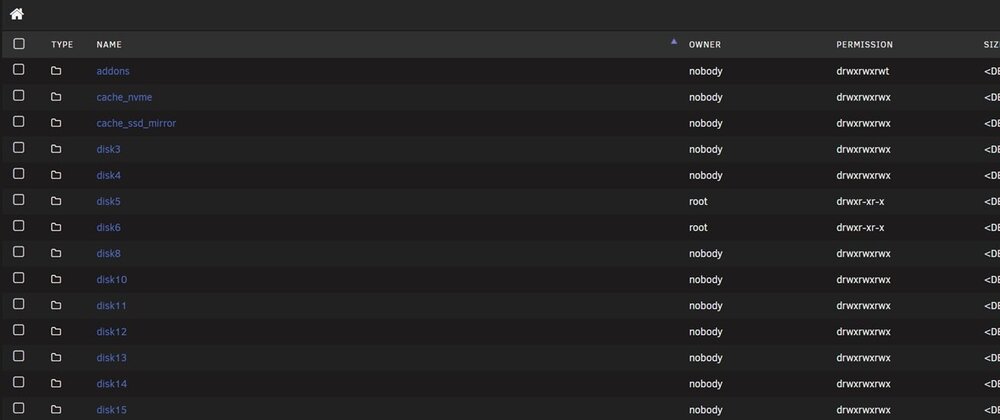
I missed that tool in the list somehow! New Permission Tool ran successfully and updated the owner/permissions. One last thing - I must be missing something... I can't seem to figure out how to create a new folder on these drives. I thought I did this before by just clicking on the Create button in File Manager and then typing a folder name?

-
Good morning, I recently swapped out the two 20TB parity drives I was using for 24TB's, and added the 20TB's to the data pool. During the startup of the array, I formatted the drives. I was just going to manually move some files to those drives, but can't (ex, options to create a folder are greyed out). I checked and the Owner and permissions are different than the rest of the data drives. Am I safe in just manually going in and changing the owner and permissions, or do I need to fix this in another way? Thanks! (diags & screenshot attached) nasbox-u1-diagnostics-20250819-1115.zip
-
The "Toggle Reads/Writes Display" is visible on the Main section, Standby Averages tab when "Page View" is Tabbed in the Display Settings. As there are no read/write statistics on this tab, it's not necessary. It does get hidden correctly when the Array Operation tab is selected. (See screen grab example attached.) UNRaid v7.1.4 [EDIT] Forgot to add file attachments. [/EDIT] nasbox-u1-diagnostics-20250818-0923.zip
-
While I wait for the parity recalc to complete, I got thinking and looking around. The 16TB drive with the issue is a Dell branded Exos X16 (ST16000NM005G) I have another 16TB drive that’s fine on the LSI HBA. It’s an Exos X18 (normal Seagate, ST16000NM000J) The Dell drive used to be on my mobo SATA ports since I run my parity drives off there and not the HBA, so that’s why I didn’t have issues with it previously. They have different firmware IDs, and the Dell drive has a message that it’s not in the smartctl database. Interesting differences between the X16 Dell and the X18 Seagate… Also, where in the diagnostics did you see where it dropped out during spin up? Thanks!
-
Thanks, I will wait for parity recalc to finish before I try that.
-
Sorry about that - forgot them. Attached now. Note that the problem drive (s/n ZL2KV4R4) is currently out of the array and shows disabled in unassigned drives. Parity recalc is running... nasbox-u1-diagnostics-20250721-1035.zip
-
Well, apparently I spoke too soon.... The rebuild finished, everything was fine for about two hours, I stopped the array to rearrange disk slot assignments and the same drive promptly dropped out disabled again... What am I looking for in the diagnostics that shows why it's dropping? I'm frustrated because this drive is a drive that previously was a parity drive for about six months without issue using cables that had another drive hooked up to them for about six months without issue (I changed the position of the drive in my case is all). Thanks for any pointers! [EDIT] In the meantime, I've shrunk the array and removed the drive since it was empty anyway. [/EDIT]
-
Sorry for the delay in responding, was busy with other stuff. I pulled the drive and reseated the cables. Array is rebuilding now. Thank you both for your help/advice, I appreciate it!
-
FYI, I have tried starting in maintenance mode, stopping the array, reassigning the disk, and starting again. Problem is when I try to select it in the dropdown. It's there, I select it, then the page blinks and the drive disappears from the list and it's not assigned.
-
Good afternoon, For background/reference, see https://forums.unraid.net/topic/191918-array-upgrade-questionplan/. I rearranged/added drives and the parity recalculation just completed. I stopped the array and got a notification that one of the drives had read errors, went disabled, and then resolved (?), yet the drive still shows as disabled. The drive in question is one of my former 16TB parity drives. It was empty. I restarted the array (without making any changes) and the drive shows as emulated. Did the drive die when I stopped the array? I really hope not, but if so at least there's no data lost. Please take a look at the diags (attached) and let me know what's going on and if there's any help for this drive... TIA!! nasbox-u1-diagnostics-20250715-1647.zip
-
Wow, that does indeed make it much simpler! Maybe I was over-thinking and made it too complicated in my head... Thank you!
-
Good morning, I am preparing to upgrade the drives in my server and feel like I might need some handholding or step-by-steps to make sure I don't screw anything up. I currently have: - 16TB x2 for dual parity - 8TB x7 and 14TB x6 for data I have 20TB x4 that have been precleared. I have also already scattered all the data off of the 8TB x7 drives so they are empty and they have been removed from the drive assignments in the share definitions. My end goal is to have: - 20TB x2 for dual parity - 20TB x2, 16TBx2, and 14TB x6 for data If possible, I wanted to do this with one total power shutdown (heavy rig to move!), and with the fewest restarts/parity recalculations as possible. I was thinking I would do the following steps: - Stop array - New config that removes 8TB x7 drives (preserve 14TB x6 assignments) - Stop/abort parity calculation - Power down - Remove 8TB x7 drives - Install 20TB x4 drives - Power up - New config to remove 16TB x2 drives and replace with 20TB x2 for dual parity (leave out 20TB x2 and 16TB x2 for now, preserve 14TB x6 assignments) - Perform parity recalculation to completion - Preclear 16TB x2 drives (former parity) - New config to add precleared 20TB x2 and 16TB x2 to the data drives (skip parity recalculation, should be valid?) - Change shares back to use all data drives - Done? Please weigh in and let me know if this works, or if I have anything missing! It just feels like I'm about to do something wrong... TIA!
-
Yeah, started to panic when Tailscale came up blacklisted for me....
-
I have one Windows 11 VM that I have the VM Backup running nightly on. Looking back over the past week or so, it had been taking 1.5 - 3 hours or so. However, the past three nights it's been taking 5 - 5.5 hours. It's a simple stripped down Windows 11 install using Atlas and the only thing I use it for is some web mail access. It has 4GB RAM allocated, two hyperthreaded cores (4 total), and the VDisk is 268GB. Any ideas on where I need to look to find out what's going on?
-
thx!
-
Sorry, yes.
-
I have one Windows 11 VM that I have the VM Backup running nightly on. Looking back over the past week or so, it had been taking 1.5 - 3 hours or so. However, the past three nights it's been taking 5 - 5.5 hours. It's a simple stripped down Windows 11 install using Atlas and the only thing I use it for is some web mail access. It has 4GB RAM allocated, two hyperthreaded cores (4 total), and the VDisk is 268GB. Any ideas on where I need to look to find out what's going on? (Diags attached.) nasbox-u1-diagnostics-20250529-1047.zip
-
That's a great idea! Didn't realize you could do it that way... I absolutely LOVE the thought of the existing parity drives as insurance! Then it becomes a simpler process (I think). Thanks!
-
Hi all, Just wanted to bounce a couple ideas around for best steps on multiple drive upgrades. Currently have: - 16TB x2 for dual parity - 8TB x7 and 14TB x6 for data I have 20TB x4 on the way. I want to get rid of all of the 8TB drives. Was thinking I would do the following: - Scatter all the data from the 8TB drives - Drop the 2nd parity and remove the 8TB drives - Replace the primary 16TB parity - Add 20TB x2 to the data - Add the final 20TB as secondary parity Thoughts? Thanks!
-
Nevermind... I had left a program open with files open on the array. Closed it and drives will spin down now! (Also fixed that the "system" share was set to cache_nvme and not vm_nvme.)


