Maximo101
Members
-
Joined
-
Last visited
Everything posted by Maximo101
-
Attached, thanks!
-
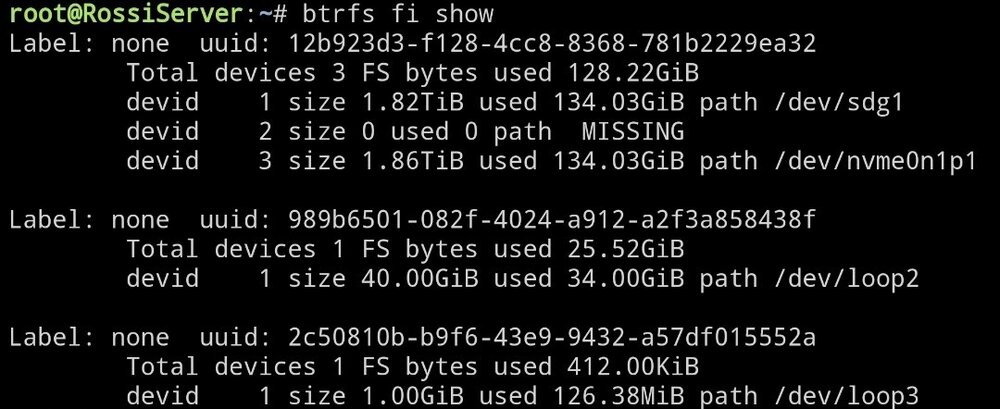
I am also trying to remove a cache drive from my cache pool. (i assume the default for a cache pool is Raid1 where it just mirrors data across each drive in the cache pool). I originally had 2, (Samsung HDD 2TB and Samsung SSD 250GB and it was limited to 250gb), i have added a Kingston 2TB nvem m.2 drive as the 3rd in the cache pool and now want to remove cache 2. I Stopped the array, removed the 2nd (by selecting 'no device'), and then started the array, i then wanted to stop the array and try to Remove the 2nd cache but after clicking stop array, it just seemed to think the array was stopped but kept saying stopping array for 20 mins or so, i could not press Start or Stop, so i rebooted. But then it would not boot into the ui, after a bit of stuffing around my usb got corrupted when putting into the windows pc, so i created a new usb, copied back over the config folder and luckily i had just backed up the day prior, so re started the server from the backup and its all back to normal now. But i want to remove the 2nd cache. What is the process process as i dont want to go through that again. thanks rossiserver-diagnostics-20250217-0906.zip

-
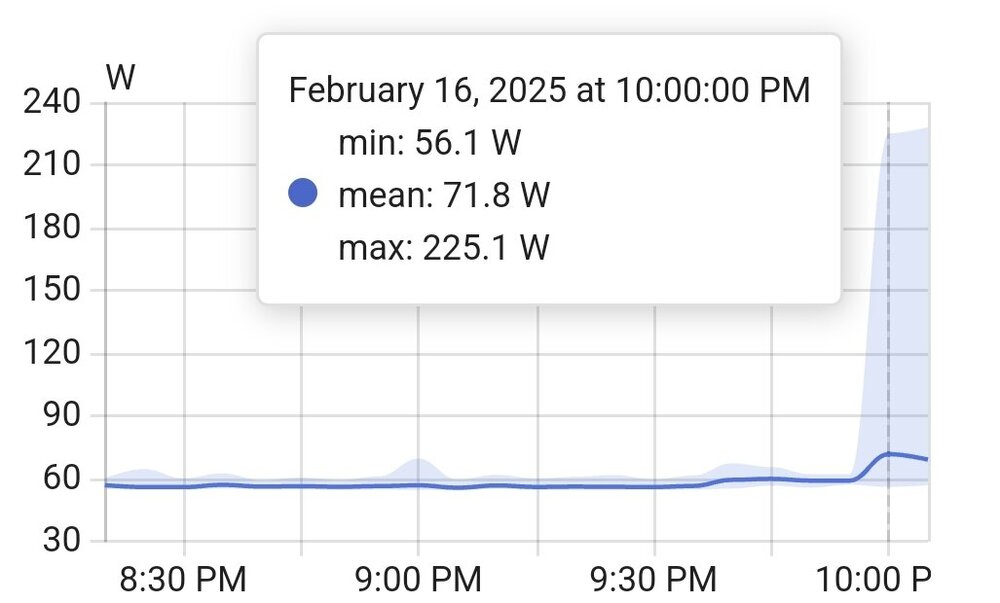
I installed the ollama (LLM) integration with Home Assistant, running the llama3.2 model. (3B parameters with 1.87GB) When it is responding it spiked (full cpu usage since i dont have a gpu) to 220watts, hovered around 190-200watts for 2-10 sec depending on the query, then down to 100-150 watts while finishing its response (5-10 words per sec response), back to 60 idle. (Specs in signature) The Home assistant UI seems to provide faster responses than the OpenWebUI, but the HA template does provide it a system prompt that it is a HA assistant to that likely narrows it focus.
-
I just installed the ollama integration into Home Assistant and it downloaded the llama3.2 model which is 3B parameters with 1.87GB size. this is running much faster (since it doesnt think and is smaller) and responds pretty quick (similar to a chatgpt response time).
-
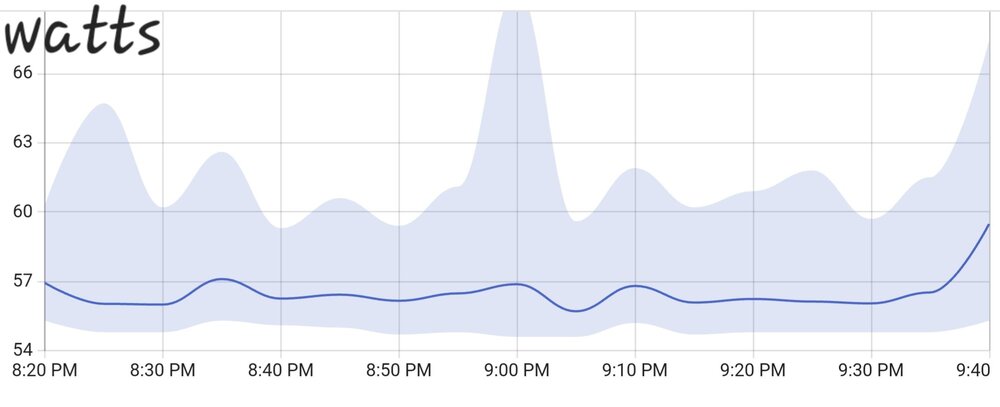
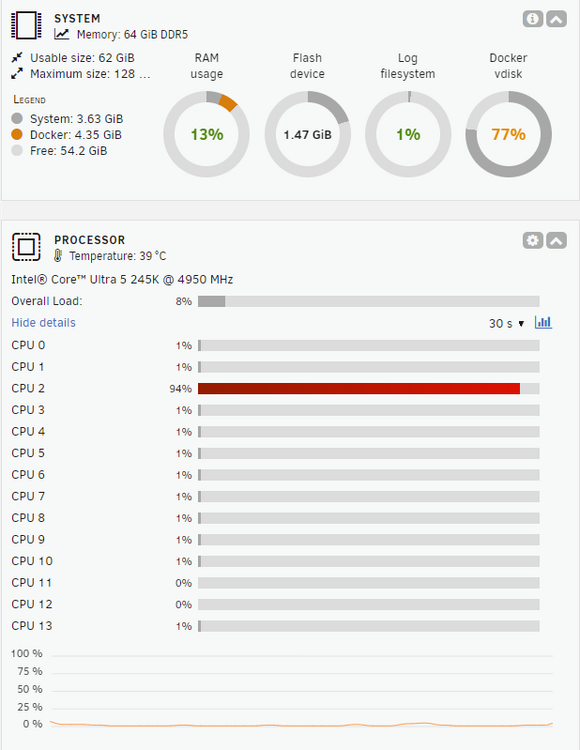
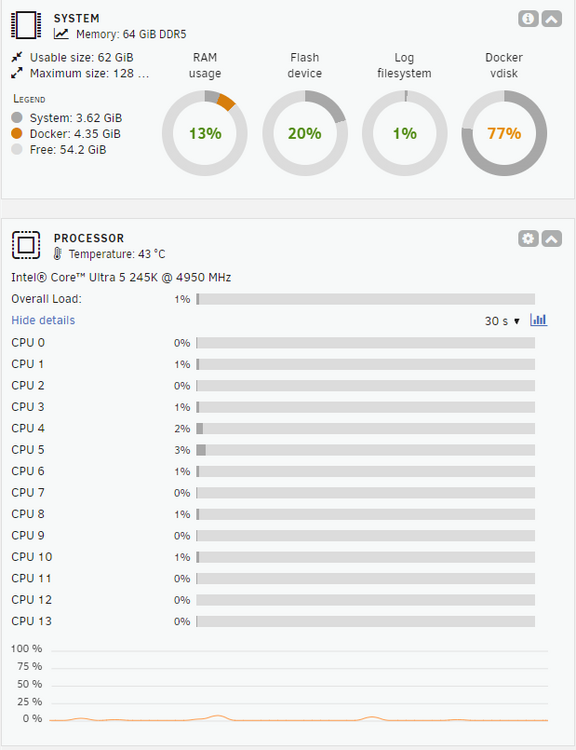
For my purposes i can get away without using the igpu yet or having a gpu until i add one later for use with ollama and ai models. I havent done much testing yet, but my system (details in signature) is running at 56-60watts just running dockers (plex, home assistant, sungather, observer). Occasional spike to 70watts every couple of min. The Sungather is polling my solar inverter every 10 seconds, sending data to mqtt while the Home Assistant reads the sensors and updates some templates/automations etc. While streaming on plex it mostly still was 62 watts with a spike to 85 watts every min or so (no gpu) Ram usage is 13% (3.6gb system and 4.3gb docker) Temperatures of all hard drives are 33 - 36°C except for the nvem m.2 which is at 56 degrees (added to the cache pool). i have ordered a heat sink for that. MB temp 27.8°C and cpu 42°C . The under stair section (currently 28°C it is in doesnt have great airflow and the Eaton ups seems to push out a lot of heat, so ill add an old ixl in line fan that runs at 40 watts, on an automated switch to trigger over a certain temp threshold to vent the room better. (It is the end of summer here in australia)
-
I did manage to install RTL8125 (once i had the usb adapter and i flushed the ip and route) and since i got the plugin from the app store i am using the onboard nic. I did also find the cable in my office where i had placed the server for the upgrades was missing line 1 of the 8 so faulty, using another cable resolved that (when it said link down) But as above it was still not connecting to network when link was detected and ip assigned on router (maybe a kernel / os issue with the virtual nic / bonding). Only way to get it back online was flush the ip and route and manually add to eth0 on each boot, so the script above does it on each boot and been working smoothly for a couple of days now. moved server back to its normal location and all good. Rebooted a few times since and all good, happy days.
-
ok thanks, appreciate the detailed explanation.
-
I was using this for a year without issues (with the previous mb i had). but ill have a read thanks
-
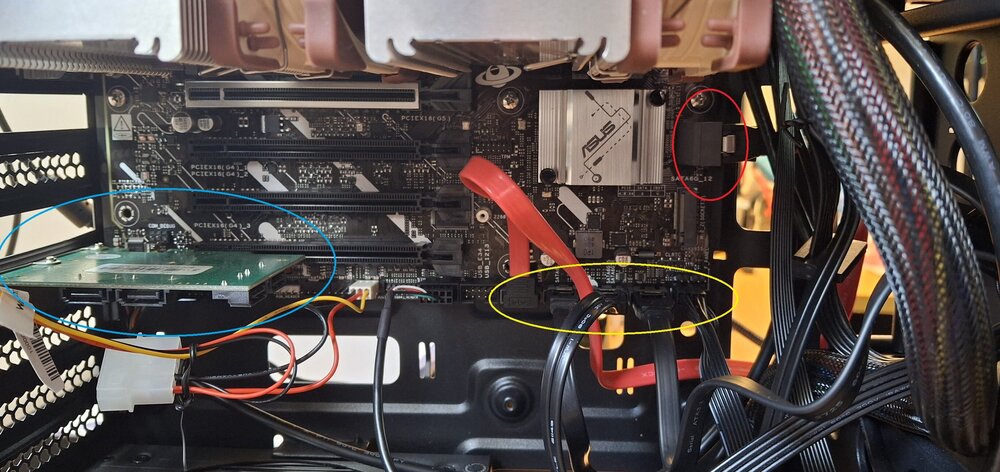
Thank you. Plenty of great information just in your reply and i will read the linked posts. I am amateur at pc hardware so appreciate the break down which is exactly what i was looking for. My mb is Micro-ATX (mATX) size so thats perfect. I have 2 sata on the edge (6gbps) (red circle) but i can use the empty ones i have in the IO Crest 4 Port SATA III PCI-e 2.0 x1 Controller Card Marvell Non-Raid with Low Profile Bracket SI-PEX40064 (blue circle) with the 4 flat sata (yellow circle). 8 sata is plenty as i will start to utilise the nvem / m.2 for cache drives. The HBA sounds good and ill keep that in mind for future if needed. When i put the server back in its normal location, i just keep the covers off for better airflow and its under the stairs so doesnt get much dust. I think the cs380 suits me without needing to look at the more expensive cs382.
-
@Hoopster You have the Silverstone CS380 in your signature, how is it for temperatures, room to install stuff. What connections does it use to make the hot swappable section connect to the motherboard (is it just sata for each or a combined connection?) I have seen some reviews which say the hdd get hot and the airflow isnt great and the model is now discontinued, i guess thats why the newer SC382 might address that a bit?
-
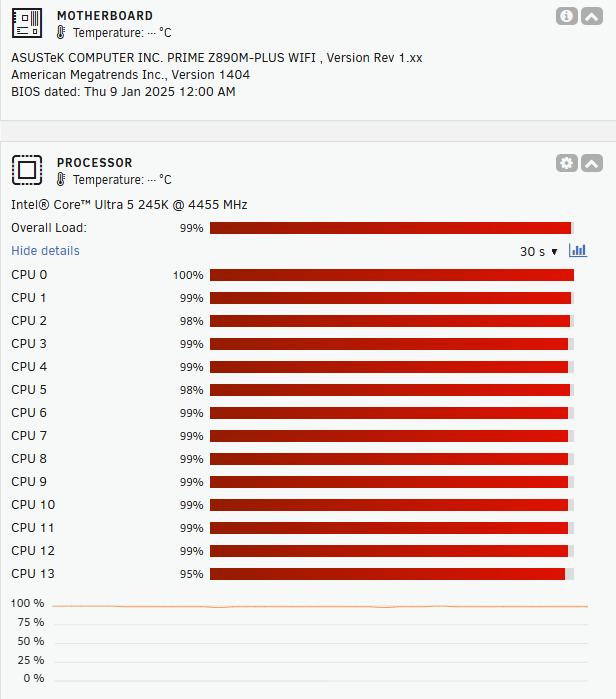
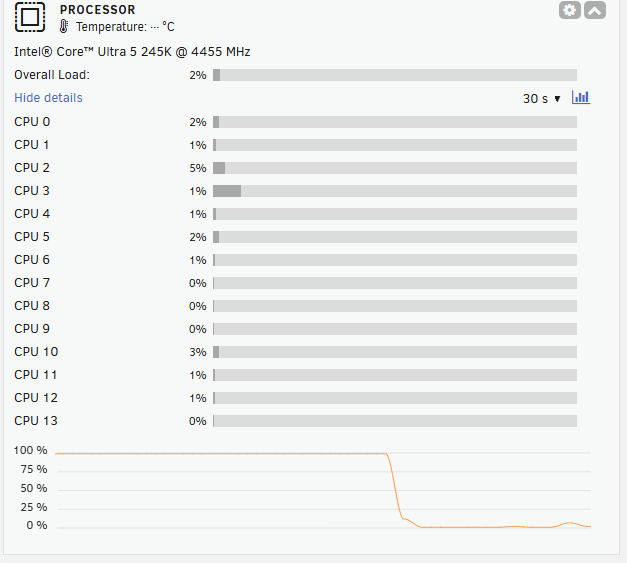
I recently upgraded my server with an ASUS prime z890m wifi plus motherboard & Intel Core 5 Ultra 245K, 64GB DDR5 RAM, but no gpu. (going to add that in the future) Is there anyway to utilise the igpu from the cpu in ollama? I ran the deepseek-r1:8b [~4.7GB] and the response took about a minute then it proceeded to write at about about 1-3 words per second for the duration of the response. Maxed out the cpu while it was thinking and responding.
-
Does anyone used OpenWebui and ollama for their own local AI on their server? What models are you able to run on your unraid system. Whats your specs?
-
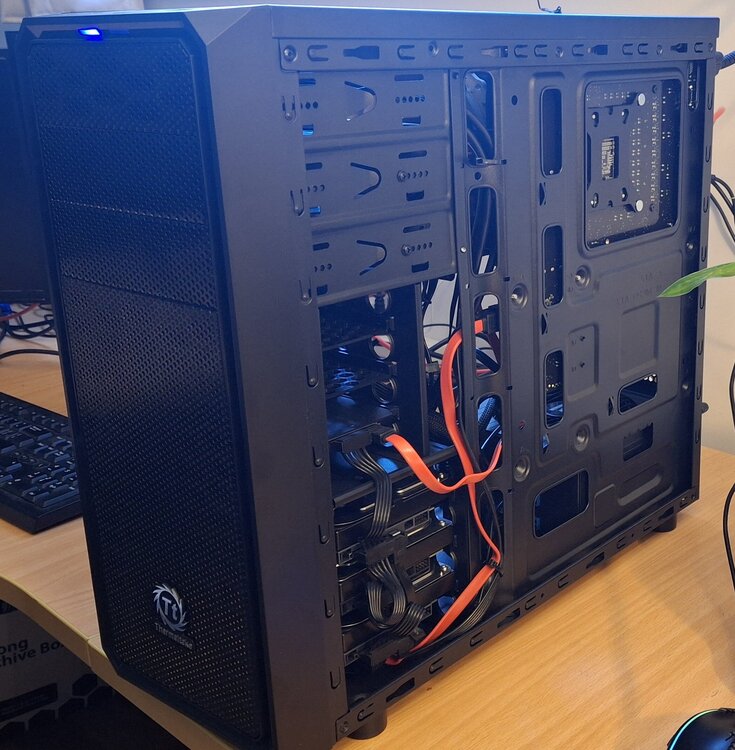
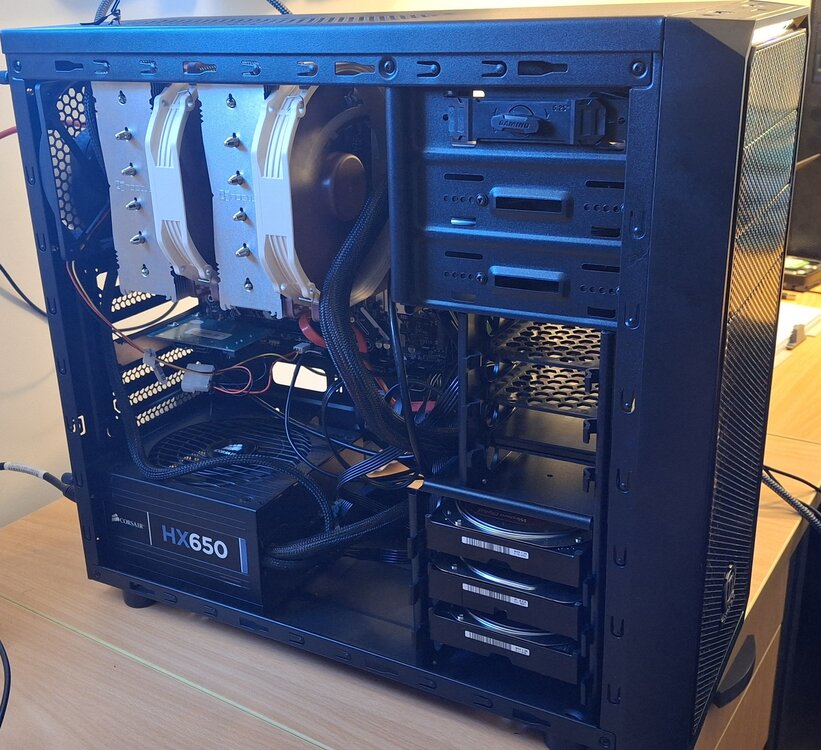
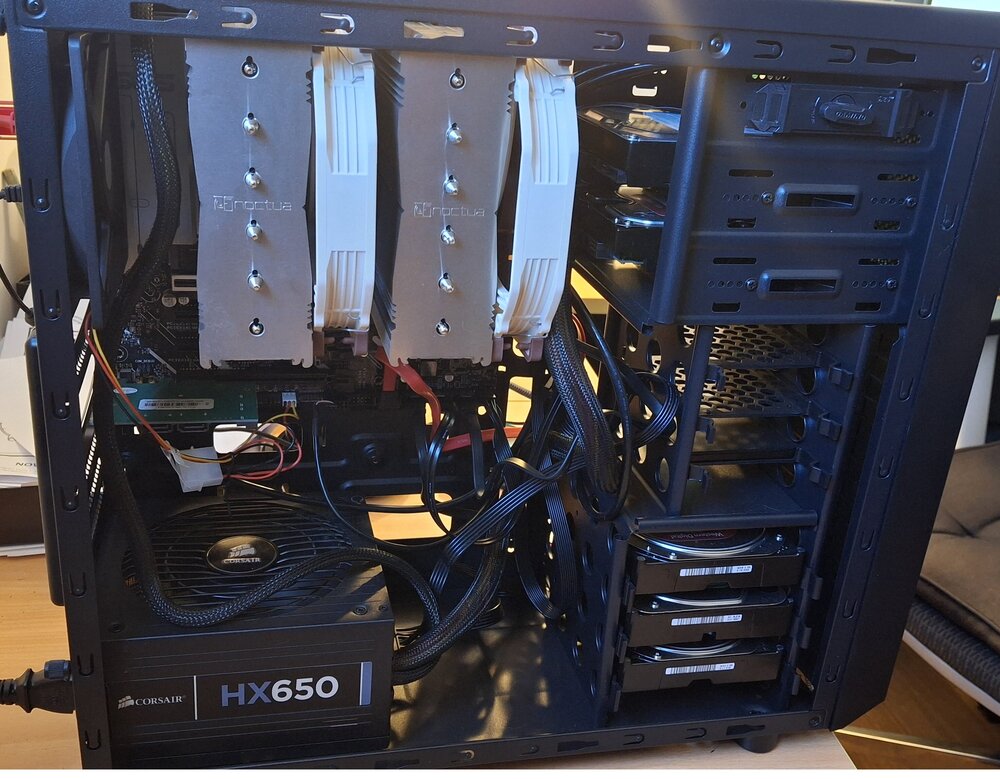
I am looking to upgrade the case for my unraid server. Been using Unraid now for a year and am happy with it and looking to grow the server. I am currently using the Thermaltake Versa H25 Mid-Tower Classis Case which has been great as a starting point with unraid from the hp proliant n40l microserver pre built nas i previously had. I recently upgraded the motherboard/cpu to Asus Prime z890m wifi plus with Intel Core 5 Ultra 245k and Noctua D15 cpu cooler. The space is now very tight and i cant access the drives docked in the top 5.25" section and i want to future proof so when i do need to upgrade the hard drives i dont need to take it all apart. I saw in someones signature the SilverStone CS380 Case Storage Series Black ATX Case which looks perfect. Anyone with this recommend it or not? My requirements is currently 5x 3.5" hdd and a couple of ssd. 8 Bays would give me room for future upgrades. Thanks (current setup with Thermaltake Versa)
-
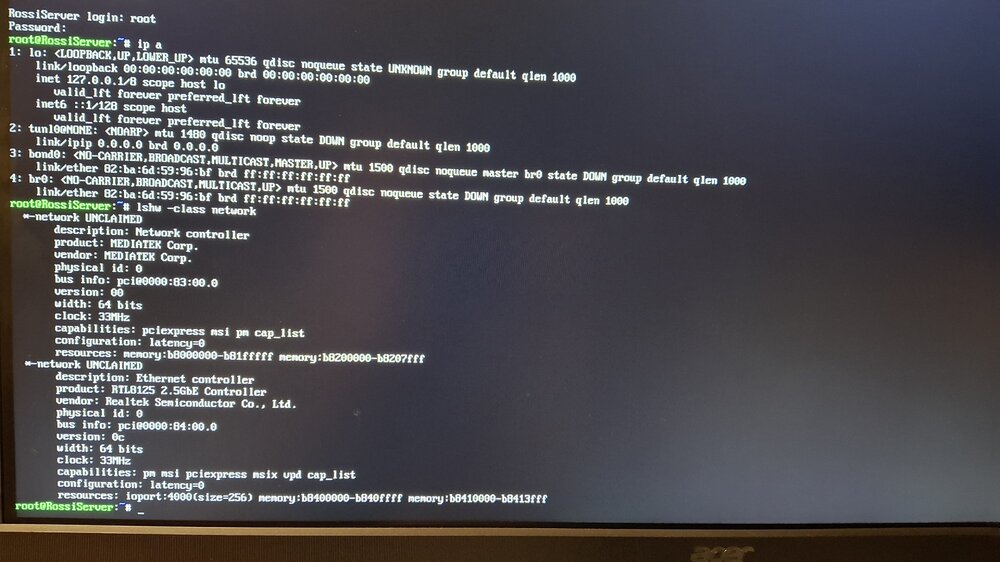
I had the same issue. Did you have a hardware change or upgrade the Unraid to newer version? (mine but a mix of both) Is your server seen on your router dchp table list? (i assume it does since you can ping it) Try logging into terminal and a few commands to see whats happening: lshw -class network (if your network is UNCLAIMED, you may need new drivers) ifconfig -a ethtool eth0 (where eth0 is your lan adapter shown in previous command) - Link detection needs to be Yes, if no it could be a faulty ethernet cable or switch port. lspci -nnk | grep -A3 Ethernet route -n here is my thread with solution which worked for me
-
i have the same line in my boot up text, but my system passes the line and boots normal. Not sure if it came with the unraid 7 upgrade?
-
Here is a startup script for UnRAID to run these network commands automatically. In UnRAID, custom startup scripts are stored in /boot/config/go scripts. UnRAID Network Fix Startup Script To implement this solution: Access your UnRAID USB drive from another computer Navigate to the /config folder on the USB drive Create a new file named go (no extension) Copy and paste the script above into this file Save the file Make the script executable by either: Running chmod +x /boot/config/go from the UnRAID command line Or setting the executable permission through your OS's file properties The script includes: Logging to help troubleshoot any issues A network check to only apply fixes if needed A delay to ensure system initialization is complete Error handling and status reporting The script will create a log file at /var/log/network_fix.log which you can check if you have any issues. Hope this helps other users. go
-
can you check the terminal for the server directly? On boot, does it say IPv4 address: not set ? if so i had the same issue and this worked for me. Seems to be a mix of linux kernel / unraid 7 / bonded nic issues?
-
I had a similar issue and this is how i managed to get it working. hopefully it helps?
-
This is how i solved this issue of no network, ip address not set on boot (minor docker issue still to resolve) Worked this out with Claude AI in a few steps, compared to two days troubleshooting with ChatGPT and CoPilot (uses chatgpt 4o). Claude has a much better understanding of coding (take a photo with phone, upload it and it reads the data from the image without having to re type the results) I used a usb ethernet adapter, flushed the route/ip to get it online. Downloaded the RTL8125 drivers/plugin from the Apps. I removed the usb ethernet adapter (since i now have the Realtek RTL8125 drivers/plugin installed). Connected the ethernet cable to the on board port. So now with: lshw -class network it is no longer unclaimed. I manually added the mac address for the motherboard to my router to set it a static IP address. It now shows up on the router (but still didnt connect to web gui) ethtool eth0 , this shows link detected: yes I edited the /boot/config/network.cfg Not sure if this part helped at all as it doesnt seem to stick each boot. to set DCHP="NO" IPADDR="my static ip" BONDING="No" (not sure if this did anything as later in the gui later it shows Bonding as yes) This is what i do to get it working, but need to be done on each boot. (ill create a startup script and add it to the next post) Server boots up with no ip set. ethtool eth0 , confirms shows link detected: yes First, remove the interface from the bond: ip link set eth0 nomaster Then reconfigure it: ip link set eth0 down ip link set eth0 up ip addr flush dev eth0 ip addr add 192.168.1.100/24 dev eth0 ip route add default via 192.168.1.1 dev eth0 Note: 192.168.1.100 is the static IP my router assigned the server, which i use for my web gui access 192.168.1.1 is the router (gateway) ip address from your network I have now rebooted, no ip set each time and using these these commands each time restores network connection and access to the GUI so i can replicate getting the server back online. Next ill add this into a startup script to do it automatically on boot. Hope this helps others as there seems to be a few with the same/similiar issue of the virtual nic / bonding / eth0 not getting ip. rossiserver-diagnostics-20250212-1055.zip
-
i rebooted the server and not gui conection lost again. How do i link it to the NIC. How do i make the network settings stick without flushing the route, manually setting the static ip to the eth0 again? ifconfig shows its now using eth1 when the last boot was using eth0
-
I managed to get to the webgui using a usb belkin network adapter although it wasnt just plug and play, I fumbled my way around setting the routing, nameservers in terminal etc. (added nameservers to /etc/resolv.conf, edited /boot/config/network.cfg to bonding=no, set static ip address, gateway. ifconfig eth0 ip_address etc) I downloaded the Realtek RTL8125 driver plugin so now the motherboard LAN is no longer UNCLAIMED, but when i tried using that it wouldnt connect. (i think its the bonded NIC which is giving things trouble) For now i put the usb adapter back in to get things going (until the tp link 3468 network adapter arrives. Since i did a bunch of tweaking network settings in terminal, they are greyed out no in the GUI. Is there any way to make them customizable in the GUI again? My dockers are running but it seems my dockers are not able to access anything outside of themselves? Eg. My plex server cant access the movies. The Home assistant isnt picking up the sensors from my SunGather script (pulls data from sungrow hybrid inverter and send it to mqtt for Home Assistant to use) Diagnosis attached, is there any docker network setting or something i need to do? rossiserver-diagnostics-20250211-2028.zip
-
Thanks for that. Great to know the power consumption of your setup, (I track my solar generation/ consumption/ battery usage etc, intend to automate more as I learn Home Assistant) I bought this mb / cpu to run distilled local ai models and intend to add a gpu later to run something like deepseek R1. Hopefully more support gets updated in the kernel soon as I picked this cpu for the igpu until I get a decent gpu
-
Did you have any issue with the network connection? I updated my unraid to 7.0.0 a week ago and just upgraded my long running unraid server (with 15+ year old mb & cpu) with the new asus prime z890m wifi plus mb and intel core ultra 5 245k and have had no luck getting the NIC to work. Seems the NIC is to new for the kernel. I have only been able to use the terminal on monitor but will need to try an external ethernet card to get it back online (to then further test plex, HA with the new components).
-
Thank you @JorgeB I will get a pcie tp link 3468 network adapter and try that out. Maybe try a usb network adapater until that arrives if i can find one.
-
Hi, i have now updated the BIOS (including ME bios) to the latest 1408. I am running UnRaid 7.0.0 Issue still occurring. Diagostics attached. thanks for any assistance. rossiserver-diagnostics-20250210-0747.zip