





maelstrm
Members
-
Joined
-
Last visited
-
Minor update, the docker logs suggest the TIMEZONE variable has been deprecated and should be changed to TZ. I've edited mine and the errors went away. Thanks for maintaining a container you don't even use anymore!
-
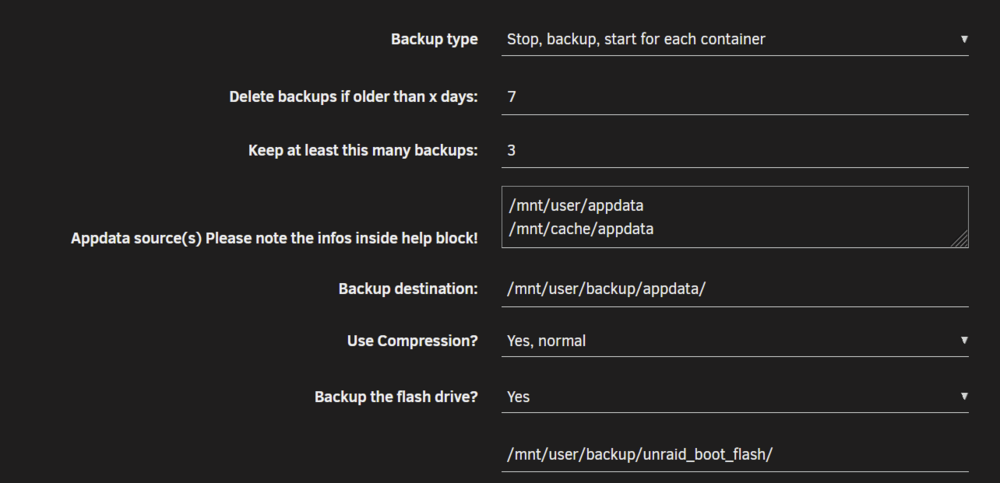
OK this makes sense - I didn't interpret that path field correctly, and assumed that it meant that the flash backup would be stored in another path but subject to the same retention policy. Hopefully it's not too common a mistake - I had hundreds of GBs being consumed by duplicate backups. All sorted for me now tho thank you!!
-
Is the retention policy intended to also apply to the automated flash backup? I just realised that whilst my appdata backups are beautifully adhering to the 7 day retention policy, I have hundreds of old flash drive backups -- looks like they go back to when the server was set up and the plugin was first installed. I can't see any errors in the logs, and the script seems to be only applying the retention policy to the appdata backups, so I suspect my install is working as expected, but always aware I might have screwed something up! If this is planned, is there a recommended way to apply a retention policy to the flash drive backups? Ps - Thanks to the creator/maintainers for all your work on this! Normal log extract [02.11.2025 01:12:05][ℹ️][Main] Backing up the flash drive. [02.11.2025 01:13:20][ℹ️][Main] Flash backup created! [02.11.2025 01:13:20][ℹ️][Main] Copying the flash backup to '/mnt/user/backup/unraid_boot_flash/' as well... [02.11.2025 01:13:22][ℹ️][Main] VM meta backup enabled! Backing up... [02.11.2025 01:13:22][ℹ️][Main] Done! [02.11.2025 01:13:22][ℹ️][Main] Checking retention... [02.11.2025 01:13:22][ℹ️][Main] Delete old backup: /mnt/user/backup/appdata/ab_20251026_010002 [02.11.2025 01:13:22][ℹ️][Main] DONE! Thanks for using this plugin and have a safe day ;) [02.11.2025 01:13:22][ℹ️][Main] ❤️ Debug log [02.11.2025 01:12:05][debug][Main] Not executing script: Not set! [02.11.2025 01:12:05][ℹ️][Main] Backing up the flash drive. [02.11.2025 01:13:19][debug][Main] flash backup returned: unraid-v7.2.0-flash-backup-20251102-0112.zip [02.11.2025 01:13:20][ℹ️][Main] Flash backup created! [02.11.2025 01:13:20][ℹ️][Main] Copying the flash backup to '/mnt/user/backup/unraid_boot_flash/' as well... [02.11.2025 01:13:22][ℹ️][Main] VM meta backup enabled! Backing up... [02.11.2025 01:13:22][debug][Main] tar return: 0 and output: 1 [02.11.2025 01:13:22][ℹ️][Main] Done! [02.11.2025 01:13:22][ℹ️][Main] Checking retention... [02.11.2025 01:13:22][debug][Main] toKeep after slicing: Array ( [0] => /mnt/user/backup/appdata/ab_20251102_010002 [1] => /mnt/user/backup/appdata/ab_20251101_010004 [2] => /mnt/user/backup/appdata/ab_20251031_010002 ) [02.11.2025 01:13:22][debug][Main] Delete backups older than 20251026_011322 [02.11.2025 01:13:22][debug][Main] Discarding /mnt/user/backup/appdata/ab_20251102_010002, because its newer or already in toKeep [02.11.2025 01:13:22][debug][Main] Discarding /mnt/user/backup/appdata/ab_20251101_010004, because its newer or already in toKeep [02.11.2025 01:13:22][debug][Main] Discarding /mnt/user/backup/appdata/ab_20251031_010002, because its newer or already in toKeep [02.11.2025 01:13:22][debug][Main] Keeping /mnt/user/backup/appdata/ab_20251030_010002 [02.11.2025 01:13:22][debug][Main] Keeping /mnt/user/backup/appdata/ab_20251029_010001 [02.11.2025 01:13:22][debug][Main] Keeping /mnt/user/backup/appdata/ab_20251028_010002 [02.11.2025 01:13:22][debug][Main] Keeping /mnt/user/backup/appdata/ab_20251027_010002 [02.11.2025 01:13:22][debug][Main] Discarding /mnt/user/backup/appdata/ab_20251026_010002, because its newer or already in toKeep [02.11.2025 01:13:22][debug][Main] Resulting toKeep: /mnt/user/backup/appdata/ab_20251102_010002, /mnt/user/backup/appdata/ab_20251101_010004, /mnt/user/backup/appdata/ab_20251031_010002, /mnt/user/backup/appdata/ab_20251030_010002, /mnt/user/backup/appdata/ab_20251029_010001, /mnt/user/backup/appdata/ab_20251028_010002, /mnt/user/backup/appdata/ab_20251027_010002 [02.11.2025 01:13:22][debug][Main] Resulting deletion list: /mnt/user/backup/appdata/ab_20251026_010002 [02.11.2025 01:13:22][ℹ️][Main] Delete old backup: /mnt/user/backup/appdata/ab_20251026_010002 [02.11.2025 01:13:22][ℹ️][Main] DONE! Thanks for using this plugin and have a safe day ;) [02.11.2025 01:13:22][ℹ️][Main] ❤️ [02.11.2025 01:13:23][debug][Main] Not executing script: Not set!
-
Because like all parts RAM can fail at some point in its life. And unlike most PC components, a failure of RAM won't just case your server/PC to not boot, it can cause it to start silently corrupt your data. I booted up a server recently, O/S started fine, seemed OK, but I decided on the off chance to run a RAM test and found that one of the RAM sticks had failed. If I had not tested it and kept using it I could have had random crashes and randomly corrupted files. Running a test in an automated fashion every so often would help avoid that.
-
Thanks for creating this! I wonder if it's possible to extend this to help guard against non-ecc memory silently having a fault which is not obvious and causes a heap of corruption, eg for cheap homelab servers that are not ECC capable. It'd be awesome if we could use this schedule this to run once a week or month, do a cycle or two, and have it generate a notification and unraid dashboard error if there's an issue - is that something you'd be open to expanding it with? Alternatively perhaps having the option in the UI to schedule a reboot and execute a 2-cycle offline memtest, writing the output somewhere that can be actioned once the server comes online?

