





DespairServices
Members
-
Joined
-
Last visited
-
Hey all, I’ve been fighting asymmetric routing issues when using NPM with Unraid. My setup is as follows: NPM container is bound to br0 with a fixed IP (e.g., 192.168.1.41) Incoming traffic (from WAN → LAN) correctly hits Nginx via br0 But responses are leaving through the host's IP (192.168.1.40), not through the container IP This causes: MAC address mismatches (seen in OPNsense) OPNsense flags this as state violations Result: Connections get dropped or firewalled I’ve tried isolating traffic and fiddling with Docker network configs, but Unraid seems to always NAT or route replies from the host IP. Question: Has anyone found a way to force NPM traffic (both ingress and egress) to go entirely through its br0 IP, preserving source MAC and IP? Or is there a known workaround to keep OPNsense from seeing traffic hop between MACs? Any way to make NPM act like a true L2 proxy instead of leaking back via host IP? At this point I’m wondering if I’m just fighting against how Unraid wires Docker NAT under the hood. Any insights or stable setups that avoid asymmetric routing or fake-MAC NAT hell would be appreciated. Thanks in advance.
-
Solution was to ditch bridges and forcefully map the container's ports in extra parameters: -p '192.168.1.41:80:80' -p '192.168.1.41:443:443' However it is interesting to note that Unraid's UI mixes up the actual IP addresses, perhaps this is a bug, not sure: ALSO (very important), uncheck the "enable default gateway" for the secondary interface because otherwise you will have an industrial quantity of asymmetric routing which will break your services.

-
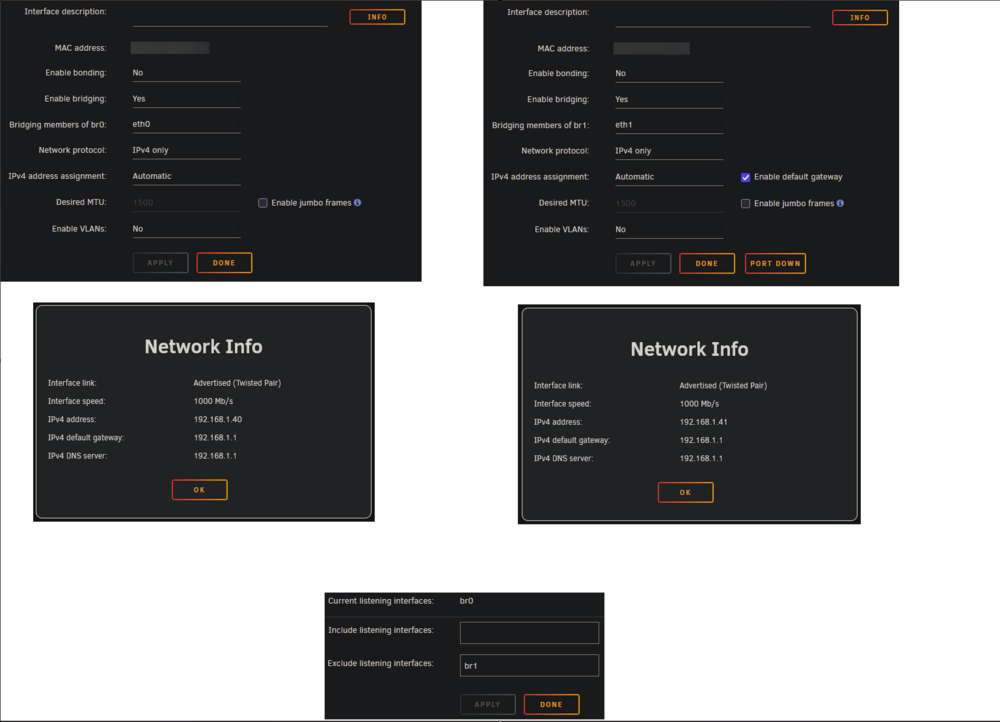
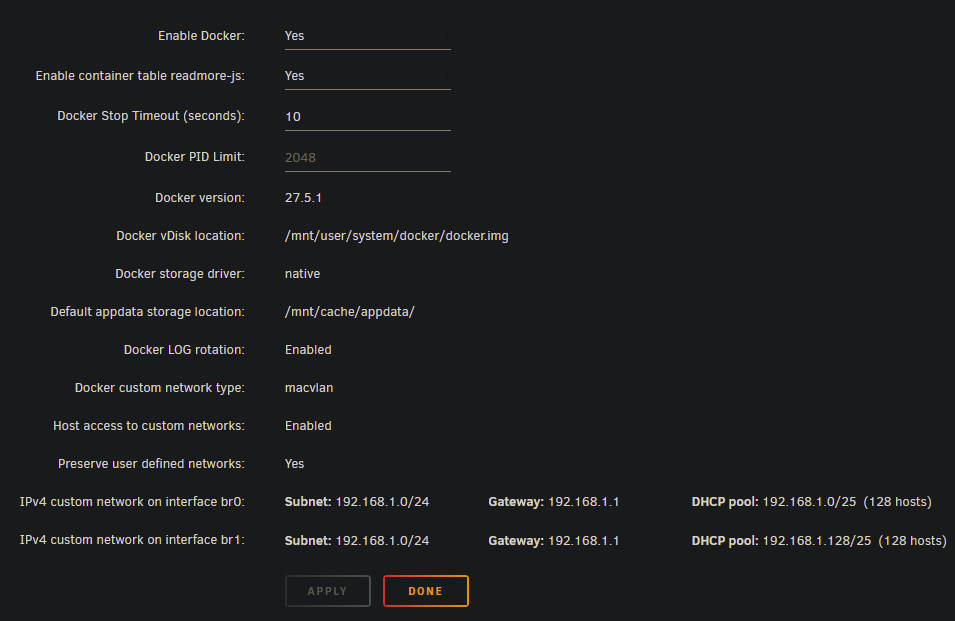
Goal I'm trying to fully segregate Unraid and a Dockerized NGINX instance using two physical NICs: Unraid is bound to br0 (NIC 1) NGINX (container) is bound to br1 (NIC 2) The intention is to isolate the traffic paths and allow communication from Unraid → NGINX. Network Interface SetupI’ve correctly configured Unraid’s network settings: br0 and br1 are assigned to separate NICs No IP conflict Bridging and assignment are set as expected Connectivity TestBoth interfaces (br0 and br1) respond to pings independently, confirming physical and IP-level connectivity PS C:\Users\admin> ping 192.168.1.40 Pinging 192.168.1.40 with 32 bytes of data: Reply from 192.168.1.40: bytes=32 time<1ms TTL=64 Reply from 192.168.1.40: bytes=32 time<1ms TTL=64 Reply from 192.168.1.40: bytes=32 time<1ms TTL=64 Reply from 192.168.1.40: bytes=32 time<1ms TTL=64 Ping statistics for 192.168.1.40: Packets: Sent = 4, Received = 4, Lost = 0 (0% loss), Approximate round trip times in milli-seconds: Minimum = 0ms, Maximum = 0ms, Average = 0ms PS C:\Users\admin> ping 192.168.1.41 Pinging 192.168.1.41 with 32 bytes of data: Reply from 192.168.1.41: bytes=32 time<1ms TTL=64 Reply from 192.168.1.41: bytes=32 time<1ms TTL=64 Reply from 192.168.1.41: bytes=32 time<1ms TTL=64 Reply from 192.168.1.41: bytes=32 time=1ms TTL=64 Ping statistics for 192.168.1.41: Packets: Sent = 4, Received = 4, Lost = 0 (0% loss), Approximate round trip times in milli-seconds: Minimum = 0ms, Maximum = 1ms, Average = 0ms Docker SettingsDocker is set to use macvlan as needed, with custom bridge support enabled. The IssueEven though Unraid logs clearly show that br1 is processed on Docker startup: Jun 28 14:01:44 Tower rc.docker: Starting network... Jun 28 14:01:44 Tower rc.docker: container nginx has an additional network that will be restored: local Jun 28 14:01:45 Tower rc.docker: Processing... br0 Jun 28 14:01:45 Tower rc.docker: created network macvlan br0 with subnets: 192.168.1.0/24; Jun 28 14:01:45 Tower rc.docker: ip link add link br0 name shim-br0 type macvlan mode bridge Jun 28 14:01:45 Tower rc.docker: ip link set shim-br0 up Jun 28 14:01:45 Tower rc.docker: ip -6 addr flush dev shim-br0 Jun 28 14:01:45 Tower rc.docker: ip -4 addr add 192.168.1.40/24 dev shim-br0 metric 0 Jun 28 14:01:45 Tower rc.docker: ip -4 route add default via 192.168.1.1 dev shim-br0 metric 0 Jun 28 14:01:45 Tower rc.docker: created network shim-br0 for host access Jun 28 14:01:45 Tower rc.docker: Processing... br1 Jun 28 14:01:45 Tower rc.docker: connecting nginx to network br1 Jun 28 14:01:45 Tower rc.docker: connecting netshoot to network br1 Jun 28 14:01:45 Tower rc.docker: ip link add link br1 name shim-br1 type macvlan mode bridge Jun 28 14:01:45 Tower rc.docker: ip link set shim-br1 up Jun 28 14:01:45 Tower rc.docker: ip -6 addr flush dev shim-br1 Jun 28 14:01:45 Tower rc.docker: ip -4 addr add 192.168.1.41/24 dev shim-br1 metric 0 Jun 28 14:01:45 Tower rc.docker: ip -4 route add default via 192.168.1.1 dev shim-br1 metric 0 Jun 28 14:01:45 Tower rc.docker: created network shim-br1 for host access Jun 28 14:01:45 Tower rc.docker: Network started. When I run docker network ls, there is no br1 network registered in Docker. root@Tower:~# docker network ls NETWORK ID NAME DRIVER SCOPE 08bc6554cd9f br0 macvlan local cc0ea04dad1e bridge bridge local 59324e20c804 host host local 84eac1d6efe4 local bridge local 042a1f312c08 none null local Looking for guidance on:Why br1 is not registered as a usable Docker network despite startup logs saying otherwise. Whether Unraid is doing partial setup (interface only) but not registering it with Docker’s IPAM Thanks in advance for your time and help.
-
Hi all, I’m looking for help or at least a sanity check. Here's what happened: I had a single-drive BTRFS cache pool in Unraid (originally one drive, later expanded). My VM disks were stored in the domains share, and unbeknownst to me, everything was actually living on the cache, not the array — even though the share was set to use the array as primary storage. I went to add a second drive to the pool and, in the process, formatted the cache pool via the GUI — thinking the important data had already been offloaded to the array. After the format, the new BTRFS pool (1TB + 2TB) was created, and the old data vanished. What I’ve tried:TestDisk: Found the old BTRFS partition but couldn’t list files (no BTRFS support in the build). btrfs restore: Detected internal trees but no usable subvolumes or files. I removed the drive and scanned it on Windows using PhotoRec. It’s currently recovering thousands of files — mostly false positives like .exe, .txt, .png, etc. — no .img or .qcow2 files yet. My Questions:Has anyone else been in this situation and actually recovered VM disk images from a formatted cache drive? If you did recover them, what tools or methods worked for you — was it PhotoRec, ddrescue, something else? Any chance that .img or .qcow2 files might be hiding under misidentified file types in PhotoRec? At this point, I'm just hoping someone has walked this road and found a way back. I know BTRFS makes this trickier — especially with overwritten superblocks — but if there's anything else I should be trying, I’m all ears. Thanks in advance.
-
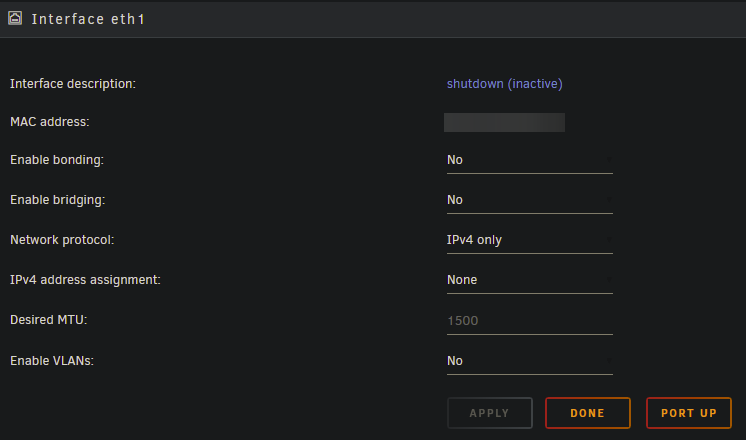
Hey there, I am attempting to bind my new network card to VFIO at boot, however I cannot because it says that it is "In use by Unraid". I've tried a 2 things with no success sadly: - Downing the interface itself (view attachment) - Manually removing the eth1 entry from /boot/config/network.cfg I also rebooted after each of the attempts mentioned above. ***EDIT: Also VM Manager & Docker are both disabled and my array is stopped. I'm out of ideas any help would be appreciated.
-
@Rysz Thanks for the hasty reply, is the codebase public and open for contributions?
-
Hey there, Is it possible to display more than 1 UPS in the GUI statistics panel and/or footer? Reason is I have 2 UPSs and configured NUT correctly; it tracks both. However the UPS Name field, doesn't let me add commas to separate them. If this is not possible, would this be a feature that would considered for this app? Thanks in advance.
-
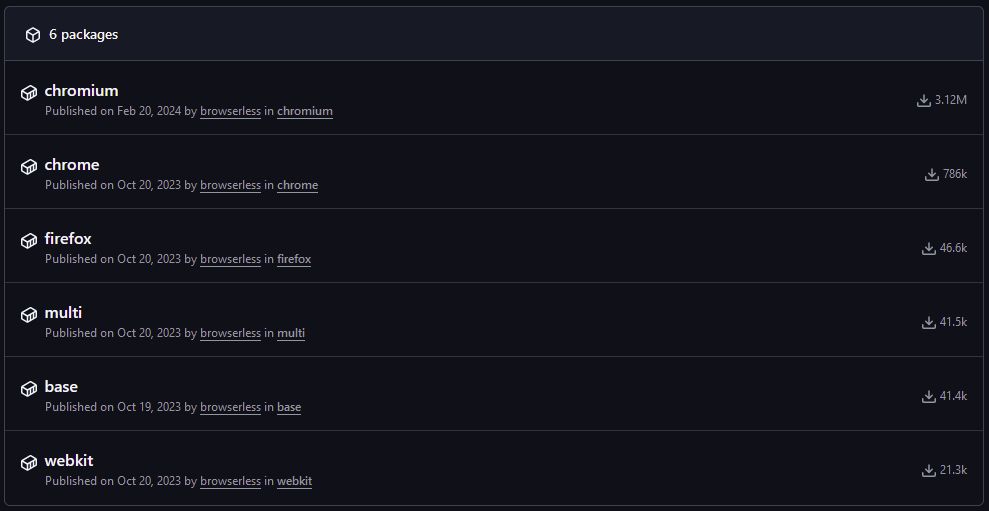
@Masterwishx Hey there, Would you consider adding the other browserless v2 packages as apps? https://github.com/orgs/browserless/packages?repo_name=browserless
-
Ahhh I see, thank you for letting me know. Followed this tutorial which solved my problem:
-
And just since I forgot stating, the unraid server is pretty much idle. There is no parity sync going on or intensive container operations.
-
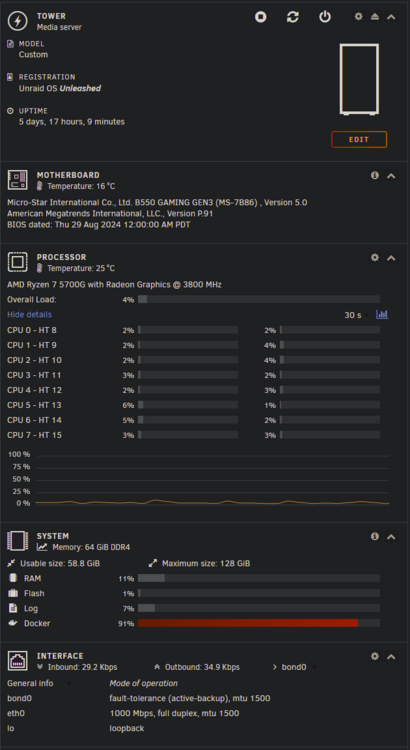
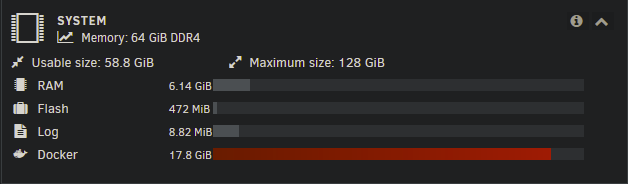
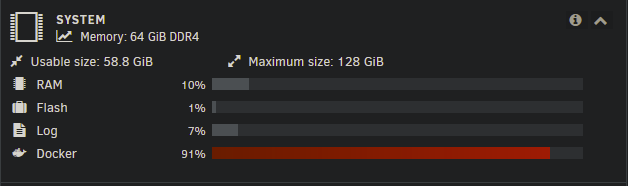
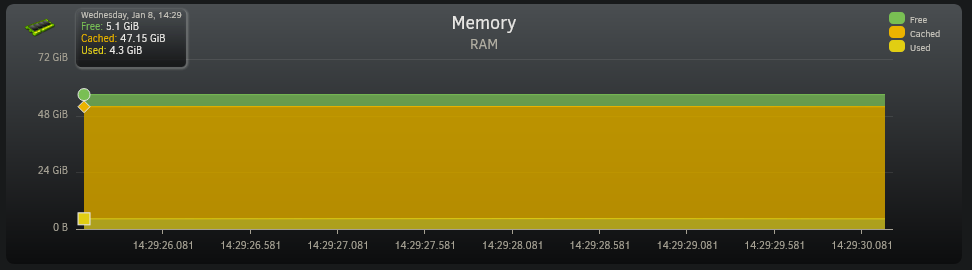
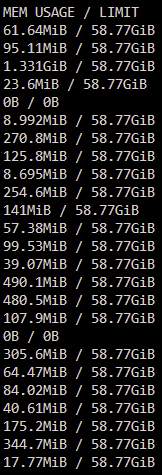
I've installed 64GiB of RAM on my unraid server. However I get this usage: And then these stats: However on docker itself I have this: So basically the first question is what is using up 47.15GiB of cache? And how does docker state that all my containers combined take up ~4 GiB of ram when unraid states that it's actually 17.8 GiB? I'm new to unraid and not an expert on docker so perhaps I am misunderstanding something here.

-
And some of the projects themselves aren't simple docker-compose.yml, there's actual code that needs to be compiled, hence why I use Github. Hopefully this is possible, because I really wouldn't want to have to manually copy and paste everything through ssh every time I make a change. I also do not wish to upgrade my docker account for this, considering I am already well acquainted with Github, and it's just for private repositories.
-
It needs to be the compose files as this is the exact target, it's basically to sync my compose projects with Github. I misread what you said, I understand now. I'll override the directory and see if that works.
-
Read/Write I would assume, it's simply to sync my compose files with my Github repository.
-
Hey there (I'm new to unraid), I've added the a container path /control-center pointing to my host path /boot/config/plugins/compose.manager/projects/control-center/. However when using this path within container I am met with "Unable to read path on disk. Please check the path and try again.". I've checked the Privileged checkbox in the container settings, but that hasn't fixed it. I suspect this has something to do with permissions, so the question would be how can I give it the correct permissions. Or am I doing something wrong?



