





dOM152
Members
-
Joined
-
Last visited
Everything posted by dOM152
-
OK thanks, but before I start the array , just to be clear, it does say "All existing data on this device will be OVERWRITTEN when array is Started" Your saying I should start the array with all disks showing blue squares.?
-
I have 4 6tb discs in my array and a parity disc. I planned to swap out the parity disk for a larger one and that's when my problems started. I'm learning as I go here but clearly have done something wrong because when I disabled parity one of my other drives dissapeared briefly from the array devices list. I reconnected it after finding it was a loose connection and now that drive has a blue square next to it in the list and partity shows an orange triangle. Thinking I could fix the blue sqaure by setting a config all in tools I now have ALL drives showing blue squares. I don't want to start the array because I am thinking that will wipe all data. Is ther anyway I can recover from this situation with data intact?
-
Thanks , yes I had missed that. Now its fixed.
-
Still learning about Unraid and decided to remove one of my drives (it wasn't needed in the array). Anyway I used Unbalanced plugin to move everything off the drive and it now has a red x next to it. I have now removed the drive from the server but unraid still shows the disk with a red x as "not installed " and its capacity is shown as a part of the array. I am now stuck as to how to remove this entirely from the array. I tried using Tools-new config but nothing has changed. How do I completely remove this please I have been reading "how to's" but am still confused.
-
The solution was to completely remove Plex from appdata and reinstall.
-
I have TV and Movies as folders under media. i.e /mnt/user/data/media with the Container path set to /media. I tried Binhex-plexpass but I cant even get that to show the web interface ,just shows an XML page. I posted in that forum for help with that problem. Very frustrating. I installed Jellyfin to see if that would work and yes it does but that wont load any plug-ins. Every way I try is a problem.
-
New to Unraid so bare with me please. Tried the official Plex docker and can't get it to accept media libraries so tried Binhex version. Installed OK but when I open I just get a lot of XML script? Docker shows plex is running but I cant load the web page. Checked the log and I see - Critical: libusb_init failed Is that the cause. This is a new install Solved: Re-installed Plex official app after deleting all appdata and it work.
-
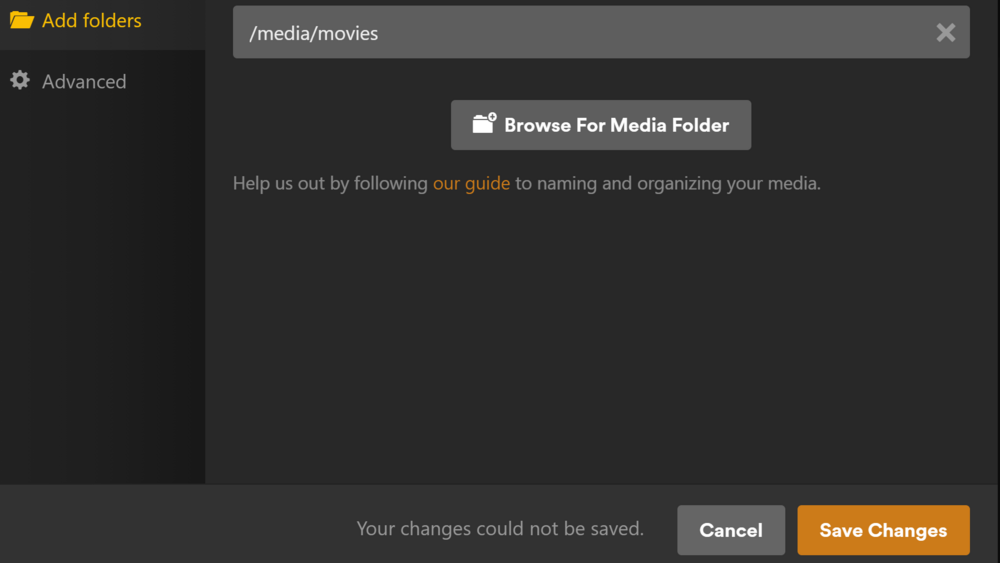
Whatever I try "Your changes cannot be saved" The whole point of me switching to Unraid was to have this as a Plex server. Is there something else I can try to get this working?
-
Help please. I am a new user of Unraid and have installed the official Plex docker app. I have read various instructions on how to add my movies, tv etc. but can't get it right. I basically don't understand the container path stuff . Anyway when I try and add shared folders to the libraries it comes back with "your changes could not be saved." I've tried all sorts of permutations in the Plex docker setup but can't get anything to work. Here are screenshots of what I have. Really stuck and confused, hope someone can put me right.


-
Thanks again. I have access by using the IP address of the windows machine NOT the name that comes up when I search for servers in Unraid. Nothing to do with credentials after all.. which were correct. The issue lies with app it seems. Thanks again for your help.
-
Thanks for your help but that's exactly what I've been doing and the shares wont show up. When you say credentials problem I assume you mean windows is denying access . On the windows desktop I have given full control to "Everyone" and even tried turning off requirement for authorisation for share access. Other windows PC on the network can see and read/write to the shares but not Unraid even though its the same credentials. Is there something in Unraid I'm missing that would enable access ?
-
I'm looking for help accessing to access an SMB share on Windows. My windows machines can see the share OK but when I try and add as a remote smb share in Unraid so I can copy files to Unraid from the share unraid wont mount it and says remote server is offline. I'm new to Unraid and only just setting up the server so maybe I'm doing something wrong here. I have the Unassigned Devices app installed and have successfully mounted my Synology Nas as an SMB share but can't get any windows shares to work.



