





Arneby
Members
-
Joined
-
Last visited
Everything posted by Arneby
-
I see. Its that first warning dialog at install that throws me of the course. I take warning dialogs to seriously obviously
-
So I wanted to install linuxserver/smokeping in Unraid Docker. But it turns out that there is no way to change the host port using the Unraid Docker template. And it's default setting is almost 100% sure to collide with another app. Instead I have to do a fully manuall installation direct from the repo. Unless I'm missing something very basic here this means that the inclusion of the image in the Apps directory is useless and a source of yet more beginners frustration. Thus amplifying the feeling that Unraid is not for everyone. So two questions; 1. What is the logic behind including a container image that you know won't work for a majority of users? 2. How can there be no host port setting in the Unraid Docker template? Not even in advanced mode. Thank you.
-
I'm starting to think that all this is above my paygrade to put it nicely. My overall knowledge here is just too low and I keep thinking that this is security by obscurity rather than actual logic. Been trying to use ChatGPT Plus as well but while I get some 75% correct answers another 25% is outdated or just dreamt up BS - which ChatGPT happily admits to when I point it out. I will have to give this a rest for now and come back when I've saved up some more mental energy. Thank you for your help this far.
-
I have now added both a Tailscale IP (not sure it's the right one though) and all the CloudFlare proxy servers under http: in configuration.yaml and restarted the Container. But still get 400: Bad request both for my CF Tunnel host name and for my Tailscale Web UI connection. At the same time UptimeKuma and Unraid GUI itself works perfectly with my CF Tunnel. Can I somehow turn off all this in my opinion stupid security in HA? I don't want multi layered security. I trust CF with this server and instance.
-
Turned out the Tailscale extension was not activated on this Mac after all. Weird but ok. With that fixed I got one step further but now I get "400: bad request" instead. I guess it's HA itself telling me this. No idea on how to setup the containers IP as a trusted proxy I'm afraid. No other containers up and running just yet.
-
So I managed to install Home Assistant as a Docker container and get it to work. But I though that I need to be able to reach it remotely as well and therefor activated Tailscale. I've been playing with Tailscale before and have my own tailnet and what not. But when I turn on Tailscale for my HA instance it falls apart. The new node named hass.my-tailnet is visible and connected in the Tailscale dashboard but the choice 'Tailscale WebUI' under the HA button in Docker does not work at all. This and all the different URLs the Tailscale dashboard provides all lead to 'DNS_PROBE_FINISHED_NXDOMAIN'. So what am I missing here? The idea is to expose several of my upcoming containers via Tailscale. Am I fooling myself when I think this is possible?
-
OK - so I added to or changed the comments for and hit apply for every share and that seemed to do the trick. Thank you! Could/should I change the name of the pool from cache to maybe zfs pool even now when all is setup and working?
-
Thank you! However, since I dont have any other array or pool a dummy change is not possible. I guess I could just delete and restart with most of them but appdata ie sure would be nice to keep due to my HA setup. Could I edit the config file directly somehow?
-
Yes, but every single one of them is already setup just like that. Or is there a trick in how to or which order to do it?
-
Hello! OK - here goes diagnostics-20250217-2347.zip
-
Followup: I just noticed that Fix Common Problems dont seem to like my zfs pool: Not sure what settings for the cache pool I can change to make FCP happy again. Does Docker actually *require* an array?
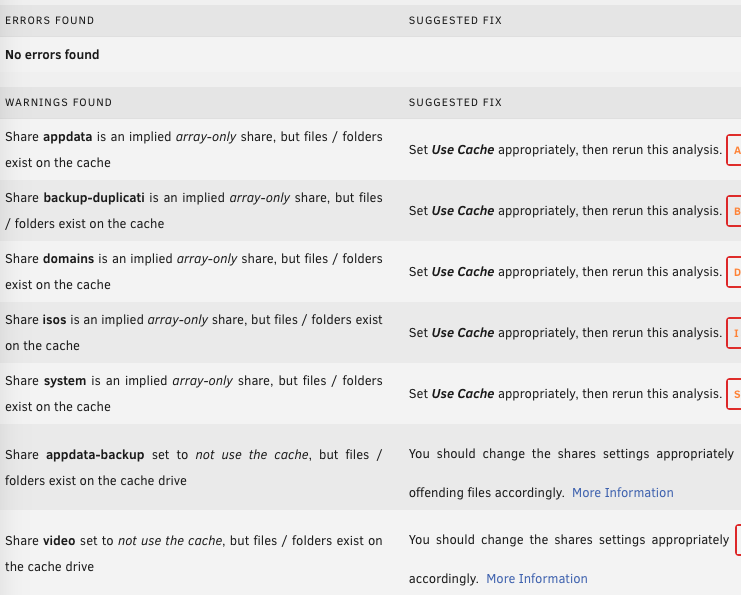
-
OK - but are there any options or features of zfs that I'd better not turn on .. or off? Does turning compression on make any real difference ie?
-
Thank you, that worked out good! Pool is up and all data seems to be intact. But does this mean that I should not play with the settings for the pool? Or are some settings more dangerous than others? Is it dangerous to change the name of the host after setting up a pool even if its not mounted at the time of name change? Please advice!
-
OK - slots for the array (up top) have been set to 'none' all the time. It looks like this:
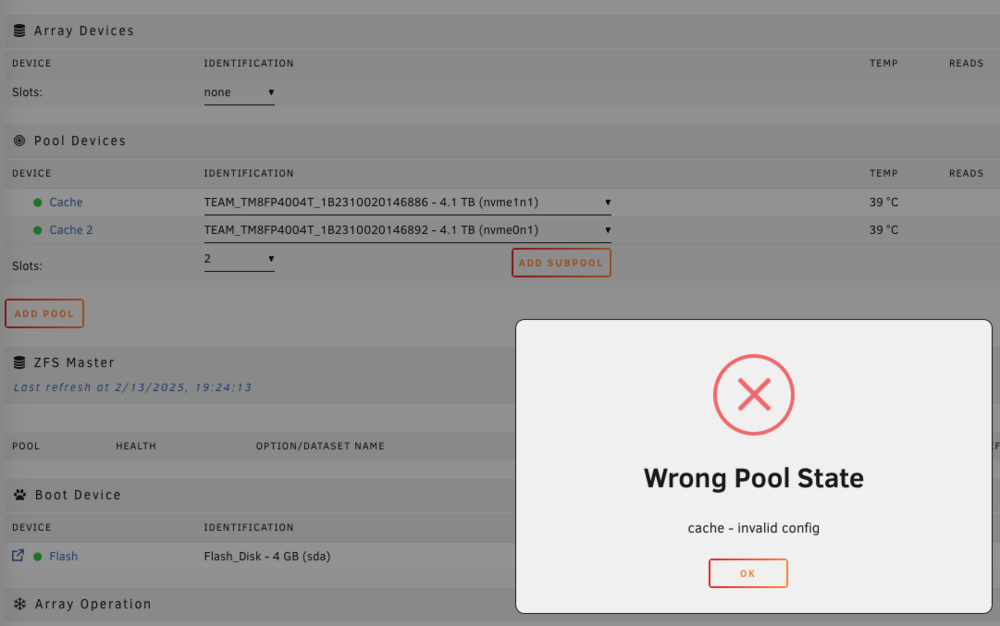
-
Not sure I understand this. So I go into the Main tab and set the slots to 'none'. Then what?
-
Ah, right. Sorry. Diagnostics file enclosed. Hopefully anonymized. Arnebys-N1-diagnostics.zip
-
Hello and thank you! Running console command zpool import. Name of zfs pool is 'cache': pool: cache id: 13103263492025029201 state: ONLINE status: Some supported features are not enabled on the pool. (Note that they may be intentionally disabled if the 'compatibility' property is set.) action: The pool can be imported using its name or numeric identifier, though some features will not be available without an explicit 'zpool upgrade'. config: cache ONLINE mirror-0 ONLINE nvme1n1p1 ONLINE nvme0n1p1 ONLINE
-
Hello! I've got the Lincstation N1 all SSD NAS appliance from LincPlus. When Unraid 7 with zfs support finally arrived I decided to scratch all, upgrade to 7 and add a zfs pool only (no array). To this I added two TeamGroup TM44 4TB M.2 sticks. Everything was set as default, including the device name. It all worked smooth for a couple of days. Then I decided to tweak the machine a bit and took down the pool and changed some parms. Nothing complicated (I think anyway). Set compression to on (Lz4 I guess), turned off spin down, turned on autotrim and set a monthly scrub schedule. But I also changed the host name from Tower to something more personal. I then rebooted and tried to mount the zfs pool with no luck. The GUI refuses to mount it while console command zpool insists that it's online and fully working without errors. In fact I can find no errors at all using console but the GUI still refuses to mount it. The message is 'invalid config' and this is where I am now. Also, both nginx and device restarted more than once. Any ideas?

