





LikeMike
Members
-
Joined
-
Last visited
Everything posted by LikeMike
-
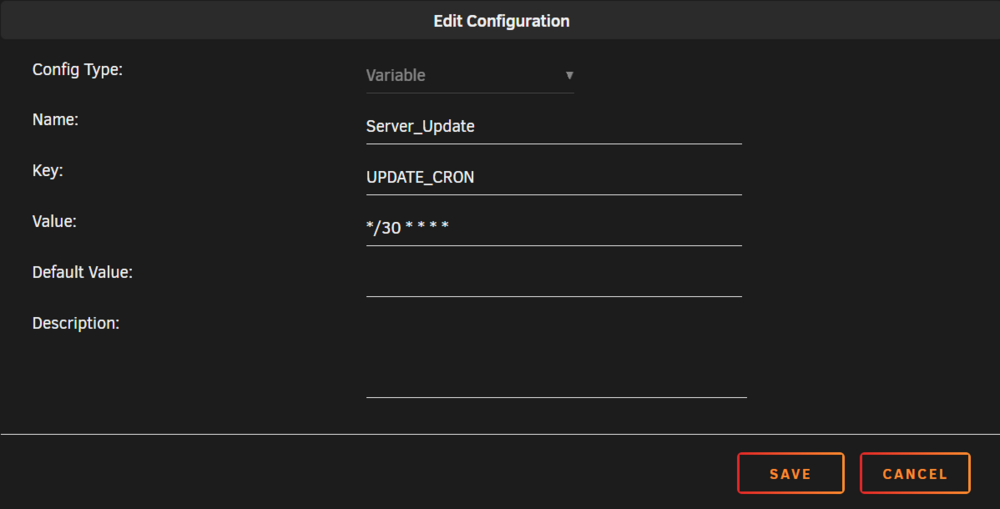
Hello, I am currently getting familiar with Unraid as a beginner because I am looking for a system for my NUC that is intended to act as a game server. However, I am still having some difficulty with Docker, especially when it comes to mounting folders. Previously, I ran a game server on my Synology NAS, where I used a Compose file to declare all the variables as follows: services: enshrouded: image: mornedhels/enshrouded-server:latest container_name: enshrouded hostname: enshrouded restart: unless-stopped stop_grace_period: 90s ports: - "15636:15636/udp" - "15637:15637/udp" volumes: - /volume1/docker/enshrouded:/opt/enshrouded - /volume1/docker/enshrouded/savegame:/opt/enshrouded/server/backups - ./game:/opt/enshrouded environment: - SERVER_NAME=Your Name - SERVER_PASSWORD=secret - UPDATE_CRON=*/30 * * * * - BACKUP_CRON=*/30 * * * * - BACKUP_MAX_COUNT=6 - BACKUP_DIR="/opt/enshrouded/server/backups" - SERVER_SLOT_COUNT=8 - PUID=4711 - PGID=4711 The key point is that the game in Docker should transfer the game server files to a folder visible to me and continuously back up the game to a savegame folder. I managed to get this working with some effort back then because I hadn’t fully grasped the concepts yet. My problem now is: How can I find out which folder in Unraid corresponds to the container folder where I want to access the relevant files? And how do I correctly mount the target path on the host? I entered the variables individually as shown in the example (see photo). In the Settings → Docker, the following paths are specified (see photo). I would greatly appreciate any help. Regards mike

-
Hello and thank you for your feedback. I’m still very new to Unraid and didn’t know that this option exists. Does this mean that if I set up the SSDs as two separate single-device pools, I would have the same scenario?
-
Hello everyone, I’m planning to equip my NUC with two M.2 SSDs (1TB + 2TB) using Unraid. I already have a suitable USB stick for Unraid. My question, however, is whether I can use the two SSDs as separate storage devices (without parity, without a pool, without any RAID-like setup)? I’d like the SSDs to simply be available as two independent storage drives that I can use for Docker containers and so on. Is that possible? If so, how should I set it up? I’d try to handle system backups with Unraid using my separate NAS. regards mike

