





Tom082
Members
-
Joined
-
Last visited
Everything posted by Tom082
-
Hi I noticed that lately Unraid got really slow when checking for updates (plugins, dockers,...). I tracked the issue down to DNS. For some reason Unraid can't reach my Pi-hole Docker anymore (this used to work and I can not remember changing related settings). ping does not work either. Pi-hole is running in a docker on the Unraid server (I know it's better to do this on another machine but for now I don't have one). Unraid is configure to use Pi-Hole as primary DNS and my DSL-Router as secondary. all my Dockers run on the custom bridge br0 all my Dockers use IPVLAN and have a static IP configured 192.168.1.x/24 I have "Host access to custom networks" enable in my Docker settings What am I missing? Why does this "suddenly" not work anymore? Of course I could re-configure Unraid to use my DSL-Router as DNS but then I would loose all my local DNS records. In about a month I should finally get a managed Switch and a Mini-PC with 2x 2.5GE and I can hopefully setup a FW, separate my network into zones and also move Pi-hole to the Mini-PC and disable Host access on Unraid. In the meantime I would like to understand what is going on and how I can fix it. Thank you very much.
-
Thanks for this great plug-in! Would it be possible to add the same custom scheduling options as parity check supports? That would be really awesome. At my place in summer it gets warm enough that my HDDs get too hot for my taste during tasks like parity and file integrity checks and therefore I try to avoid them between June and September - something your plugin currently does not allow me to do. I'm currently using a User Script to invoke parity check but I'm not confident this works correctly...
-
Thank you very much! Probably I'm too naive in thinking that I can replace the sources in your container with the ones from thor's repository?
-
@ich777 do you still maintain and share your docker to build custom kernels and driver modules? If you do, where can I find it and is there any kind of documentation on how to use it? My GPU (RX9070) is currently forcing me to run a custom kernel until Unraid comes with at least 6.13.5 (at least that is my current understanding). The kernel from @thor2002ro is working great and I have no issues with it. However it's missing the Nuvoton NTC6687 driver. Therefore for the time being I'm at the mercy of my BIOS when it comes to fan control and with that my HDDs get too hot for my taste especially during parity or file integrity checks since the BIOS does not ramp up the fans.. Therefore I'd like to build the Nuvoton driver for thor's kernel. Any hints and advice for someone that has never attempted this? Thank you both very much for the great work you have done and are doing. This is amazing!
-
I already started with updating my scripts to run on my chosen intervals... Thanks!
-
Thanks @MAM59 How it works is explained here. I understand that Unraid is fully runnig in RAM and therefore has some limitations. However from my point of view if a command is part of Unraid and uses the same name as the "real thing" then I would expect the same functionality. How are users supposed to figure out differences? In my case there is no error message for parameters that are apparently not supported. I could also not find any Unraid specific cron documentation and Unraid comes without man pages. If there is documentation please let me know because I'm still a rookie when it comes to Unraid and Linux.
-
I found similar issues here and here
-
I described the issue here. I don't believe that this is a "User Script" issue therefore I re-post here. "User Script" seems to correctly write the cron config files but Unraid does not seem to execute the jobs as expected. Any ideas other than scheduling the backup weekly on Mondays and then check within the script if it's the first Monday of the month and exit if not? Thank you.
-
Is there a difference between normal crontab jobs and how User Scripts is scheduling jobs? I have a script that I want to run on every first Monday of each month. I have setup User Scripts to use a custom schedule with the following syntax: 30 1 */32,1-7 * 1 which according to https://crontab.guru/#30_1_*/32,1-7_*_1 should do exactly what I need. However Unraid seems to run this script on every Monday instead: My configs seem to be correct though: root@blackbox:~# cat /boot/config/plugins/user.scripts/customSchedule.cron ... # Generated cron schedule for user.scripts 30 1 */32,1-7 * 1 /usr/local/emhttp/plugins/user.scripts/startCustom.php /boot/config/plugins/user.scripts/scripts/12_backup_monthly/script > /dev/null 2>&1 ... The script is also correctly scheduled in /etc/cron.d/root: root@blackbox:~# cat /etc/cron.d/root ... # Generated cron schedule for user.scripts 30 1 */32,1-7 * 1 /usr/local/emhttp/plugins/user.scripts/startCustom.php /boot/config/plugins/user.scripts/scripts/12_backup_monthly/script > /dev/null 2>&1 ...Why is this not working as expected and how can I fix it? Unraid bug? Thank you very much!


-
Yes, reboot did fix it. So far I had this particular issue only once.
-
@JorgeB Thank you very much! I had some wired issues lately and my confidence in Unraid or my HW is not very high at the moment. And I still have the update to 7.1.2 on my to-do list (my first Unraid upgrade and I'm quite nervous) blackbox-diagnostics-20250518-1253.zip To me this looks like "Unassigned Devices" is the trigger, however I did neither connect nod disconnect any devices so this is very odd.
-
Restarting nginx service via CLI does not fix the issue. After the login page (which Brave suddenly insists is not available via https but only via http) I'm right back at the above error message.
-
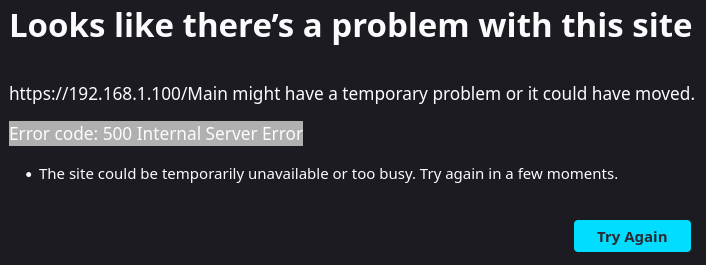
Hi What is this and how can I fix this? I was moving files from one share to another (via Unraid WebGUI) and suddenly my browser is showing me the above. I can not connect to Unraid GUI anymore. Dockers, and VMs are running fine though and I still have access to Unraid via SSH. Thank you very much.
-
Docker and VM Services were disabled when it happened. I was adding a redundant Cache Pool and therefore first moved off /appdata, /system and /domains from my NVMe to the Array following SpaceInvader's guide. The issue above happened after using mover. It could not move /system completely and stopped moving files at some point. So I stopped mover via CLI and restarted. It still did not move the remaining files. Hence I tried to stop/start the array and the above happened. I then rebooted via CLI. The server came up and started parity check due to an unclean shutdown. Then I manually copied /system to my backup folder, stopped the array and then renamed the NVMe from Cache to Work, added 2 SSD in a BTRFS RAID-1 Pool named Cache and invoked mover again to transfer all data back to Cache or Work depending where I want it. This time mover had no issues.. When all was moved I tried to stop the array once more out of curiosity, and again the same issue as above. To me this seems to be a mover related issue. I rebooted again, canceled parity check and tested stopping/starting the array with Docker and VM services still disabled. It worked flawlessly multiple times. I have now started parity check...
-
Hi something is wrong with my Unraid Server. I cant stop the array anymore. I get the following error message: May 17 12:20:07 blackbox root: rmdir: failed to remove '/mnt/user': Device or resource busy May 17 12:20:07 blackbox emhttpd: shcmd (3913): exit status: 1 May 17 12:20:07 blackbox emhttpd: shcmd (3916): /usr/local/sbin/update_cron May 17 12:20:07 blackbox emhttpd: Retry unmounting user share(s)... May 17 12:20:12 blackbox emhttpd: shcmd (3917): /usr/sbin/zfs unmount -a May 17 12:20:12 blackbox emhttpd: shcmd (3918): umount /mnt/user May 17 12:20:12 blackbox root: umount: /mnt/user: target is busy. May 17 12:20:12 blackbox emhttpd: shcmd (3918): exit status: 32 May 17 12:20:12 blackbox emhttpd: shcmd (3919): rmdir /mnt/user May 17 12:20:12 blackbox root: rmdir: failed to remove '/mnt/user': Device or resource busy What confuses me on top of this is that I'm not using zfs at all. All my drives are formated with xfs or btrfs. blackbox-diagnostics-20250517-1234.zip How can I fix this? Thank you very much for your help and suggestions!
-
Hi, for some reason my Unraid WebUI crashes sometimes. I'm not sure why. If it happens, Unraid still seems to be working in the background and I can login via console or SSH. How can I manually restart the WebUI? I tried both /etc/rc.d/rc.nginx restart /etc/rc.d/rc.php-fpm restart what I see after that is the login screen, but as soon as I login I'm looking at an empty white page and can do nothing. Currently the only way I know to get the WebUI back to a working state is reboot the server. Last time my WebUI "crashed" when I tried to download a S.M.A.R.T. report. I'm running Unraid 7.0.1 with 6.14.rc5 kernel which I need for my RX9070. Thank you!
-
Hi I'm new to Unraid and Linux, so excuse my probably stupid question. When I use the hotplug plugin to passthrough an USB disk to my Kubuntu VM the plugin reports a successful passthrough, but in the Kubuntu VM the USB HDD does not seem to show up. What am I doing wrong? Update: I can see the device in the VM with lsusb ... Bus 002 Device 003: ID 174c:235c ASMedia Technology Inc. Ugreen Storage Device ... but I have no clue what to do to actually mount it because it does not show up with tom@daily:~$ lsblk NAME MAJ:MIN RM SIZE RO TYPE MOUNTPOINTS vda 253:0 0 25G 0 disk ├─vda1 253:1 0 300M 0 part /boot/efi └─vda2 253:2 0 24.7G 0 part /swap / vdb 253:16 0 20G 0 disk └─vdb1 253:17 0 20G 0 part /home tom@daily:~$ Update 2: I also tried with an USB flash drive which shows up immediately in the VM, the same is true for an old WD Elements 2.5" HDD enclosure. Still no success with the 2.5" SATA HDD in the USB enclosure from Ugreen though. I have no clue why, Unraid sees the disk and I can mount it with Unassigned Devices (obviously it's not mounted when I try to pass it to the VM) Update 3: tom@daily:~$ sudo dmesg --follow-new [835066.847307] usb 2-2: new high-speed USB device number 11 using ehci-pci [835066.979121] usb 2-2: config 1 interface 0 altsetting 0 bulk endpoint 0x81 has invalid maxpacket 1024 [835066.979129] usb 2-2: config 1 interface 0 altsetting 0 bulk endpoint 0x2 has invalid maxpacket 1024 [835066.979130] usb 2-2: config 1 interface 0 altsetting 1 bulk endpoint 0x81 has invalid maxpacket 1024 [835066.979131] usb 2-2: config 1 interface 0 altsetting 1 bulk endpoint 0x2 has invalid maxpacket 1024 [835066.979132] usb 2-2: config 1 interface 0 altsetting 1 bulk endpoint 0x83 has invalid maxpacket 1024 [835066.979133] usb 2-2: config 1 interface 0 altsetting 1 bulk endpoint 0x4 has invalid maxpacket 1024 [835066.980513] usb 2-2: New USB device found, idVendor=174c, idProduct=235c, bcdDevice= 1.00 [835066.980516] usb 2-2: New USB device strings: Mfr=2, Product=3, SerialNumber=1 [835066.980517] usb 2-2: Product: Ugreen Storage Device [835066.980518] usb 2-2: Manufacturer: Ugreen [835066.980519] usb 2-2: SerialNumber: 20D11E800A4F [835067.005686] scsi host2: uas [835087.627736] scsi 2:0:0:0: tag#0 uas_eh_abort_handler 0 uas-tag 1 inflight: CMD [835087.627744] scsi 2:0:0:0: tag#0 CDB: Inquiry 12 00 00 00 24 00 [835087.635738] scsi host2: uas_eh_device_reset_handler start [835087.904732] usb 2-2: reset high-speed USB device number 11 using ehci-pci [835088.061546] scsi host2: uas_eh_device_reset_handler success [835088.061731] scsi 2:0:0:0: tag#0 uas_eh_abort_handler 0 uas-tag 1 inflight: CMD [835088.061736] scsi 2:0:0:0: tag#0 CDB: Test Unit Ready 00 00 00 00 00 00 [835088.061738] scsi host2: uas_eh_device_reset_handler start [835088.064895] usb 2-2: cmd cmplt err -2 [835088.336725] usb 2-2: reset high-speed USB device number 11 using ehci-pci [835088.493514] scsi host2: uas_eh_device_reset_handler success [835088.493522] scsi 2:0:0:0: Device offlined - not ready after error recovery [835088.493546] scsi 2:0:0:0: rejecting I/O to offline device This is what I see when connecting the Ugreen enclosures (I have 2). At this point I'm pretty sure this has to be some incompatibility issue between this Ugreen enclosure and Kubuntu or the passthrough. Update 4: It is a passthrough issue! When I passthough a USB controller to the VM and then attach to Ugreen USB enclosure to this controller, the HDD shows up immediately. Not sure if this is a general passthrough issue or somehow related to this plugin. Thank you!
-
@Frank1940 Thank you very much. I'm still a Linux Noob (started ~4 weeks ago) so I still stumble quite often and have to read up a lot of stuff. Sometimes I can't find the obvious answer and then people like you providing help in forums save my day ❤️
-
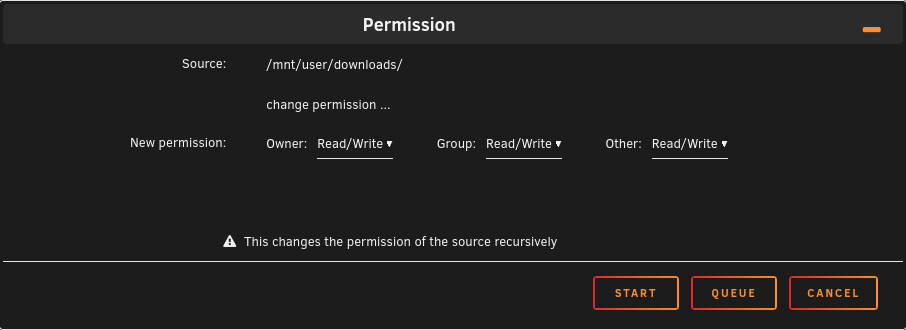
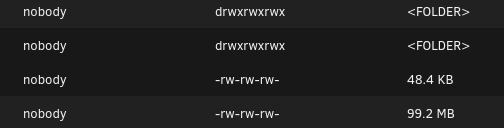
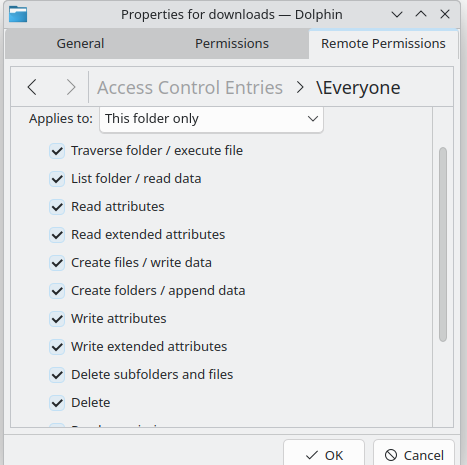
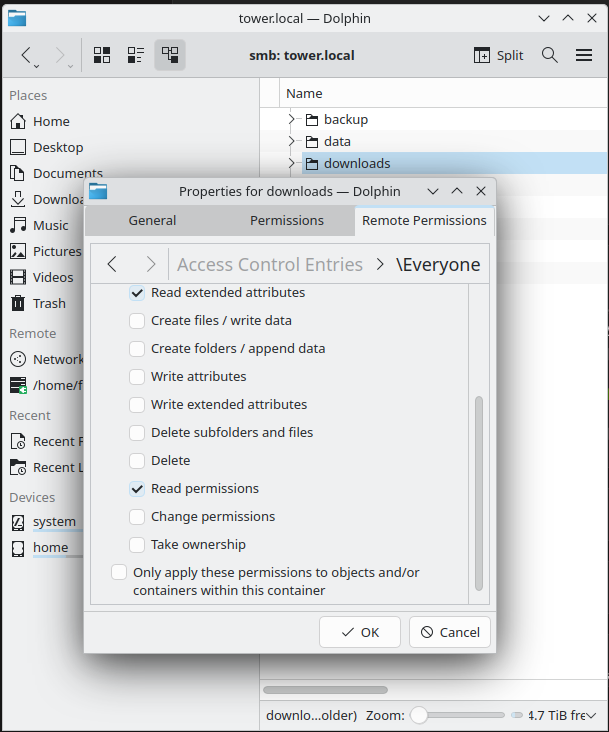
However, after running this: Permissions look like this now: Dolphin is reporting this: So it's working now. I just don't understand why. The only difference is the execute flag and still the read/write behavior has changed. Can someone please explain?
-
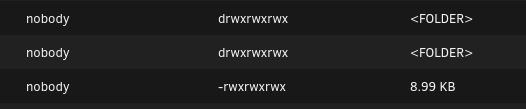
All the files and folders on Unraid have these permissions. My understanding is that this should work.
-
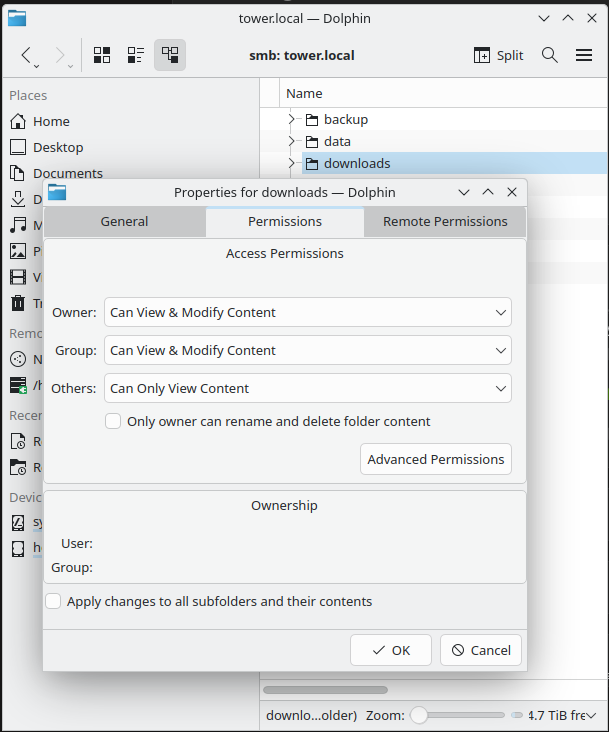
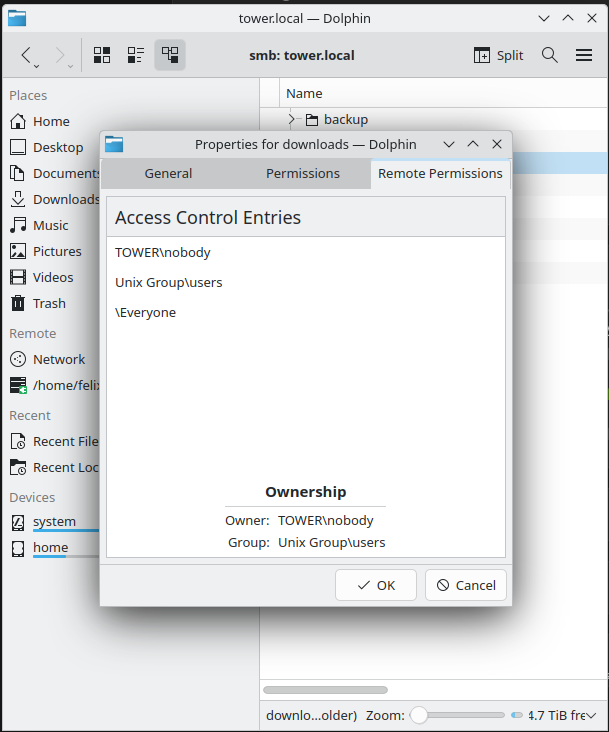
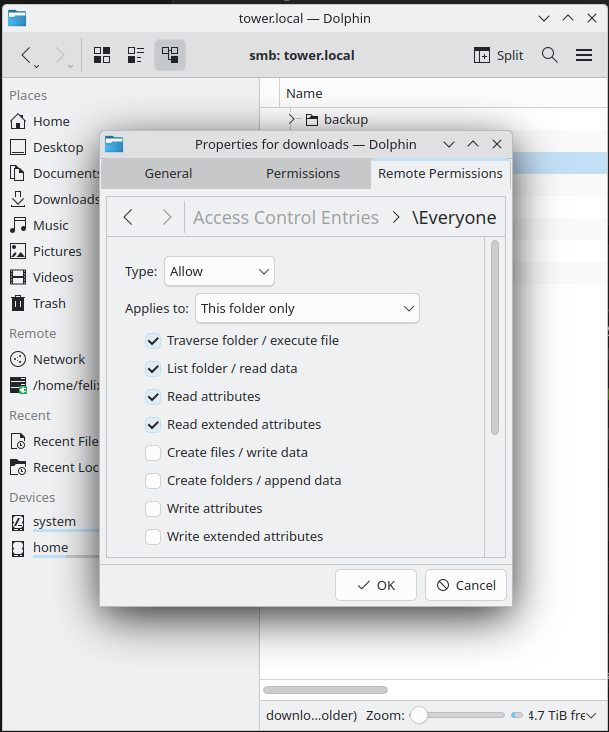
What is going on here? If I check with Dolphin I see this: How is this possible if the share is set to public?
-
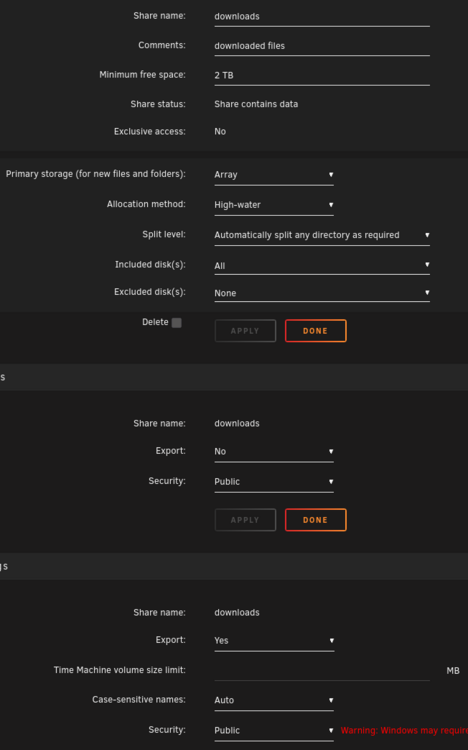
Hi I have configured this share: When I try to access it from a Kubuntu VM running on Unraid I can only read. As soon as I try to create/move/delete folders/files Dolphin complains with "Access denied". I get the same result using smbclient. I also get the same result when changing the share to secure and then connect with the same username that has read/write rights and Dolphin also never asks for credentials. However as soon as I mount the share within the VM with mount -t cifs -o credentials=/home/tom/credentials/samba.txt,uid=tom,gid=tom,_netdev //tower.home/downloads /home/tom/downloads/ I have full access. What am I doing wrong? I don't want to mount all my shares across all the different VMs.
-
I'm on Unraid 7.0.1 but already using Kernel 6.14.rc5. I need this for my AMD RX9070. I tried to upgrade to 6.14 but this "breaks" Unraid when shutting down the VM with the RX9070 passthrough. Is there a filter for the log? I'm happy to just blacklist this message. As I said everything seems to work just fine.
-
Hi the following messages are spamming my Unraid log every couple of seconds: Apr 13 11:24:08 Tower kernel: pcieport 0000:1b:00.0: Unable to change power state from D3cold to D0, device inaccessible Apr 13 11:24:08 Tower kernel: pcieport 0000:1b:04.0: Unable to change power state from D3cold to D0, device inaccessible Apr 13 11:24:12 Tower kernel: pcieport 0000:1b:00.0: Unable to change power state from D3cold to D0, device inaccessible Apr 13 11:24:12 Tower kernel: pcieport 0000:1b:04.0: Unable to change power state from D3cold to D0, device inaccessible Apr 13 11:24:15 Tower kernel: pcieport 0000:1b:00.0: Unable to change power state from D3cold to D0, device inaccessible Apr 13 11:24:15 Tower kernel: pcieport 0000:1b:04.0: Unable to change power state from D3cold to D0, device inaccessible Apr 13 11:24:18 Tower kernel: pcieport 0000:1b:00.0: Unable to change power state from D3cold to D0, device inaccessible Apr 13 11:24:18 Tower kernel: pcieport 0000:1b:04.0: Unable to change power state from D3cold to D0, device inaccessible The messages refer to my USB4/Thunderbolt controller: IOMMU group 28: [1b21:2421] 18:00.0 PCI bridge: ASMedia Technology Inc. Device 2421 (rev 01) IOMMU group 29: [1b21:2423] 19:00.0 PCI bridge: ASMedia Technology Inc. Device 2423 (rev 01) [8086:0b26] 1a:00.0 PCI bridge: Intel Corporation Thunderbolt 4 Bridge [Goshen Ridge 2020] (rev 03) [8086:0b26] 1b:00.0 PCI bridge: Intel Corporation Thunderbolt 4 Bridge [Goshen Ridge 2020] (rev 03) [8086:0b26] 1b:01.0 PCI bridge: Intel Corporation Thunderbolt 4 Bridge [Goshen Ridge 2020] (rev 03) [8086:0b26] 1b:02.0 PCI bridge: Intel Corporation Thunderbolt 4 Bridge [Goshen Ridge 2020] (rev 03) [8086:0b26] 1b:03.0 PCI bridge: Intel Corporation Thunderbolt 4 Bridge [Goshen Ridge 2020] (rev 03) [8086:0b26] 1b:04.0 PCI bridge: Intel Corporation Thunderbolt 4 Bridge [Goshen Ridge 2020] (rev 03) IOMMU group 30: [1b21:2423] 19:01.0 PCI bridge: ASMedia Technology Inc. Device 2423 (rev 01) IOMMU group 31: [1b21:2423] 19:02.0 PCI bridge: ASMedia Technology Inc. Device 2423 (rev 01) [1b21:2426] 7a:00.0 USB controller: ASMedia Technology Inc. Device 2426 (rev 01) This controller is bound to vfio, connected USB devices are not visible. IOMMU group 32: [1b21:2423] 19:03.0 PCI bridge: ASMedia Technology Inc. Device 2423 (rev 01) [1b21:2425] 7b:00.0 USB controller: ASMedia Technology Inc. Device 2425 (rev 01) I have a Thunderbolt monitor connected there and it's working perfectly fine. So I really do not understand these messages. I can only imagine that these are coming from the 2nd USB4 port, but there is nothing connected there. This Thunderbolt controller is part of a combo chip ASM4242 which consists of a USB4 and Thunderbolt controller. In my setup the Thunderbolt controller (group 32) is controlled by the host whereas the USB4 controller (group 31) is passed through to the VM. This is needed for the upstream USB of the monitor's integrated KVM to work ant get keyboard and mouse routed into the VM. Unfortunately AsRock did not implement any USB4/Thunderbolt options in my motherboard's BIOS. There support told my, all options are enabled by default. This means I cannot enable/disable any potential "power settings". How can I debug or fix that or at the very least configure an "ignore rule" so that my log is not useless? Thank you very much!
-
By chance I found a solution that works for me even though the solution does not answer my question how to bind directly to VFIO without blacklisting drivers or only temporary "runtime blacklisting". So here is what happened: I got distracted by a phone call while my VM once again had the blackscreen issue. After the call I forgot that the VM was still running and was "hard-resetting" both the USB and TBT controller on the host. After that Unraid bound the USB controller to the USB driver and the Thunderbolt controller to VFIO as described above. Suddenly the monitor had a picture again (at this point I realized that the VM was still running). I would have expected at least a VM crash but all was running fine. Even more wired is the fact that neither VM nor the host had any drivers for Thunderbolt loaded but suddenly I could reboot start/stop the VM without any issues. This only broke after I power cycled the monitor (I guess detach/attach of the cable would have the same effect). This is when I realized that the only way this is possible is if Thunderbolt is only required for device authorization which happened in the VM when the controller was passed through. As long as the monitor was connected and powered on the authorization remained valid. If this is correct then passthrough of the Thunderbolt controller should also not be required. In the VM I used boltctl in order to authorize Thunderbolt devices. Unfortunately neither boltd nor boltctl or any other tool for thunderbolt exists in Unraid except the driver and I could not find any. All I found is one post in another forum where a guy was building the boltctl package for slackware but this I didn't want to try, this is way over my head at this point. In the end I found this admin guide. So my new setup does neither passthrough the Thunderbolt nor the USB4 controller, neither driver is blacklisted. The Thunderbolt monitor gets authorized by this udev rule: root@Tower:~# cat /boot/config/udev/50_enable_thunderbolt.rules ACTION=="add", SUBSYSTEM=="thunderbolt", \ ATTR{authorized}=="0", \ ATTR{authorized}="1", \ RUN+="/bin/sh -c 'echo 1 > /sys/bus/thunderbolt/devices/domain0/0-0/0-1/authorized && echo 1 > /sys/bus/pci/rescan'" root@Tower:~# I also wanted to use ATTR{iommu_dma_protection}=="1", \ ATTR{security}=="dponly", \ but unfortunately my system seems not to support these. Anyway, this solves my issue. I can now reboot/start/stop my VM with iGPU passthrough. It's running for 2 days now I once had to "hard-reset" the Thunderbolt controller and power cycle the monitor a 2nd time after the monitor was off over night. I' not sure why, but I could do the hard-reset without stopping the VM. I will investigate a bit more. Worst case I create a script in the VM that triggers at login and reset the Thunderbolt controller on the host or something similar. @SimonF and @JorgeB thank you very much for your time and help 💗


