





Tom082
Members
-
Joined
-
Last visited
Everything posted by Tom082
-
Perfect! Thank you very much. Now I just have to figure this "runtime" reset out.
-
NP, it was a long post 😅 Thank you very much!
-
I don't want to be rude, I really appreciate the help but did you actually read though my post or did you stop at "I blacklisted the TBT controller? I know that under normal circumstance that is not necessary. But as soon as you use /remove and /rescan things are different as you can see above. Probably I should have mentioned the blacklisting part further down in my post when it's actually necessary.
-
OK, let me try to show step by step what happens with my Thunderbolt Controller. In Unraid if have marked the TBT ctrl for passthrough. Unraid binds the controller correctly to VFIO. The same is true for the USB4 ctrl (both are part of the same chip but have different IOMMU groups): I have blacklisted the TBT driver but not the USB4 driver: root@Tower:~# ls /boot/config/modprobe.d/ thunderbolt.conf root@Tower:~# cat /boot/config/modprobe.d/thunderbolt.conf blacklist thunderbolt root@Tower:~# ls /etc/modprobe.d/ README cdc_ether.conf iommu_unsafe_interrupts.conf kvm.conf mpt3sas.conf scsi-sata-controllers.conf thunderbolt.conf zfs.conf I cannot blacklist the USB driver in the same way, otherwise I loose all USB ports on the host incl the port with the Unraid flash drive. This is the state after booting into Unraid: root@Tower:~# lspci -d 1b21:* -k 7a:00.0 USB controller: ASMedia Technology Inc. Device 2426 (rev 01) Subsystem: ASMedia Technology Inc. Device 2426 Kernel driver in use: vfio-pci 7b:00.0 USB controller: ASMedia Technology Inc. Device 2425 (rev 01) Subsystem: ASMedia Technology Inc. Device 2425 Kernel driver in use: vfio-pci Kernel modules: thunderbolt As expected both are bound to VFIO Resetting both ctrl with a FLR reset does not change this binding: root@Tower:~# echo "1" > /sys/bus/pci/devices/0000\:7b\:00.0/reset root@Tower:~# echo "1" > /sys/bus/pci/devices/0000\:7a\:00.0/reset root@Tower:~# lspci -d 1b21:* -k 7a:00.0 USB controller: ASMedia Technology Inc. Device 2426 (rev 01) Subsystem: ASMedia Technology Inc. Device 2426 Kernel driver in use: vfio-pci 7b:00.0 USB controller: ASMedia Technology Inc. Device 2425 (rev 01) Subsystem: ASMedia Technology Inc. Device 2425 Kernel driver in use: vfio-pci Kernel modules: thunderbolt Unfortunately this reset is not good enough. My monitor attached to USB4 remains black after a VM reboot or VM stop/start cycle. At this point the only way to revive it is to reboot the host. I was experimenting with a Fedora Rawhide live flash drive and there I could reproduce a similar issue by detaching/attaching the TBT monitor multiple times. At some point it remains black. A FLR as shown above does not change that. However removing the TBT ctrl from the PCI bus and rescanning the bus revived my TBT monitor after a few seconds. After that I could go through 20+ detach/attach cycles and the monitor came back each time. So I wanted to reproduce that on Unraid and use the "hard-reset" mode. Doing that has results in the following: root@Tower:~# echo "1" > /sys/bus/pci/devices/0000\:7a\:00.0/remove root@Tower:~# echo "1" > /sys/bus/pci/devices/0000\:7b\:00.0/remove root@Tower:~# lspci -d 1b21:* -k root@Tower:~# echo "1" > /sys/bus/pci/rescan root@Tower:~# lspci -d 1b21:* -k 7a:00.0 USB controller: ASMedia Technology Inc. Device 2426 (rev 01) Subsystem: ASMedia Technology Inc. Device 2426 Kernel driver in use: xhci_hcd 7b:00.0 USB controller: ASMedia Technology Inc. Device 2425 (rev 01) Subsystem: ASMedia Technology Inc. Device 2425 Kernel modules: thunderbolt As you can see, after the /rescan neither TBT nor USB ctrl are bound to VFIO anymore and I can not start my VM. My question is how can I change that. I can bind them back to VFIO but since both ctrl where already claimed by Unraid this makes the hard-rest questionable at best. root@Tower:~# lspci -n | grep -E "7a:00|7b:00" 7a:00.0 0c03: 1b21:2426 (rev 01) 7b:00.0 0c03: 1b21:2425 (rev 01) root@Tower:~# root@Tower:~# echo 1b21 2426 > /sys/bus/pci/drivers/vfio-pci/new_id root@Tower:~# echo 1b21 2425 > /sys/bus/pci/drivers/vfio-pci/new_id root@Tower:~# echo 0000:7a:00.0 > /sys/bus/pci/drivers/xhci_hcd/unbind root@Tower:~# echo 0000:7a:00.0 > /sys/bus/pci/drivers/vfio-pci/bind root@Tower:~# echo 0000:7b:00.0 > /sys/bus/pci/drivers/thunderbolt/unbind root@Tower:~# echo 0000:7b:00.0 > /sys/bus/pci/drivers/vfio-pci/bind root@Tower:~# lspci -d 1b21:* -k 7a:00.0 USB controller: ASMedia Technology Inc. Device 2426 (rev 01) Subsystem: ASMedia Technology Inc. Device 2426 Kernel driver in use: vfio-pci 7b:00.0 USB controller: ASMedia Technology Inc. Device 2425 (rev 01) Subsystem: ASMedia Technology Inc. Device 2425 Kernel driver in use: vfio-pci Kernel modules: thunderbolt I need Unraid to bind both ctrl to VIFO after a /rescan. I tried with "runtime" blacklisting: root@Tower:~# touch /etc/modprobe.d/xhci_hcd.conf root@Tower:~# echo "blacklist xhci_hcd" > /etc/modprobe.d/xhci_hcd.conf root@Tower:~# root@Tower:~# touch /etc/modprobe.d/thunderbolt.conf root@Tower:~# echo "blacklist thunderbolt" > /etc/modprobe.d/thunderbolt.conf root@Tower:~# root@Tower:~# ls /etc/modprobe.d/ README iommu_unsafe_interrupts.conf mpt3sas.conf thunderbolt.conf zfs.conf cdc_ether.conf kvm.conf scsi-sata-controllers.conf xhci_hcd.conf root@Tower:~# but somehow this works only for TBT but not USB4. I'm very confused! root@Tower:~# echo "1" > /sys/bus/pci/devices/0000\:7a\:00.0/remove root@Tower:~# echo "1" > /sys/bus/pci/devices/0000\:7b\:00.0/remove root@Tower:~# echo "1" > /sys/bus/pci/rescan root@Tower:~# lspci -d 1b21:* -k 7a:00.0 USB controller: ASMedia Technology Inc. Device 2426 (rev 01) Subsystem: ASMedia Technology Inc. Device 2426 Kernel driver in use: xhci_hcd 7b:00.0 USB controller: ASMedia Technology Inc. Device 2425 (rev 01) Subsystem: ASMedia Technology Inc. Device 2425 Kernel driver in use: vfio-pci Kernel modules: thunderbolt This doesn't make much sense to me, how and why do the two controllers behave differently and how can I fix this? The reason I want to also "hard-reset" the USB ctrl is because both controllers seem to share at least one memory block. Unfortunately I don't have this output anymore I also can't remember where I have seen it. I believe it was when I was booting the Rawhide live flash.

-
How can I do that? Unraid binds it automatically to vfio-pci at booting. Unfortunately the reset method I have to use for my TBT controller removes that binding and when I do a rescan to reconnect the USB4 controller it will load the USB driver. Blacklisting the thunderbolt driver only works because there is only 1 TBT controller in my system. For USB4 I need to be able to blacklist a single device to load driver X or I need the ability to manually add USB4 with the vfio-pci driver. Mhhh, if I could only temporarily blacklist a driver this might also work. Do you know by chance if the blacklisting config in /boot/config/modprobe.d is reloaded everytime it changes or if it's consulted whenever the system needs to load a driver?
-
Thank you for confirming the correct location for blacklisting_ One more question regarding blacklisting. It looks like I also have to blacklist the USB4 controller that is part of the TBT (or vice versa - its one chip). How can I blacklist a driver only for a certain device and not globally? I do not want to loose all my other USB ports. Do I understand this correctly that Unraid does not have the capability to execute scripts on VM start/stop? At least not exposed to the user? What about libvirt hook-scripts, are they exposed to the user? If yes, where?
-
root@Tower:~# cat /etc/modprobe.d/README # /etc/modprobe.d/README # # The monolithic "blacklist" file (and others) that used to be here in this # directory have been split into several more fine-grained files and moved # to the /lib/modprobe.d/ directory. Any file in /lib/modprobe.d/ will be # overridden by an identically named file in this directory (/etc/modprobe.d/) # or /run/modprobe.d/ (but since /run is on a tmpfs, it's not persistent # across reboots, so you probably don't want to use it). # # See "man modprobe.d" for more information. # root@Tower:~# This is very confusing, because .conf files in /etc/modprode.d/ do not seem to have any effect and are not persistent across reboots as suggested in Unraid's own README. /boot/config/modprobe.d/ works though.
-
Hi In order to get my thunderbolt controller passthrough fully working (incl VM reboot & start/stop cycles) I have to "hard-reset" the controller. Unraid's function level reset (FLR) is unfortunately not enough. root@Tower:~# lspci -k 7b:00.0 USB controller: ASMedia Technology Inc. Device 2425 (rev 01) Subsystem: ASMedia Technology Inc. Device 2425 Kernel driver in use: vfio-pci Kernel modules: thunderbolt root@Tower:~# The first thing I have to do is blacklist the thunderbolt driver. Yes Unraid binds vfio-pci to it at boot times but after the hard-reset it seems to load the thunderbolt driver if not blacklisted. Where in Unraid 7 is the correct config file to target and what do I have to configure? Is this correct: (Update: seems to be correct, at least it's working) touch /boot/config/modprobe.d/thunderbolt.conf echo "blacklist thunderbolt" > /boot/config/modprobe.d/thunderbolt.conf Where do I have to attach a script that executes a Thunderbolt controller hard-reset whenever the VM starts and/or reboots? Do I have to use libvirt hooks? If so where do I have to configure those in Unraid? This is the hard reset I need to do: echo "1" > /sys/bus/pci/devices/0000\:7b\:00.0/remove sleep 2 echo "1" > /sys/bus/pci/rescan Then I need to manually bind the Thunderbolt controller to VFIO again. How do I do that? I tried with echo 0000:7b:00.0 > /sys/bus/pci/drivers/vfio-pci/bind but this does not work. I get > echo: write error: No such device Thank you very much.
-
Except for the Thunderbolt issue the solution for blackscreen and login issues are the following: Blackscreen: - detach all video cables from the iGPU (this includes USB-C in case of Thunderbolt). - boot into Unraid - attach video cables to the iGPU - start VM Black screen until after login: - install the VM with VNC plus iGPU otherwise the VM might not start the required drivers For the Thunderbolt instability I opened another thread at Level1
-
Thank you. I downloaded the 6.14 today and will eventually update. I had to do my setup with 6.14.rc5 which works great for me. I have dGPU and iGPU passthrough working without any GPU reset issues 🙂 I have only 2 open issues left for my Unraid setup. 1) I can't use the "Nuvoton NCT6687 Driver" plugin due to the unofficial thor2002 kernel - I have made my peace with that. 2) Thunderbolt is not stable and does not always survive VM reboots or start/stop cycles (VM with iGPU using 1st monitor @HDMI and 2nd monitor @Thunderbolt). I have not made peace with this one yet
-
Update: I was wrong about the HDMI port. My VM can use it. The trick is to unplug all the monitor cables (HDMI, DP, Thunderbolt) at host boot time so that neither the BIOS/EFI nor Unraid have a chance to detect the monitor and initialize it. Once the iGPU is bound to VFIO it's safe to plug the cables back in. Starting the VM will produce a picture on the HDMI attached monitor. Maybe switching off all the monitors during host boot instead of unplugging might be enough - I have not tested this yet though. In my case configuring the BIOS to use the dGPU instead of the iGPU does somehow not prevent the BIOS/EFI to use the output ports of the iGPU if the monitors are plugged in and detected. In the meantime my VM also runs without the VNC GPU. When I was first setting up my Kubuntu-VM I did so only with the VNC GPU attached (no passthrough, neither iGPU nor the thunderbolt controller). Reinstalling the VM with both the iGPU and thunderbolt controller attached to the VM from the very beginning did solve the issue and now my Kubuntu-VM displays the login screen directly on my monitor, no VNC needed. Since I'm still a Linux Noob with only 2 weeks of experience now, my best guess is that installing the VM with only VNC did not install or load the drivers for the iGPU and Thunderbolt Controller and they were only loaded/activated after the GUI login. As said, this is just a guess. I can now repeatedly start/stop/reboot the VM with the iGPU attached and also move the iGPU between different VMs. I have done at least 20 reboot cycles, 10 start/stop cycles and moved the iGPU back and forth between 2 different VMs. I do not have the AMD_vendor-reset" plugin installed. I could not install it if I needed to, because I have to run a 6.13.5 or newer kernel in order for my 9070 to work correctly. This leaves me with one last issue to solve. Thunderbolt! As mentioned passing through the Thunderbolt Controller is required in order to get a picture to the 2nd monitor. I did test Thunderbolt DP-MST already and it works. In order to get an actual picture on the attached monitors I have to unplug the Thunderbolt cable during host boot. Once the Thunderbolt controller is attached to VFIO it's safe to attach the cable. The VM does recognize Thunderbolt and monitors attached to it. I do get pictures. What is not working at least not reliably and repeatedly are VM reboots and start/stop cycles. Unfortunately at some point my monitors that are using Thunderbolt remain black. The VM reports that the monitors are not attached. HDMI remains working though. So it looks to me that the issue is with the Thunderbolt controller and not the iGPU. Unraid reports that the Thunderbolt controller has and supports function level resets (FLR). Also in the Unraid logs I can clearly see the the Thunderbolt controller goes though successful resets (at least according to Unraid) even if the Thunderbolt monitors remain black. Mar 29 11:53:47 Tower kernel: vfio-pci 0000:7c:00.0: resetting Mar 29 11:53:47 Tower kernel: vfio-pci 0000:7c:00.0: reset done Mar 29 11:53:47 Tower kernel: vfio-pci 0000:7c:00.1: resetting Mar 29 11:53:47 Tower kernel: vfio-pci 0000:7c:00.1: reset done Mar 29 11:53:47 Tower kernel: vfio-pci 0000:7b:00.0: resetting Mar 29 11:53:47 Tower kernel: vfio-pci 0000:7b:00.0: reset done 7c is the GPU, 7b is the Thunderbolt controller. How I can debug and fix this? Any hints and tips? Thank you very much!
-
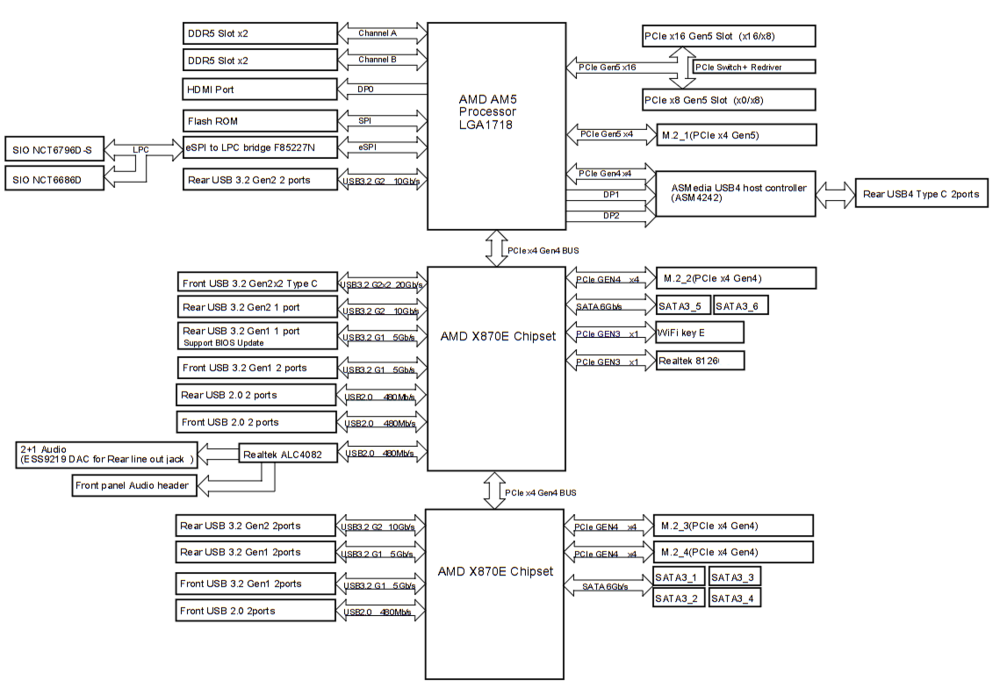
Hi, I have HW passtrhough working perfectly for my dGPU a 9070. Now I need to also passthrough mi iGPU (Ryten 9950) to another VM. I'm close but I'm encountering a wired problem. If I start the VM with VNC as primary GPU, then my Kubuntu VM boots up normally. Once logged in I can switch primary display to my monitor and turn off the VNC display. Now I have a picture on my monitor using Thunderbolt (USB4-DP-ALT). I can reboot the VM and it will boot normally except that I'm sitting in front of a black screen until I blindly enter my pwd and then my monitor shows a picture again and all is OK. However if I remove the VNC GPU from my VM config (leaving everything else untouched) then my VM does never output anything to my screen. Waiting and blindly entering pwd does not do the trick either. I have a theory that the VM without detecting a monitor does not boot at all. How can I fix this? I have tried a OVMF and SEABIOS. Same behavior. It's not the reset bug. I can start/stop the VM with the VNC attached multiple times and get output via iGPU. I have also tried to modify the VM's GRUB with GRUB_CMDLINE_LINUX_DEFAULT="nomodeset" and updated GRUB with "sudo update-grub" As output I have to use USB4 Thunderbolt since I need to connect 2 monitors. My HDMI port does not output anything anyway. My theory here is that the HDMI port is not accessible form the VM because it's still bound to the CPU (probably a part I cannot passthrough, or at least I have no clue how to figure out what part). In order to get a picture via Thunderbolt I also have to passthrough the ASMedia USB Controller where those USB4 ports are connected to. I got this information from my motherboard's manual: (Asrock X870E Taichi Lite) I have extracted the VBIOS and AMDGopDriver, although currently I don't use the GOP ROM Here is my lspci: root@Tower:~# lspci 00:00.0 Host bridge: Advanced Micro Devices, Inc. [AMD] Raphael/Granite Ridge Root Complex 00:00.2 IOMMU: Advanced Micro Devices, Inc. [AMD] Raphael/Granite Ridge IOMMU 00:01.0 Host bridge: Advanced Micro Devices, Inc. [AMD] Raphael/Granite Ridge Dummy Host Bridge 00:01.1 PCI bridge: Advanced Micro Devices, Inc. [AMD] Raphael/Granite Ridge GPP Bridge 00:01.2 PCI bridge: Advanced Micro Devices, Inc. [AMD] Raphael/Granite Ridge GPP Bridge 00:02.0 Host bridge: Advanced Micro Devices, Inc. [AMD] Raphael/Granite Ridge Dummy Host Bridge 00:02.1 PCI bridge: Advanced Micro Devices, Inc. [AMD] Raphael/Granite Ridge GPP Bridge 00:02.2 PCI bridge: Advanced Micro Devices, Inc. [AMD] Raphael/Granite Ridge GPP Bridge 00:03.0 Host bridge: Advanced Micro Devices, Inc. [AMD] Raphael/Granite Ridge Dummy Host Bridge 00:04.0 Host bridge: Advanced Micro Devices, Inc. [AMD] Raphael/Granite Ridge Dummy Host Bridge 00:08.0 Host bridge: Advanced Micro Devices, Inc. [AMD] Raphael/Granite Ridge Dummy Host Bridge 00:08.1 PCI bridge: Advanced Micro Devices, Inc. [AMD] Raphael/Granite Ridge Internal GPP Bridge to Bus [C:A] 00:08.3 PCI bridge: Advanced Micro Devices, Inc. [AMD] Raphael/Granite Ridge Internal GPP Bridge to Bus [C:A] 00:14.0 SMBus: Advanced Micro Devices, Inc. [AMD] FCH SMBus Controller (rev 71) 00:14.3 ISA bridge: Advanced Micro Devices, Inc. [AMD] FCH LPC Bridge (rev 51) 00:18.0 Host bridge: Advanced Micro Devices, Inc. [AMD] Raphael/Granite Ridge Data Fabric; Function 0 00:18.1 Host bridge: Advanced Micro Devices, Inc. [AMD] Raphael/Granite Ridge Data Fabric; Function 1 00:18.2 Host bridge: Advanced Micro Devices, Inc. [AMD] Raphael/Granite Ridge Data Fabric; Function 2 00:18.3 Host bridge: Advanced Micro Devices, Inc. [AMD] Raphael/Granite Ridge Data Fabric; Function 3 00:18.4 Host bridge: Advanced Micro Devices, Inc. [AMD] Raphael/Granite Ridge Data Fabric; Function 4 00:18.5 Host bridge: Advanced Micro Devices, Inc. [AMD] Raphael/Granite Ridge Data Fabric; Function 5 00:18.6 Host bridge: Advanced Micro Devices, Inc. [AMD] Raphael/Granite Ridge Data Fabric; Function 6 00:18.7 Host bridge: Advanced Micro Devices, Inc. [AMD] Raphael/Granite Ridge Data Fabric; Function 7 01:00.0 PCI bridge: Advanced Micro Devices, Inc. [AMD/ATI] Navi 10 XL Upstream Port of PCI Express Switch (rev 24) 02:00.0 PCI bridge: Advanced Micro Devices, Inc. [AMD/ATI] Navi 10 XL Downstream Port of PCI Express Switch (rev 24) 03:00.0 VGA compatible controller: Advanced Micro Devices, Inc. [AMD/ATI] Device 7550 (rev c0) 03:00.1 Audio device: Advanced Micro Devices, Inc. [AMD/ATI] Device ab40 04:00.0 Non-Volatile memory controller: Samsung Electronics Co Ltd NVMe SSD Controller S4LV008[Pascal] 05:00.0 PCI bridge: Advanced Micro Devices, Inc. [AMD] 600 Series Chipset PCIe Switch Upstream Port (rev 01) 06:00.0 PCI bridge: Advanced Micro Devices, Inc. [AMD] 600 Series Chipset PCIe Switch Downstream Port (rev 01) 06:04.0 PCI bridge: Advanced Micro Devices, Inc. [AMD] 600 Series Chipset PCIe Switch Downstream Port (rev 01) 06:05.0 PCI bridge: Advanced Micro Devices, Inc. [AMD] 600 Series Chipset PCIe Switch Downstream Port (rev 01) 06:06.0 PCI bridge: Advanced Micro Devices, Inc. [AMD] 600 Series Chipset PCIe Switch Downstream Port (rev 01) 06:07.0 PCI bridge: Advanced Micro Devices, Inc. [AMD] 600 Series Chipset PCIe Switch Downstream Port (rev 01) 06:08.0 PCI bridge: Advanced Micro Devices, Inc. [AMD] 600 Series Chipset PCIe Switch Downstream Port (rev 01) 06:0c.0 PCI bridge: Advanced Micro Devices, Inc. [AMD] 600 Series Chipset PCIe Switch Downstream Port (rev 01) 06:0d.0 PCI bridge: Advanced Micro Devices, Inc. [AMD] 600 Series Chipset PCIe Switch Downstream Port (rev 01) 0a:00.0 Ethernet controller: Realtek Semiconductor Co., Ltd. RTL8126 5GbE Controller (rev 01) 0b:00.0 Network controller: MEDIATEK Corp. Device 0717 0c:00.0 PCI bridge: Advanced Micro Devices, Inc. [AMD] 600 Series Chipset PCIe Switch Upstream Port (rev 01) 0d:00.0 PCI bridge: Advanced Micro Devices, Inc. [AMD] 600 Series Chipset PCIe Switch Downstream Port (rev 01) 0d:04.0 PCI bridge: Advanced Micro Devices, Inc. [AMD] 600 Series Chipset PCIe Switch Downstream Port (rev 01) 0d:05.0 PCI bridge: Advanced Micro Devices, Inc. [AMD] 600 Series Chipset PCIe Switch Downstream Port (rev 01) 0d:06.0 PCI bridge: Advanced Micro Devices, Inc. [AMD] 600 Series Chipset PCIe Switch Downstream Port (rev 01) 0d:07.0 PCI bridge: Advanced Micro Devices, Inc. [AMD] 600 Series Chipset PCIe Switch Downstream Port (rev 01) 0d:08.0 PCI bridge: Advanced Micro Devices, Inc. [AMD] 600 Series Chipset PCIe Switch Downstream Port (rev 01) 0d:0c.0 PCI bridge: Advanced Micro Devices, Inc. [AMD] 600 Series Chipset PCIe Switch Downstream Port (rev 01) 0d:0d.0 PCI bridge: Advanced Micro Devices, Inc. [AMD] 600 Series Chipset PCIe Switch Downstream Port (rev 01) 13:00.0 Non-Volatile memory controller: Samsung Electronics Co Ltd NVMe SSD Controller S4LV008[Pascal] 14:00.0 USB controller: Advanced Micro Devices, Inc. [AMD] 800 Series Chipset USB 3.x XHCI Controller (rev 01) 15:00.0 SATA controller: Advanced Micro Devices, Inc. [AMD] 600 Series Chipset SATA Controller (rev 01) 16:00.0 USB controller: Advanced Micro Devices, Inc. [AMD] 800 Series Chipset USB 3.x XHCI Controller (rev 01) 17:00.0 SATA controller: Advanced Micro Devices, Inc. [AMD] 600 Series Chipset SATA Controller (rev 01) 18:00.0 PCI bridge: ASMedia Technology Inc. Device 2421 (rev 01) 19:00.0 PCI bridge: ASMedia Technology Inc. Device 2423 (rev 01) 19:01.0 PCI bridge: ASMedia Technology Inc. Device 2423 (rev 01) 19:02.0 PCI bridge: ASMedia Technology Inc. Device 2423 (rev 01) 19:03.0 PCI bridge: ASMedia Technology Inc. Device 2423 (rev 01) 1a:00.0 PCI bridge: Intel Corporation Thunderbolt 4 Bridge [Goshen Ridge 2020] (rev 03) 1b:00.0 PCI bridge: Intel Corporation Thunderbolt 4 Bridge [Goshen Ridge 2020] (rev 03) 1b:01.0 PCI bridge: Intel Corporation Thunderbolt 4 Bridge [Goshen Ridge 2020] (rev 03) 1b:02.0 PCI bridge: Intel Corporation Thunderbolt 4 Bridge [Goshen Ridge 2020] (rev 03) 1b:03.0 PCI bridge: Intel Corporation Thunderbolt 4 Bridge [Goshen Ridge 2020] (rev 03) 1b:04.0 PCI bridge: Intel Corporation Thunderbolt 4 Bridge [Goshen Ridge 2020] (rev 03) 7a:00.0 USB controller: ASMedia Technology Inc. Device 2426 (rev 01) 7b:00.0 USB controller: ASMedia Technology Inc. Device 2425 (rev 01) 7c:00.0 VGA compatible controller: Advanced Micro Devices, Inc. [AMD/ATI] Granite Ridge [Radeon Graphics] (rev c9) 7c:00.1 Audio device: Advanced Micro Devices, Inc. [AMD/ATI] Rembrandt Radeon High Definition Audio Controller 7c:00.2 Encryption controller: Advanced Micro Devices, Inc. [AMD] Family 19h PSP/CCP 7c:00.3 USB controller: Advanced Micro Devices, Inc. [AMD] Raphael/Granite Ridge USB 3.1 xHCI 7c:00.4 USB controller: Advanced Micro Devices, Inc. [AMD] Raphael/Granite Ridge USB 3.1 xHCI 7c:00.6 Audio device: Advanced Micro Devices, Inc. [AMD] Family 17h/19h/1ah HD Audio Controller 7d:00.0 USB controller: Advanced Micro Devices, Inc. [AMD] Device 15b8 root@Tower:~# This is my iGPU which I pass as multifunction device with my extracted vbios: 7c:00.0 VGA compatible controller: Advanced Micro Devices, Inc. [AMD/ATI] Granite Ridge [Radeon Graphics] (rev c9) 7c:00.1 Audio device: Advanced Micro Devices, Inc. [AMD/ATI] Rembrandt Radeon High Definition Audio Controller Here the ASMedia USB4 "Thunderbolt" controller I also need in order to get a picture on my monitor: 7b:00.0 USB controller: ASMedia Technology Inc. Device 2425 (rev 01) What I'm wondering is if I also have to passthrough the 6 Thunderbolt bridges above. But I can't bind them to VFIO (at least not via GUI) and then I also have no clue what I would need to modify the VM config XML. Any hints? Getting this to work it the last piece of my puzzle. Any support is highly appreciated. Thank you
-
Thanks a lot for you help, it's highly appreciated! Luckily I do not have data loss at least nothing important. I'm new to Unraid and Linux. I just set this server up last week and so far I'm mostly playing around, testing and learning. I have dGPU passthrough working to my gaming VM and have setup my daily-driver VM which should autostart once all is running. Before this share/pool problem happened I was installing some dockers and working on the iGPU passthrough to the daily VM. All my important data is still on the "old NAS". If I have lost something then its dockers or VMs and this is not a big deal. In the meantime I deleted both the "cache" and "gaming" pool and recreated them as "cache" and "game" but this time with XFS. I learned today that "nested" COW is a bad idea and with my old setup I believe I had 3 levels of COW, 1st the host with ZFS then the vdisks with QCOW2 and last BTRFS in the guests. So recreating the pools also has its upsides. With the new setup I will have XFS then RAW and the new VMs I will build with LVM partitions and EXT4. My VMs are not critical so a weekly backup is good enough, I don't rely on a self-healing FS. The important data is on the array and I have the dynamics file integrity plugin installed to at least get bitrot warnings. The super important stuff gets backed up to an external drive and the idea is to setup an additional offsite backup via Tailscale to my brother's place (and vice versa). So I should be covered. Currently I'm restoring the pools. The copying will take some time . The shares are already setup and this time no complaints from FCP. Tomorrow I will most likely have to fix or recreate my VMs. Let's see what works and what I can recover...
-
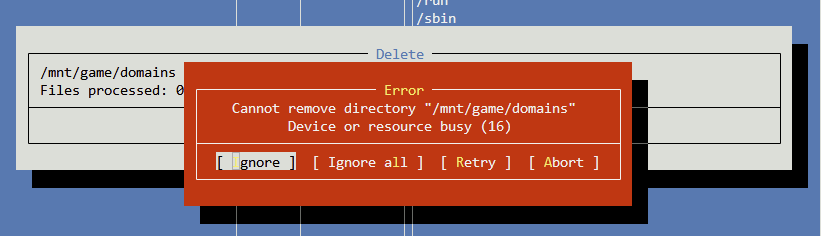
I stopped the array then went to CLI, mounted the pools manually and tried to delete. Same error message. Now clue what at this stage could block this.
-
VM and Dockers are all stopped and the agents disabled in settings. Array is stopped too. I even rebooted. Nothing works. Why would I have to set gaming as a secondary storage? the vms shall remain on the cache. except for the gaming vm which is on the gaming pool. So basically all files are where they should be. Thank you both for your help.
-
I can not even delete the domains share, the check box is grayed out. How did I get here? I have copied all the data from the gaming and cache pool to the backup folder on the array. Shall I delete the pools and try to re-create them? Could this also fix the share?
-
Neither with dynamix nor via cli can I do anything with these folders, I tried deleting, moving and renaming them. Nothing happnes.
-
I have cleaned up the directory structure and I have no duplicate files anymore. However the system does not let me delete the /domains/gaming on the cache pool and also not /domains on the gaming pool. None of these folders still contain any vdisks, They are empty.
-
I don't believe so. They are all set to either cache or array. I have created a "domains" folder though on the gaming pool and I currently believe that this is what was causing "check for common problem" to trigger the error. This is still there. As you can see above in the shares it clearly says cache for domains. but when I navigate down the folder structure then I see the domain folder from the gaming pool for some reason. and this one also has a double tag, cache and gaming. This does not make much sense to me.
-
I had everything setup properly. Then I added another pool for my gaming VM. While creating the gaming VM, Unraid also created a domains folder on my gaming pool and put the vdisk there. So far so good. After installing everything I ran "Fix Common Problems" which reported the following: Share domains set to use pool cache, but files / folders exist on the gaming pool As suggested by the plugin I tried to fix that by using move. This did not do what I expected. Now my domains folder on the cache pool looks like that: root@Tower:~# tree /mnt/cache/domains/ /mnt/cache/domains/ ├── Cubuntu ├── Kubuntu - Base ├── Kubuntu - Base _GPU ├── Windows 11 ├── daily ├── domains │ ├── Cubuntu │ │ └── vdisk1.img │ ├── Kubuntu - Base │ │ └── vdisk1.img │ ├── Kubuntu - Base _GPU │ │ └── vdisk1.img │ ├── Windows 11 │ │ └── vdisk1.img │ ├── daily │ │ ├── vdisk1.img │ │ └── vdisk2.img │ ├── domains │ │ ├── Cubuntu │ │ │ └── vdisk1.img │ │ ├── Kubuntu - Base │ │ │ └── vdisk1.img │ │ ├── Kubuntu - Base _GPU │ │ ├── daily │ │ └── gaming │ └── gaming │ ├── vdisk1.img │ └── vdisk2.img └── gaming There should not be a 2nd domains folder and all the directories and files in the nested domains folder should be in the 1st domains folder. There should also not be a gaming folder anywhere on /mnt/cache. gaming should only be on /mnt/gaming. My gaming pool looks like that: root@Tower:~# tree /mnt/gaming/ /mnt/gaming/ └── domains ├── domains │ ├── Cubuntu │ │ └── vdisk1.img │ ├── Kubuntu - Base │ │ └── vdisk1.img │ ├── Kubuntu - Base _GPU │ ├── Windows 11 │ ├── daily │ └── gaming └── gaming ├── vdisk1.img └── vdisk2.img 10 directories, 4 files root@Tower:~# Here again I have somehow a nested domains folder. All these folders and files in the nested domains folder should be on the cache pool in the domains folder. The only folder here should be /mnt/gaming/domains/gaming. I don't know if I have multiple copies of my vdisks now, or if these are somehow only links. How can I fix that? I should look like that: /mnt/cache/domains/ ├── Cubuntu │ ├── vdisk1.img ├── Kubuntu - Base │ ├── vdisk1.img ├── Kubuntu - Base _GPU │ ├── vdisk1.img ├── Windows 11 │ ├── vdisk1.img └── daily ├── vdisk1.img └── vdisk2.img /mnt/gaming/domains/ └── gaming ├── vdisk1.img └── vdisk2.img Is the domains folder under /mnt/gaming/ the issue that started all of this? Should I only have done to following? /mnt/gaming/ └── gaming ├── vdisk1.img └── vdisk2.img Can I use CLI to fix that or do I have to use Unraid GUI and plugins?Missunderstanding. I wanted to say, thank you for the help and insights you have already given me. I know now why the sensors are not working and why I can't install the driver. Regarding bleeding edge HW, there was not much choice. The GPU marked is f****ed up for far too long already and the 9070 was the only card I could get for a halfway reasonable price (I was lucky enough to snag one on launch day for MSRP). Even last gen GPUs are still more expensive in my country. The 9070 is a huge upgrade for me, my old rig is still running a Vega56.Yes there is one thread here in the forums with a successful passthrough of a 9070. It's the "guide" I'm following and it links to the reddit thread I linked above. According to Wendel from Level1 minimum kernel 6.13.5 is required for the 9070 (see here). Not sure if Unraid beta will do the trick with 6.12.19 even if it works for DG1 but I'm willing to try. Although first I would like to have a successful 9070 passthrough as a reference with 6.14 since this seems to work. I have not tried yet - just finished to setup everything else incl a Kubuntu VM with VNC graphics. If I have to decide between passthrough or full monitoring then this is an easy choice in favor of passthrough. Attached my Diagnostics. Thank you very much for your help and time. It's well appreciated! tower-diagnostics-20250321-0934.zipNo I didn't know. Thanks for the hint. I'm new to Unraid and I just activated my trial license yesterday. I'm basically following all kinds of tutorials and if I hit an issue I try to find a solution on the web trying to learn as I go. According to this I need 6.14 for the 9070. Is there another way to install nct6687d? If not, do I have to forgo proper monitoring until Unraid catches up to 6.14?Hi is the "Nuvoton NCT6687 Driver" plug-in broken? Whenever I try to install it I get an error saying "Can't download NCT6687d Drivers" Or does this happen because I have to run a custom kernel for RX 9070 support? Thank you very much!




