Gepelmario
Members
-
Joined
-
Last visited
-
Ne, da kann ich dir dann leider auch nicht wirklich helfen sorry. Genug Offtopic denke ich. Mam59 wird mein Vorschlag eh zuviel Arbeit sein denke ich 🙃
-
Bei Emby heißt die Option: Bildmaterial in Medienordnern speichern und unten drunter gibt es auch nochmal : Eine Kopie der Bilder im Metadaten-Ordner des Servers zwischenspeichern Das kannst du für jede angelegte Bibliothek einstellen. Bei Jellyfin wird das ähnlich sein denke ich.
-
Guten Morgen, du könntest dein Problem auch ganz anders lösen und Jellyfin oder Emby mit dem entsprechenden Plugin für Kodi nutzen, den Wechsel habe ich auch 2019 oder so gemacht. Deren Datenbank und alle Bilder (wenn du das so einstellst) liegen auf deiner Cache SSD und die benötigte Platte fährt dann wirklich nur hoch, wenn jemand einen Film startet. Das ist auf Dauer auch gesünder für deine Platten. Ist zwar bem Umstieg 1x viel Arbeit, erleichtert dir aber auch die Verwaltung. Weiterhin könntest du dann auch gleich alturismo's Cache Mover Plugin nutzen, dann bleiben deine Platten noch länger aus.
-
I am using this plugin a lot and i like it. It would be great, if it would work with shares created by this plugin:
-
Hallo Salvadore, ich hatte genau das gleiche Problem mit den verwaisten Containern . Unraid scheint seit 7.3 irgendwie wählerisch bei der Auswahl des Dateisystems des Docker Images zu sein. Mein Cache auf dem die Docker Container laufen, ist mit BTRFS formatiert. Mit einem BTRFS Docker Image und auch mit der Ordner Variante hatte ich nach dem Start des Arrays verwaiste Container. Mir wurde empfohlen mein Docker Image auf XFS umzustellen. Seitdem ich das Image auf XFS umgestellt habe, sind meine Probleme weg und die Container starten auch schneller. Eventuell klappt das bei dir auch.
-
Thank you very much, the plugin is working great. I have a suggestion to further improve the functionality. Is it possible to make the SMB Share plugin compatible with the official Recycle Bin plugin?
-
Kann gelöscht werden. Ich habe den Fehler selbst gefunden.
-
That did the trick:) Thank you very much for your patience
-
AHH, ok , thank you.
-
I have no idea what you mean :)
-
Sorry, Unfortunately, I am not able to understand everything you wrote. Can you please check my scrennshots ?In in my opinion the amateur should have been deleted yesterday.
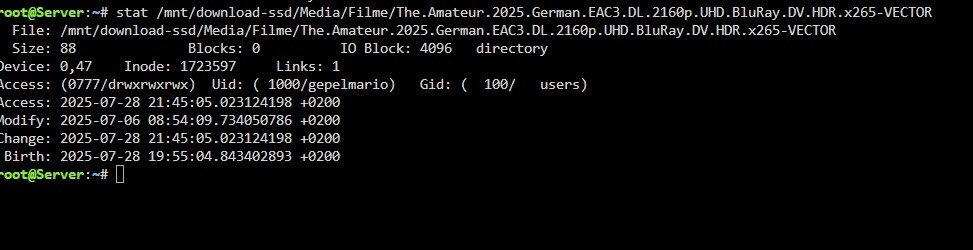
 Ok, the cache cleaner is not working at all. Every file is " still in range" disks="" pool="download-ssd" subfolders="Filme Serien" filetypes=".mkv" wait_todo="120" move_excl="yes" move_excl_list="/mnt/user/system/mover/mover_excl.txt" move_tune_list="/mnt/user/system/mover/mover_ignore.txt" rsync_mode="folder" rsync_move="" rsync_copy="rsync --stats -azht --mkpath" switch_mode="switch" time_keephours="24" time_keephours_sub="720" subfolder_keep_sub="" target_keephours="user0" use_recycle="no" recycle_folder=".Recycle.Bin" unraid_note="Yes" unraid_syslog="yes" script_cron="*/5 * * * *" clean_cron="0 */12 * * *" mediaserver_type="emby" mediaserver_url="http" mediaserver_host="192.168.178.2" mediaserver_port="8096" mediaserver_key=" mediaserver_only="only" script_cron_state="started" clean_cron_state="started" exclusions="" rewrite_source="/media/Media:/mnt/user/Media"At the moment I'm waiting for the plugin to delete the data from the SSD🙃Do you think the Cleaner is working as aspectec now ?