SteveCStreams
Members
-
Joined
-
Last visited
-
Thanks for the suggestion, however I ended up purchasing and installing a relatively cheap 2.5G PCIe NIC (TP-Link TX201). Unraid detected it without problems and its working great. Marking this as solved.
-
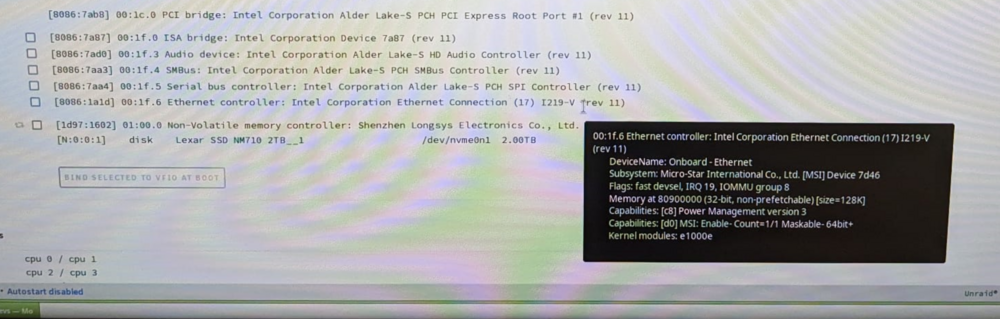
I'm setting up my first unraid server and am having a lot of difficulty with unraid detecting the NIC on the motherboard. Unraid Ver: 7.0.0 Unraid Server Name: Nexus CPU: Intel i3 12100 Mobo: MSI PRO H610M-G (MS-7D46), Link: https://www.msi.com/Motherboard/PRO-H610M-G/Specification Mobo BIOS Firmware: E7D46IZ1.AF2, build date: 03/06/2024 Looking at other posts, I'm encountering similar issues with both IPv4 and IPv6 not being set. The cable is connected to a switch on my home network. Both activity and link lights are lit up. Things I've tried: - Static IP assignment (DHCP pool is outside the static address range and no IP conflicts are present) - DHCP IP assignment (Unraid fails to acquire an IP) - Confirmed CAT5e cable is good by testing it with another known working computer I ran Unraid in GUI mode and confirmed it is picking up the ethernet controller. See attached diagnostics log. I'm very new at this so any feedback would be greatly appreciated. EDIT #1: Ran a live USB ISO image of Ubuntu. No issues with resolving an IP address via DHCP. Confirms NIC and cable are both good. Issue appears to be localized to Unraid not detecting the NIC. EDIT #2: I ended up purchasing and installing a relatively cheap 2.5G PCIe NIC (TP-Link TX201). Flashed my USB boot drive with Unraid 6.12.14 and upon boot, Unraid detected it without any issue. Marking issue as solved. nexus-diagnostics-20250112-1042.zip