





uZbn4jD9aW8An5ZsaBzp
Members
-
Joined
-
Last visited
-
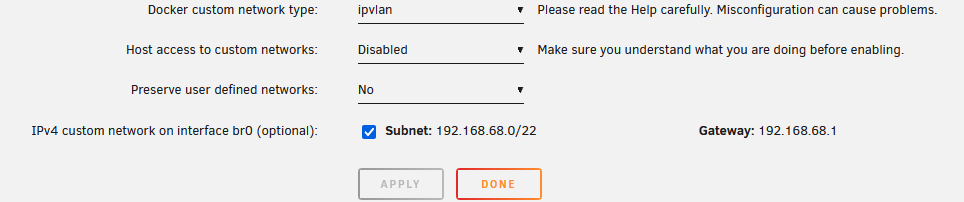
Sorry to dig up an old thread but I'm new to UNRAID and I am stuck on step 2 from @bonienl post from 2021. Step 1: Completed. The UNRAID server has both IPV4 and IPV6 address. Step 2: My Docker settings only shows IPV4 not both IPV4 and IPV6. I am running UNRAID 7.0.0. The reason I'm trying to get docker containers IPV6 addresses is because I want to use pi hole as a DNS server but cannot point networked IPV6 devices to an IPV4 only DNS. Any hints / tips appreciated. Thank you.

-
Thanks for the help / reply...can you elaborate a little bit. Within the "tools" tab I see the "New Permissions" icon/folder...I can select discs and run, but I don't understand what it is going to do? Sorry for the newb question...I've only been working with UNRAID for a few weeks.
-
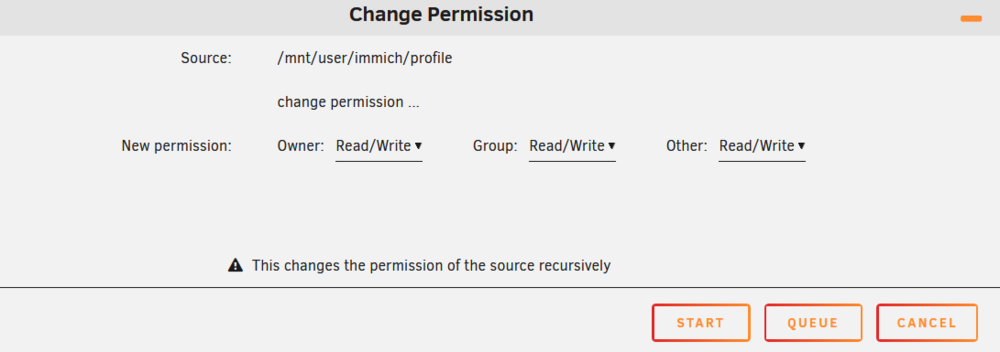
Okay, I stumbled into the GUI way to change permissions and as a stop-gap trouble-shooting effort I set the entire folder and all sub folders to read-write for all users. Immich is working again and all errors cleared. So that brings me to the question or PROPER permissions...Owner, Group, Other...what do those mean and what are best practices for permission setting?
-
I recently upgraded to UNRAID 7.0.0 and now Immich (immich openvino-v1.124.2-ig63) is throwing an error about having permission to it's own share. I made no change to Immich or the shares. I don't know HOW to change permissions. If anyone can provide guidance on this (GUI preferred / not great with command line), I would really appreciate it. Extract from the Immich log with error attached. container logs.txt
