atlantis4547
Members
-
Joined
-
Last visited
-
Thanks so much, I really appreciate your help here. I was able to get a clue form config you shared to look into yaml file, and I deleted/edited the adguard.yaml (/mnt/user/appdata/adguard/config/AdGuardHome.yaml) file and started the service from dashboard. The file got created/fixed this time. Network Type: BridgeHostContainerNoneCustom : br0Custom : wg0 -- wireguard The config looked wrong as: http: pprof: port: 6060 enabled: false address: 172.17.0.1:80 session_ttl: 720h users: It now looks like http: pprof: port: 6060 enabled: false address: 0.0.0.0:80 session_ttl: 720h
-
Thanks, I looked into that. The thing is I am also not familiar with Tailscale and it seems I will have to pay for it if I want more than 3 users to share my NAS/VPN. I was finally figure it out from here https://docs.unraid.net/unraid-os/manual/security/vpn/#complex-networks , It seems I was not looking to the latest docs earlier. The youtube videos and reddit dint really mention these setting at all.
-
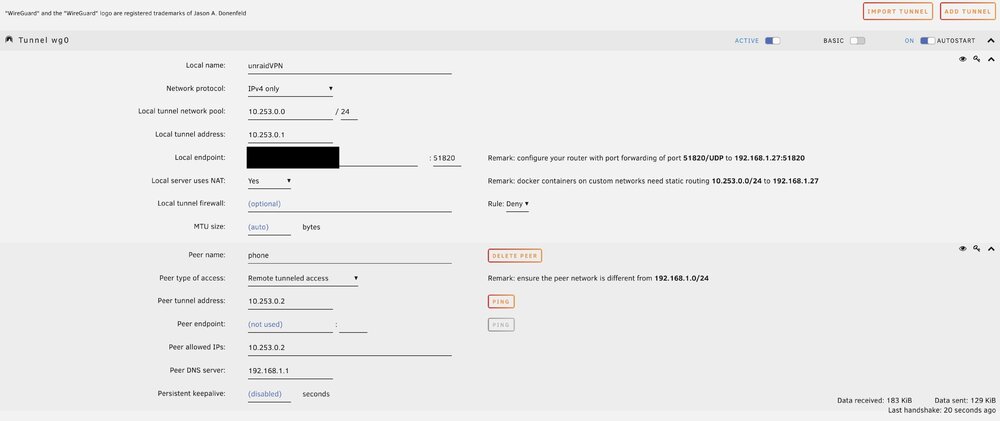
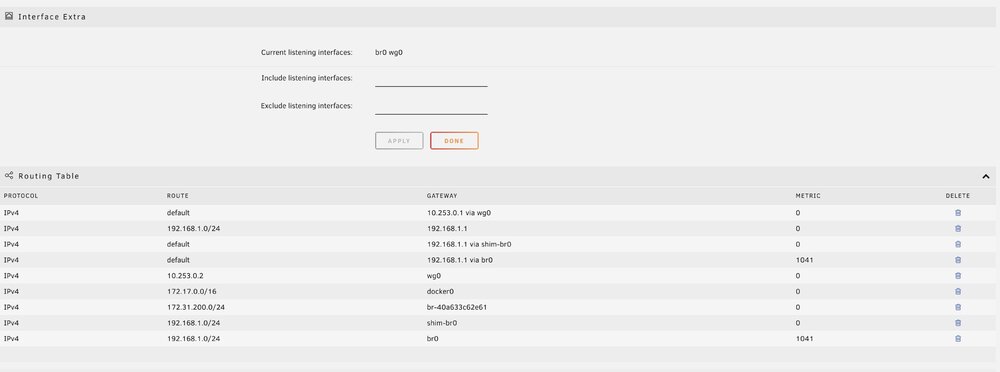
Rant: Hi, I am new to unraid (just 1-2 weeks in) and networking in general. My purpose is to setup unraid as NAS, VPN with AdGuard working. I am having really hard time setting things up. I watched all the youtube videos before taking every step but it worked alright while setting Array and disks but nothing else worked as it just did on the videos. I looked up in the forum and on reddit where people have similar issues but couldn't find a solution. I apologize in advance if its already been answered Issue: I have a WireGuard tunnel on unRAID set to “Remote Tunneled Access” (with NAT enabled). My phone successfully connects (I can reach my unRAID share on 192.168.1.27), but all Internet traffic and access to 192.168.1.1 fails. Traceroutes stop at 10.253.0.1, meaning unRAID isn’t forwarding traffic onward to the router. Basic Setup: unRAID WireGuard: “Remote Tunneled Access” + “Local server uses NAT: Yes” Phone client: AllowedIPs = 0.0.0.0/0 Symptoms: SMB shares on 192.168.1.27 work. Router web UI (192.168.1.1) times out. Pings to public IPs (e.g., 1.1.1.1) fail, tracert only shows 10.253.0.1. What I’ve Tried So Far: Changing DNS to public (1.1.1.1) on both server and phone. Verifying phone’s AllowedIPs includes 0.0.0.0/0. root@atlantis:~# cat /etc/wireguard/wg0.conf [Interface] #unraidVPN PrivateKey=xx Address=10.253.0.1 ListenPort=51820 PostUp=logger -t wireguard -- 'Tunnel WireGuard-wg0 started';/usr/local/emhttp/webGui/scripts/update_services PostUp=iptables -t nat -A POSTROUTING -s 10.253.0.0/24 -o br0 -j MASQUERADE;iptables -t nat -A POSTROUTING -s 10.253.0.0/24 -o vhost0 -j MASQUERADE PostDown=logger -t wireguard -- 'Tunnel WireGuard-wg0 stopped';/usr/local/emhttp/webGui/scripts/update_services PostDown=iptables -t nat -D POSTROUTING -s 10.253.0.0/24 -o br0 -j MASQUERADE;iptables -t nat -D POSTROUTING -s 10.253.0.0/24 -o vhost0 -j MASQUERADE PostUp=ip -4 route flush table 200 PostUp=ip -4 route add default via 10.253.0.1 dev wg0 table 200 PostUp=ip -4 route add 192.168.1.0/24 via 192.168.1.1 dev br0 table 200 PostDown=ip -4 route flush table 200 PostDown=ip -4 route add unreachable default table 200 PostDown=ip -4 route add 192.168.1.0/24 via 192.168.1.1 dev br0 table 200 [Peer] #phone PublicKey=xx PresharedKey=xx AllowedIPs=10.253.0.2
-
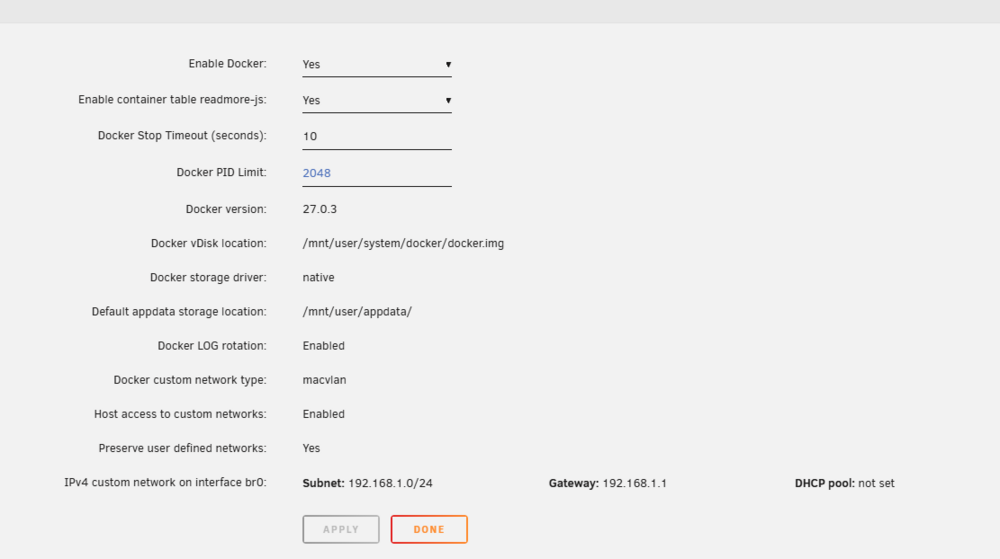
Thanks for your help this are my docker settings Not sure if there is something obviously wrong. Also not sure why AdGuard tries to listen on 172.17.0.1:80 also why does it activates at a weird address 2025/02/08 18:36:41.399500 [info] webapi: AdGuard Home is available at the following addresses: 2025/02/08 18:36:41.399507 [info] go to http://172.17.0.1:80 I will look into the videos and see if I can make sense of these settings.
-
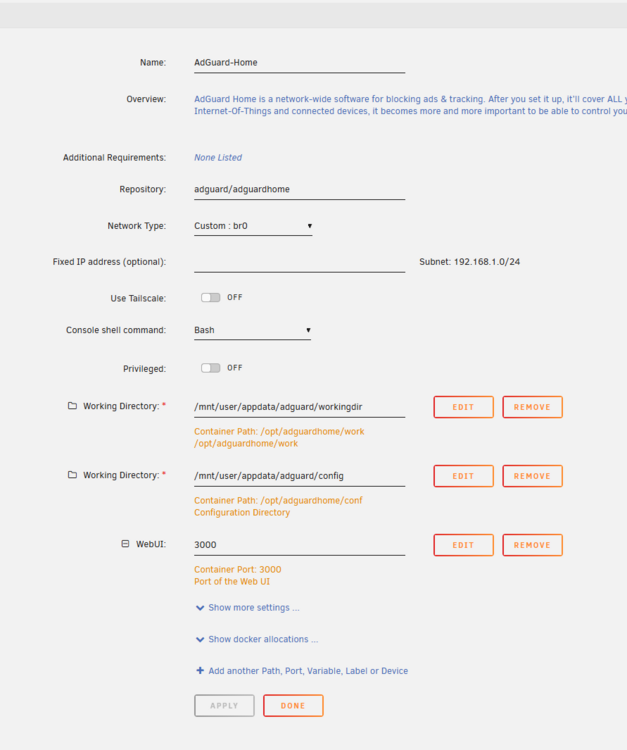
Hey everyone, I’m new to Unraid and still trying to wrap my head around how Docker networking works on this platform. I’ve searched the forums but couldn’t find anything that exactly matches my situation, and the YouTube videos I watched didn’t really clear things up either. I’m trying to run AdGuard Home on Unraid, and I keep hitting a wall. Here’s what’s going on: Errors/Logs: cannot assign requested address listen tcp 172.17.0.1:80: bind: cannot assign requested address AdGuard tries to listen on 172.17.0.1:80 and then immediately panics. I’d like it to run on my LAN at 192.168.1.xxx. Network Modes I’ve Tried: Host Mode: Keeps complaining that it can’t bind to port 80 (likely a conflict with Unraid’s Web UI). Also sees 172.17.0.1 in the logs, which is confusing since my Unraid server is at 192.168.1.52. Custom: br0: I tried assigning a static IP (e.g. 192.168.1.53) so AdGuard has its own address. For some reason, it still references 172.17.0.1 or sometimes I see 192.168.0.0/24 pop up, which doesn’t match my 192.168.1.x network. The container won’t fully start and just panics with the same bind error. My Goal: Give AdGuard a dedicated IP on my 192.168.1.x subnet. Avoid conflicts with Unraid’s own Web UI. Route all DNS from Unraid (and maybe my entire home network) through AdGuard. Additional Info: I noticed a warning in the logs about “no upstream specified” and a permissions warning (0755 vs. 0700), but I’m not sure if those are related to the bind error. I’m definitely a noob when it comes to Docker on Unraid, so apologies if I’m missing something simple! If anyone can point me in the right direction—especially regarding how to properly configure the Docker network settings (Host vs. br0 vs. something else) or how to handle the port conflicts—I’d really appreciate it. Thanks in advance for any help you can offer! Attaching complete logs. adguard.txt