





khior
Members
-
Joined
-
Last visited
-
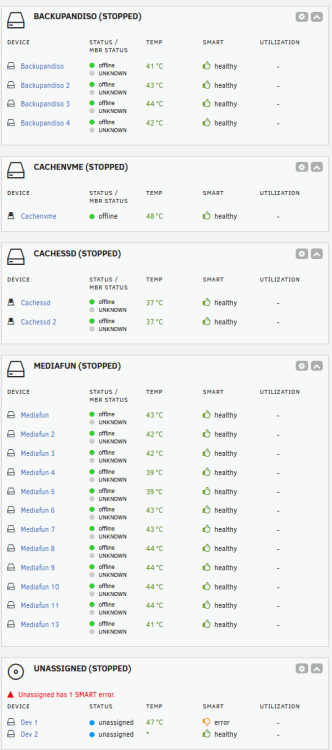
Hello, I'm hoping someone here can help. So I have a couple of zfs pools. One in particular (named Mediafun) is made up of 13 devices. I had some errors show up on one of them, Device 12 (sdn). I kept using it until the system removed the disk. I ran a quick SMART test on that disk that came back with no errors. I tried to reintroduce it, and the resilver process started but was moving extremely slow (0.3%, 70 days to go) and didn't run for too long before the drive was shown as removed again by the system and seemed to stop the resilver process. In the meantime I had a second drive, Device 5 (sdt), that started stating it had errors. I decided to shut down the server and check to see if the same breakout cable was connected to both drives as I have had loose/bad cables in the past. Device 12 (that was previously removed by the system) is connected to a breakout cable and Device 5 has a sata cable connected directly to a Sata port on the motherboard. I re-seated only those two sata cables and powered up the server. Now all drives are showing as offline and when I try to start the array I'm receiving "Wrong Pool State mediafun - invalid config". Device 12 (sde) still shows as unassigned. I've tried rebooting as well as assigning the drive that was removed (Device 12) back into that same slot. I'm wondering if stopping it during the resilver process was problematic as I'm seeing "sdn1/old" as OFFLINE and "sdn1" as UNAVAIL when I run zpool import. Any suggestions would be welcome. ******************************* I ran lsblk -o name,size,model,serial -Result was all the drives are seen. When I run "zpool import" I see the below: pool: mediafun id: 2954754274543482954 state: DEGRADED status: One or more devices were being resilvered. action: The pool can be imported despite missing or damaged devices. The fault tolerance of the pool may be compromised if imported. config: mediafun DEGRADED raidz2-0 DEGRADED sde1 ONLINE sdf1 ONLINE sda1 ONLINE sds1 ONLINE sdt1 ONLINE sdb1 ONLINE sdd1 ONLINE sdj1 ONLINE sdh1 ONLINE sdk1 ONLINE sdo1 ONLINE replacing-11 UNAVAIL insufficient replicas sdn1/old OFFLINE sdn1 UNAVAIL sdm1 FAULTED corrupted data When I run zpool status -v mediafun I receive the following: pool: mediafun state: DEGRADED status: One or more devices is currently being resilvered. The pool will continue to function, possibly in a degraded state. action: Wait for the resilver to complete. scan: resilver in progress since Mon Oct 26 07:52:13 2026 0B / 108T scanned, 0B / 108T issued 0B resilvered, 0.00% done, no estimated completion time config: NAME STATE READ WRITE CKSUM mediafun DEGRADED 0 0 0 raidz2-0 DEGRADED 0 0 0 sde1 ONLINE 0 0 4 sdf1 ONLINE 0 0 4 sda1 ONLINE 0 0 4 sds1 ONLINE 0 0 4 sdt1 ONLINE 0 0 4 sdb1 ONLINE 0 0 4 sdd1 ONLINE 0 0 4 sdj1 ONLINE 0 0 4 sdh1 ONLINE 0 0 4 sdk1 ONLINE 0 0 4 sdo1 ONLINE 0 0 4 replacing-11 UNAVAIL 0 0 0 insufficient replicas sdn1/old OFFLINE 0 0 0 sdn1 REMOVED 0 0 0 7355020672882961856 FAULTED 0 0 0 was /dev/sdm1 I've been trying to work through Claude but things are getting pretty in the weeds for me. Part of what its come back with is it thinks that Device 13 (sdm) somehow had it's label changed so it's GUID is different than the GUID ZFS is expecting. I'm still unsure why anything for that drive may have been changed. In it's words: Two different records are involved. The pool’s config (zdb -e -C mediafun) says position 12 is a disk with guid 7355020672882961856 at /dev/sdm1. This is what ZFS expects, and it’s the value we want. The config is read from the labels of the healthy disks, so it is intact. It also shows that the attempted replace on sdm1 never made it into the pool’s config. The label on the disk itself (zdb -l /dev/sdm1) says guid: 8450324955016200314. That is the stub label that overwrote the original. When ZFS opens sdm1, it compares the guid in the disk’s own label to the guid the config expects. 8450324955016200314 isn’t 7355020672882961856, so ZFS decides this isn’t the right disk and marks it FAULTED with “corrupted data”. The disk is fine. Its label is simply wrong. This is the mismatch the reconstruction would fix. The goal is to make sdm1’s label say 7355020672882961856, so it matches what the config already says. I realize this is a dump of info, let me know if I can clarify anything. Diagnostics are attached. mediaunraid-diagnostics-20261026-1226.zip
-
Easy Peasy - that worked like a charm. Thanks again so much for the help. Can a cable cause that much problem to the point where I can't start/stop the array? I had rebooted several times prior to changing the cable with no change. The only thing I did differently yesterday was completely unplug power (ie, flea power drain) before changing the cable. Anyway, back to normal. I'll monitor mediafun11 to make sure errors stay under control. If not I've got a replacement ready to go. Thanks again for your time, calling this one good
-
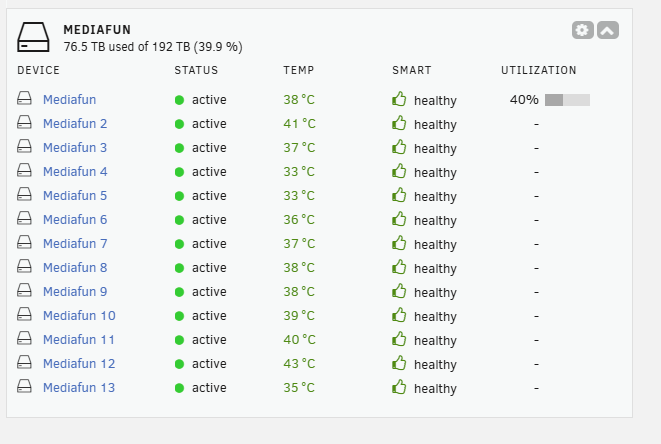
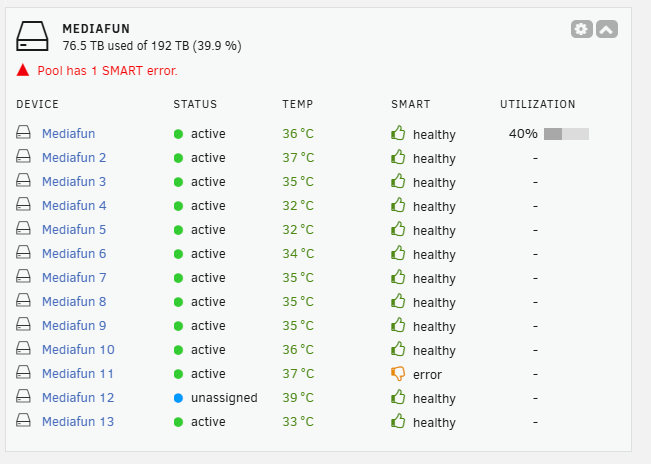
So I swapped cables and brought it back up. I'm unsure what may have changed, at the moment I can stop and start the array again from the GUI so that part is good. The two drives in question that have been problematic are still questionable to me. ST18000NM000J-2TV103_ZR56RY07 is still showing in an error state, but is displaying a green indicator and a status of "active" which it was not before. When I look at the logs from the latest diags it says SMART overall health assessment = PASSED. I acknowledged its error state and will monitor to see if it changes back to "standby mode: Spun Down" ST24000NM000C-3WD103_ZXA08Y57 is still showing a status of Unassigned with a blue indicator. I stopped the array, selected this drive and chose "no-device". I then started the array so the drive would show "offline". I then stopped the array again, and assigned this drive to that slot and started the array again but the status hasn't changed. I'm not sure if that means this disk is actively being used in this zfs pool or not. mediaunraid-diagnostics-20250211-1150.zip
-
@JorgeB-Thanks for replying and the suggestion. That's a good place to start; I'm using an LSI 9305-16i PCI-Express 3.0 x8 Low Profile SAS Host Bus Adapter with qty (4) SFF-8643 to 4X SATA Cables to connect all of my drives. I can try to replace one of the cables to see if that makes any difference. I've seen the disk errors I'm just unsure why I'm unable to start/stop the array. It's just not executing that request from the GUI interface anyway. I have a spare SFF-8643 to 4X SATA Cable, I'll open it up and see if perhaps the same cable is connecting the two offending drives. If so maybe I'll just replace that cable, fire it up and see where we are. Thanks again
-
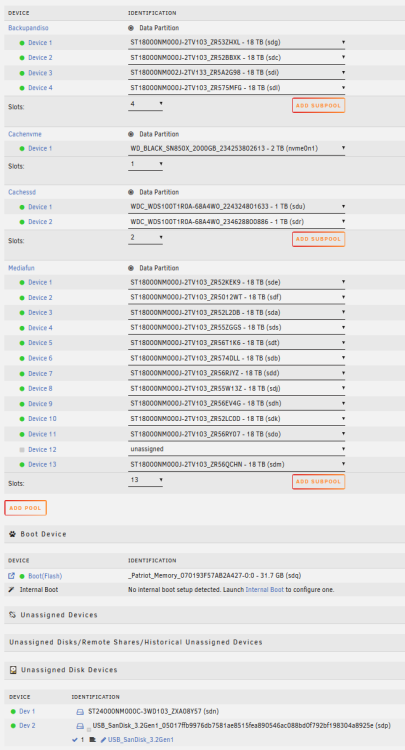
Unraid 7.0 So I’ve been an Unraid user for a couple years now after making the transition from Truenas. Once ZFS was introduced in Unraid and I tried it out I was sold. I’ve been pretty self-sufficient for the most part, but I’ve run into a couple of issues that have finally prompted me to reach out to the community to see if anyone might have an idea of what I can try. I have a pretty simple setup, I have two main ZFS storage pools and two cache pools. Storage Pools are BackupandISO and Mediafun, then I have Cachenvme and CacheSSD. I run a few dockers but mostly use it for a Plex Media Server. I have two disks in my Mediafun pool that have been problematic. Mediafun 12 (sdt) has suddenly shown as unassigned and as a “new device” although I’ve been using it for a bit over a month (ballpark). Mediafun 11 (sds) has been throwing errors for a while and is now showing status as “standby mode (spun down). That one seems to be toast at this point. I’ve successfully replaced disks in a ZFS pool before and follow the steps outlined in the procedure for when I cannot have both the old and new devices connected at the same time here: So the crux of my issue is that suddenly I’m unable to stop and start the array from the GUI. I click the button, it grays out, but nothing happens. When I refresh the page it’s like nothing happened. I can manually edit the config file to not start the array on startup and vice versa, but when the array comes up in a stopped state and I off-line a drive, edit the config file to start the array automatically, then restart, nothing has changed at all on the reboot (sdt and sds are in the same state). That’s Issue #1 (listing two as they may be connected). Issue #2 is I recently noticed via the Fix Common Problem App that my System Share now references a non-existent pool “Cache” which was news to me; I’m not sure what changed. After looking online I see some references to the array not being able to be stopped/started in some cases because there are open files on the array and that changing the location of the System Share is best done by stopping Docker and VM Manager, changing the location (in my case to Cachenvme) running the mover and then turning them back on again. So Maybe Issue #1 (unable to stop/start array) is related to Issue #2 (incorrect location of System Share is keeping files open on the array?). I looked at the following topics: https://forums.unraid.net/topic/125240-array-will-not-auto-start/ I am able to stop the Docker and VM Manager, but when I chose a new Primary Storage location of Cachenvme (or anything else) and hit apply, nothing changes. My System Share just keeps pointing the non-existent Cache pool. I'm stuck with not being able to stop/start the array easily and not being able to change location of my System Share. I'm limping along and have my media backed up but it would be nice to figure this out. A few weeks ago I upgraded from 6.12.9 to 7.0 with zero issues. The only other thing I can think that I tried outside of my day-to-day was I installed the Appdata Backup plugin and ran it for the first time last week. It completed successfully. mediaunraid-diagnostics-20250210-1325.zip



