





socool
Members
-
Joined
-
Last visited
Everything posted by socool
-
I really like your plugin interface. Would be very useful to expose it as a MCP server so it can integrate with broader clients (e.g OpenWebUI, LobeHub or RikkaHub on android). Is there any plan to support this?
-
Based on the description from the MinIO app in unRAID and after doing some research, I understand that MinIO conflicts with how unRAID manages disks. Could you suggest some ways to make MinIO run smoothly without using a VM? I'm currently considering two approaches: - Adding a full disk as a pool (not in the main array) and letting MinIO use that entire disk (mounted at `/mnt/disk1`). However, I'm concerned about potential conflicts since unRAID still manages pool disks. - Using the Unassigned Devices app to mount the disk. I believe this approach might be better since unRAID does not manage the disk this way. Am I correct?
-
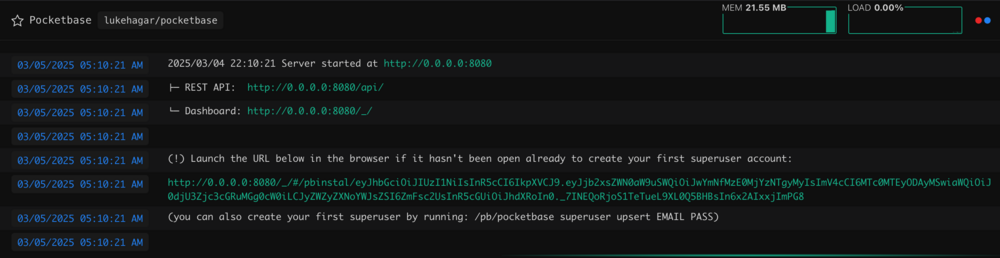
I've just set up this Pocketbase app, and like you, it didn’t prompt me to create the first admin account as mentioned in the guide 😅 Just check the container log, and you should see the link there.
-
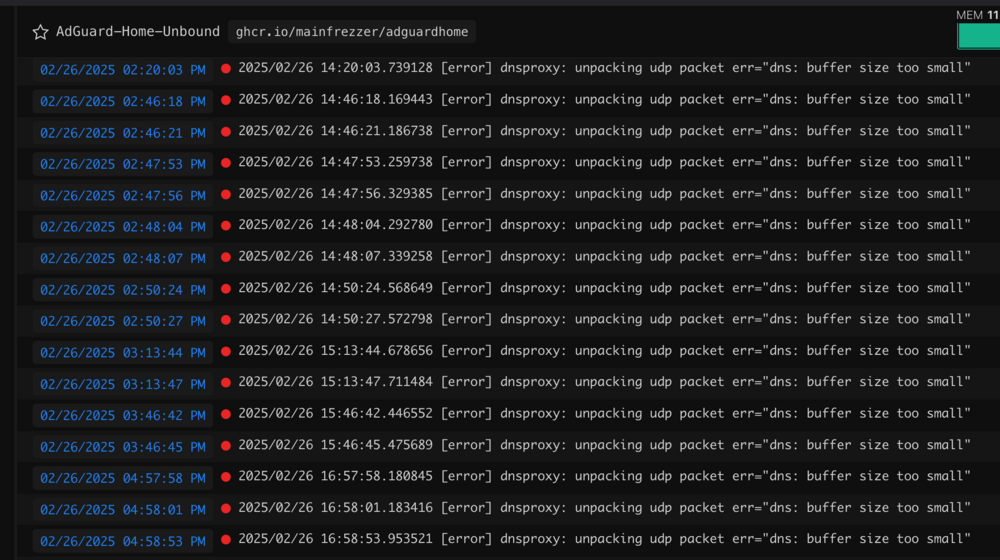
I'm getting a lot of error log with AdGuard-Home-Unbound app. Web browsing seem pretty normal. Is there anyway to fix this? [error] dnsproxy: unpacking udp packet err="dns: buffer size too small"
-
Just want to say thanks. I have a bunch of folders and suddenly it broken yesterday. You saved my Raid.
-
Unraid 7 on Intel 12600k. I've just done this and it worked too.

