alelucc
Members
-
Joined
-
Last visited
-
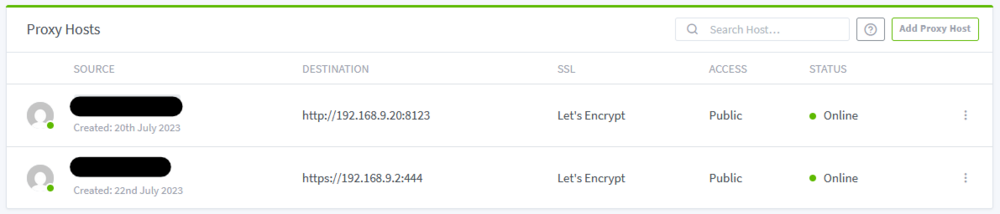
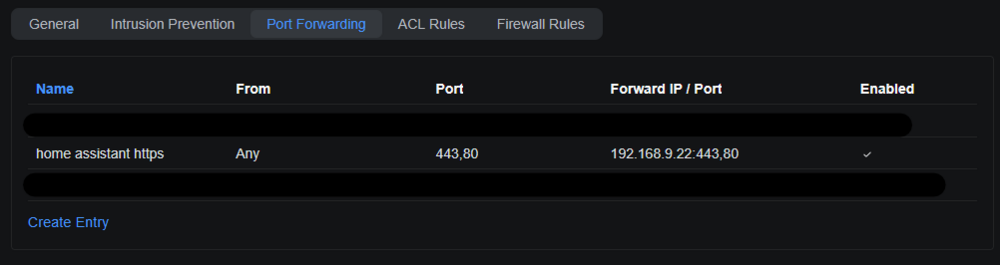
Hello, I am not able anymore to connect to my exposed services from outside my local network, from inside the local network works, even reaching for the external URL. The Problem, I'm not completely shure, started when i upgraded to Unraid OS 7.0.0, I reveted back to 6.12.14 and trying to diagnose the issue now the server is on 6.12.15 version but the problem still persists. The involved Network configuration is: - Ubiquiti Gateway STATIC IP 192.168.9.1 - Unraid Server Machine STATIC IP 192.168.9.2 - Nginx Proxy Docker Set to Custom : br0 -- Ethernet Fixed IP 192.168.9.22 - Home Assistant VM STATIC IP 192.168.9.20 - Vaultwarden Docker Set to Custom : br0 -- Ethernet Fixed IP 192.168.9.24 - Nextcloud Docker Set to Bridge The services that I have exposed are : - Nextcloud in Docker - Vaultwarden in Docker - Home Assistant in VM All of these services are behind a Docker Reverse Proxy (Nginx-Proxy-Manager-Official) running on the same Unraid Machine. This is the configuration: - First row is the Home Assistant VM - Second row the Nextcloud Docker Container The Ubiquity Gateway is configured this way: Taking Home Assistant VM as an example: as I mentioned above I can reach the Internal URL from LAN side (http://192.168.9.20:8123). From LAN also the External URL works (my.external.domain), but from WAN the client keeps loading with a timeout error in the end. I'm pretty sure that the Port Forward rules are working 1. because I didn't change anything 2. because the VPN server is working correctly (Hidden forward rule). Thanks to all that will help out. Alessandro srvnascasa-diagnostics-20250219-1033.zip