SimonP
Members
-
Joined
-
Last visited
-
I don't know if this has been covered before but I have been optimising my system from a hardware point of view to wring the most speed out of my array and thought I'd share what I did for the smaller scale users who might be interested. No software changes are necessary. When using the on-board disk controller on a PC motherboard, all the drives are sharing the same bus so Unraid can't write to the parity disk and an array disk at the same time and has to do them sequentially. 4 port PCIe SATA controller boards are dirt cheap and are plug-and-play so if you get one and dedicate it to the parity disk, it will let Unraid write to both disks simultaneously and speed up the array quite a bit. Don't add a second drive to that controller as it slows down transfers like before, but with the low cost of the controller boards it's no problem to sacrifice the other three ports and add a third controller for expansion if you need it. Use the fastest disk you have for the parity disk, it makes a difference. I just replaced my WD 12TB parity disk with a WD 18TB drive and the rebuild is flying - 1GB/s read, 150MB/s write with a 72TB + parity array! The array disks should use the motherboard ports and if you want to take this to max., separating slower and faster disks to different controllers will also make a small difference. I hope this helps you.
-
To update: Plex Pass seems to have resolved the buffering problem by allowing hardware decoding, although the CPU still runs at 60% when playing 2160p @ 60fps. In case anyone else wants to install a TBS tuner card, with help from ChatGPT I did the following: Go to Tools > System Devices. Look under PCI Devices and IOMMU Groups to confirm the TBS6281SE is detected. Unraid Web UI > Plugins. Click Install Plugin and paste: https://raw.githubusercontent.com/ich777/unraid-dvb-driver/master/dvb-driver.plg Click Install. Go to Settings > DVB Driver, select TBS-Open Source. Reboot UnRaid ls /dev/dvb shows adapter0 adapter1 dmesg | grep -i dvb should show the TBS card initialized. Edit the Plex container and enable Advanced View Scroll down to Extra Parameters and add --device=/dev/dvb (If there’s already something in this field (like --runtime=nvidia), just add a space and then paste --device=/dev/dvb.) Go to Plex Web UI. Navigate to Settings > Live TV & DVR. It should now detect your TBS tuner. Proceed to scan channels and set up DVR. That worked and plays SD channels nicely but it doesn't see the DVB-T2 (HD) tuners. Apparently this is a known problem in Plex, not helped by my tuner not being in the approved list.
-
Thank you for the replies, looks like Plex Pass is the way to go then, which is fair enough as we use it most nights. I did look for the direct play setting in the TV's Plex app but couldn't find it. Thanks for suggesting looking for the dvb drivers in CA Apps, I hadn't thought of that.
-
Thanks for the quick reply, I checked back just as you were writing. :) The client is a 3 year old 55 inch Sony Bravia TV running the Plex app. I have Google Wi-Fi with a node in the same room as the TV so network speed is no problem (60+Mb/s according to the TV IIRC). Plex's Transcoder section is set to Automatic and 'Disable video stream transcoding' stopped it from working. Also, I forgot to mention that these videos work fine with Jellyfin so paying for Plex Pass is probably the only solution but I'm surprised that this CPU couldn't handle the transcode, I've given it all the cores in Plex's advanced settings in UnRaid. Re the TV card: as I said, I'm not familiar with Linux and can't make much sense of how to make the driver and then install it (Windows makes it too easy). ChatGPT has given me some ideas but any help would certainly be useful.
-
Hi, My system: i7-7700K / 16GB / no graphics card / Plex running in a Docker container in the cache drive (500GB NVMe SSD) on UnRaid 7.1.4. No Plex Pass currently. Problem: Plex can't handle 4K video and buffers every few seconds. Some 2160p/24fps videos are fine, others not, and 2160p/60fps is impossible. The TV is downstairs and the server upstairs so it's tricky seeing what's wrong. I upgraded from my previous i7-4790k after ChatGPT assured me that this system would be sufficient to run 4K but it appears it was wrong. Should it be OK? Is there something I should look at as the cause, or is the only solution to buy Plex Pass to allow hardware decoding? Another aspect of this is that I have a TBS6281SE TV tuner with info about Linux drivers (https://github.com/tbsdtv/linux_media/wiki which doesn't mean much to me), will it be possible to add this to my system so that if/when I buy Plex Pass I can integrate it? I'm still new to Linux so any help installing the drivers and letting Plex see them would be appreciated. TIA, Simon.
-
Yup, I tested it before fully committing to UnRaid, it works pretty well.
-
-
Hi, fairly new user to UnRaid here. The only thing that I am remotely displeased about with it is the write speed, not really a problem but irritating. I understand the reason given that it's writing to both the destination and parity drives but I thought that having the parity drive on a separate controller would help matters. My motherboard has two controllers on board so I tried that but it made no difference. I then fished out a PCIe SATA controller and moved the parity drive to it but still it was the same. Surely in that case it is writing to two drives via separate controllers on different buses so both should run at full speed? Since that isn't the case, why are writes so slow? BTW, I have set my UnRaid as JBOD + Parity, is this a common configuration? My reasoning was that if a drive started to fail, I couild move it to my Windows PC and read off as much as I could using tools that I am familiar with. Any form of striping would make this impossible so it's another layer of security. Any known downsides to this? Simon.
-
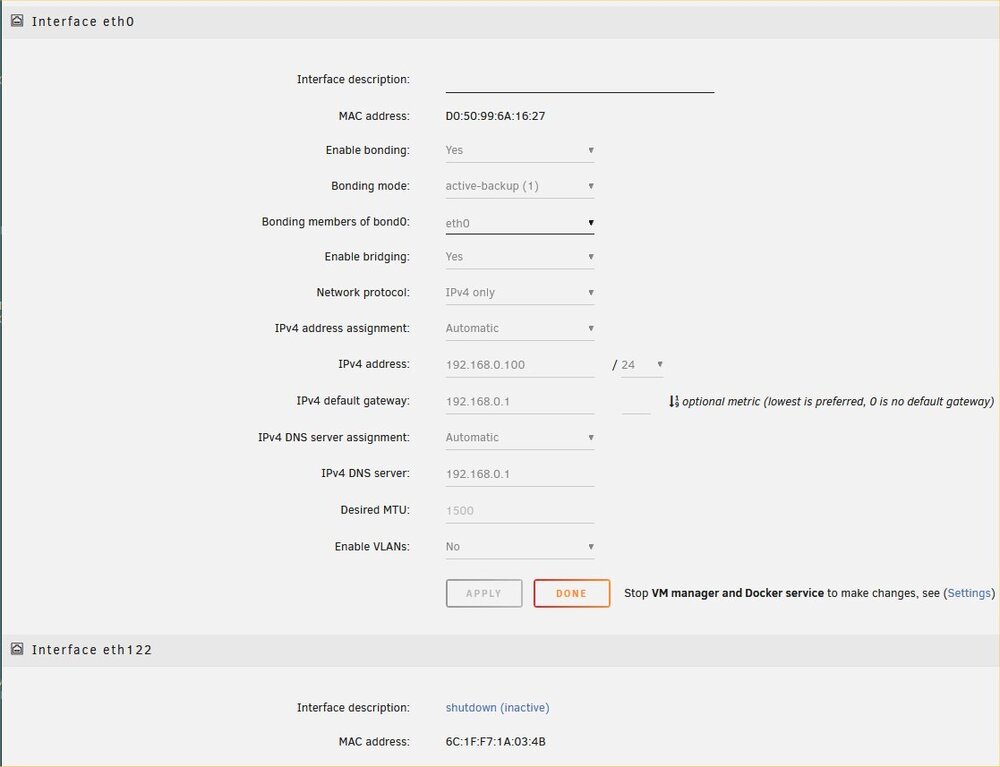
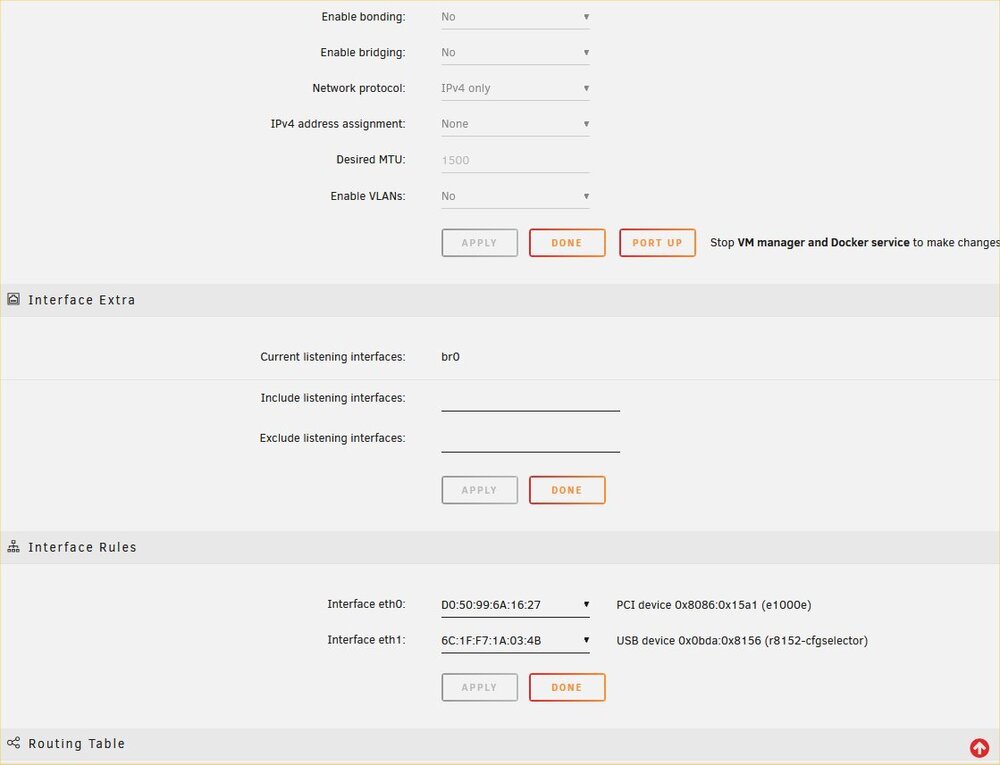
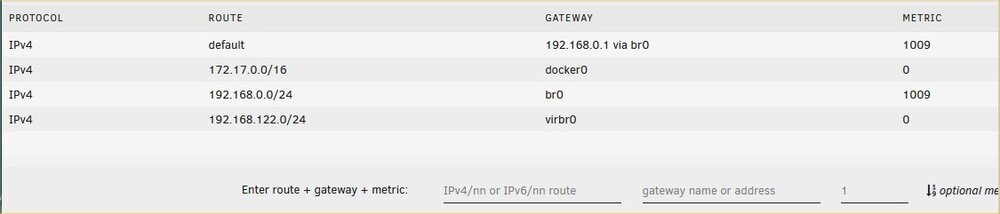
Ah-ha, with the aid of that video and ChatGPT I've got it working! In Network Settings I set Enable Bridging to yes, added both adaptors to 'Bridging members of br0:', set my normal static address, pressed 'Done', restarted the array and now I have a single network cable connecting the two computers and one from the UnRaid server to the switch, with UnRaid passing the Internet connection through to my PC while giving me fast file transfers between the two computers, exactly as I'd hoped. It looks like the problem was not adding the second adaptor to 'Bridging members of br0:' - obvious in retrospect but he didn't do that in the video and for some reason it wasn't working at first. Thank you so much for your help, I really appreciate it and as I become more familiar with UnRaid I hope to pass on my experience to others.
-
Thank you, that was helpful but I still can't get it to work. I managed to get the computers talking to each-other via 2.5Gbe but UnRaid didn't bridge the connection - i.e. I want UnRaid to pass the internet connection from its on-board 1Gbe socket to the 2.5Gbe adaptor and out to my PC. The video shows using one network port going to the switch as usual and the other linking the computers directly but I only have the one 2.5Gbe socket on my PC, hence the need for the bridge. I then thought the easiest thing to do would be to just buy a 2.5Gbe switch so I tried to make UnRaid use the new USB 2.5Gbe adaptor to connect to the existing switch but couldn't work out how to do that as it still wants to use eth0. Can UnRaid pass the ethernet connection to the second adaptor as I hoped or do I need to buy another network adaptor for my PC so that I connect each computer to the switch then connect the computers directly via the 2.5Gbe adaptors as in the video?
-
Yes, that's right, UnRaid's on-board Gigabit NIC faces the router, I want to connect the 2.5Gb USB NIC to the on-board 2.5Gb NIC on my PC, passing through the network connection.
-
Thanks for your quick reply and suggestions, sorry mine is slow, I couldn't check the VT setting as I was running a parity check at the time. Once it had finished I went into the BIOS and found Intel Virtualisation Technology enabled and Intel VT-x Tecnology supported so I had thought it was set up correctly but going through all the settings I found VT-d under Chipset so it is now enabled and I see the audio controller in 'Edit'. However the back button still doesn't work. UnRaid sees the mouse in the VM settings but if I enable it, it doesn't work at all in the Windows VM. I have to unplug and re-plug it so that Windows recognises it. It works if I don't select it but still no back button. Regarding the ethernet pass-through, both computers have static IP addresses set in my router. Having connected it up I checked that my Windows computer is set to DHCP and did an 'ipconfig /release' and 'ipconfig /renew' but nothing happened, it wouldn't renew. I'm unfamiliar with Linux and UnRaid so could you talk me through setting a static IP for the second NIC and changing the subnet? Or would it be easier to just buy a 2.5Gb switch to connect them?
-
New, and impressed, user of UnRaid here. I've worked out most of the problems I've encountered but there are two I haven't been able to solve so I hope you can help. 1) UnRaid doesn't pass through my integrated audio or the back button on my mouse in VMs (Realtek ALC1150 in ASRock Z97 Extreme4 motherboard). The back button works fine in the UnRaid display. System Devices / PCI Devices (No IOMMU Groups Available) shows: [8086:8ca0] 00:1b.0 Audio device: Intel Corporation 9 Series Chipset Family HD Audio Controller so it's pretty standard (if old) stuff and I can't see what I'm missing. 2) My PC has 2.5Gb ethernet on board and to save buying a new router I thought I'd get a USB 2.5Gb network adaptor and bridge the connection in UnRaid so that the connection between the two computers would be faster than the regular 1Gb network, which doesn't need it. It looks right in UnRaid but doesn't work. The only thing I can think of is that I'm just using a normal Cat 6 cable but from what I know it shouldn't need a crossover. Device: https://www.amazon.co.uk/dp/B0CWV2Q6HJ?ref=ppx_yo2ov_dt_b_fed_asin_title Any ideas? server-diagnostics-20250314-1814.zip