





joshallen
Members
-
Joined
-
Last visited
-
I looked into the DHCP server, which is a Unifi UDM Pro SE. It has a fixed IP address set and nothing in the logs with an issue with the Unraid client device. No other devices on the network are exhibiting similar behavior. I did notice the following errors in the Unraid logs (server is still reachable at this time): Dec 17 13:45:41 ATLANTIS kernel: pcieport 0000:00:1c.0: AER: Correctable error message received from 0000:04:00.0 Dec 17 13:45:41 ATLANTIS kernel: atlantic 0000:04:00.0: PCIe Bus Error: severity=Correctable, type=Physical Layer, (Receiver ID) Dec 17 13:45:41 ATLANTIS kernel: atlantic 0000:04:00.0: device [1d6a:07b1] error status/mask=00000001/0000a000That PCI device is my 10G NIC. These errors are also periodic (daily, roughly). Is my NIC the issue here? I do not have the built in 1G port is not disabled at the BIOS. Appreciate the help narrowing this down.
-
That makes sense for those errors. Syslog is indeed writing to a share. Anything elsewhere that would explain the server going unreachable after a few days of running?
-
Uptime shows 2 days, 3 hours, 14 minutes
-
I don't believe so. That was just a cut and paste from the syslog of an error I thought pertinent
-
Since upgrading to 7.2.2, every few days I cannot reach any of the IP's on my local Unraid server. I can ping it, but cannot reach the webui, any shares, or docker web's. I'm hard rebooting at that point. Looking at the logs, the messages below repeat just prior to becoming unreachable. Dec 14 10:38:04 ATLANTIS rsyslogd: omfwd/udp: socket 1: sendto() error: Network is unreachable [v8.2102.0 try https://www.rsyslog.com/e/2354 ] Dec 14 10:38:04 ATLANTIS rsyslogd: omfwd: socket 1: error 101 sending via udp: Network is unreachable [v8.2102.0 try https://www.rsyslog.com/e/2354 I also see errors like the following every once in a while that I did not see prior. kernel: celery[92673]: segfault at 2f998 ip 000000000063d967 sp 0000148eb5b052f0 error 6 in python3.13[23d967,420000+2fa000] likely on CPU 7 (core 7, socket 0) Any ideas? Possibly a bad NIC? Diagnostics attached. Appreciate any help I can get. Thanks! atlantis-diagnostics-20251216-1148.zip
-
Thank you that helps. Off I go.
-
I'm using CA. The postgresql branch looks to be a path. Question though if I rebuild the stack using the guide earlier, how do I migrate my old database? Or do I need to start again?
-
Thank you for that. Lots there. I'll work my way through it. Much appreciated.
-
Hi all, I've been happily running immich using community apps on my system for 2 years now. Aside from earlier breaking changes issues, it's been problem-free. I had not logged into Immich for some time - but had updated Unraid a couple of times, and updated the dockers containers when shown there was an update available. When I logged in recently, it prompted to set up an admin user, then told me I had no photos. No obvious errors in the logs for immich, postgresql14, or redis. To troubleshoot, I noticed that the owner of my postgresql14 appdata was "UNKNOWN". Changing it in the Unraid GUI didn't help, as soon as I started the container it reverted back to UNKNOWN owner. I did not try restoring from backup, as I honestly don't know how long its been like this. Googling solutions came up with a ranging fixes like manually editing docker templates etc, but nothing Unraid-specific. I am currently running Unraid 7.2.0 postgresql14 v 14.17 immich (latest update from Unraid docker tab.... could not query specific version from immich console, said postgresql14 error) redis v 8.4.0 Any ideas where to start?
-
Solved. Thank you!
-
I disabled the docker service to run the mover before replacing the cache drives. The cache drives were empty. However, after replacing the drives and rebooting the server, the docker service started automatically (with appdata on the array). I shut down the service, changed my share settings to point back to the array and ran the mover. But YES, the docker service ran before I could move the files back to the cache atlantis-diagnostics-20251101-1114.zip
-
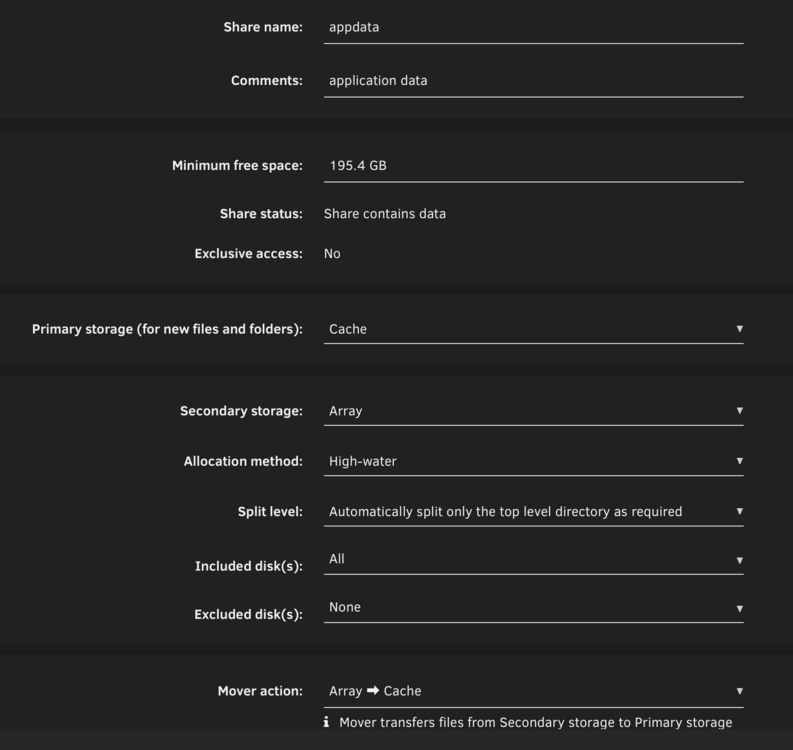
I replaced my cache drive successfully using the instructions here: https://forums.unraid.net/topic/46802-faq-for-unraid-v6/#findComment-511923 After replacement, I changed my /appdata, /data and /tmp bar back to array->cache , and ran the mover (see pic below) I've noticed that docker start/stop is now very slow. It used to take 15/20 seconds to start the docker containers, now it takes ~5 minutes. Updating docker containers also is slow. I feel like it's still reading/writing off the array. Reading the share setting screen it says cache is for new files, but I can verify that the appdata files are indeed on the cache drive. Any ideas? Thanks in advance.
-
Thank you. Will do.
-
It's a pool of 2 drives, not mirrored 2x1TB. I am replacing both. Plan is to mirror them this time. Both 1TB again (yes I'm halving my cache size but adding mirroring)
-
I'm replacing my cache drives and just wanted to be certain on the sequence of events. My current share settings involving cache is pictured below. Do I have this correct? Change share settings pointing to cache to array (in my case appdata, domains, temp only) invoke mover replace cache drives change share settings back to the picture below invoke mover Sure I'm overthinking, but thanks in advance.



